Andy in the Cloud
Home | About | Archives
Account Hierarchy Rollups #ClicksNotCode
May 8, 2014 11:26 am
 The Declarative Lookup Rollup Summary Tool is holding up to quite an onslaught of requirements at the moment. When this one came in, i thought it may have met its match! However it has taken just less than a day in the Spanish sunshine to get my head round it and work with the poster to find a solution!
Use Case: Rollup a Count of Contacts to the related Account (which is pretty straight forward rollup for the tool), but then within the Account hierarchy rollup a Sum of Account Contacts at each level, so each Account shows the total Contacts for itself and all its child Accounts. The Number of Contacts (Inclusive) field shown below shows the Contact count rolled up at each level in the Account hierarchy. Burlington Textiles is the root account in this case.
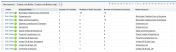
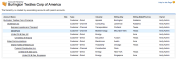
Having realised it is a solution to the general requirement for Account Hierarchy Rollups (or in fact any Custom Object hierarchy type relationship) i thought i would share how it was eventually achieved in true “clicks not code” style! Note that while we are rolling up Contacts per Account here, this could effectively be any numeric field on Account.
First you will need to install the Declarative Lookup Rollup Summary tool from the latest package install link here. Then in the case of Account create the following Custom Field‘s.

- Number of Contacts,
Results of a Count rollup of the number of Contacts associated with an Account.
- Number of Child Contacts,
Results of a Sum rollup of the Number of Contacts on each child Account to the parent Account.
- Number of Contacts (inclusive),
Formula field that adds the above two fields together and is actually used as the Field to Aggregate when calculating the Number of Child Contacts rollup.
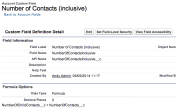
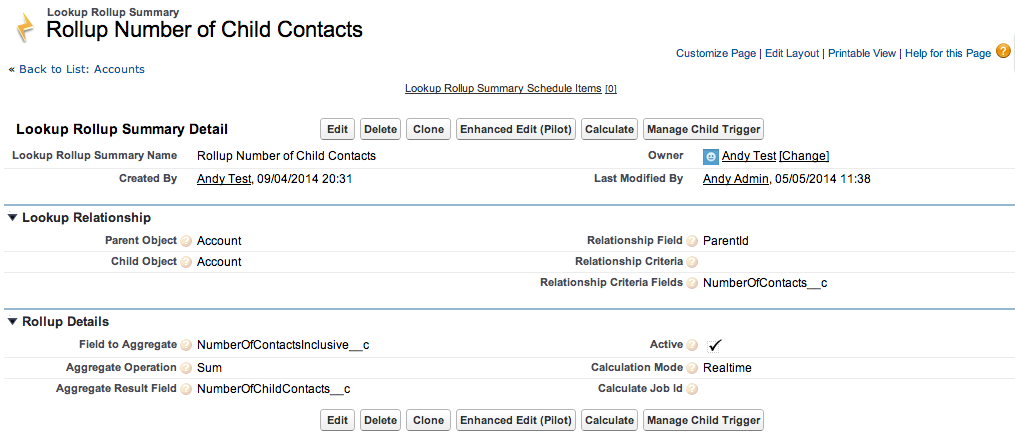
To populate these fields we are actually using two rollups, one to count the Contacts on each Account, then another to Sum the total Contacts on each child Account to each parent Account, any numeric fields on the Accounts will work the same way. Note that both these rollups are done Realtime and that the second rollup is using the Relationship Criteria Fields feature to ensure a change made by the first rollup triggers a recalculation of the second.
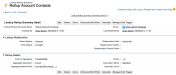
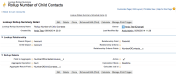
Two rollups have been used here, only because the information we wanted to rollup in the Account hierarchy was not readily available on the Account record itself. So is a more complex setup than it needs to be if your just for example rolling up an existing Account field, such as Annual Revenue. However it does show nicely how two rollups can be used and have one trigger the recalculation of the other.
Scheduled Rollups: I have yet to try this with Scheduled mode, i suspect there maybe some dependency issues in the processing of two rollups in the correct order (something the tool can be taught about in the future if this is proven to be an issue), however a single independent rollup will work just fine in Scheduled or Realtime mode.
Posted by Andrew Fawcett
Categories: Tools, Uncategorized
Tags:
« Older Newer »
Leave a Reply
Mobile Site | Full Site
Get a free blog at WordPress.com Theme: WordPress Mobile Edition by Alex King.
 The Declarative Lookup Rollup Summary Tool is holding up to quite an onslaught of requirements at the moment. When this one came in, i thought it may have met its match! However it has taken just less than a day in the Spanish sunshine to get my head round it and work with the poster to find a solution!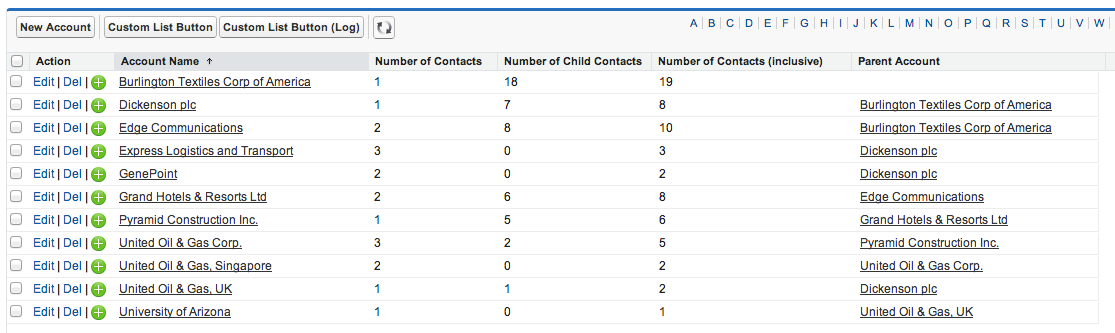


Hi there! I’ve tried implementing this same idea but in Scheduled mode because my child records are coming in each night by the tens of thousands and realtime was too much for it to handle. However, I think I may be running into some dependency issues with realtime mode because my understanding is there’s just the one “RollupJob” I can schedule. Is there a way for me to schedule the job on the lower level followed by the upper?
By Andrew Rennie on May 24, 2016 at 9:38 pm
Sadly not at present, it is on the enhancement list though
By Andrew Fawcett on May 25, 2016 at 10:10 pm
Thanks for the update, Andy, I’ll see if I can find a workaround in the interim.
On a related note, could you help me understand the difference between the Rollup and RollupCalculateJobSchedulable batches?
By Andrew Rennie on June 7, 2016 at 5:44 pm
Sure the later allows you to calibrate how many parents the batch job tries to rollup up per chunk of work. If you see governor issues in the apex jobs page, you might need to reduce this, you will process less parent records per chunk so longer overall job execution, but each parent record will get a bigger slice of governed resources.
By Andrew Fawcett on June 7, 2016 at 5:53 pm
Hello. I’m clearly missing a huge step or misunderstanding. But I thought using this method meant you didn’t need Triggers or a process. I’m simply looking to roll up a volume (#) field from child records to the Parent so I went and used your setup in 2nd screen shot. I guess I need more than this? I should set up a process to do something with this? Appreciate your input.
By Kim Creese on April 6, 2018 at 9:39 am
So you will need a Trigger, Process Builder or Apex to invoke the rollup engine. This tool helps when your relationship is not Master-Detail mainly, since if have Master-Detail rollups work.
By Andrew Fawcett on April 8, 2018 at 6:28 pm
Thanks Andy. I’ve built processes in the past but have no experience with triggers. Is it a simple field update with criteria based on a non empty field? Appreciate it,
Kim
By Kim Creese on April 9, 2018 at 6:23 am
Yes that should do it
By Andrew Fawcett on April 21, 2018 at 11:16 am
As a Salesforce Admin, DLRS is one of the best things to happen to me. I seriously probably have 50 active rollups. So convenient and user friendly.
By Alex Markle on December 11, 2018 at 9:59 am
This looks like a fabulous solution for rolling up account heirarchies, specifically Opportunities from all the Child Accounts, however I keep getting errors. Both my Parent and Child are the Account object. First it was [Active: Apex Trigger dlrs_AccountTrigger has not been deployed. Click Manage Child Trigger and try again] when I tried to save, so I didn’t even have access to the ‘Manage Child Trigger’ button. So I switched to Developer Mode – I could then save, and
‘Manage Child Trigger’, but I got a string of ‘Not available for deploy for this organization’ for a bunch of classes and triggers. Any ideas?
By carinawalker on April 23, 2019 at 1:21 pm
Is this a professional editing org? If so it’s not supported in these kind of orgs
By Andrew Fawcett on April 27, 2019 at 7:23 am
I’m not sure what you mean by professional editing org – we are a non profit providing services to homeless families. We are using NPSP for Salesforce. Some of accounts make donations individually as well as through family trusts, and we would like to set up Family Trusts as children to the parent Individual Household Account.
By carinawalker on April 27, 2019 at 4:40 pm
Is there a way to hide the calculated field on the Child object but display on the Parent without using different record types or page layouts? I’m trying to do something similar with Account Hierarchies. I need to display a rollup of Invoices from Child Accounts on the Parent. I got the rollup from DLRS to work but the calculated field shows on both the Child and Parent. Child and Parent have the same record type and page layout
By Steve on February 7, 2023 at 12:13 pm
Please post on https://github.com/SFDO-Community/declarative-lookup-rollup-summaries#questions-and-community-support. Thank you.
By Andrew Fawcett on April 23, 2023 at 5:42 pm