November 19, 2012 7:31 pm
I’ve been wanting for a while now to explore using the Apex JSON serialize and deserialize support with SObject’s. I wanted to see if it was possible to build a generic native import/export solution natively, that didn’t just handle a single record was able to follow relationships to other records. Such as master-detail and lookup relationships. Effectively to give a means to extract and import a set of related records as one ‘bundle’ of record sets. With the flexibility of something like this, one could consider a number of uses…
For me, some interesting use cases and touch apone a number of topics I see surfacing now and again on Salesforce StackExchange and in my own job. However before having a crack at those I felt I first needed to crack open the JSON support in Apex in a generic way or at least with some minimal config.
A fellow developer Agustina García had recently done some excellent research into Apex JSON support. She found that while JSON.serialise would in fact work with SObject’s containing related child records (queried using subqueries), by outputting the child records within the JSON (as nested JSON objects). Sadly however, the JSON.deserialize method ignores them. The solution was to utilise some wrapper Apex classes to contain the SObject records and provide the necessary relationship structure. This gave me the basis to develop something more generic that would work with any object.
Like the JSON class, the SObjectDataLoader class has two main methods, ‘serialize‘ and ‘deserialize‘. To serialize records all you need give it is a list of ID’s. It will automatically discover the fields to include and query the records itself. Seeking out (based on some default rules) related child and lookup relationship records to ‘follow’ as part of the recursive serialisation process. Outputting a serialised RecordsBundle. Due to how the serialisation process executes the RecordSetBundle’s are output in dependency order.
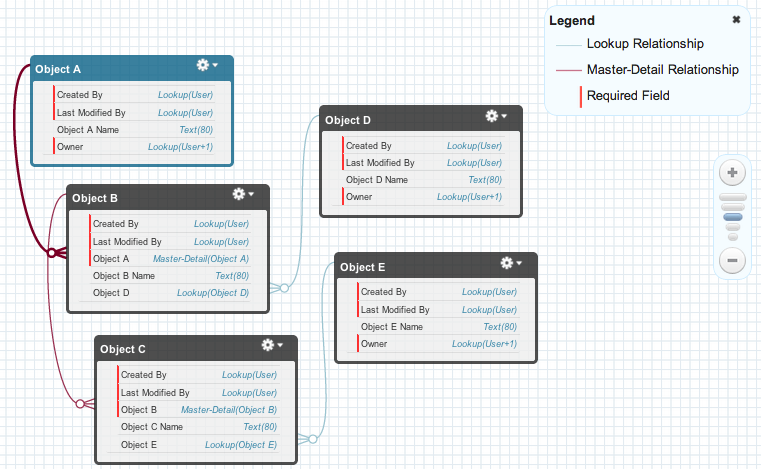
Consider the following objects and relationships with a mix of master-detail and lookup relationships as shown using the Schema Builder tool.
Here is a basic example (utilising auto configure mode) that will export records in the above structure, when given the Id of the root object, Object A.
String serialisedData =
  SObjectDataLoader.serialize(
      new Set<Id>; { 'a00d0000007kUms' });
The abbreviated resulting JSON looks like this (see full example here)…
{
    "RecordSetBundles": [
        {
            "Records": [
                {
                    "Id": "a00d0000007kUmsAAE",
                    "Name": "Object A Record"
                }
            ],
            "ObjectType": "ObjectA__c"
        },
        {
            "Records": [
                {
                    "Id": "a03d000000EHi6tAAD",
                    "Name": "Object D Record",
                }
            ],
            "ObjectType": "ObjectD__c"
        },
        {
            "Records": [
                {
                    "Id": "a01d0000006JdysAAC",
                    "Name": "Object B Record",
                    "ObjectA__c": "a00d0000007kUmsAAE",
                    "ObjectD__c": "a03d000000EHi6tAAD"
                }
            ],
            "ObjectType": "ObjectB__c"
        },
        {
            "Records": [
                {
                    "Id": "a04d00000035cFAAAY",
                    "Name": "Object E Record"
                }
            ],
            "ObjectType": "ObjectE__c"
        },
        {
            "Records": [
                {
                    "Id": "a02d000000723fvAAA",
                    "Name": "Object C Record",
                    "ObjectB__c": "a01d0000006JdysAAC",
                    "ObjectE__c": "a04d00000035cFAAAY"
                }
            ],
            "ObjectType": "ObjectC__c"
        }
    ]
}
The ‘deserialize‘ method takes a JSON string representing a RecordsBundle (output from the ‘serialize’ method). This will insert the records in the required order and take care of making new relationships (as you can see the original Id’s are retained in the JSON to aid this process) as each record set is processed.
Set<Id> recordAIds =
    SObjectDataLoader.deserialize(serialisedData);
The auto configuration route has its limitations and assumptions, so a manual configuration mode is available. This can be used if you know more about the objects. Though you can merge both configuration modes. The test methods in the class utlise some more advanced usage. For example…
String serializedData =
    SObjectDataLoader.serialize(createOpportunities(),
       new SObjectDataLoader.SerializeConfig().
        // Serialize any related OpportunityLineItem's
        followChild(OpportunityLineItem.OpportunityId).
          // Serialize any related PricebookEntry's
          follow(OpportunityLineItem.PricebookEntryId).
            // Serialize any related Products's
            follow(PricebookEntry.Product2Id).
            // Skip UnitPrice in favour of TotalPrice
            omit(OpportunityLineItem.UnitPrice));
The deserialize method in this case takes an implementation of SObjectDataLoader.IDeserializerCallback. This allows you to intercept the deserialization process and populate any references before the objects are inserted into the database. Useful if the exported data is incomplete.
Set<ID>; resultIds =
   SObjectDataLoader.deserialize(
      serializedData, new ApplyStandardPricebook());
I hope this will be of use to people and would love to hear about more use cases and/or offers to help extend (see TODO’s below if you fancy helping) or fix any bugs in it to grow it further. Maybe one day Salesforce might even consider implementing into the Apex runtime! In the meantime, enjoy! GitHub repo link.
This is an initial release that I think will suite some use cases within the current tolerances of the implementation. As always, life and work commitments prevent me from spending as much time on this as I would really like. So here are a few TODO’s, until next time…
Posted by Andrew Fawcett
Mobile Site | Full Site
Get a free blog at WordPress.com Theme: WordPress Mobile Edition by Alex King.
Looking forward testing on Bank Format !!
By Agustina García on November 20, 2012 at 9:13 am
Great work. Thanks for sharing. Is you code only serializing an objects childs but also all direct and indirect parents? It would really be cool to have a tool where a user just says I need to export that object. Please crawl me the relationships and find everything that is conncected and export it to JSON.
By Robert on March 11, 2013 at 8:02 am
Hi Robert, this is indeed exactly what it does. If its auto crawl is not what you want you can then tweak it via the config object. Or if you prefer you can teach it from scratch what to crawl. Thanks.
By andyinthecloud on March 11, 2013 at 8:44 am
Object D and E are examples of this kind of relationship in fact. 🙂
By andyinthecloud on March 11, 2013 at 12:29 pm
I meant more object like Object B. How would I have to call you code to get Object B including all (in a way required) children and parents?
By rsoese on March 12, 2013 at 11:21 am
The auto crawl code will stop eventually crawling the references to avoid loops and eventually governor errors. However the object model shown in the post is supported, in that object b’s children (object c) will get included by default. Note also if you want to capture more root level records and hence their related records, just pass more Id’s into the top level call. If you have a diagram such as the one i show via the schema builder that you want me to take a look at. Please feel free to send and I’ll let you know if the default crawling will handle it or if you will need to give it more hints.
By andyinthecloud on March 13, 2013 at 9:21 pm
Hi Andrew, I have a for more than 3 child relationship in data loader class. please see my question and provide me some solution. Thanks.
https://salesforce.stackexchange.com/questions/198957/sobjectdataloader-class-is-not-able-to-search-relationship-for-more-than-3-child
By Paras BK on November 15, 2017 at 1:27 am
I would recommend you provide more information. What have tried? Different number of levels? What is returned from the method? Have you debugged the code?
By Andrew Fawcett on November 16, 2017 at 8:45 pm
The structure is like this: https://dl.dropbox.com/u/240888/uml.png
I would like to pass the id of the top P object and get the whole tree. No matter how deep and no matter of the children are MDRs or lookups. Is that possible?
BTW: Thanks for you help and you great code contributions 🙂
By rsoese on March 14, 2013 at 12:05 pm
This does not appear that different from the example I used in the blog post, where I used a three level deep master detail with some lookup relationships. Have you given it a try? The class is self contained (complete with tests) and requires a single line to invoke it with the top P object Id. Let me know how you get on, if you have any issues raise them on the Github Issues and we can work together to resolve! https://github.com/afawcett/apex-sobjectdataloader/issues
By andyinthecloud on March 15, 2013 at 8:37 am
This looks good, but I get “Apex governor limit” error when I pass single account Id?
sfcloud1:Number of SOQL queries: 80 out of 100
sfcloud1:Number of fields describes: 101 out of 100
sfcloud1:Number of child relationships describes: 67 out of 100
Am I doing something wrong here? I created issue under GitHub as well.
Thank you for your time.
Mitesh
By Mitesh Sura (@SFDC_Developer) on August 20, 2013 at 10:23 am
The auto configure option follows relationships from the root object, so I assume you have a lot of those hanging from Account. You will need to manually configure or adjust to omit some relationship paths you don’t want it to follow. Can you dump via JSOn serialise the config object state, this should give you an idea of what the auto config mode is trying to do. Btw can you share the link to the GitHub issue you raised.
By Andrew Fawcett on August 20, 2013 at 3:12 pm
Did you ever find the time to improve your fabulous solution regarding scalability (meaning more records using Batch Apex)? I just had a problem where I would love to use you code but failed miserably due to Large Data Volumes (10.000 -100.000 related records)
By Robert Sösemann on January 22, 2014 at 10:36 pm
Not yet, though we happen to be looking at a project internally that needs this from this library also, once we get it done I will look into sharing.
By Andrew Fawcett on January 22, 2014 at 10:38 pm
Just merged a pull request providing an excellent contribution from Sonal4J update the library to support self references, from the developer “added ‘LastViewedDate’, ‘LastReferencedDate’ to the whitelist. It also allows to add user to serialize List containing Id’s of different objects . While deserializing Self reference fields relationship is maintained. Test methods are added to test class.”
By Andrew Fawcett on March 5, 2014 at 1:44 pm
Andrew – That’s indeed great work. From your blog, I came to understand that we need to pass set of Ids to serialize method. Something like this:
Set clonedMasterIds =
SObjectDataLoader.deserialize( SObjectDataLoader.serialize(masterIdsToDeepClone) );
However, when I do that, I get some “implementation error”. Can you tell me how to fix this?
Also, will it clone the master object, child and grandchild object? Any chances of hitting the governor limit????
By Rajeev Shekhar on May 26, 2015 at 7:13 am
Yes it will support master, child, grandchild. And yes with a lot of data governors will kick in. If your getting an error can you raise a GitHub Issue please regarding your error.
By Andrew Fawcett on June 6, 2015 at 9:50 am
Hi Andy,
can you help me in getting product names of an opportunity through dynamic apex?
By Lakshmi Prasanna on June 29, 2016 at 11:59 am
Is this relating to SObject data loader?
By Andrew Fawcett on July 7, 2016 at 9:02 pm