
Over the past year or so, I have been attending various community conferences, and now as an independent consultant I have more time to keep a pulse on many things across the ecosystem — past, present, and future. I’m often asked about FFLib and/or DLRS.
When discussions turn to FFLib, two topics regularly come up: the role of the Application class pattern and questions about recent updates. In this post, I’ll cover both, along with what’s next and highlight some recent community contributions.
Before jumping in, I also want to express my gratitude to FFLib’s core team, who are the official curators of the project and with whom I’ve been enjoying more opportunities to reconnect. In addition to the questions answered in this blog we are keen to here more from you!
- John M. Daniel – Senior Director of Digital Platforms, Steampunk, Inc.
- John Storey – Staff Software Engineer, Thrivent
- David Esposito – SVP Engineering, Leap Event Technology
What are the latest updates?
There have been a number of updates recently, which I cover in full in the summary at the end of this blog. Here though, I want to highlight an enhancement to one of my favourite features of FFLIb, the Unit of Work. Thanks to a community contribution, we now have support for upsert! So you can now wrap all your DML and, in fact, email or custom operations in a single unit of work. It’s used much like other register methods on the Unit of Work. The following is a basic example but showcases the new method well:
// Sync invoices from external system - insert new, update existing by External ID
public static void syncFromExternal(List<InvoiceSyncPayload> payloads) {
    fflib_ISObjectUnitOfWork uow = Application.UnitOfWork.newInstance();
    for (InvoiceSyncPayload p : payloads) {
        Invoice__c inv = new Invoice__c(
            Reference__c = p.externalRef,  // External ID - matches existing or creates new
            Description__c = p.description,
            InvoiceDate__c = p.invoiceDate,
            Account__c = p.accountId,
            Amount__c = p.amount
        );
        uow.registerUpsert(inv, Invoice__c.Reference__c);
    }
    uow.commitWork();
}
Do I need the Application class and Apex Interfaces? Are there other options?
In short, having an Application class is not a requirement to use FFLib; it depends on your needs, particularly regarding dependency injection. The Application class and its methods became common a few years after the library began to support mocking in tests. As a factory pattern, it also aids in handling dynamic business logic, like invoicing that determines target objects at runtime. For those unaware, the Application class is a code-based metadata defining the dependency order of your app’s object schema, services, and logic. Here’s the classic example:
public class Application
{
	// Configure and create the UnitOfWorkFactory for this Application
	public static final fflib_Application.UnitOfWorkFactory UnitOfWork =
		new fflib_Application.UnitOfWorkFactory(
				new List<SObjectType> {
					Account.SObjectType,
					Invoice__c.SObjectType,
					InvoiceLine__c.SObjectType });

	// Configure and create the ServiceFactory for this Application
	public static final fflib_Application.ServiceFactory Service =
		new fflib_Application.ServiceFactory(
			new Map<Type, Type> {
					IAccountsService.class => AccountsServiceImpl.class,
					IOpportunitiesService.class => OpportunitiesServiceImpl.class,
					IInvoicingService.class => InvoicingServiceImpl.class });

	// Configure and create the SelectorFactory for this Application
	public static final fflib_Application.SelectorFactory Selector =
		new fflib_Application.SelectorFactory(
			new Map<SObjectType, Type> {
					Account.SObjectType => AccountsSelector.class,
					Opportunity.SObjectType => OpportunitiesSelector.class });

	// Configure and create the DomainFactory for this Application
	public static final fflib_Application.DomainFactory Domain =
		new fflib_Application.DomainFactory(
			Application.Selector,
			new Map<SObjectType, Type> {
					Opportunity.SObjectType => Opportunities.Constructor.class,
					OpportunityLineItem.SObjectType => OpportunityLineItems.Constructor.class });
}

// --- UnitOfWorkFactory usage and mocking support ---
Application.UnitOfWork.newInstance();
Application.UnitOfWork.newInstance(new fflib_SObjectUnitOfWork.UserModeDML());
Application.UnitOfWork.newInstance(new List<SObjectType>{ Account.SObjectType });
Application.UnitOfWork.setMock(uowMock);

// --- SelectorFactory usage and mocking support ---
Application.Selector.newInstance(Account.SObjectType);
Application.Selector.selectById(new Set<Id>(sourceRecordIds));
Application.Selector.selectByRelationship(opps, Opportunity.AccountId);
Application.Selector.setMock(selectorMock);

// --- DomainFactory usage and mocking support ---
Application.Domain.newInstance(new Set<Id>{ oppId });
Application.Domain.newInstance(records);
Application.Domain.newInstance(records, Opportunity.SObjectType);
Application.Domain.setMock(domainMock);

// --- ServiceFactory usage and mocking support ---
Application.Service.newInstance(IOpportunitiesService.class);
Application.Service.setMock(IOpportunitiesService.class, serviceMock);
The above example shows the classic way to configure the Application class to provide various factories. Each instance is accessed via helper methods that offer mocking and more advanced factory access patterns. It’s easy to use with a code-driven configuration, but has downsides, specifically when it comes to deployments and compilation errors. Alternatively, it can also be configured through metadata. Finally, if you’re only interested in mocking features, the Application class is as I mentioned above, optional. This table explores this further and introduces two new type descriptors for the Application class:
| Features Required | Application Class Required | Pros + / Cons – |
|---|---|---|
| + Unit Test Mocking | Not required | + Smaller code footprint + Apex interfaces optional – Custom mocking injection |
| + Unit Test Mocking + Factories | Type I: Code Configured | + Simple to configure + Built in mocking injection + Polymorphic instantiation – Deployment challenges – Does not span packages |
| + Unit Test Mocking + Factories + Dependency Injection + Package Dependency Injection | Type II: Metadata Configured | + Same as Type I + Flexible DI configuration + No Deployment challenges + Spans multiple packages – More complex to manage |
In the rest of this blog, we will dive deeper into simple unit test mocking without requiring an Application class (row one above). Before that, though, let’s quickly discuss how the use of Apex Interfaces has evolved in respect to unit test mocking and take a brief look at how you can implement a metadata-configured application class.
Do I have to use Apex Interfaces?
For Type II: Metadata Configured usage, dependency injection clearly requires interfaces as a contract for the different implementations needing runtime resolution. However, when using the Salesforce’s Apex Stub feature (directly or indirectly through a mocking library), interfaces are optional for Type I: Application class usage. If interfaces are used for purposes outside of mocking, it’s a different case; otherwise, the Service factory needs only to list available concrete services for mocking injection to function as shown below:
	// Type I: Application class, configure and create the ServiceFactory for this Application
	public static final fflib_Application.ServiceFactory Service =
		new fflib_Application.ServiceFactory(
			new Map<Type, Type> {
					AccountsService.class => AccountsService.class,
					OpportunitiesService.class => OpportunitiesService.class,
					InvoicingService.class => InvoicingService.class });

// --- ServiceFactory usage and mocking (without interfaces) ---
Application.Service.newInstance(OpportunitiesService.class);
Application.Service.setMock(OpportunitiesService.class, serviceMock);
Note: This approach also requires service methods as instance methods – since Apex Stubs cannot mock static methods.
What does Metadata Configuration look like?
For more advanced Type II: Application class usage, FFLib includes the factory implementations for you, but not the metadata types for the configuration. Inclusion of objects like this has always been seen as outside of scope by the authors – open to feedback on this. So since FFLib does not include custom metadata types a custom Application class must be created that seeds the factories dynamically from CMT you create. Here is a very basic example:
public class Application {
	public static final fflib_Application.SelectorFactory Selector;
	public static final fflib_Application.DomainFactory Domain;
	public static final fflib_Application.UnitOfWorkFactory UnitOfWork;
	public static final fflib_Application.ServiceFactory Service;

	static {
		Map<SObjectType, Type> selectorTypeBySObject = new Map<SObjectType, Type>();
		Map<SObjectType, Type> constructorTypeBySObject = new Map<SObjectType, Type>();
		List<SObjectType> unitOfWorkTypes = new List<SObjectType>();
		Map<Type, Type> implByInterface = new Map<Type, Type>();
		for (Application__mdt m : [
			SELECT FactoryType__c, SObjectType__c, KeyClass__c, ValueClass__c, Order__c
			FROM Application__mdt
			WITH SYSTEM_MODE
			ORDER BY FactoryType__c, Order__c ASC NULLS LAST
		]) {
			SObjectType sType = Schema.getGlobalDescribe().get(m.SObjectType__c);
			Type keyType = Type.forName(m.KeyClass__c);
			Type valueType = Type.forName(m.ValueClass__c);
			switch on m.FactoryType__c {
				when 'Selector' {
					selectorTypeBySObject.put(sType, keyType);
				}
				when 'Domain' {
					constructorTypeBySObject.put(sType, keyType);
				}
				when 'UnitOfWork' {
					unitOfWorkTypes.add(sType);
				}
				when 'Service' {
					implByInterface.put(keyType, valueType);
				}
			}
		}
		Selector = new fflib_Application.SelectorFactory(selectorTypeBySObject);
		Domain = new fflib_Application.DomainFactory(Selector, constructorTypeBySObject);
		UnitOfWork = new fflib_Application.UnitOfWorkFactory(unitOfWorkTypes);
		Service = new fflib_Application.ServiceFactory(implByInterface);
	}
}
The above design is simple to help illustrate the point. You can check out the AT4DX library, which is built on FFLib to manage dependency injection in Apex, including across different Salesforce packages. AT4DX also maintains the Application helper methods but dynamic binding at runtime using custom metadata, eliminating the class dependency complexity of Type I: Application class usage. It also implements caching to improve performance when loading the configuration. If your interested in a more general purpose DI framework, check out Force-DI.
Unit Test Mocking without an Application class?
If you’re only interested in mocking your unit of work, service, domain, and/or selector implementations—and don’t need the additional features provided by Application Type I or Type II—one option you can use is basic method-based dependency injection approach to roll your own mocking injection, along with simple class factories.
Without the Application class, there is no built-in factory or mock dependency injection; as such. You can also reflect on commonly established dependency injection patterns such as the factory pattern, as well as constructor- or method-based injection techniques. The following example uses a straightforward method/property-driven approach for simplicity and ease of illustration:
// --- UnitOfWork mocking and class factory ---
UnitOfWork.mock = uowMock;
UnitOfWork.newInstance();

// --- Selectors mocking and class factory ---
AccountsSelector.mock = selectorMock;
AccountsSelector.newInstance().selectById(accountIds);

// --- Domains mocking and class factory ---
Opportunities.mock = domainMock;
Opportunities.newInstance(records);

// --- Services mocking and class factory ---
OpportunitiesService.mock = serviceMock;
OpportunitiesService.newInstance();
Here is the template for a very basic injection approach used in each class, along with a means to replace the Application.UnitOfWork factory with single class configuration approach if that suites your needs:
public class MyService ...
{
	@TestVisible
	private static MyService mock;
	public static MyService newInstance()
	{
		if (mock != null) { return mock; }
		return new MyService();
	}
    ...
}

public with sharing class UnitOfWork
{
	@TestVisible
	private static fflib_ISObjectUnitOfWork mock;
	public static fflib_ISObjectUnitOfWork newInstance()
	{
		if (mock != null) { return mock; }
		return new fflib_SObjectUnitOfWork(new List<SObjectType> {
			Account.SObjectType,
			Invoice__c.SObjectType,
			InvoiceLine__c.SObjectType
		}, new fflib_SObjectUnitOfWork.UserModeDML());
	}
}
The Apex test code below conducts a unit test of the service class’s logic by mocking its key dependencies and checking both the service’s output and behavior. Since FFLib depends on the FFLib Apex Mocks framework, this library is used in the example, but is basically highlighting the use of the factory and mocking methods mentioned above.
// Create mocks (interfaces and concrete classes)
fflib_ApexMocks mocks = new fflib_ApexMocks();
fflib_ISObjectUnitOfWork uowMock = (fflib_ISObjectUnitOfWork) mocks.mock(fflib_ISObjectUnitOfWork.class);
Opportunities domainMock = (Opportunities) mocks.mock(Opportunities.class);
OpportunitiesSelector selectorMock = (OpportunitiesSelector) mocks.mock(OpportunitiesSelector.class);

// Stub return values
mocks.startStubbing();
// ... set mock method responses, query data etc
mocks.stopStubbing();

// Given - Configured mocks
UnitOfWork.mock = uowMock;
OpportunitiesSelector.mock = selectorMock;
Opportunities.mock = domainMock;

// When – Calling service
OpportunitiesService.newInstance().applyDiscounts(testOppsSet, 10);

// Then – Correct selector method invoked and work committed
((OpportunitiesSelector) mocks.verify(selectorMock)).selectByIdWithProducts(testOppsSet);
((Opportunities) mocks.verify(domainMock)).applyDiscount(10, uowMock);
((fflib_ISObjectUnitOfWork) mocks.verify(uowMock, 1)).commitWork();
The code above uses no interfaces for services, domains or selectors and each class handles its on dependency injection via mock. In the app logic type instantiation is handled via newInstance static methods on the classes to act as an alternative to the Apex new operator. In the next section dependency injection comes up again and I also highlight the use of DI frameworks.
Custom Metadata Factories WITHOUT an Application class
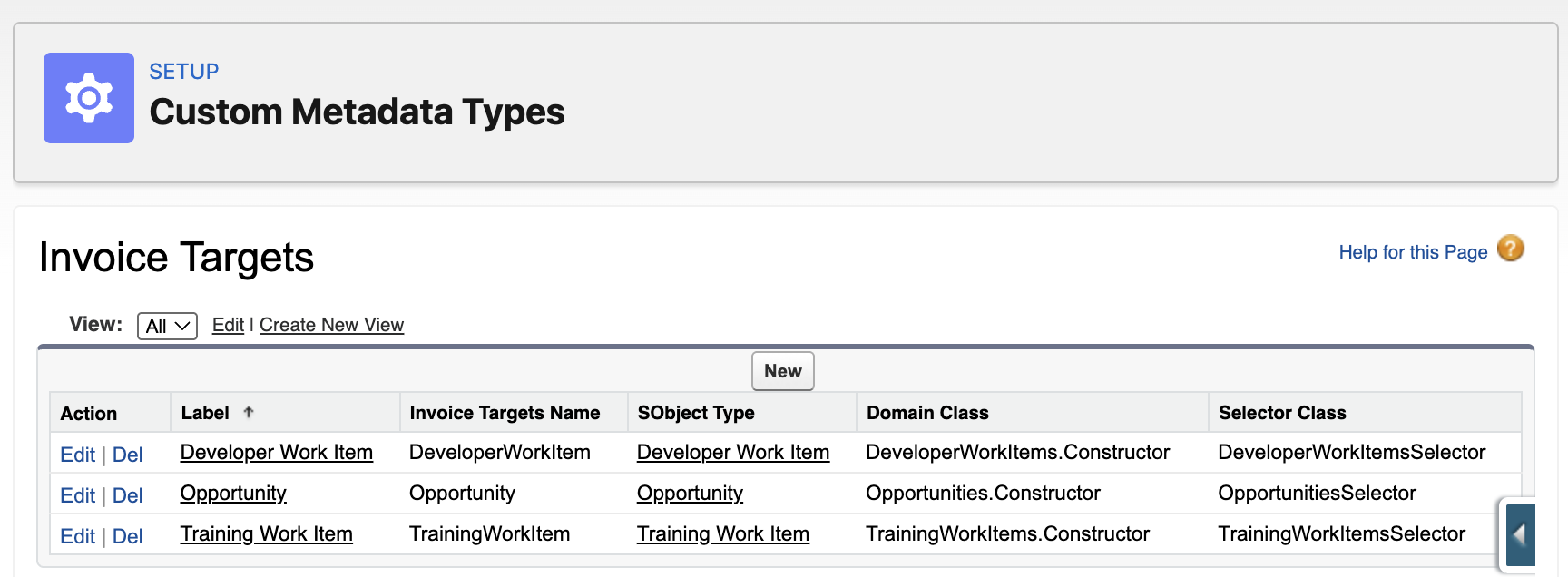
Using a factory pattern, you can also resolve dynamically different implementations based on a runtime only context. For example, a general invoicing engine can have various objects capable of storing billable activities – each with their own differ invoicing calculations. In this case, we want to dynamically resolve the specific domain classes and selector implementations associated with the SObjectType of the records passed to our service.
The code below demonstrates a custom factory called InvoicingTargetsRegistry that is simple config-based factory using custom metadata. The InvoicingTargetsRegistry class actually uses utility classes from FFLib that support the Application class pattern – but in this case they are late bound (no compiler refs) and initialised on demand. The full source code for the InvoicingTargetsRegistry is here – and its usage and config is shown below:
public with sharing class InvoicingService {

    public List<Id> generate(List<Id> sourceRecordIds)
    {
        fflib_ISObjectUnitOfWork uow = UnitOfWork.newInstance();
        InvoiceFactory invoiceFactory = new InvoiceFactory(uow);
        List<SObject> records = InvoicingTargetsRegistry.selectById(new Set<Id>(sourceRecordIds));
        fflib_IDomain domain = InvoicingTargetsRegistry.newDomain(records);
        if (domain instanceof ISupportInvoicing)
        {
            ((ISupportInvoicing) domain).generate(invoiceFactory);
            uow.commitWork();
            List<Id> invoiceIds = new List<Id>();
            for (Invoice__c inv : invoiceFactory.Invoices) { invoiceIds.add(inv.Id); }
            return invoiceIds;
        }
        throw new InvoicingException('Invalid source object for generating invoices.');
    }
}
We have explored the Application class and whether it is necessary, along with other options. This includes examining the reasons for using it, its features, and how it can enhance dependency injection and configuration beyond simple mocking.
Whats next and community contributions
As to what’s next – we have been discussing doubling down on older PRs, refreshing and consolidating documentation and of course continue to track applicable features in Salesforce platform as they arrive. One such feature I have my eye on, that I think would go well with the existing User Mode support in Unit of Work is this AccessLevel.User_Mode.withPermissionSetId. Though currently in Developer Preview, according to an Apex PM, it is presently under active discussion at high levels in the platform. This feature is significant for closing the gap in being able to implement targeted permission elevation in Apex.
Finally, FFLib has not got to PR number 525 and nearly 1000 GitHub stars without a strong community! So I want to close by giving a huge thanks for your support and contributions!
 Andy in the Cloud