
UPDATE: Apex Cursors is now GA and with additional features! This blog is still relevant however so read this first – then head over to Improved Infinite Data Scrolling with the new Apex Pagination Cursors GA.
The infinite scrolling feature of the Lightning Datatable component allows practically an unlimited amount of data to be loaded incrementally as the user scrolls. This is a common web UI approach to load pages faster and without consuming unnecessary amounts of database and compute resources retrieving records some users may not even view. The current recommended approach to retrieve records is to use SOQL OFFSET and LIMIT – however, ironically, this approach is limited to 2,000 max records. Substituting this with the new Apex Cursors feature, as you can see in the screenshot below, we have already gone past this limit! Actually, the limit for Apex Cursors is 50 million records – that said, I would seriously question the sanity of a requirement to load this many! This blog gives an overview of the Apex Cursor feature and how it can be adapted to work with LWC components.
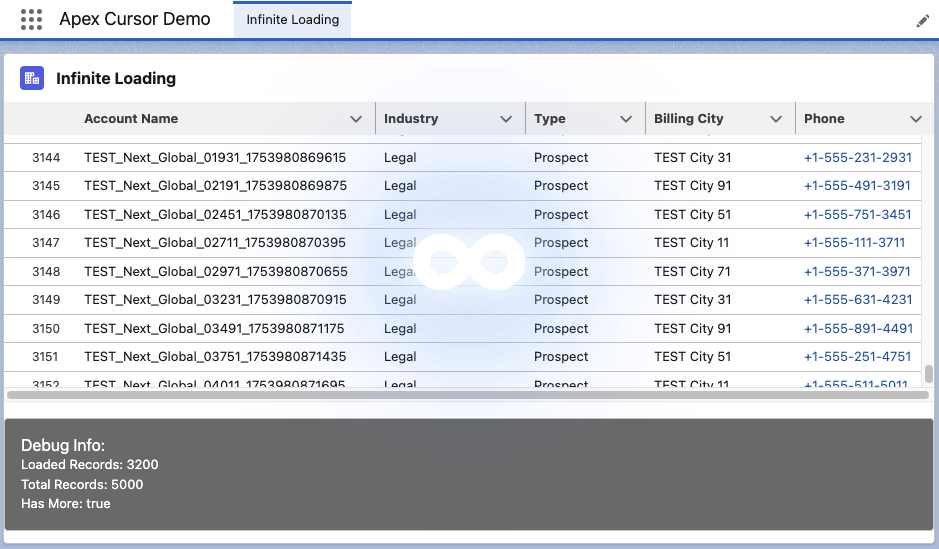
If you want to go ahead and deploy this demo checkout the GitHub repo here. Also please keep in mind that as this is a Beta release – Salesforce does not recommend use in production at this time.
What are Apex Cursors?
If you’re not familiar, the Apex Cursors feature (currently in Beta), it enables you to provide a SOQL statement to the platform and for it to return a means for you to incrementally fetch chunks of records from the result set – this feels similar to the way Batch Apex works – except that it’s much more flexible as you decide when to retrieve the records and, in fact, in any order or chunk size. The standard documentation and much of what you’ll read elsewhere online focuses on using it to drive your own custom Apex async workloads using Apex Queueable as an alternative to Batch Apex – however, because it’s just an Apex API, it can be used for other use cases such as the one featured in this blog.
Usage is simple; first, you create a cursor with Database.getCursor (or getCursorWithBinds) giving your desired SOQL. Then, with the returned Cursor object, call the fetch method with the desired position and count. Unlike Batch Apex, you can actually go back and forth using the position parameter, as this is not an iterator interface. You can also determine the total record size via getNumRecords. Before we dive into the full demo code, let’s use some basic Apex to explore the feature to query 5000 accounts.
Database.Cursor cursor = Database.getCursor(
      'SELECT Id, Name, Industry, Type, BillingCity, Phone
       FROM Account
       WHERE Name LIKE \'TEST%\' WITH USER_MODE ORDER BY Name');

System.debug('***** BEFORE FETCH *****');
System.debug('Total Records: ' + cursor.getNumRecords());
System.debug('Limit Queries: ' + Limits.getLimitQueries());
System.debug('Limit Query Rows: ' + Limits.getLimitQueryRows());
System.debug('Limit Aggregate Queries: ' + Limits.getLimitAggregateQueries());
System.debug('Limit Apex Cursor Rows: ' + Limits.getLimitApexCursorRows());
System.debug('Limit Fetch Calls On Apex Cursor: ' + Limits.getLimitFetchCallsOnApexCursor());

List<Account> accounts = cursor.fetch(1, 500);

System.debug('***** AFTER FETCH *****');
System.debug('Accounts Read: ' + accounts.size());
System.debug('Limit Queries: ' + Limits.getLimitQueries());
System.debug('Limit Query Rows: ' + Limits.getLimitQueryRows());
System.debug('Limit Aggregate Queries: ' + Limits.getLimitAggregateQueries());
System.debug('Limit Apex Cursor Rows: ' + Limits.getLimitApexCursorRows());
System.debug('Limit Fetch Calls On Apex Cursor: ' + Limits.getLimitFetchCallsOnApexCursor());
The following code gives us the following debug output:
DEBUG|***** BEFORE FETCH *****DEBUG|Total Records: 5000DEBUG|Limit Queries: 100DEBUG|Limit Query Rows: 50000DEBUG|Limit Aggregate Queries: 300DEBUG|Limit Apex Cursor Rows: 50000000DEBUG|Limit Fetch Calls On Apex Cursor: 10DEBUG|***** AFTER FETCH *****DEBUG|Accounts Read: 500DEBUG|Limit Queries: 100DEBUG|Limit Query Rows: 50000DEBUG|Limit Aggregate Queries: 300DEBUG|Limit Apex Cursor Rows: 50000000DEBUG|Limit Fetch Calls On Apex Cursor: 10The findings, at least for Beta, show that retrieving or counting records does not count against the traditional limits for SOQL; all the common ones are still untouched. However, before you get excited, this is not an alternative – it has its own limits! Some of which you can see above, which for the Beta do not seem to be getting updated, see further discussion here. The most important one, however, is not exposed via the Limits class but is documented here, which states you can only create 10,000 cursors per org per day. The other important aspect is that cursors can also span multiple requests, so long as you can find a way to persist them; however, they will get deleted after 48 hours. This is also stated to align with the sister feature Salesforce REST API Cursors.
Using Cursors with LWC Components
Cursors when used in the context of Queueable are persisted in the class state – for LWC components while they don’t give an error – are at time of this Beta not serialisable between the LWC client and the Apex Controller – I suspect for security reasons, so I posted here to confirm. This however is not the end of the story, as we do have other forms of statement management between Apex and LWC, specifically Apex Session cache – as the Apex Controller code below demonstrates.
public with sharing class ApexCursorDemoController {

    @AuraEnabled(cacheable=false)
    public static LoadMoreRecordsResult loadMoreRecords(Integer offset, Integer batchSize) {
        try {
            Database.Cursor cursor = (Database.Cursor) Cache.Session.get('testaccounts');
            if(cursor == null) {
                cursor = Database.getCursor(
                         'SELECT Id, Name, Industry, Type, BillingCity, Phone FROM Account
                          WHERE Name LIKE \'TEST%\' ORDER BY Name', AccessLevel.USER_MODE);
                Cache.Session.put('testaccounts', cursor);
            }
            LoadMoreRecordsResult result = new LoadMoreRecordsResult();
            result.records = cursor.fetch(offset, batchSize);
            result.offset = offset + batchSize;
            result.totalRecords = cursor.getNumRecords();
            result.hasMore = result.offset < result.totalRecords;
            return result;
        } catch (Exception e) {
            Cache.Session.remove('allaccounts');
            throw new AuraHandledException('Error loading records: ' + e.getMessage());
        }
    }

    public class LoadMoreRecordsResult {
        @AuraEnabled public List<Account> records;
        @AuraEnabled public Integer offset;
        @AuraEnabled public Boolean hasMore;
        @AuraEnabled public Integer totalRecords;
    }
}
Because the use of Apex Cursors is purely contained within the Apex Controller the LWC component HTML and JavaScript controller are as per traditional implementation of the DataTable component using the infinite scrolling feature – you can click here to see the code.
Thoughts and Community Findings
This feature is a welcome, modern addition to Apex and I look forward to the full GA that allows us to use this confidently in a production scenario. Here is a short summary of some usage guidelines to be aware and some very good points already raised by the community in the Apex Previews and Betas group.
- Cursor Sharing and Security Considerations
As you can see in the above, user mode is not the default, but is enabled per best practice via use ofAccessLevel.USER_MODE. As it is possible (at least for Beta) to share cursors it is important to make sure you consider who/where else you share the cursor as the user and sharing rules could be different. In this case the above code uses the users session cache so its explicitly scoped to the current user only. I suspect (see below) sharing, CRUD and FLS maybe getting re-evaluated anyway onfetch– but just in case (or you explicitly used the system mode, or the default) – this is something to keep in mind. On the flip side, another use case to explore might indeed by that in some cases it might be optimal to have a shared record set evaluated and maintain across a set of users. - Partial Cached Results
The result set appears to be cached when the cursor is created, but I suspect only the Ids since when changing the record field values – changes are seen in the results on refresh. When a record is deleted however it is not returned from the corresponding fetch call – so worth noting thecountyou ask for when callingfetchmay not be what you get back – though thepositionindexing and total records remains the same. Likewise if you create a record, even if its matches the original criteria it is not returned. These nuances and others are further discussed here – hopefully the GA documentation can formally confirm the behaviours. - Ability to Tidy up
Given the 10k daily limit, while seemingly generous it would be useful to be able to explicitly delete cursors as well. Suggestion posted here. - Just because you can show more data – does not mean you should
What I mean by this – is just because you can now expose more data does not always mean you should – always consider accordingly the fields and rows your users really need as you would any list / data table view your building – in most cases not having any filter is likely to be an anti-pattern. Additionally don’t forget Salesforce has a number of analytical tools that can help users further when moving through large amounts of data.
Additional Resources
Here is a list of useful resources I found:
 Andy in the Cloud