
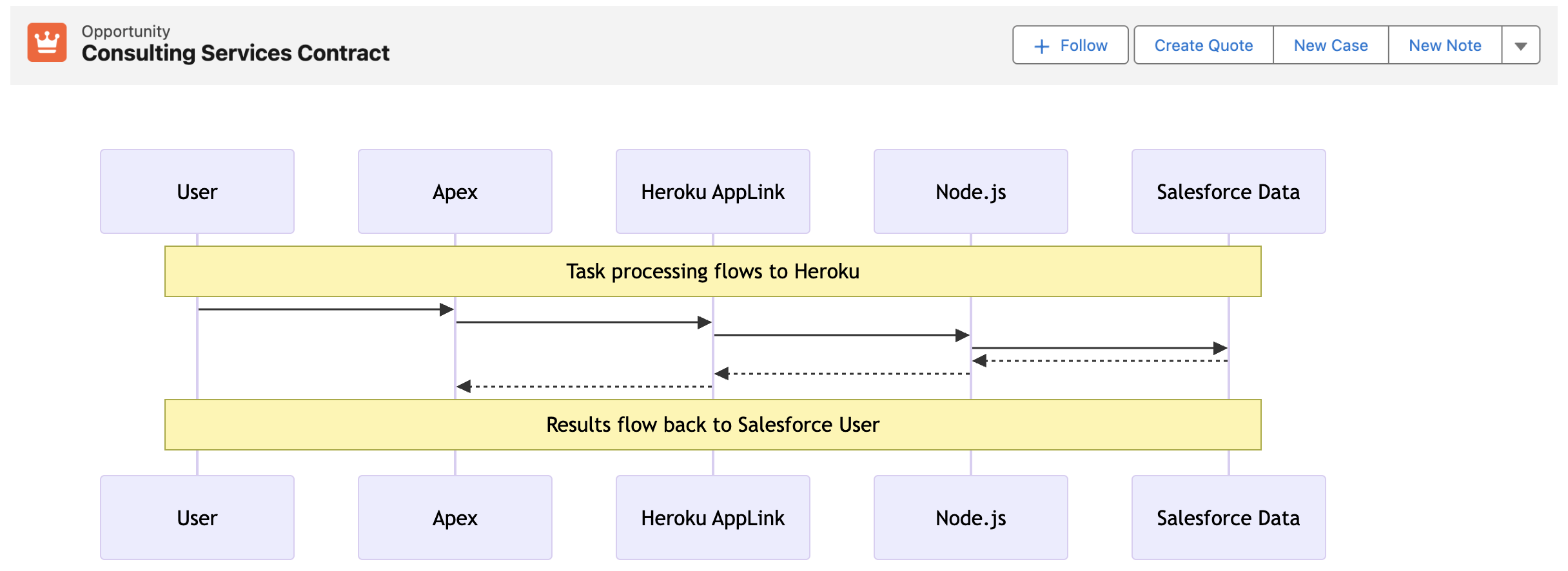
An app is often judged by its features, but equally important is its durability, confidence, and predictability in the tasks it performs – especially as a business grows; without these, you risk frustrating users with unpredictable response times or worse random timeouts. As Apex developers we can reach out to Queuables and Batch Apex for more power – though usage of these can also be required purely to work around the lower interactive governor limits – making programming interactive code more complex. I believe you should still include Apex in your Salesforce architecture considerations – however now we have an additional option to consider! This blog revisits Heroku AppLink and how it can help and without having to move wholesale away from Apex as your primary language!
This blog comes with full source code and setup instructions here.
Why Heroku AppLink?
In my prior blog I covered Five ways Heroku AppLink Enhances Salesforce Development Capabilities – if you have not read that and need a primer please check it out. Heroku AppLink has a flexible points of integration with Salesforce, among those is a way to stay within a flow of control driven by Apex code (or Flow for that matter), yet seamlessly offload certain code execution to Heroku, once complete revert back to Apex control. In contrast to Apex async workloads, this allows code to run immediately and uninterrupted until complete. In this mode there is no competing with Apex CPU, heap, or batch chunking constraints. As a result the overall flow of execution can be simpler to design and completion times are faster, largely only impacted by org data access times (no escaping slow Trigger logic). For the end user and overall business the application scales better, is more predictable and timely – and critically, grows more smoothly in relation to business data volumes.
Staying within Apex flow of control, allows you to leverage existing investments and skills in Apex, while when needed hooking into additional skills and Heroku’s more performant compute layer. All while maintaining the correct flow of the user identity (including their permissions) and critically without leaving the Salesforce (inclusive of Heroku) DX tool chains and overall fully managed services. The following presents two examples, one expanding what can be done in an interactive (synchronous) use case and the second moving to a full background (asynchronous) use case.
Improving Interactive Tasks – Synchronous Invocation
In this interactive (synchronous) example we are converting an Opportunity to a Quote – a task that can, depending on discount rules, size of the opportunity and additional regional tweaks, become quite compute heavy – sometimes in Apex hitting CPU or Heap limits. The sequence diagram below illustrates the flow of control from the User, through Apex, Heroku and back again. As always full code is supplied, but for now lets dig into the key code snippets below.
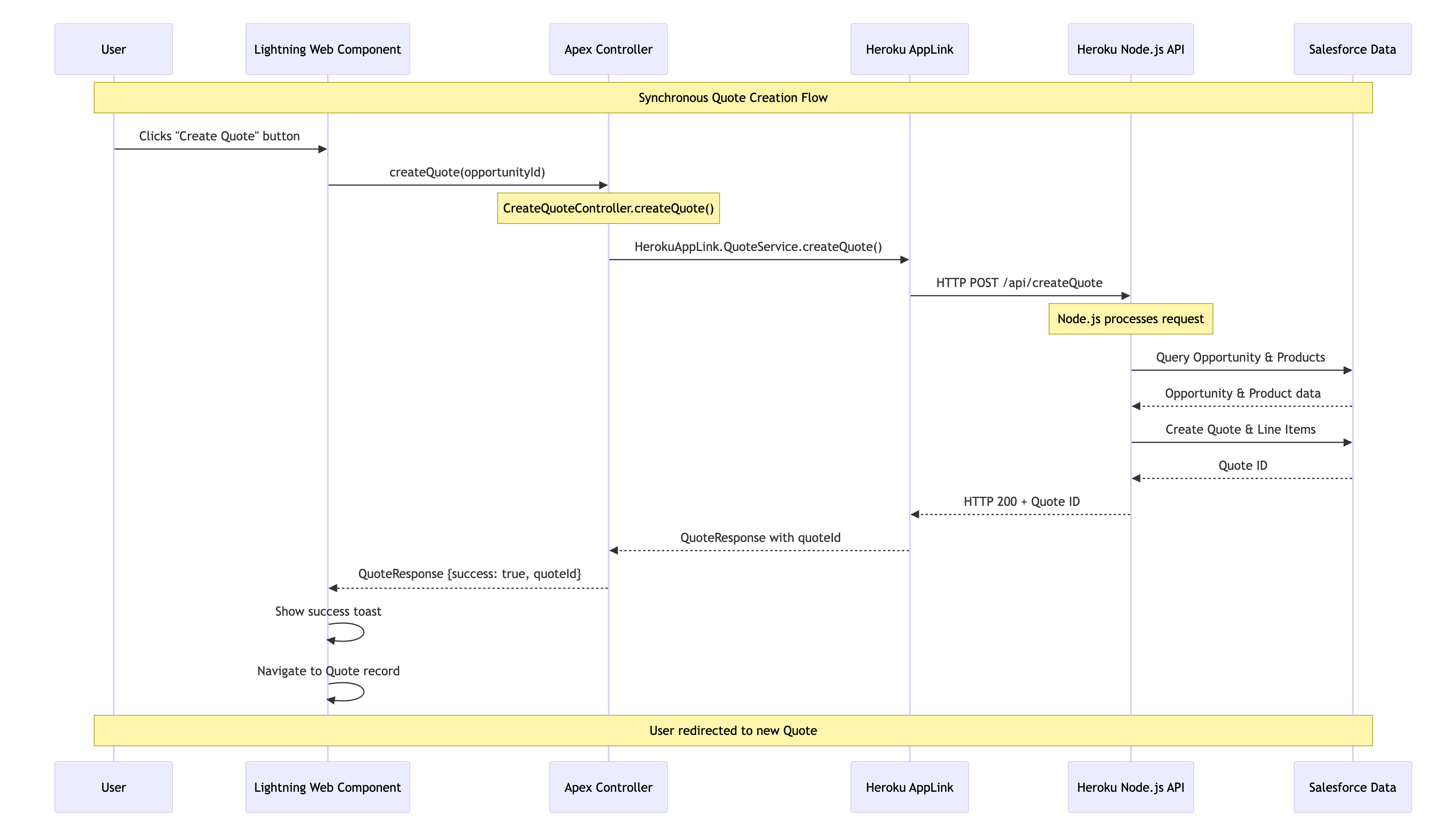
We start out with an Apex Controller that is attached to the “Create Quote” LWC button on the Opportunity page. This Apex Controller calls the Heroku AppLink exposed conversion logic (in this case written in Node.js – more on this later) – and waits for a response before returning control back to Lighting Experience to redirect the user to the newly created Quote. As you can see the HerokuAppLink namespace contains dynamically generated types for the service.

    @AuraEnabled(cacheable=false)
    public static QuoteResponse createQuote(String opportunityId) {
        try {
            // Create the Heroku service instance
            HerokuAppLink.QuoteService service = new HerokuAppLink.QuoteService();
            // Create the request
            HerokuAppLink.QuoteService.createQuote_Request request =
               new HerokuAppLink.QuoteService.createQuote_Request();
            request.body = new HerokuAppLink.QuoteService_CreateQuoteRequest();
            request.body.opportunityId = opportunityId;
            // Call the Heroku service
            HerokuAppLink.QuoteService.createQuote_Response response =
               service.createQuote(request);
            if (response != null && response.Code200 != null) {
                QuoteResponse quoteResponse = new QuoteResponse();
                quoteResponse.opportunityId = opportunityId;
                quoteResponse.quoteId = response.Code200.quoteId;
                quoteResponse.success = true;
                quoteResponse.message = 'Quote generated successfully';
                return quoteResponse;
            } else {
                throw new AuraHandledException('No response received from quote service');
            }
        } catch (HerokuAppLink.QuoteService.createQuote_ResponseException e) {
            // Handle specific Heroku service errors
            // ...
        } catch (Exception e) {
            // Handle any other exceptions
            throw new AuraHandledException('Error generating quote: ' + e.getMessage());
        }
    }

The Node.js logic (show below) to convert the quote uses the Fastify library to expose the code via a HTTP endpoint (secure by Heroku AppLink). In the generateQuote method the Heroku AppLink SDK is used to access the Opportunity records and create the Quote records – notably in one transaction via its Unit Of Work interface. Again it is important to note that none of this requires handling authentication thats all done for you – just like Apex – and just like Apex (when you apply USER _MODE) – the SOQL and DML has permissions applied.
// Synchronous quote creation
  fastify.post('/createQuote', {
    schema: createQuoteSchema,
    handler: async (request, reply) => {
      const { opportunityId } = request.body;
      try {
        const result = await generateQuote({ opportunityId }, request.salesforce);
        return result;
      } catch (error) {
        reply.code(error.statusCode || 500).send({
          error: true,
          message: error.message
        });
      }
    }
  });
//
// Generate a quote for a given opportunity
// @param {Object} request - The quote generation request
// @param {string} request.opportunityId - The opportunity ID
// @param {import('@heroku/applink').AppLinkClient} client - The Salesforce client
// @returns {Promise<Object>} The generated quote response
//
export async function generateQuote (request, client) {
  try {
    const { context } = client;
    const org = context.org;
    const dataApi = org.dataApi;
    // Query Opportunity to get CloseDate for ExpirationDate calculation
    const oppQuery = `SELECT Id, Name, CloseDate FROM Opportunity WHERE Id = '${request.opportunityId}'`;
    const oppResult = await dataApi.query(oppQuery);
    if (!oppResult.records || oppResult.records.length === 0) {
      const error = new Error(`Opportunity not found for ID: ${request.opportunityId}`);
      error.statusCode = 404;
      throw error;
    }
    const opportunity = oppResult.records[0].fields;
    const closeDate = opportunity.CloseDate;
    // Query opportunity line items
    const soql = `SELECT Id, Product2Id, Quantity, UnitPrice, PricebookEntryId FROM OpportunityLineItem WHERE OpportunityId = '${request.opportunityId}'`;
    const queryResult = await dataApi.query(soql);
    if (!queryResult.records.length) {
      const error = new Error(`No OpportunityLineItems found for Opportunity ID: ${request.opportunityId}`);
      error.statusCode = 404;
      throw error;
    }
    // Calculate discount based on hardcoded region (matching createQuotes.js logic)
    const discount = getDiscountForRegion('NAMER'); // Use hardcoded region 'NAMER'
    // Create Quote using Unit of Work
    const unitOfWork = dataApi.newUnitOfWork();
    // Add Quote
    const quoteName = 'New Quote';
    const expirationDate = new Date(closeDate);
    expirationDate.setDate(expirationDate.getDate() + 30); // Quote expires 30 days after CloseDate
    const quoteRef = unitOfWork.registerCreate({
      type: 'Quote',
      fields: {
        Name: quoteName,
        OpportunityId: request.opportunityId,
        Pricebook2Id: standardPricebookId,
        ExpirationDate: expirationDate.toISOString().split('T')[0],
        Status: 'Draft'
      }
    });
    // Add QuoteLineItems
    queryResult.records.forEach(record => {
      const quantity = parseFloat(record.fields.Quantity);
      const unitPrice = parseFloat(record.fields.UnitPrice);
      // Apply discount to QuoteLineItem UnitPrice (matching createQuotes.js exactly)
      const originalUnitPrice = unitPrice;
      const calculatedDiscountedPrice = originalUnitPrice != null
                                        ? originalUnitPrice * (1 - discount)
                                        : originalUnitPrice; // Default to original if calculation fails
      unitOfWork.registerCreate({
        type: 'QuoteLineItem',
        fields: {
          QuoteId: quoteRef.toApiString(),
          PricebookEntryId: record.fields.PricebookEntryId,
          Quantity: quantity,
          UnitPrice: calculatedDiscountedPrice
        }
      });
    });
    // Commit all records in one transaction
    try {
      const results = await dataApi.commitUnitOfWork(unitOfWork);
      // Get the Quote result using the reference
      const quoteResult = results.get(quoteRef);
      if (!quoteResult) {
        throw new Error('Quote creation result not found in response');
      }
      return { quoteId: quoteResult.id };
    } catch (commitError) {
      // Salesforce API errors will be formatted as "ERROR_CODE: Error message"
      const error = new Error(`Failed to create quote: ${commitError.message}`);
      error.statusCode = 400; // Bad Request for validation/data errors
      throw error;
    }
  } catch (error) {
    // ...
  }
}
This is a secure way to move from Apex to Node.js and back. Note certain limits still apply: callout timeout is 120 seconds max (applicable when calling Heroku per above) – additionally, the Node.js code is leveraging the Salesforce API, so API limits still apply. Despite the 120 seconds timeout, you get practically unlimited CPU, heap, and the speed of the latest industry language runtimes – in the case of Java – compilation to the machine code level if needed!
The decision to use AppLink here really depends on identifying the correct bottle neck; if some Apex logic is bounded (constrained to grow) by CPU, memory, execution time, or even language, then this is a good approach consider – without going off doing integration plumbing and risking security. For example, if you’re doing so much processing in memory you’re hitting Apex CPU limits – then even with the 120-second callout limit to Heroku – the alternative Node.js (or other lang) code will likely run much faster – keeping you in the simpler synchronous mode for longer as your compute and data requirements grow.
Improving Background Jobs – Asynchronous Invocation
When processing needs to operate over a number of records (user selected or filtered) we can apply the same expansion of the Apex control flow – by having Node.js do the heavy lifting in the middle and then once complete passing control back to Apex to complete user notifications, logging, or even further non-compute heavy work. The diagram shows two processes; the first is the user interaction, in this case, selecting the records that Apex passes over to Heroku to enqueue a job to handle the processing. Heroku compute is your org’s own compute, so will begin execution immediately and run until it’s done. Thus, in the second flow, we see the worker taking over, completing the task, and then using an AppLink Apex callback, sending control back to the org where a user notification is sent.
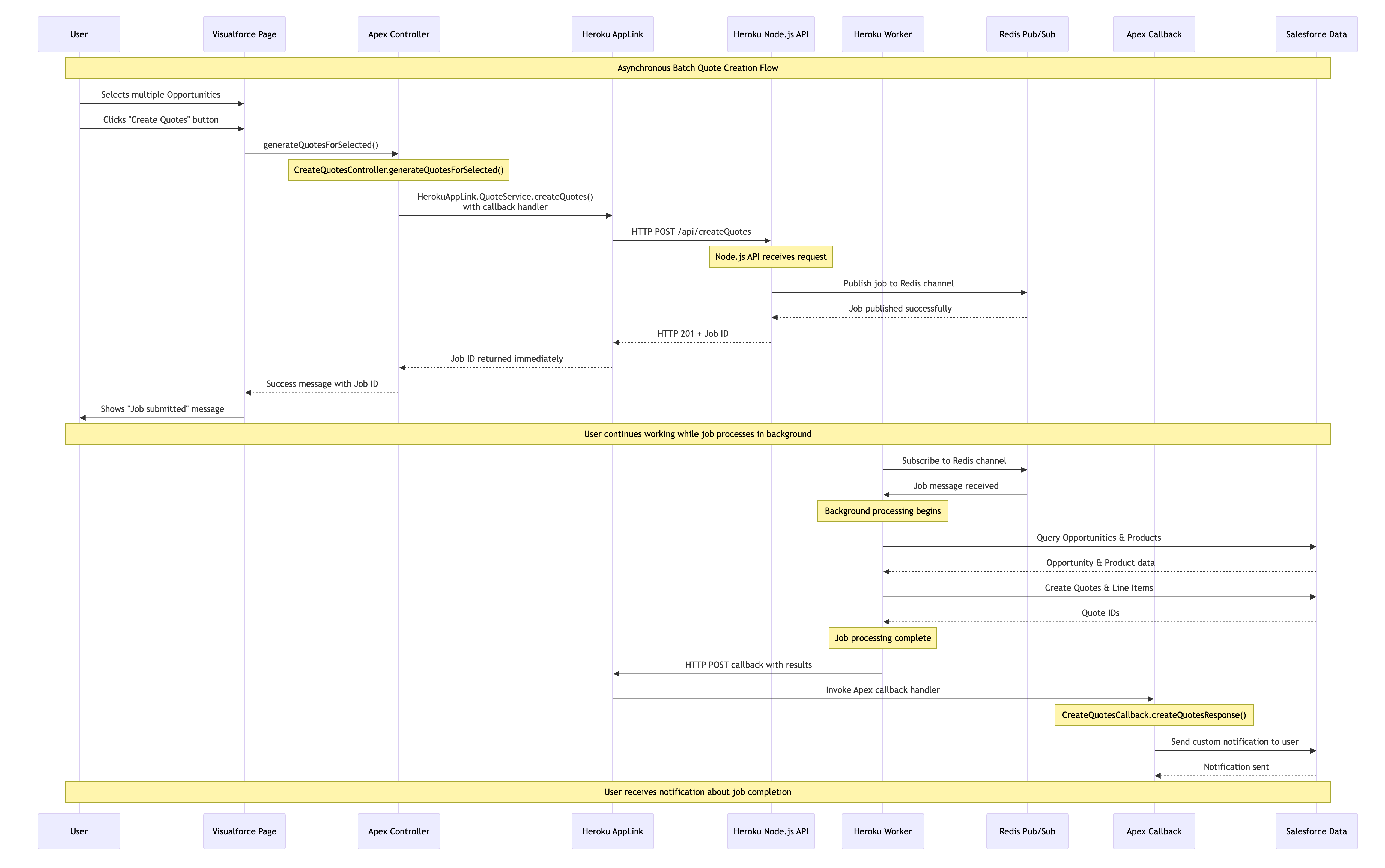
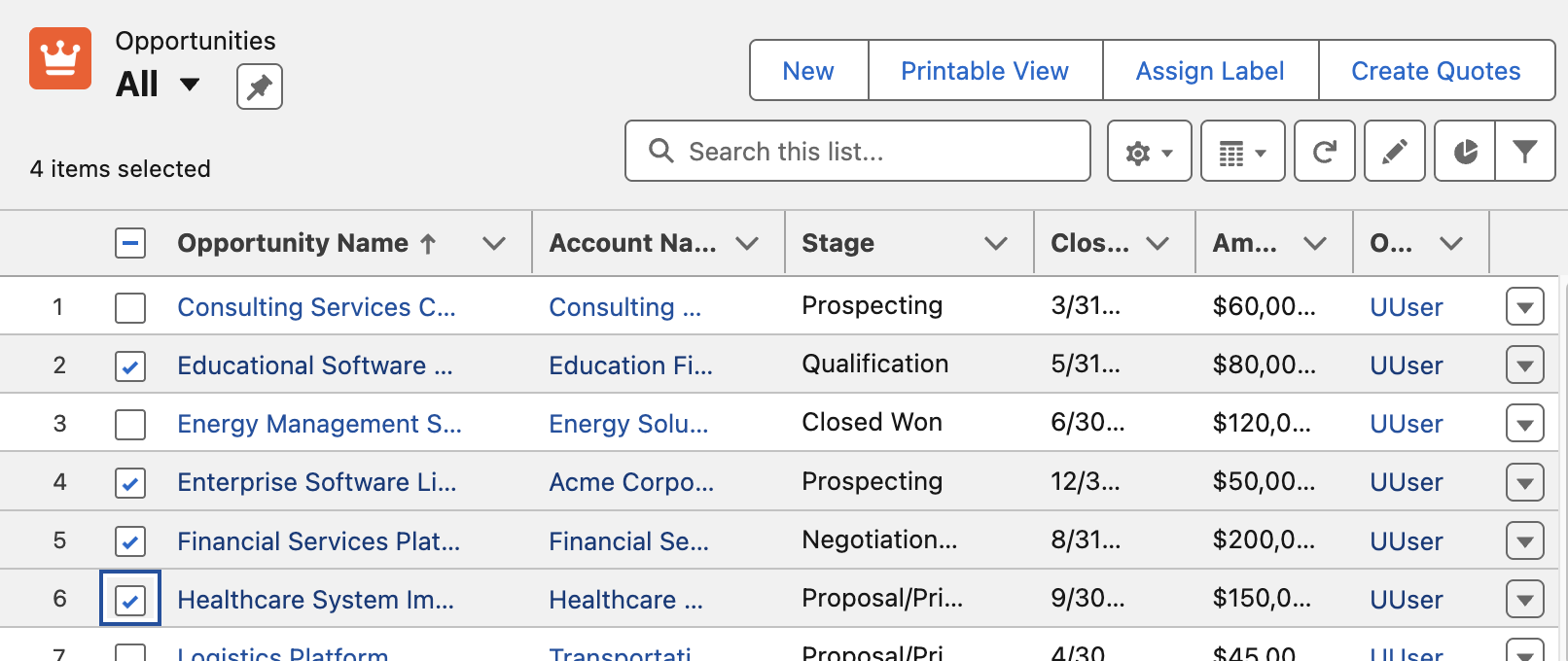
In this example we have the Create Quotes button that allows the user to select which Opportunities to be converted to Quotes. The Apex Controller shown below takes the record Ids and passes those over to Node.js code for processing in Heroku – however in this scenario it also passes an Apex class that implements a callback interface – more on this later. Note you can also invoke via Apex Scheduled jobs or other means such as Change Data Capture.
    public PageReference generateQuotesForSelected() {
        try {
            // Get the selected opportunities
            List<Opportunity> selectedOpps = (List<Opportunity>) this.stdController.getSelected();
            // Extract opportunity IDs
            List<String> opportunityIds = new List<String>(selectedOpps.keySet());
            // Call the Quotes service with an Apex callback
            try {
                HerokuAppLink.QuoteService service = new HerokuAppLink.QuoteService();
                HerokuAppLink.QuoteService.createQuotes_Request request = new HerokuAppLink.QuoteService.createQuotes_Request();
                request.body = new HerokuAppLink.QuoteService_CreateQuotesRequest();
                request.body.opportunityIds = opportunityIds;
                // Create callback handler for notifications
                CreateQuotesCallback callbackHandler = new CreateQuotesCallback();
                // Set callback timeout to 10 minutes from now (max 24hrs)
                DateTime callbackTimeout = DateTime.now().addMinutes(10);
                // Call the service with callback
                HerokuAppLink.QuoteService.createQuotes_Response response =
                   service.createQuotes(request, callbackHandler, callbackTimeout);
                if (response != null && response.Code201 != null) {
                    // Show success message
                    // ....
            } catch (HerokuAppLink.QuoteService.createQuotes_ResponseException e) {
                // Handle specific service errors
                // ...
            }
        } catch (Exception e) {
            // Show error message
            //  ...
        }
        return null;
    }
Note: You may have noticed the above Apex Controller is that of a Visualforce page controller and not LWC! Surprisingly it seems (as far as I can see) this is still the only way to implement List View buttons with selection. Please do let me know of other native alternatives. Meanwhile the previous button is a modern LWC based button, but this is only supported on detail pages.
As before you can see Fastify used to expose the Node.js code invoked from the Apex controller – except that it is returning immediately to the caller (your Apex code) rather than waiting for the work to complete. This is because the work has been spun off in this case into another Heroku process known as a Worker. This pattern means that control returns to the Apex Controller and to the user immediately while the process continues in the background. Note that the callbackURL is automatically supplied by AppLink you just need to retain it for later.
// Asynchronous batch quote creation
  fastify.post('/createQuotes', {
    schema: createQuotesSchema,
    handler: async (request, reply) => {
      const { opportunityIds, callbackUrl } = request.body;
      const jobId = crypto.randomUUID();
      const jobPayload = JSON.stringify({
        jobId,
        jobType: 'quote',
        opportunityIds,
        callbackUrl
      });
      try {
        // Pass the work to the worker and respond with HTTP 201 to indicate the job has been accepted
        const receivers = await redisClient.publish(JOBS_CHANNEL, jobPayload);
        request.log.info({ jobId, channel: JOBS_CHANNEL, payload: { jobType: 'quote', opportunityIds, callbackUrl }, receivers }, `Job published to Redis channel ${JOBS_CHANNEL}. Receivers: ${receivers}`);
        return reply.code(201).send({ jobId }); // Return 201 Created with Job ID
      } catch (error) {
        request.log.error({ err: error, jobId, channel: JOBS_CHANNEL }, 'Failed to publish job to Redis channel');
        return reply.code(500).send({ error: 'Failed to publish job.' });
      }
    }
  });
The following Node.js is running in the Heroku Worker and performs the same work as the example above, querying Opportunities and using the Unit Of Work to create the Quotes. However in this case when it completes it calls the Apex Callback handler. Note that you can support different types of callbacks – such as an error state callback.
/**
 * Handles quote generation jobs.
 * @param {object} jobData - The job data object from Redis.
 * @param {object} logger - A logger instance.
 */
async function handleQuoteMessage (jobData, logger) {
  const { jobId, opportunityIds, callbackUrl } = jobData;
    try {
    // Get named connection from AppLink SDK
    logger.info(`Getting 'worker' connection from AppLink SDK for job ${jobId}`);
    const sfContext = await sdk.addons.applink.getAuthorization('worker');
    // Query Opportunities
    const opportunityIdList = opportunityIds.map(id => `'${id}'`).join(',');
    const oppQuery = `
      SELECT Id, Name, AccountId, CloseDate, StageName, Amount,
             (SELECT Id, Product2Id, Quantity, UnitPrice, PricebookEntryId FROM OpportunityLineItems)
      FROM Opportunity
      WHERE Id IN (${opportunityIdList})
    // ...
    logger.info(`Processing ${opportunities.length} Opportunities`);
    const unitOfWork = dataApi.newUnitOfWork();
    // Create the Quotes and commit Unit Of Work
    // ...
    const commitResult = await dataApi.commitUnitOfWork(unitOfWork);
    // Callback to Apex Callback class
    if (callbackUrl) {
      try {
        const callbackResults = {
          jobId,
          opportunityIds,
          quoteIds: Array.from(quoteRefs.values()).map(ref => {
            const result = commitResult.get(ref);
            return result?.id || null;
          }).filter(id => id !== null),
          status: failureCount === 0 ? 'completed' : 'completed_with_errors',
          errors: failureCount > 0 ? [`${failureCount} quotes failed to create`] : []
        };
        const requestOptions = {
          method: 'POST',
          body: JSON.stringify(callbackResults),
          headers: { 'Content-Type': 'application/json' }
        };
        const response = await sfContext.request(callbackUrl, requestOptions);
        logger.info(`Callback executed successfully for Job ID: ${jobId}`);
      } catch (callbackError) {
        logger.error({ err: callbackError, jobId }, `Failed to execute callback for Job ID: ${jobId}`);
      }
    }
  } catch (error) {
    logger.error({ err: error }, `Error executing batch for Job ID: ${jobId}`);
  }
}
Finally the following code shows us what the CreateQuotesCallback Apex Callback (provided in the Apex controller logic) is doing. For this example its using the custom notifications to notify the user via UserInfo.getUserId(). It can do this because it is running as the original user that started the work. Also meaning that if it needed to do any further SOQL or DML these run in context of the correct user. Also worth noting that handler is bulkified – indicating that Salesforce will likely batch up callbacks if they arrive in close timing.
/**
 * Apex Callback handler for createQuotes asynchronous operations
 * Extends the generated AppLink callback interface to handle responses
 */
public class CreateQuotesCallback
      extends HerokuAppLink.QuoteService.createQuotes_Callback {

    /**
     * Handles the callback response from the Heroku worker
     * Sends a custom notification to the user with the results
     */
    public override void createQuotesResponse(List<HerokuAppLink.QuoteService.createQuotes_createQuotesResponse_Callback> callbacks) {
        // Send custom notification to the user
        for (herokuapplink.QuoteService.createQuotes_createQuotesResponse_Callback callback : callbacks) {
            if (callback.response != null && callback.response.body != null) {
                Messaging.CustomNotification notification = new Messaging.CustomNotification();
                notification.setTitle('Quote Generation Complete');
                notification.setNotificationTypeId(notificationTypeId);
                String message = 'Job ' + callback.response.body.jobId + ' completed with status: ' + callback.response.body.status;
                if (callback.response.body.quoteIds != null && !callback.response.body.quoteIds.isEmpty()) {
                    message += '. Created ' + callback.response.body.quoteIds.size() + ' quotes.';
                }
                if (callback.response.body.errors != null && !callback.response.body.errors.isEmpty()) {
                    message += ' Errors: ' + String.join(callback.response.body.errors, ', ');
                }
                notification.setBody(message);
                notification.setTargetId(UserInfo.getUserId());
                notification.send(new Set<String>{ UserInfo.getUserId() });
            }
        }
    }
}

Configuration and Monitoring
In general the Node.js code runs as the user invoking the actions – which is very Apex like and gives you confidence your code only does what the user is permitted. There is also an elevation mode thats out the scope of this blog – but is covered in the resources listed below. The technical notes section in the README covers an exception to running as the user – whereby the asynchronous Heroku worker logic is running as a named user. Note that the immediate Node.js logic and Apex Callbacks both still run as the invoking user so if needed you can do “user mode” work in those contexts. You can read more about the rational for this this in the README for this project.
Additionally there are subsections in the README that cover the technical implementation of Heroku AppLink asynchronous callbacks. Configuration for Heroku App Async Callbacks provides the OpenAPI YAML structure required for callback definitions, including dynamic callback URLs and response schemas that Salesforce uses to generate the callback interface. Monitoring and Other Considerations explains AppLink’s External Services integration architecture, monitoring through the BackgroundOperation object, and the 24-hour callback validity constraint with Platform Event alternatives for extended processing times or in progress updates.

Summary
As always I have shared the code, along with a more detailed README file on how to set the above demos up for yourself. This is just one of many ways to use Heroku AppLink, others are covered in the sample patterns here – including using Platform Events to trigger Heroku workers and transition control back to Apex or indeed Flow. This Apex Callback pattern is unique to using Heroku AppLink with Apex and is not yet that deeply covered in the official docs and samples – you can also find more information about this feature by studying the general External Services callback documentation.
Finally, the most important thing here is that this is not a DIY integration like you may have experienced in the past – though I omitted here the CLI commands (you can see them in the README) – Salesforce and Heorku are taking on a lot more management now. And overall this is getting more and more “Apex” like with user mode context explicitly available to your Heroku code. This blog was inspired by feedback on my last blog, so please keep it coming! There is much more to explore still – I plan to get more into the DevOps integration side of things and explore ways to automate the setup using the AppLink API.
Meanwhile, enjoy some additional resources!
- Additional Code and Information for this Blog
- Extend Salesforce with Any Language
- AppLink Fundamentals I: Integration Patterns – Connecting Salesforce to Heroku Applications
- AppLink Fundamentals II: Advanced AppLink Integrations – Automation & AI
- AppLink Fundamentals III: Building with AppLink – Development Flow and Language Choices
- AppLink Trailhead
- Overview
- Getting Started Guides
- CLI Guide
- API Guide
- Node.js SDK
- Python SDK
- Sample Code (Java, Node.js)
- How External Services Asynchronous Callbacks Work
- Heroku Trailhead
 Andy in the Cloud
August 21, 2025 at 8:07 pm
You can try this other way to implement List View buttons with selection.
August 23, 2025 at 8:04 am
Thanks for sharing. I looked at all the options except the Flow one (with the embedded LWC) at the end. That’s the only one that supports passing Ids.
If an LWC is required (though VF already does a good job of looking like Lightning for basic use cases), then the Flow approach is solid. That said, I’d also consider hosting an LWC component inside a VF page — it’s more direct (no Flow needed) and potentially more secure, since Id passing is handled by the platform through VF not on the URL’s.
If you don’t need Ids passed, then any of the approaches in that video look great! Thanks again for sharing.
Pingback: Securing Salesforce Integrations with Heroku AppLink | Andy in the Cloud