Andy in the Cloud

From BBC Basic to Force.com and beyond…


2 Comments

What does the new Apex User Mode Default mean for you?

Since I started with Salesforce some 15+ years ago, as part of a team building the first account app on AppExchange, security has always been an important consideration. Coming from other platforms, the principle of least privilege was also instilled in me. While Salesforce has always had a flexible set of security controls, they weren’t enforced “by default” in Apex code – giving it access to everything. This has now changed with these two Summer’26 / API 67.0 changes for CRUD security and sharing security, marking one of the biggest design shifts for Apex since its inception! The trouble with this of course – is literally millions and millions of lines of Apex code has been written against the exact opposite assumption.

So what’s going to happen once you upgrade to Summer’26 / API 67.0?

Firstly you don’t have to upgrade to API 67.0 straight away and quite often I have seem teams lag a little bit to take on the work in planned way or just wait to see if its stable. But once you do make the move, to be realistic, despite explicit Apex trigger code being exempt (by design they remain in system mode), you cannot assume the rest of your Apex code is not going to break. When it does, you will probably find yourself having a number of painful but “good” security design reflections. The good news is that, depending on how recent your codebase is, you might already be partway on the journey! There is a lot more to be written, reflected, tooled up etc on this topic. For now in this blog, I want to discuss what paths you might find yourself on and what to be thinking about.

How much Apex breaks depends on whether you’ve been using either the new declarative-based Apex user and system modes or sticking with the old method of manually performing CRUD checks. If you’ve applied either, you should also have started using Permission Set in your solution. Permission Sets are key to this adoption. By applying both these approaches in deployments and during test execution (via System.runAs), you’re not only enforcing security but also providing admins with ready-to-use permission configurations that match your entire codes needs or, if desired, a more granular breakdown by module or groups of actions users are permitted to perform. Below, we will first explore this optimistic adoption path and then discuss the more challenging one.

Before we dive in here is a short summary table of paths that you might fall into:

Path A:

Fully applied:

– Apex User Mode
– System Mode
– “without sharing”
Path B:

Partially applied:

– Apex User Mode fully
– Or Apex Describe Checks
– Or “with sharing”, some “without sharing”
Path C:

No Security Checks:

– Possibly no Permission Sets


If this is exclusively the case across your code base – well done! This falls into the best happy path of all – and aligns with Salesforce guidance on system mode. Don’t assume all is well though, plan accordingly, use this as an opportunity to review your Permission Set strategy (see over-permissioning below) and double check without sharing usage with System Mode. *You are in a good starting position, and should have some created some Permission Sets to support your code, but still might need to check those and also check any system mode scenarios. Then apply system mode and/or without sharing annotations. See further guidance below.Depending on the size of your codebase this could be a significant bit of work depending on your approach to permission sets and use of state flags, calc fields and hidden/app only objects. Resist diving into this by simply creating a quick fix huge permission set for all fields, objects required. See further guidance below.

* The requirement to also use “without sharing” with System Mode did catch me out – its not parity with User Mode, it does not require “with sharing” per documentation and in fact overrides class level sharing.

Ok, so I have already been embracing Apex User Mode now what? (Path B)

In short, if this is the case, your journey has already started, and you’re either already done (unlikely tbh) or have some work left to do. If you have been using user mode in your DML or SOQL code, you will have noticed that the Apex runtime (by design) throws errors when fields or DML operations are not accessible—because the users profile (or ideally, permission set) has not granted such access. This can occur not only when end users run your code but also during Apex tests.

Security exceptions in Apex tests are as valid as they are for end users without permissions. They are designed to prompt you to create dynamic test users in your Apex code, assign your permission sets, and leverage System.runAs to ensure the tests run successfully from a permissions perspective – failure is a bug in your code or permission set. This setup is effective, and code paths using it will function “as is” under the new user mode default.

However, in places you may have opted not to use user mode because the code needs to act on a flag, computed field or object need by your code but not the user. In these cases, simply not using user mode did used to default to the Apex system mode, which can lead to failures with the new user mode default. First, do not add such fields/objects to permission sets unless the rationale has changed; they are still system mode access scenarios. Instead, elevate permissions to system mode explicitly by using the explicit SYTEM_MODE flag/clause in Apex/SOQL. The same applies to classes where you have also not specified without sharing. In short, be as explicit about system mode now as you have been about user mode and you will heading in a good direction.

What is user mode? I have not been adding security enforcement in my code… (Path C)

Firstly, you might have historically thought that your code runs in user mode simply because the user executes it, which is true. However, unlike the Lightning UI, which removes fields, makes them read-only, or hides records, Apex has not followed suit to date. It does not generate errors, atomically clear variables, or block inserts. This means your custom UIs may display information to which they should not have access, and they could also allow updates or deletions that should not be permitted. It’s possible that you are reading this and thinking that it’s just a small team in a small organization, and you don’t really care. While that may have been a pragmatic approach in the past, in today’s world of increasing security exploits, it’s not a strategy you can continue to embrace – on any platform. Salesforce, although challenging here, is providing you with a necessary wake-up call.

So, what should you do to prepare? A simple but not holistic step is to repeatedly run your Apex code and tests against API 67.0 to identify any issues as you update assigned profiles/permission sets. However, keep in mind that this may not provide complete coverage, so performing end-user UX testing is also likely going to be important. This is a basic approach will help you pinpoint which objects and fields users need access to. But what is also crucial, is to ask what types (or roles) of users you are supporting and what actions they perform. Without this understanding, you might fall into the trap of over-permissioning, which involves creating and assigning a permission set with access to every object and field in your object model and others.

Over-permissioning is a trap because, unless your solution is very simple, the data a user type needs access to (for a specific subset of features) will likely differ from the entire data set or the data your code requires to function properly. For instance, users can then inadvertently edit calculated fields or related objects (like logs, rollups, and state flags) outside of your code if given access. Therefore, it’s important to delineate user types (roles/personas), their actions, and how those actions relate to the essential objects and fields for business functionality versus those necessary solely for managing the application, often termed system-level. The same principle applies to sharing rules: if code requires visibility over all rows but users do not, this must be acknowledged as well.

For a more holistic view I do recommend using various org dependency inspection tools alongside running tests to map out which objects and fields are utilized by specific Apex classes, as well as the code paths of those classes, and how those relate to each user type’s required actions. Note this will not help with dynamically referenced fields and objects. Overall though this will help you design a solid Permission Set strategy that is effectively a manifestation of your apps features and security design.

Closing thoughts… for now

If you have a sizable codebase that’s fairly old, you’re certainly reading this with your head in your hands, wondering where to get started. While you can defer upgrading to API 67.0, it cannot be done indefinitely. I know it’s a lot to manage, but please try to avoid the trap of over-permissioning. It’s an easy fix, but keep in mind that you will also expose all those objects and fields through standard Salesforce interfaces, Lightning Experience, List Views, Dashboards, Reports, etc. Even if such fields and objects are not on layouts, they can still be accessed by end users.

There is certainly some tooling that will help with all of this by combining dependency data among classes, objects and fields to help uncover the super set of objects/fields in scope, this at least would be a good start. Such tooling is something I might explore but likely best served by others building such tools already to expand into. For sure Salesforce Security Scanner / PMD rules will also need to be updated – which I assume is in the pipeline. I will likely follow up with further thoughts on this topic – so let me know your thoughts. Also if you want to connect with me meanwhile to discuss your situation feel free to find me on LinkedIn.
Leave a comment

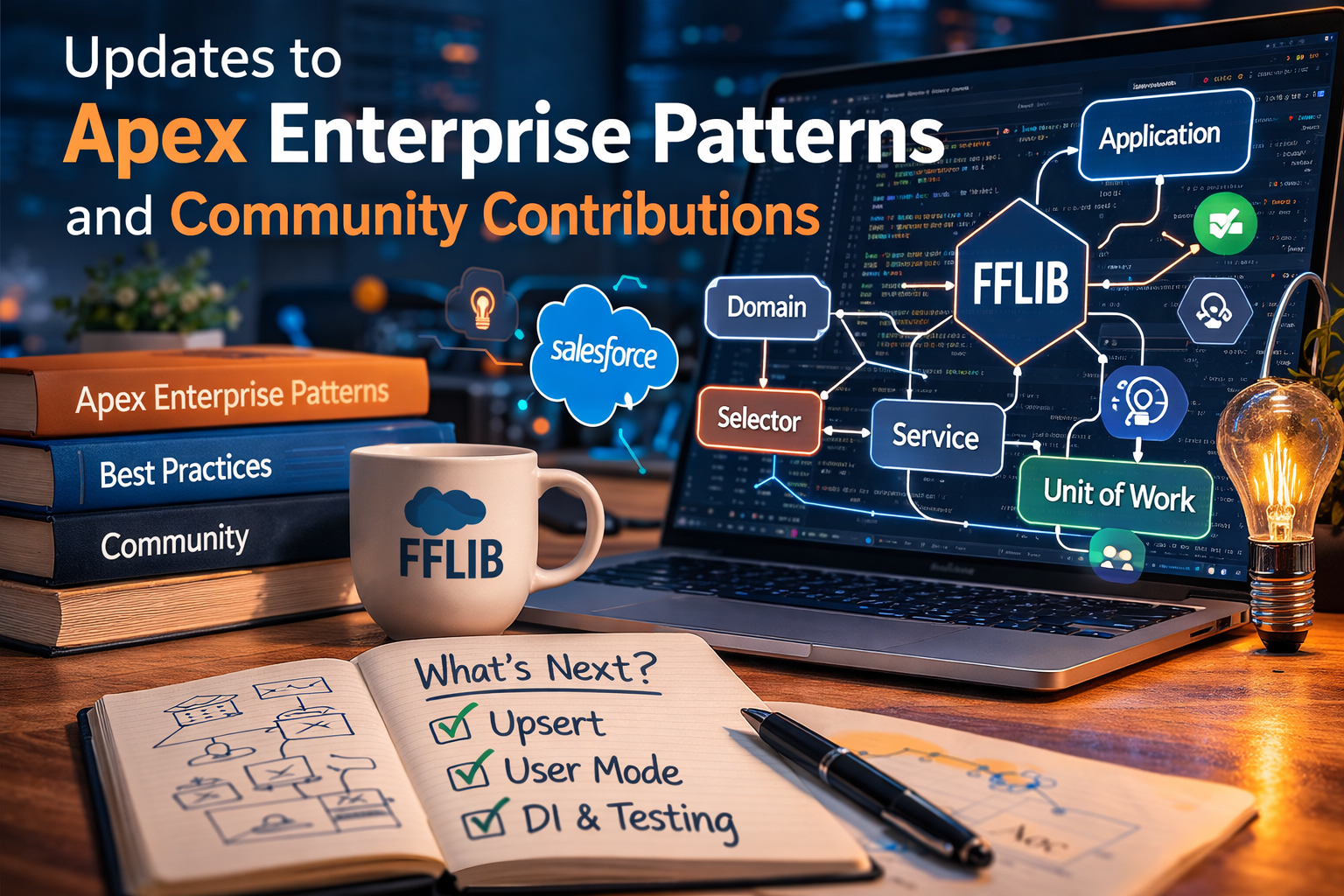
Apex Enterprise Patterns: Recent Updates and Thoughts on the Application Class

Over the past year or so, I have been attending various community conferences, and now as an independent consultant I have more time to keep a pulse on many things across the ecosystem — past, present, and future. I’m often asked about FFLib and/or DLRS.

When discussions turn to FFLib, two topics regularly come up: the role of the Application class pattern and questions about recent updates. In this post, I’ll cover both, along with what’s next and highlight some recent community contributions.

Before jumping in, I also want to express my gratitude to FFLib’s core team, who are the official curators of the project and with whom I’ve been enjoying more opportunities to reconnect. In addition to the questions answered in this blog we are keen to here more from you!

What are the latest updates?

There have been a number of updates recently, which I cover in full in the summary at the end of this blog. Here though, I want to highlight an enhancement to one of my favourite features of FFLIb, the Unit of Work. Thanks to a community contribution, we now have support for upsert! So you can now wrap all your DML and, in fact, email or custom operations in a single unit of work. It’s used much like other register methods on the Unit of Work. The following is a basic example but showcases the new method well:

// Sync invoices from external system - insert new, update existing by External ID
public static void syncFromExternal(List<InvoiceSyncPayload> payloads) {
    fflib_ISObjectUnitOfWork uow = Application.UnitOfWork.newInstance();
    for (InvoiceSyncPayload p : payloads) {
        Invoice__c inv = new Invoice__c(
            Reference__c = p.externalRef,  // External ID - matches existing or creates new
            Description__c = p.description,
            InvoiceDate__c = p.invoiceDate,
            Account__c = p.accountId,
            Amount__c = p.amount
        );
        uow.registerUpsert(inv, Invoice__c.Reference__c);
    }
    uow.commitWork();
}

Do I need the Application class and Apex Interfaces? Are there other options?

In short, having an Application class is not a requirement to use FFLib; it depends on your needs, particularly regarding dependency injection. The Application class and its methods became common a few years after the library began to support mocking in tests. As a factory pattern, it also aids in handling dynamic business logic, like invoicing that determines target objects at runtime. For those unaware, the Application class is a code-based metadata defining the dependency order of your app’s object schema, services, and logic. Here’s the classic example:

public class Application 
{
	// Configure and create the UnitOfWorkFactory for this Application
	public static final fflib_Application.UnitOfWorkFactory UnitOfWork = 
		new fflib_Application.UnitOfWorkFactory(
				new List<SObjectType> {
					Account.SObjectType,
					Invoice__c.SObjectType,
					InvoiceLine__c.SObjectType });	

	// Configure and create the ServiceFactory for this Application
	public static final fflib_Application.ServiceFactory Service = 
		new fflib_Application.ServiceFactory( 
			new Map<Type, Type> {
					IAccountsService.class => AccountsServiceImpl.class,
					IOpportunitiesService.class => OpportunitiesServiceImpl.class,
					IInvoicingService.class => InvoicingServiceImpl.class });

	// Configure and create the SelectorFactory for this Application
	public static final fflib_Application.SelectorFactory Selector = 
		new fflib_Application.SelectorFactory(
			new Map<SObjectType, Type> {
					Account.SObjectType => AccountsSelector.class,
					Opportunity.SObjectType => OpportunitiesSelector.class });

	// Configure and create the DomainFactory for this Application
	public static final fflib_Application.DomainFactory Domain = 
		new fflib_Application.DomainFactory(
			Application.Selector,
			new Map<SObjectType, Type> {
					Opportunity.SObjectType => Opportunities.Constructor.class,
					OpportunityLineItem.SObjectType => OpportunityLineItems.Constructor.class });
}

// --- UnitOfWorkFactory usage and mocking support ---
Application.UnitOfWork.newInstance();
Application.UnitOfWork.newInstance(new fflib_SObjectUnitOfWork.UserModeDML());
Application.UnitOfWork.newInstance(new List<SObjectType>{ Account.SObjectType });
Application.UnitOfWork.setMock(uowMock);

// --- SelectorFactory usage and mocking support ---
Application.Selector.newInstance(Account.SObjectType);
Application.Selector.selectById(new Set<Id>(sourceRecordIds));
Application.Selector.selectByRelationship(opps, Opportunity.AccountId);
Application.Selector.setMock(selectorMock);

// --- DomainFactory usage and mocking support ---
Application.Domain.newInstance(new Set<Id>{ oppId });
Application.Domain.newInstance(records);
Application.Domain.newInstance(records, Opportunity.SObjectType);
Application.Domain.setMock(domainMock);

// --- ServiceFactory usage and mocking support ---
Application.Service.newInstance(IOpportunitiesService.class);
Application.Service.setMock(IOpportunitiesService.class, serviceMock);

The above example shows the classic way to configure the Application class to provide various factories. Each instance is accessed via helper methods that offer mocking and more advanced factory access patterns. It’s easy to use with a code-driven configuration, but has downsides, specifically when it comes to deployments and compilation errors. Alternatively, it can also be configured through metadata. Finally, if you’re only interested in mocking features, the Application class is as I mentioned above, optional. This table explores this further and introduces two new type descriptors for the Application class:

Features RequiredApplication Class RequiredPros + / Cons –
+ Unit Test MockingNot required+ Smaller code footprint
+ Apex interfaces optional
– Custom mocking injection
+ Unit Test Mocking
+ Factories
Type I: Code Configured + Simple to configure
+ Built in mocking injection
+ Polymorphic instantiation
– Deployment challenges
– Does not span packages
+ Unit Test Mocking
+ Factories
+ Dependency Injection
+ Package Dependency Injection
Type II: Metadata Configured+ Same as Type I
+ Flexible DI configuration
+ No Deployment challenges
+ Spans multiple packages
– More complex to manage

In the rest of this blog, we will dive deeper into simple unit test mocking without requiring an Application class (row one above). Before that, though, let’s quickly discuss how the use of Apex Interfaces has evolved in respect to unit test mocking and take a brief look at how you can implement a metadata-configured application class.

Do I have to use Apex Interfaces?

For Type II: Metadata Configured usage, dependency injection clearly requires interfaces as a contract for the different implementations needing runtime resolution. However, when using the Salesforce’s Apex Stub feature (directly or indirectly through a mocking library), interfaces are optional for Type I: Application class usage. If interfaces are used for purposes outside of mocking, it’s a different case; otherwise, the Service factory needs only to list available concrete services for mocking injection to function as shown below:

	// Type I: Application class, configure and create the ServiceFactory for this Application
	public static final fflib_Application.ServiceFactory Service = 
		new fflib_Application.ServiceFactory( 
			new Map<Type, Type> {
					AccountsService.class => AccountsService.class,
					OpportunitiesService.class => OpportunitiesService.class,
					InvoicingService.class => InvoicingService.class });

// --- ServiceFactory usage and mocking (without interfaces) ---
Application.Service.newInstance(OpportunitiesService.class);
Application.Service.setMock(OpportunitiesService.class, serviceMock);

Note: This approach also requires service methods as instance methods – since Apex Stubs cannot mock static methods.

What does Metadata Configuration look like?

For more advanced Type II: Application class usage, FFLib includes the factory implementations for you, but not the metadata types for the configuration. Inclusion of objects like this has always been seen as outside of scope by the authors – open to feedback on this. So since FFLib does not include custom metadata types a custom Application class must be created that seeds the factories dynamically from CMT you create. Here is a very basic example:

public class Application {
	public static final fflib_Application.SelectorFactory Selector;
	public static final fflib_Application.DomainFactory Domain;
	public static final fflib_Application.UnitOfWorkFactory UnitOfWork;
	public static final fflib_Application.ServiceFactory Service;

	static {
		Map<SObjectType, Type> selectorTypeBySObject = new Map<SObjectType, Type>();
		Map<SObjectType, Type> constructorTypeBySObject = new Map<SObjectType, Type>();
		List<SObjectType> unitOfWorkTypes = new List<SObjectType>();
		Map<Type, Type> implByInterface = new Map<Type, Type>();
		for (Application__mdt m : [
			SELECT FactoryType__c, SObjectType__c, KeyClass__c, ValueClass__c, Order__c
			FROM Application__mdt
			WITH SYSTEM_MODE
			ORDER BY FactoryType__c, Order__c ASC NULLS LAST
		]) {
			SObjectType sType = Schema.getGlobalDescribe().get(m.SObjectType__c);
			Type keyType = Type.forName(m.KeyClass__c);
			Type valueType = Type.forName(m.ValueClass__c);
			switch on m.FactoryType__c {
				when 'Selector' {
					selectorTypeBySObject.put(sType, keyType);
				}
				when 'Domain' {
					constructorTypeBySObject.put(sType, keyType);
				}
				when 'UnitOfWork' {
					unitOfWorkTypes.add(sType);
				}
				when 'Service' {
					implByInterface.put(keyType, valueType);
				}
			}
		}
		Selector = new fflib_Application.SelectorFactory(selectorTypeBySObject);
		Domain = new fflib_Application.DomainFactory(Selector, constructorTypeBySObject);
		UnitOfWork = new fflib_Application.UnitOfWorkFactory(unitOfWorkTypes);
		Service = new fflib_Application.ServiceFactory(implByInterface);
	}
}

The above design is simple to help illustrate the point. You can check out the AT4DX library, which is built on FFLib to manage dependency injection in Apex, including across different Salesforce packages. AT4DX also maintains the Application helper methods but dynamic binding at runtime using custom metadata, eliminating the class dependency complexity of Type I: Application class usage. It also implements caching to improve performance when loading the configuration. If your interested in a more general purpose DI framework, check out Force-DI.

Unit Test Mocking without an Application class?

If you’re only interested in mocking your unit of work, service, domain, and/or selector implementations—and don’t need the additional features provided by Application Type I or Type II—one option you can use is basic method-based dependency injection approach to roll your own mocking injection, along with simple class factories.

Without the Application class, there is no built-in factory or mock dependency injection; as such. You can also reflect on commonly established dependency injection patterns such as the factory pattern, as well as constructor- or method-based injection techniques. The following example uses a straightforward method/property-driven approach for simplicity and ease of illustration:

// --- UnitOfWork mocking and class factory ---
UnitOfWork.mock = uowMock;
UnitOfWork.newInstance();

// --- Selectors mocking and class factory ---
AccountsSelector.mock = selectorMock;
AccountsSelector.newInstance().selectById(accountIds);

// --- Domains mocking and class factory ---
Opportunities.mock = domainMock;
Opportunities.newInstance(records);

// --- Services mocking and class factory ---
OpportunitiesService.mock = serviceMock;
OpportunitiesService.newInstance();

Here is the template for a very basic injection approach used in each class, along with a means to replace the Application.UnitOfWork factory with single class configuration approach if that suites your needs:

public class MyService ...
{
	@TestVisible
	private static MyService mock;
	public static MyService newInstance()
	{
		if (mock != null) { return mock; }
		return new MyService();
	}
    ...
}

public with sharing class UnitOfWork
{
	@TestVisible
	private static fflib_ISObjectUnitOfWork mock;
	public static fflib_ISObjectUnitOfWork newInstance()
	{
		if (mock != null) { return mock; }
		return new fflib_SObjectUnitOfWork(new List<SObjectType> {
			Account.SObjectType,
			Invoice__c.SObjectType,
			InvoiceLine__c.SObjectType
		}, new fflib_SObjectUnitOfWork.UserModeDML());
	}
}

The Apex test code below conducts a unit test of the service class’s logic by mocking its key dependencies and checking both the service’s output and behavior. Since FFLib depends on the FFLib Apex Mocks framework, this library is used in the example, but is basically highlighting the use of the factory and mocking methods mentioned above.

// Create mocks (interfaces and concrete classes)
fflib_ApexMocks mocks = new fflib_ApexMocks();
fflib_ISObjectUnitOfWork uowMock = (fflib_ISObjectUnitOfWork) mocks.mock(fflib_ISObjectUnitOfWork.class);
Opportunities domainMock = (Opportunities) mocks.mock(Opportunities.class);
OpportunitiesSelector selectorMock = (OpportunitiesSelector) mocks.mock(OpportunitiesSelector.class);

// Stub return values
mocks.startStubbing();
// ... set mock method responses, query data etc
mocks.stopStubbing();

// Given - Configured mocks
UnitOfWork.mock = uowMock;
OpportunitiesSelector.mock = selectorMock;
Opportunities.mock = domainMock;

// When – Calling service
OpportunitiesService.newInstance().applyDiscounts(testOppsSet, 10);

// Then – Correct selector method invoked and work committed
((OpportunitiesSelector) mocks.verify(selectorMock)).selectByIdWithProducts(testOppsSet);
((Opportunities) mocks.verify(domainMock)).applyDiscount(10, uowMock);
((fflib_ISObjectUnitOfWork) mocks.verify(uowMock, 1)).commitWork();

The code above uses no interfaces for services, domains or selectors and each class handles its on dependency injection via mock. In the app logic type instantiation is handled via newInstance static methods on the classes to act as an alternative to the Apex new operator. In the next section dependency injection comes up again and I also highlight the use of DI frameworks.

Custom Metadata Factories WITHOUT an Application class

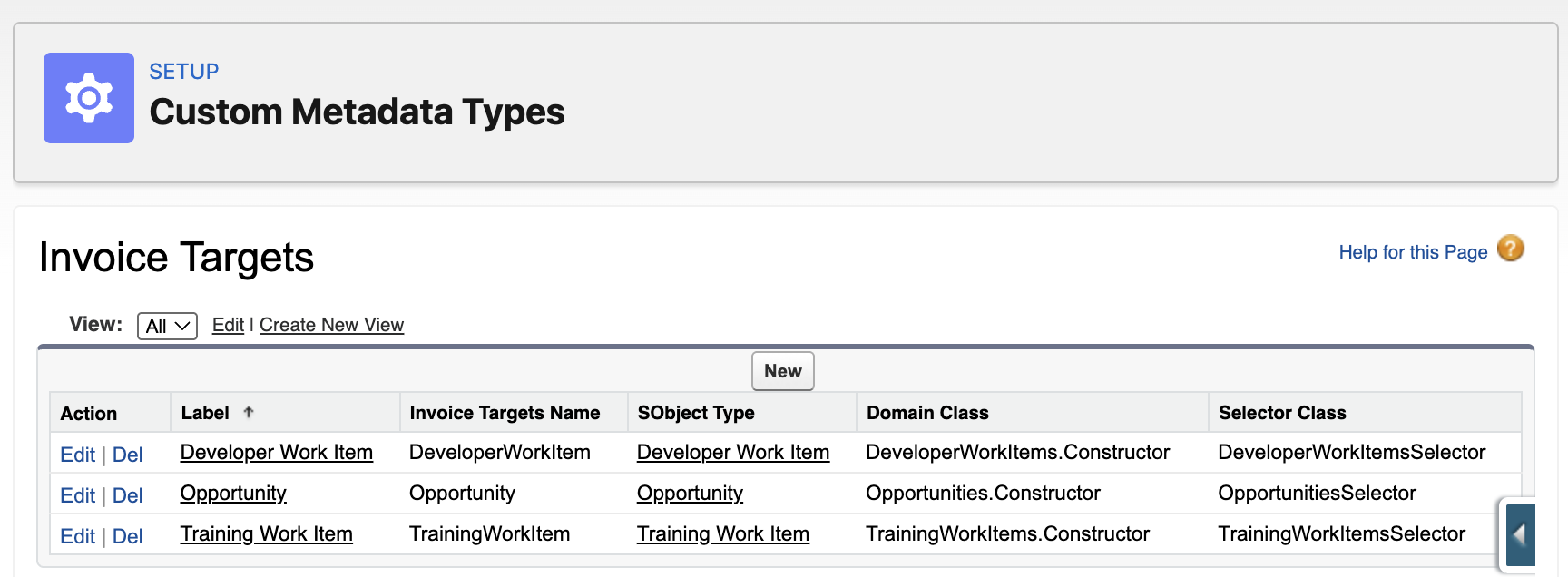
Using a factory pattern, you can also resolve dynamically different implementations based on a runtime only context. For example, a general invoicing engine can have various objects capable of storing billable activities – each with their own differ invoicing calculations. In this case, we want to dynamically resolve the specific domain classes and selector implementations associated with the SObjectType of the records passed to our service.

The code below demonstrates a custom factory called InvoicingTargetsRegistry that is simple config-based factory using custom metadata. The InvoicingTargetsRegistry class actually uses utility classes from FFLib that support the Application class pattern – but in this case they are late bound (no compiler refs) and initialised on demand. The full source code for the InvoicingTargetsRegistry is here – and its usage and config is shown below:

public with sharing class InvoicingService {

    public List<Id> generate(List<Id> sourceRecordIds)
    {
        fflib_ISObjectUnitOfWork uow = UnitOfWork.newInstance();
        InvoiceFactory invoiceFactory = new InvoiceFactory(uow);
        List<SObject> records = InvoicingTargetsRegistry.selectById(new Set<Id>(sourceRecordIds));
        fflib_IDomain domain = InvoicingTargetsRegistry.newDomain(records);
        if (domain instanceof ISupportInvoicing)
        {
            ((ISupportInvoicing) domain).generate(invoiceFactory);
            uow.commitWork();
            List<Id> invoiceIds = new List<Id>();
            for (Invoice__c inv : invoiceFactory.Invoices) { invoiceIds.add(inv.Id); }
            return invoiceIds;
        }
        throw new InvoicingException('Invalid source object for generating invoices.');
    }
}

We have explored the Application class and whether it is necessary, along with other options. This includes examining the reasons for using it, its features, and how it can enhance dependency injection and configuration beyond simple mocking.

Whats next and community contributions

As to what’s next – we have been discussing doubling down on older PRs, refreshing and consolidating documentation and of course continue to track applicable features in Salesforce platform as they arrive. One such feature I have my eye on, that I think would go well with the existing User Mode support in Unit of Work is this AccessLevel.User_Mode.withPermissionSetId. Though currently in Developer Preview, according to an Apex PM, it is presently under active discussion at high levels in the platform. This feature is significant for closing the gap in being able to implement targeted permission elevation in Apex.

Finally, FFLib has not got to PR number 525 and nearly 1000 GitHub stars without a strong community! So I want to close by giving a huge thanks for your support and contributions!