

Over the years through this blog I have enjoyed covering various advancements in Salesforce APIs, Apex, Flow, and more recently, Agentforce. While I have featured Heroku quite a bit – despite it being a Salesforce offering, the reality has been that access to Heroku for a Salesforce developer has felt like plugging in another platform – not just because on the surface its DX is different from SFDX, but because in a more material sense, it has not been integrated with the rest of the platform and its existing tools – in the same way Apex and Flow are. Requiring you to do the integration plumbing before you can access its value.
Now with a new “free” Heroku AppLink add-on, Heroku has now been tangibly integrated by Salesforce into the Salesforce platform – it and code deployed to it even sits under the Setup menu. So now it is finally time to reflect on what Heroku brings to the party!

This blog starts a series on what this new capability means for Salesforce development. Choosing the best tool for the job is crucial for maximizing the holistic development approach the Salesforce platform offers. Apex, Flow, LWC, etc., are still important tools in your toolkit. In my next blog in this series, I’ll share hands-on content, but for now, let’s explore five reasons to be aware of what Heroku and Heroku AppLink can do for Salesforce development:
1. Seamlessly and Securely Attach Unlimited Compute to your Orgs
At times, certain automations or user interactions demand improved response times and/or abiility handle increasing data volumes. While Apex and Flow have a number of options here, they are inherently always constrained by the multi-tenant nature of the core platform that runs their respective logic. The core platform’s first priority is a stable environment for all – thus, largely we see the continued realities of the infamous governor limits. Going beyond some, though not all, of the governor limits that either stop or at least slow things down is now possible – and without leaving the Salesforce family of services.
You can deploy code to Heroku with git push heroku main, which works in much the same way as sf project deploy to upload your code and run it, then you declaratively assign your compute needs, and attach (using the publish command) access to it for use within your Flow, Apex, LWC or Agentforce implementations – across as many orgs as you like using the connect command.
$ heroku salesforce:connect
$ heroku salesforce:publish
Heroku supports both credit card (pay as you go) and contract billing for compute usage – with the smallest plan at $5 a month already able to run complex and lengthy compute tasks easily – though milage of course varies on usecase.
2. Tap into the worlds most popular languages and frameworks within Salesforce
Salesforce has some history of embracing industry languages such as Node.js for Lightning Web Components and, with that, taps into wider skill set pools, and also commercial and open-source web component libraries. With Heroku AppLink, this is now true for backend logic – and in fact, it extends language support to Python, .NET, Ruby, Java, and many more languages, all with their own rich communities, libraries, and frameworks. Does this mean I am suggesting you port all your Apex code to other languages? No – remember this is a best tool for the job mindset – so if what you need can be better served with existing skills, code, or libraries available in such languages, then with AppLink you can now tap into these while staying within the Salesforce services.






Note: Heroku AppLink provides additional SDK support presently only for Node.js and Python. That said its API is available to any language – and is fully documented. Java samples included with AppLink illustrate how to access the API directly – along with existing Salesforce API libraries.
$ git push heroku main
You may also think that with this flexibility comes more complexity; well, like the rest of Salesforce, Heroku keeps things powerful yet simple. Its buildpacks and simple CLI command git push heroku main remove the heavy lifting of building, deploying, and scaling your code that would otherwise require skills in AWS, GCP, or other platforms – what’s more, Heroku also curates the latest operating system versions, and build tools for you.
3. More power to existing Apex, Flow and Agentforce investments
As we are practicing choosing the best tool for the job – for complex solutions it’s typically not a case of one size fits all – that’s why we have a spectrum of tools to choose from – while one solution, for example, might be mostly delivered through Flow, the most complex parts of it might depend on some code – and thus having interoperability between each approach is important.
Heroku AppLink draws on the use of platform actions – which has over the years become the de facto means to decompose logic/automations – allow reusable logic to be built in code via Apex or declaratively in Flow. Now with Heroku AppLink, you can also effectively write actions in any of the aforementioned languages and also if needed scale that code beyond traditional limits such as CPU timeout and heap – while benefiting from increased execution times.
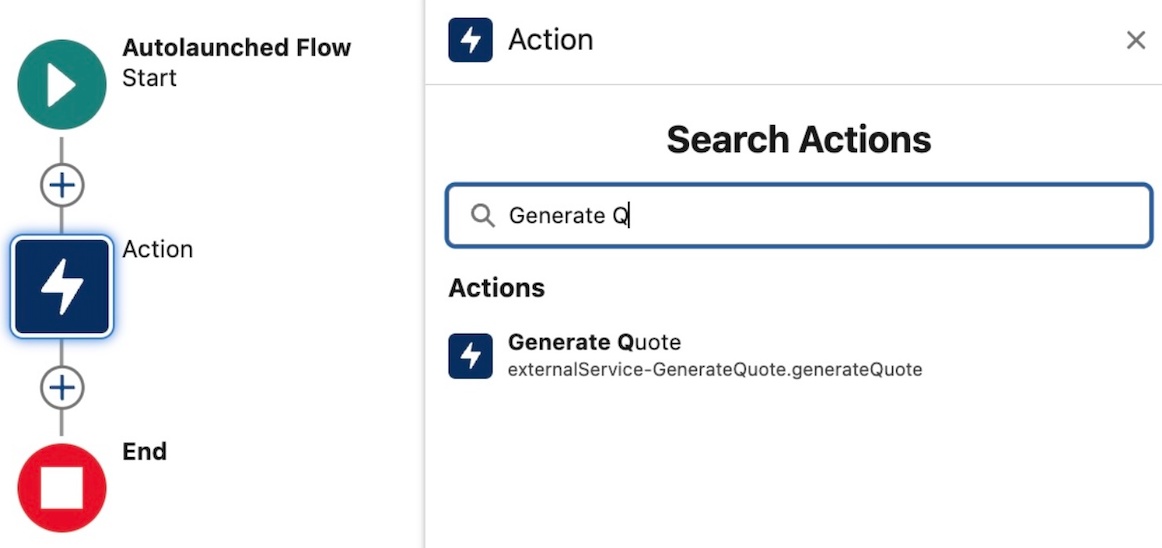

What is also critical to such code, is user context, so that data access honors the current user, both in terms of their object, field, sharing permissions but also audit information retaining a trail of who did what and when to the data. Thus, Heroku AppLink has the ability to run code in Salesforce “user mode” – much like Apex and Flow – this means the same – your SOQL and DML all operate in this mode – in fact, that’s the default – no need to qualify it as with Apex. This approach follows the industry pattern of the Principle of Least Privilege – there is also a way to selectively elevate permissions as needed using permission sets.
4. Make External Integrations more Secure
Heroku is also known to the wider world as a Paas (Platform-as-a-Service) providing easy to use compute, data and more recently AI services without the infrastructure hassle. This leads to Heroku customers building practically any application or service they desire – again in any language they desire. For example, a web/mobile experience can be hosted along with required data storage – both able to scale to global event needs. Heroku AppLink, joins Heroku Connect to start a family of add-ons that also help such consumer facing or even internal experiences tap into Salesforce org or even Data Cloud data – by effectively managing the connection details securely in one place – elevating the complexity of managing oAuth, JWT, certifications etc.
5. Leverage additional data and AI services
If all your data resides within a Salesforce org or Data Cloud, Heroku AppLink provides an easy to use SDK to make using the most popular APIs easy and even provides a long time favorite of mine, Martin Fowlers, Unit of Work over the relatively complex composite Salesforce APIs to manage multi-object updates within a single transaction.
Beyond this, you can also take advantage of Heroku Postgres to store additional data that does not need to be in the org but needs to be close at hand to your code – likewise attach to data services elsewhere in AWS, DynamoDB for example. Heroku also provides new AI services that provide a set of simple to use AI tooling primitives on top of the latest industry LLM’s. All these Heroku services exist with the same trust and governance as other Salesforce services and thus leveraging them means you don’t have to move data or compute outside of Salesforce if thats something your business is particularly sensitive to.
Summary
Salesforce continues to bring new innovations to its no-code and code tools that are exciting but yet broaden the burden of choice and making the right choice. With Heroku AppLink, this has indeed added to the mix – and expands the classic vs. question – to – when to use Flow vs. Apex vs. Heroku?
I’ve noticed that the Flow vs. Apex debate is still strong at community events this year. When it comes to “code,” whether it’s Apex, Python, Java, or .NET—excluding Triggers, which AppLink doesn’t support—my opinion on no-code versus code remains the same – consider wisely use of one or both accordingly. In respect to coded needs, I still would still generally recommend Apex first, that is unless your project needs align with the points above – then it’s worth further discussion. Ultimately, it’s about finding a suitable mix instead with all three supporting actions, it’s easier to blend and evolve as needed.
As I hinted at the start of this blog, I plan to get into more hands-on blogs on Heroku AppLink and some reflections on ISV usage. Between these, I also have other Apex-related topics I want to explore—such as the new Apex Cursors feature. In the meantime, here below are some useful links about Heroku AppLink available as of the time of this blog.
- Extend Salesforce with Any Language
- Overview
- Getting Started Guides
- CLI Guide
- API Guide
- Node.js SDK
- Python SDK
- Sample Code
- Heroku Trailhead
- AppLink Trailhead
Thanks for readying, hope it was useful!
 Andy in the Cloud