
Salesforce have provided further support for JavaScript in the upcoming Spring’14 release. With a new flavour of the popular Visualforce Remoting facility. Visualforce Remote Objects is a pilot feature I have been trying out in a pre-release org. It’s aim is effectively to make performing database operations, like create, read, update and delete in JavaScript as easy as possible without the need for Apex, and without consuming the orgs daily API limits. This blog introduces the feature and contrasts it with its very much still relevant Visualforce Remoting brother.
Consider a master detail relationship between WorkOrder__c and WorkOrderLineItem__c. The first thing you need to do is declare your intent to access these objects via JavaScript on your Visualforce page with some new tags.
	<apex:remoteObjects >
	    <apex:remoteObjectModel name="WorkOrder__c" fields="Id,Name,AccountName__c,Cost__c"/>
	    <apex:remoteObjectModel name="WorkOrderLineItem__c" fields="Id,Name,Description__c,Hours__c,WorkOrder__c"/>
	</apex:remoteObjects>
The following JavaScript can now be used to access the JavaScript objects the above automatically injects into the page (note that while not shown there is further control over object and field naming, i used the defaults here).
It is an async API, so you provide a function call back to handle the result of the operations (create, update, delete and select are supported), it does not throw exceptions. In the example below if the insert of the Work Order master record is successful the child is then inserted. Note the event parameter actually contains the Id of the inserted record.
		function doSomethingJS(answer)
		{
			// Create work order
			var workOrder = new SObjectModel.WorkOrder__c();
			workOrder.set('AccountName__c','Hitchhikers.com');
			workOrder.set('Cost__c', answer * 100);
			workOrder.create(function(error, result, event)
				{
					// Success?
					if(error == null)
					{
						// Create work order line item
						var workOrderLineItem = new SObjectModel.WorkOrderLineItem__c();
						workOrderLineItem.set('Description__c', 'Answering the question');
						workOrderLineItem.set('Hours__c', answer);
						workOrderLineItem.set('WorkOrder__c', result[0]);
						workOrderLineItem.create(function(error, result, event)
							{
								// Errors?
								if(error!=null)
									alert(error);
								else
									alert('Success');
							} );
						return;
					}
					// Display error
					alert(error);
				} );
		}
As per the documentation, this means you no longer need an Apex controller to do this. You can also query using this object model as well, as per this the pre-release documentation querying a Wharehouse object. However before we cast aside our Apex thoughts, lets look at what the above would like implemented via a Remote Action.
		function doSomethingApex(answer)
		{
			// Create work order and line item via Apex
			Visualforce.remoting.Manager.invokeAction(
				'{!$RemoteAction.RemoteObjectDemoController.doSomething}',
				answer,
				function(result, event){
					alert(event.status ? 'Success' : event.message);
				});
		}
The following Apex code implements the remote action.
	@RemoteAction
	public static void doSomething(Integer answer)
	{
		WorkOrder__c workOrder = new WorkOrder__c();
		workOrder.AccountName__c = 'Hitchhikers.com';
		workOrder.Cost__c = answer * 100;
		insert workOrder;
		WorkOrderLineItem__c workOrderLineItem = new WorkOrderLineItem__c();
		workOrderLineItem.Description__c = 'Answering the question';
		workOrderLineItem.Hours__c = answer;
		workOrderLineItem.WorkOrder__c = workOrder.Id;
		insert workOrderLineItem;
	}
On the face of it, it may appear both accomplish the same thing, but there is a very important and critical architecture difference between them. To help illustrate this i created a page to invoke both of these options. 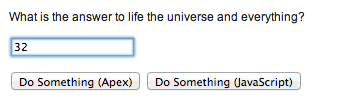
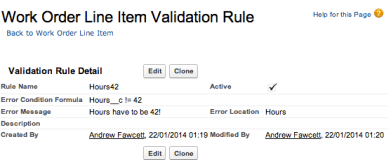 While also creating a strategically placed Validation Rule on the Work Order Line item, one which would fail the insert if anything other than 42 was entered in the UI.
So given the validation rule in place, lets perform a test.
- Ensure there are no Work Order records present
- Enter an invalid value, say 32, click the buttons, observe the expect error
- Correct the value to 42, click the button again and observe the outcome on the database.
- The expected result is one Work Order record with a single Work Order Line Item record.
Testing the ‘Do Something (Apex)’ Button
After going through the test above, the button initially gives the error as expected…
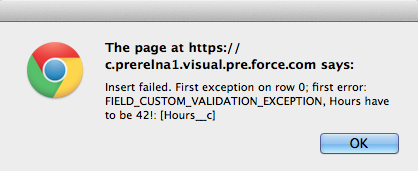
When the value is corrected and button pressed again, the result is this…
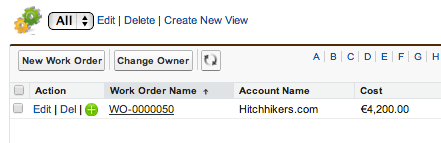
The test passed.
Testing the ‘Do Something (JavaScript)’ Button
Going through the tests again, this button initially gives the error as expected…
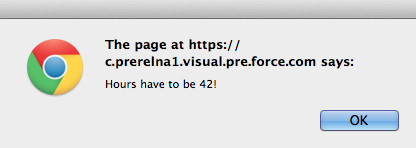
When the value is corrected and button pressed again, the result is this…
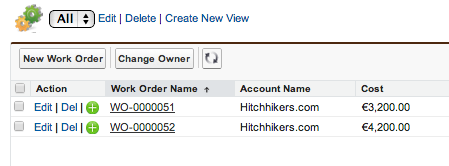
While Visualforce Remote Objects technically performed as I believe Salesforce intended, this functional tests expectation failed. Since we have two Work Order records, one with no Work Order Lines and one that is what we expected. So why did this additional rogue Work Order record get created, what did we do wrong?
The answer lies in the scope of the database transaction created…
- In the Visualforce Remote @RemoteAction use case the platform automatically wraps a transaction around the whole of the Apex code and rolls back everything if an error occurs, you can read more about this here.
- In the Visualforce Remote Objects use case the database transaction is only around the individual database operations not around the whole JavaScript function. Hence by the time the Work Order Line Item fails to insert the Work Order has already been committed to the database. The user then corrects their mistake and tries again, hence we end up with two Work Orders and not one as the user expected.
Since Apex transaction management is so transparent most of the time (by design), its likely that the same assumption might be made of Remote Objects, however as you can see its not a valid one. Those of you that know core thoughts on patterns will also be thinking something else at this point, that presents a potentially even more compelling reason to be watchful over what logic you implement this way…
Separation of Concerns
As you may have gathered by now if you’ve been reading my blog for the last year, my other passion is Apex Enterprise Patterns. A key foundation of this is Separation of Concerns or SOC for short. SOC sees us layer our code so that aspects such as business logic are located in the same place, easily accessible and reusable (not mention easily testable) from other existing and future parts of our applications, such as API’s, Batch Apex etc.
While the above example is not that complex it illustrates when code in your JavaScript layer might start to become business logic and if so something you should ideally (if not solely for the reason above) consider keeping in your Service Layer and accessing via JavaScript Remoting @RemoteAction.
Summary
Despite this new feature the use of Visualforce Remoting with @RemoteAction Apex should still very much factor in your decision making. And nor despite the issue above should we necessarily let the lack of transaction management count against our use of Visualforce Remote Objects either.
For sure this will become the best and lightest way to perform rapid client side querying without impacting API limits, and I am sure the alias feature (see docs) will be welcome to those preferring more elegant AngularJS or other bindings. All very nice! Furthermore if you are developing client logic that is essentially doing simple record editing then by all means let your Apex Triggers (Domain Layer) do its job and enforce the validity of those records.
Just keep in mind when your starting to write more and more JavaScript code that is orchestrating the updating, inserting or deleting of a set of related records, you really need to be sure be sure you and your testers understand the transaction scope differences between the two approaches described here or switch over to Apex and let the platform manage the transaction scope for you. Finally its worth keeping in mind if you don’t have a client side automated testing strategy your automatically adding manual testing overhead to your backlog.
The full source code for this blog can be found here.
UPDATE: Since publishing this blog, Salesforce documentation team have written up an excellent additional topic covering some best practices and outlining the transactional differences described above. Its really great to see this type of content appearing in the standard Salesforce developer documentation, thank you Salesforce!
Other Notes and Observations
Here are some final points of note, given this is still pilot hopefully of use to Salesforce as feedback.
- It does buffer requests to the server like Visualforce Remoting, very cool!
- It does not complain when you set the wrong field or get the name wrong, like SObject.put and SObject.get do, maybe to be expected, though since we gave it the field list might have been nice?
- It differs slightly from Dynamic Apex, it uses SObject.put, here WorkOrder__c.set is used
- Success is expressed in ‘error’ being null, not quite what i expected, and different from Visualforce Remoting.
- It does not implement field defaulting
- Errors need to be hanlded by callbacks (as per VF Remoting), though by default errors are not emitted to the JavaScript console like Visualforce Remoting
- References to fields on via the apex:remoteObjectModel fields attribute do not seem to surface as dependencies on the fields, which would be good given how soft references within the JavaScript are.
 Andy in the Cloud
January 22, 2014 at 10:59 pm
Love the overview and comparison, but disagree that the second example isn’t working as (it should be) intended. They are both executing off a transaction and responding via asynchronous callback. The real distinction here is that the first transaction is an Apex method (which includes a create DML call) and the second is basically just a DML call.
It is, however, a very important distinction and not one necessarily apparent. Using Remote Object should certainly not completely using RemoteAction and when you need to fine tune a transaction to get the first outcome, I would still recommend RemoteAction.
Great feedback though Andy and I’ll shop it around 🙂
January 22, 2014 at 11:10 pm
Thanks Josh, yeah both examples from an architecture and transaction perspective actually do operate as I expected them to as well, the reference to the second failing was in respect to the function expectations I set against then, designed to highlight the differences in transaction scope, I will check back on the wording to be sure not to confuse the two. Thanks for the kind words and super fast responses! 😉
January 22, 2014 at 11:44 pm
No problem, thanks for taking it for a spin. I also just got reminded that RO calls back with (error, result, event), unlike Remoting’s normal (result,event). That might be why you’re getting a null on success. I’ve got to check some of my current samples, because I may very well have done the same thing…
January 22, 2014 at 11:53 pm
Ah ha cool, let me know and I will update accordingly.
January 23, 2014 at 9:06 pm
Yeah:
var new_contact = new SObjectModel.Contact({ FirstName: “James”, LastName: “Bond”})
new_contact.create(function(error,result,event) {
console.log(error);
console.log(result);
console.log(event);
});
Gives me a full set of info, including the expected ID (in result). My assumption is that this allows a richer error and event response as opposed to jamming them together.
January 24, 2014 at 11:55 am
Great thanks, I have updated. I also added another but of feedback at the bottom regarding thoughts on field dependencies.
March 12, 2014 at 12:35 pm
Great addition to the developer docs here, more architecture best practices is what we need in the Salesforce docs, great to see! http://www.salesforce.com/us/developer/docs/pages/index_Left.htm#CSHID=pages_remote_objects_considerations.htm|StartTopic=Content%2Fpages_remote_objects_considerations.htm|SkinName=webhelp
January 30, 2014 at 5:27 pm
Love the JavaScript in Visualforce! My prediction is in another couple of years we’ll be writing S-Controls again. #neverforget
January 23, 2014 at 12:05 am
Great writeup Andy – I’ve been playing around with remote objects, one thing I noticed is that you can change the SObjectModel properties to add fields at anytime, allowing you to define fields on the fly, and if you create from the base object, you can create new SObjects remoteObject instances that were not defined in the visualforce. To me it appears you only need to include one remoteObject on the page to get the SObjectModel to show up in the Javascript and then you have access to all SObjects. I dont know if that was intentional or not, but looking how it proxies to the VisualforceRemoteManger it appears that this should work unless they have breaking changes before it goes GA. Have you noticed this?
January 23, 2014 at 12:14 am
Very interesting I did not notice this, definitely one for Josh Burk to check for us…
January 23, 2014 at 10:55 am
If true then it sounds potentially dangerous. Is it possible for the user to access fields that are not available to them through the Layouts?
Consider a situation where a bank web site allows users to select the bank account to pay in to. A lazy programmer can just expose the whole SObject to the Javascript front end. It’s a little more data going over the wire than normal, but I can get my job done early and go home. The Javascript only displays the name, sort code and account number so what’s the problem?
The problem is that once the data is in the browser the user has full access. The Javascript debugger allows data to be read and to be tampered with making any security attempts on the browser ineffective. If the user can change the options on the fly to expose more fields then they have free reign.
The Javascript program can help the user to do the right thing but cannot stop a determined user doing the wrong thing. If that means accessing the PIN for the bank account or other confidential information then so be it. If that means changing the bank balance then so be it, because the only validation is the trigger and the trigger cannot know that the change came from a user hacking Javascript not a piece of business logic making a payment.
January 23, 2014 at 1:22 pm
Sounds like it was intentional, but not necessarily something we’re going to promote. Using the components resolves a few things – but one of the more important things is preserving namespaces and package integrity. But for the intrepid developer, the flexibility is there.
As for the security model, nothing changes there. You can define fields to your heart’s content but if the authenticated user doesn’t have access to that data they don’t have access to that data. That’s true no matter if you go via web, API or JavaScript Remoting / Remote Objects.
January 23, 2014 at 3:12 pm
So given the example of a user hitting F12 in Chrome and updating their bank balance – we must ensure that the user is unable to access that field or at least write to it, and all business logic that updates balances runs “without sharing”? I suppose it makes sense as if I pay from one account to another then both balances need to change, and I won’t necessarily have access to the other bank account or its balance.
January 23, 2014 at 3:13 pm
(Apologies Andy – I was trying to reply to Josh but it seems my post has gone to top level.)
January 23, 2014 at 7:54 pm
I guess what I’m saying is that putting it in the client side model of Remote Objects in now way changes that user’s actual accessibility or sharing rules. In the case of purely Remote Objects, there’s no Apex side that requires without sharing but JS Remoting it would always be best practice to specify that. It’s also good practice to check accessibility/permissions – but that is more to make sure your client isn’t going to behave badly, not for data security. Just because I add “Sensitive_Field__c” to the Remote Object model does not mean I’m suddenly granted some special access to that field. It’s just that the model now has a spot for it.
I’ll put it another way – if I can get to information I should not be able to get to by pulling up JavaScript Console and running some code on the fly, that is a failure of either your controller or far more likely your security and sharing setup. Don’t do security in Apex and definitely don’t do it in JavaScript.
January 24, 2014 at 7:15 pm
Josh, I totally agree. Basically Remote Objects is just making it easier to do queries / DML that you’re already allowed to do, from JavaScript. And that is NOT “potentially dangerous”, that is helpful!
I’ve seen over and over again examples of developers “cutting corners” in Apex and really not spending any time at all to validate that the DML or queries they are performing are allowed for the running user given the user’s Object, Field, and Record-Level access. And the reason they’re cutting corners is that this is legitimately a huge headache! To be totally “secure” in Apex, you have to iterate over all Objects / Fields a user is trying to CRUD, check the Describe information for the SObjects and SObjectFields for isAccessible(), isCreateable(), isUpdateable() / isEditable(), isDeleteable(), etc., and then and only then perform the CRUD — this is VERY tedious and difficult to maintain. Lots of developers ignore this completely in their code — and the only place they get busted for it is on the DEV501 Programming Assignment 🙂
With regular JavaScript Remoting, you have to build out all of this CRUD permissions validation yourself.
I work for Skuid, and we had to build this out in a dynamic fashion with JavaScript Remoting, such that you could, technically, go into JavaScript and write any sort of DML or query that you want, BUT still be ensured that you would NOT be able to do stuff you’re not allowed to do once you get to Apex. So for instance, you can in Skuid define a Model similar to what JS Remote Objects is aiming to achieve, and then do model.save() which initiates a Remoting call if necessary to perform DML as appropriate given the state of the Model — and you can create your own Models in JS, mess with them all you want to add Fields, add new records, etc. BUT, when you call save() to initiate the Remoting Call, Skuid parses out everything you’re requesting and validates it against Object, Field, and Record-Level Security, preventing you from doing anything you’re not allowed to do according to your org’s Security Model. That took a bit of work for us to code in a generic sense! But once it was done, it made it so much faster to be productive in JavaScript.
I’m assuming that with JS Remote Objects, Object, Field, and Record-Level Security is universally enforced, in a way that it is NOT with regular JS Remoting. And if this is true, this would be HUGE for developers, saving them from having to do the necessary security checking logic themselves, and NOT presenting a security hole at all. If it was NOT universally enforced, then Richard is 100% correct — it would be a massive security hole.
(I setup a Pre-Release Org to test this, but the Pre-Release Org does not let you modify / create Profiles or Permission Sets, or set Field Level Security, so I can’t verify that this security hole is not there yet… Josh?)
So, assuming we don’t have to worry about security, it really empowers anyone to do DML and queries from JavaScript! If a Sales rep had 100 Leads to enter, and they knew about the JavaScript Console, they could jump in to a Visualforce Page including at least one Remote Object, and basically create new records, or retrieve and mass delete/update existing records, via code… which sometimes is way the heck easier than clicks.
January 30, 2014 at 6:29 am
I am rather excited about this from an auditing perspective. from my understanding I could drop in a bit of javascript on every VF page i wanted and i could track user visits etc ( to a user reportable custom object) while not having to write additional extensions on to the back end Apex Class. Maybe there is another way to do this but this was the first way that seemed easy for me. Am i totally off base here?
January 30, 2014 at 12:20 pm
Sounds like a spot on use case, Analytics logging, nice!
June 12, 2014 at 9:10 am
Hi Andy,
I have seen your example and the links what you have given is relaly helpful. But meanwhile when I understand the remote objects, am just thinking whether I could use this idea to overcome the view state error and the fast transaction onclick. Since I have heavy data on the page and hierarchy level is 4 object level and we have used apex repeat to display the data from 4 objects in one row , used Dynamic SOQL and fieldsets in the page and it hits view state.
So i was thinking is it the good idea of using remote objects and redesign the page. Am not sure whether this all of my requirements will be achievable using remote objects? Can you please advise.
June 12, 2014 at 9:14 am
It sounds like your wanting to deal with multiple objects in one request to retrieve and also update. I would personally consider this a reason to go for Remote Actions and put this logic on Apex (and thus a single transaction when updating). Remote Actions still offer the same benefits as Remote Objects in terms of stateless controllers, but offer more encapsulation of logic at the server end in Apex and are safer since the platform wraps apex execution in a database transaction for you.
June 12, 2014 at 9:41 am
Thanks for you suggestion , Thats Right Andy , Am trying to add the 4 levels of objects to the UI to display everytime and on every action my record size grows bigger to hit the view state error . So i think I will start building the page using remote action.
Pingback: Spring ’14: Using Visualforce Remote Objects with CanJS | Developer Force Blog
Pingback: Spring ’14: Using Visualforce Remote Objects with CanJS - SkyOffice Consulting | SkyOffice Consulting
March 7, 2014 at 12:21 pm
Reblogged this on Sutoprise Avenue, A SutoCom Source.
Pingback: Introduction to Visualforce Remote Objects | Shiva Blog
Pingback: Building a Wellness Tracking App on Salesforce1 in a Couple Hours | Michael Welburn
Pingback: Adding Promises to Visualforce Remote Objects – Matt Welch
July 18, 2014 at 7:51 pm
I strongly suggest that where data security is concern put the data update code in the controller always. Rest for reporting purpose using remote objects will be one of the best approach.
July 18, 2014 at 8:33 pm
Good advice! Thanks
Pingback: Visualforce Remote Objects | MST Solutions
Pingback: Salesforce Developers