
This blog starts a series of updates leading up to Dreamforce 2014, where I am pleased to announce that my Advanced Apex Enterprise Patterns session has just been selected! In the coming series of blogs I will be covering enhancements to the existing base classes supporting the Apex Enterprise Patterns and highlighting some of the more general classes from within the FinancialForce Apex Common repository both reside in.
This time I will be highlighting some excellent contributions from fellow Force.com MVP Chris Peterson who has recently added more general utility classes to support security and dynamic queries. As well as some improvements from myself to the existing Domain and Selector classes.
In a following blog I’ll be going over in more detail the current results of some experimental work I’ve been doing relating to generic Field Level Security enforcement within the patterns base classes, meanwhile enjoy the new fflib_SecurityUtils class..
New fflib_SecurityUtils.cls
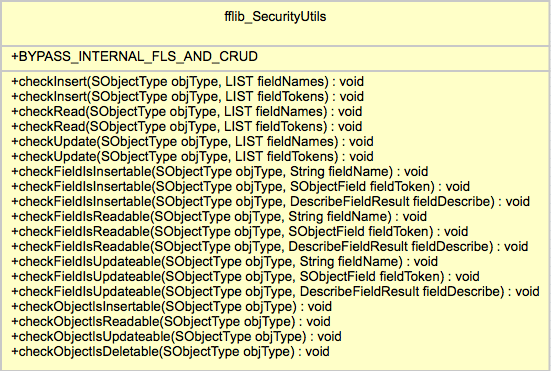 The Salesforce Security Review currently requires that both object level and field level security is enforced by your code. The later of which, field level security has recently stirred up quite a lot of discussion and concern in the ISV community, more on this in the follow up blog post! In the meantime if you read the two Salesforce articles (here and here) describing the requirement and how to implement it in your Apex code (Visualforce offers some built in support for you). If like me, you’ll quickly realise the sample code provided is in reality somewhat verbose for anything more than a single object or field usage!
Enter the fflib_SecurityUtils class! As you can see from the UML representation shown here it’s methods are pretty simple and thus easy to use, an Apex exception is thrown if the user does not have access to the given object and/or fields. Here are some examples of it in use, you can choose to check individually or in bulk a set of fields and the object, covering both CRUD and Field Level Security.
fflib_SecurityUtils.checkObjectIsInsertable(Account.SObjectType);

fflib_SecurityUtils.checkInsert(
   Account.SObjectType,
   new List<Schema.SObjectField>{
      Account.Name,
      Account.ParentId, } );

fflib_SecurityUtils.checkUpdate(
   Lead.SObjectType,
   new List<Schema.SObjectField>{
     Lead.LastName,
     Lead.FirstName,
     Lead.Company } );
This class will also help perform object and field read access checks before making SOQL queries, though you may want to check out the features of the QueryFactory class as it also leverages this utility class internally.
New fflib_QueryFactory.cls
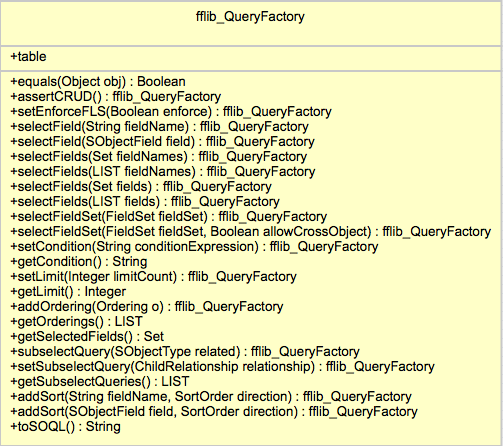
The key purpose of this class is to make building dynamic SOQL queries safer and more robust than traditional string concatenation or String.format approaches. It also has an option to automatically check read security for the objects and fields given to it.
If your using Fieldsets in your Visualforce pages you’ll know that it’s generally up to you to query these fields, as you can see from the UML diagram, the class supports methods that allow you to provide the Fieldset name and have it automatically include those fields for you in the resulting query.
Chris has done an amazing job with this class not only in its feature and function but in its API design, leveraging the fluent model to make coding with it easy to use but also easy to read and understand. He first presented in at the FinancialForce DevTalks event this month, his presentation can be found here. In the presentation he gives some examples and discusses when you should use it and when not. So if your writing code like this currently…
String soql = ‘SELECT ‘;
for(Integer i = 0; i< fieldList.size(); i++){
  soql += fieldList + ‘, ‘;
}
soql = soql.substring(0,soql.length()-2);
soql += conditions != null && conditions.trim().size() > 0 ?  ‘ WHERE ‘ +
    soqlConditions : ‘’;
soql += limit != null && limit.trim().size() > 0 ? ‘ LIMIT ‘+limit;
List<Contact> nonBobs = Database.query(soql);
In it’s simplest form it’s use looks like this..
String soql =
  new fflib_QueryFactory(Contact.SObjectType)
    .selectField(Contact.Name)
    .setLimit(5)
    .toSOQL();
With object and field read security enforcement and Fieldset support would look like this…
String soql =
  new fflib_QueryFactory(Contact.SObjectType)
    .assertIsAccessible().
    .setEnforceFLS(true).
    .selectFields(myFields)
    .selectFieldSet(Contact.fieldSets.ContactPageFieldSet)
    .setCondition(‘Name != “Bob”’)
    .toSOQL();
The class is fully commented and the associated test class has further examples, also Chris is keen to work on API for the SOQL where clause in the future, i look forward to seeing it!
fflib_SObjectSelector.cls (Selector Pattern) Updates
I have updated this base class used to support the Selector pattern, to leverage the fflib_QueryFactory, in doing so you now have the option (as a constructor argument) to enable Field Level Security for fields selected by the selector. The default constructor and prior constructors are still supported, with the addition of the following that now allows you to control Fieldset, object and field level security enforcement respectively. For example…
OpportunitiesSelector oppsSelector =
    new OpportunitiesSelector(includeFieldSetFields, enforceObjectSecurity, enforceFLS);
NOTE: You can of course implement your own Selector default constructor and enable/disable these features by default within that, if you find yourself constantly passing a certain combination of these configurations parameters.
For custom selector methods you can leverage a QueryFactory constructed and initialised based on the Selector information, leaving you to add the additional where clause for the particular query logic the method encapsulates. Because of this you no longer need to add assertIsAccessible as the first line of your custom Selector methods. Prior to adopting QueryFactory a custom selector method might have looked like this…
public Database.QueryLocator queryLocatorReadyToInvoice()
{
  assertIsAccessible();
  return Database.getQueryLocator(
     String.format('SELECT {0} FROM {1} WHERE InvoicedStatus__c = \'\'Ready\'\' ORDER BY {2}',
     new List<String>{getFieldListString(),getSObjectName(),getOrderBy()}));
}
The updated patterns sample applications OpportunitiesSelector example to use the new newQueryFactory base class method, because this method pre-configures the factory with the selector object, fields, order by and fieldsets (if enabled), the new implementation is simplified and more focused on the criteria of the query the method encapsulates.
public Database.QueryLocator queryLocatorReadyToInvoice()
{
  return Database.getQueryLocator(
    newQueryFactory().setCondition('InvoicedStatus__c = \'\'Ready\'\'').toSOQL());
}
This updated fflib_SObjectSelector base class is backwards compatible from the API perspective, so you can choose to continue with the original String.format approach or adopt the newQueryFactory method accordingly. You can further review the old example here, against the new one here.
fflib_SObjectDomain.cls (Domain Pattern) Updates
This base class has to date had minimal functionality in it other than the routing of trigger events to the applicable virtual methods and object security enforcement. To support better configuration of these features and those in the future, i have added a new Domain class configuration feature, accessed via a new Configuration property.
Despite the focus on enforcing security in the above new features and updates, there are times when you want to enforce this in the calling code and not globally. For this reason the base class can now be configured to disable the object security checking (by default performed during the trigger after event), leaving it up to the calling code to enforce. Methods accessed from the new Configuration property can be used to control this.
public class ApplicationLogs extends fflib_SObjectDomain
{
  public ApplicationLogs(List<ApplicationLog__c> records)
  {
    super(records);
    Configuration.disableTriggerCRUDSecurity();
  }
}
Domain Trigger State
I have also been asked to provide a means to maintain member variable state between invocation of the trigger handler methods. Currently if you define a member variable in your Domain class it is reset between the before and after trigger phases. This is due to the default trigger handler recreating your Domain class instance each time.
If you want to retain information or records queried in the before handler methods in your class member variables such that it can be reused in the after handler methods, you can now enable this feature using the following configuration. The following illustrates the behaviour.
public class Opportunties extends fflib_SObjectDomain
{
  public String someState;

  public TestSObjectStatefulDomain(List<Opportunity> sObjectList)
  {
    super(sObjectList);
    Configuration.enableTriggerState();
  }

  public override void onBeforeInsert()
  {
    System.assertEquals(null, someState);
    someState = 'Something';
  }

  public override void onAfterInsert()
  {
    System.assertEquals('Something', someState);
  }
}
This feature is also aware of trigger recursion, meaning if there is such a scenario a new Domain class instance is created (since the records it wraps are new).
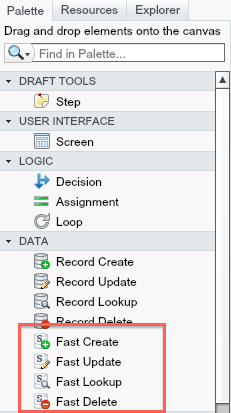
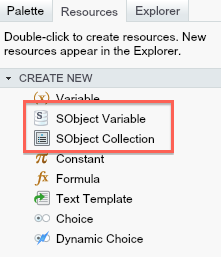
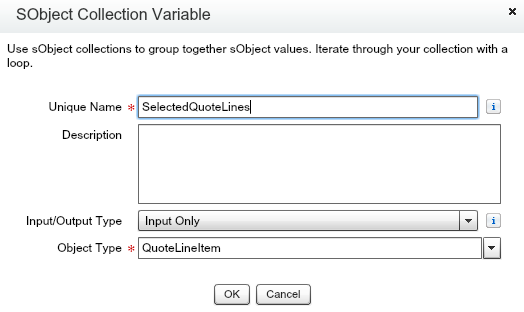
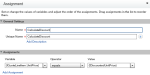
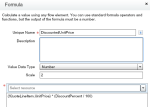
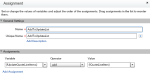
 To illustrate these new features i decide to implement in Flow something i have previously written using Apex code. The following use case is to Apply a user entered discount to selected Quote Line Items from the Related list. The flow will prompt the user for the Discount amount and they apply it, before returning the user back to the Quote detail page.




 Andy in the Cloud