Andy in the Cloud

From BBC Basic to Force.com and beyond…


16 Comments

Mocking SOQL sub-select query results

If your a fan of TDD you’ll hopefully have been following FinancialForce.com‘s latest open source contribution to the Salesforce community, known as ApexMocks. Providing a fantastic framework for writing true unit tests in Apex. Allowing you to implement mock implementations of classes used by the code your testing.

The ability to construct data structures returned by mock methods is critical. If its a method performing a SOQL query, there has been an elusive challenge in the area of queries containing sub-selects. Take a look at the following test which inserts and then queries records from the database.

	@IsTest
	private static void testWithDb()
	{
		// Create records
		Account acct = new Account(
			Name = 'Master #1');
		insert acct;
		List<Contact> contacts = new List<Contact> {
			new Contact (
				FirstName = 'Child',
				LastName = '#1',
				AccountId = acct.Id),
			new Contact (
				FirstName = 'Child',
				LastName = '#2',
				AccountId = acct.Id) };
		insert contacts;

		// Query records
		List<Account> accounts =
			[select Id, Name,
				(select Id, FirstName, LastName, AccountId from Contacts) from Account];

		// Assert result set
		assertRecords(acct.Id, contacts[0].Id, contacts[1].Id, accounts);
	}

	private static void assertRecords(Id parentId, Id childId1, Id childId2, List<Account> masters)
	{
		System.assertEquals(Account.SObjectType, masters.getSObjectType());
		System.assertEquals(Account.SObjectType, masters[0].getSObjectType());
		System.assertEquals(1, masters.size());
		System.assertEquals(parentId, masters[0].Id);
		System.assertEquals('Master #1', masters[0].Name);
		System.assertEquals(2, masters[0].Contacts.size());
		System.assertEquals(childId1, masters[0].Contacts[0].Id);
		System.assertEquals(parentId, masters[0].Contacts[0].AccountId);
		System.assertEquals('Child', masters[0].Contacts[0].FirstName);
		System.assertEquals('#1', masters[0].Contacts[0].LastName);
		System.assertEquals(childId2, masters[0].Contacts[1].Id);
		System.assertEquals(parentId, masters[0].Contacts[1].AccountId);
		System.assertEquals('Child', masters[0].Contacts[1].FirstName);
		System.assertEquals('#2', masters[0].Contacts[1].LastName);
	}

Now you may think you can mock the results of this query by simply constructing the required records in memory, but you’d be wrong! The following code fails to compile with a ‘Field is not writeable: Contacts‘ error on line 16.

		// Create records in memory
		Account acct = new Account(
			Id = Mock.Id.generate(Account.SObjectType),
			Name = 'Master #1');
		List<Contact> contacts = new List<Contact> {
			new Contact (
				Id = Mock.Id.generate(Contact.SObjectType),
				FirstName = 'Child',
				LastName = '#1',
				AccountId = acct.Id),
			new Contact (
				Id = Mock.Id.generate(Contact.SObjectType),
				FirstName = 'Child',
				LastName = '#2',
				AccountId = acct.Id) };
		acct.Contacts = contacts;

While Salesforce have gradually opened up write access to previously read only fields, the most famous of which being Id, they have yet to enable the ability to set the value of a child relationship field. Paul Hardaker contacted me recently to ask if this problem had been resolved, as he had the very need described above. Using his ApexMock’s framework he wanted to mock the return value of a Selector class method that makes a SOQL query with a sub-select.

Driven by an early workaround (I believe Chris Peterson found) to the now historic inability to write to the Id field. I started to think about using the same approach to stich together parent and child records using the JSON serialiser and derserializer. Brace yourself though, because its not ideal, but it does work! And i’ve managed to wrap it in a helper method that can easily be adapted or swept out if a better solution presents itself.

	@IsTest
	private static void testWithoutDb()
	{
		// Create records in memory
		Account acct = new Account(
			Id = Mock.Id.generate(Account.SObjectType),
			Name = 'Master #1');
		List<Contact> contacts = new List<Contact> {
			new Contact (
				Id = Mock.Id.generate(Contact.SObjectType),
				FirstName = 'Child',
				LastName = '#1',
				AccountId = acct.Id),
			new Contact (
				Id = Mock.Id.generate(Contact.SObjectType),
				FirstName = 'Child',
				LastName = '#2',
				AccountId = acct.Id) };

		// Mock query records
		List<Account> accounts = (List<Account>)
			Mock.makeRelationship(
				List<Account>.class,
				new List<Account> { acct },
				Contact.AccountId,
				new List<List<Contact>> { contacts });			

		// Assert result set
		assertRecords(acct.Id, contacts[0].Id, contacts[1].Id, accounts);
	}

NOTE: Credit should also go to Paul Hardaker for the Mock.Id.generate method implementation.

The Mock class is provided with this blog as a Gist but i suspect will find its way into the ApexMocks at some point. The secret of this method is that it leverages the fact that we can in a supported way expect the platform to deserialise into memory the following JSON representation of the very database query result we want to mock.

[
    {
        "attributes": {
            "type": "Account",
            "url": "/services/data/v32.0/sobjects/Account/001G000001ipFLBIA2"
        },
        "Id": "001G000001ipFLBIA2",
        "Name": "Master #1",
        "Contacts": {
            "totalSize": 2,
            "done": true,
            "records": [
                {
                    "attributes": {
                        "type": "Contact",
                        "url": "/services/data/v32.0/sobjects/Contact/003G0000027O1UYIA0"
                    },
                    "Id": "003G0000027O1UYIA0",
                    "FirstName": "Child",
                    "LastName": "#1",
                    "AccountId": "001G000001ipFLBIA2"
                },
                {
                    "attributes": {
                        "type": "Contact",
                        "url": "/services/data/v32.0/sobjects/Contact/003G0000027O1UZIA0"
                    },
                    "Id": "003G0000027O1UZIA0",
                    "FirstName": "Child",
                    "LastName": "#2",
                    "AccountId": "001G000001ipFLBIA2"
                }
            ]
        }
    }
]

The Mock.makeRelationship method turns the parent and child lists into JSON and goes through some rather funky code i’m quite proud off, to splice the two together, before serialising it back into an SObject list and vola! It currently only supports a single sub-select, but can easily be extended to support more. Regardless if you use ApexMocks or not (though you really should try it), i hope this helps you write a few more unit tests than you’ve previous been able.


65 Comments

Calling Flow from Apex

Since Summer’14 it has been possible to invoke a Flow from Apex, through the oddly named Interview system class method start. This blog talks about using this as a means to provide an extensibility mechanism, as an alternative option to asking an Apex developer to implement an Apex interface you’ve exposed. Clicks not code plugins!

Prior to Summer’14 it was only possible to embed a Flow in a Visualforce page, using the the flow:interview component, as described here. But this of course required a UI and hence user interaction to drive it. What if you wanted to allow admins to extend or customise the flow of some Apex logic using Flow from a none UI context?

Enter trigger ready-flows, first introduced as part of the Summer’14 pilot for running Flow from Workflow, which itself is still in Pilot, thought the ability to create trigger ready-flows is now generally available, yipee! Here’s what the docs have to say about them…

You can also build trigger-ready flows. A trigger-ready flow is a flow that can be launched without user interaction, such as from a flow trigger workflow action or the Apex interview.start method. Because trigger-ready flows must be able to run in bulk and without user interaction, they can’t contain steps, screens, choices, or dynamic choices in the active flow version—or the latest flow version, if there’s no active version.

This blog will present the following three examples of calling trigger-ready flows from Apex.

  • Hello World, returning a text value set in a Flow
  • Calc, shows passing in values to a Flow and returning the result of some processing.
  • Record Updater, shows passing in some SObject records to the Flow for processing and returning them.

Hello World Example

Here is a simple example that invokes a Flow that just returns a string value defined within the Flow.

ReturnHelloWorldFlow

ReturnHelloWorldAssignment

The following Apex code calls the above Flow and outputs to the Debug log.

// Call the Flow
Map<String, Object> params = new Map<String, Object>();
Flow.Interview.ReturnHelloWorld helloWorldFlow = new Flow.Interview.ReturnHelloWorld(params);
helloWorldFlow.start();

// Obtain the results
String returnValue = (String) helloWorldFlow.getVariableValue('ReturnValue');
System.debug('Flow returned ' + returnValue);

This outputs the following to the Debug log…

11:18:02.684 (684085568)|USER_DEBUG|[13]|DEBUG|Flow returned Hello from the Flow World!

Calc Example

This example passes in a value, which is manipulated by the Flow and returned.

CalcFlow CalcFlowAssignment

The following code invokes this Flow, by passing the X and Y values in through the Map.

// Call the Flow
Map<String, Object> params = new Map<String, Object>();
params.put('X', 10);
params.put('Y', 5);
Flow.Interview.Calc calcFlow = new Flow.Interview.Calc(params);
calcFlow.start();

// Obtain the results
Double returnValue = (Double) calcFlow.getVariableValue('ReturnValue');
System.debug('Flow returned ' + returnValue);

This outputs the following to the Debug log…

12:09:55.190 (190275787)|USER_DEBUG|[24]|DEBUG|Flow returned 15.0

Record Updater Example

With the new SObject and SObject Collection types in Summer’14 we can also pass in SObject’s. For example to apply some custom defaulting logic before the records are processed and inserted by the Apex logic. The following simple Flow loops over the records passed in and sets the Description field.

RecordUpdaterFlowRecordUpdaterAssignment

This code constructs a list of Accounts, passes them to the Flow and retrieves the updated list after.

// List of records
List<Account> accounts = new List<Account>{
	new Account(Name = 'Account A'),
	new Account(Name = 'Account B') };

// Call the Flow
Map<String, Object> params = new Map<String, Object>();
params.put('Accounts', accounts);
Flow.Interview.RecordUpdater recordUpdaterFlow = new Flow.Interview.RecordUpdater(params);
recordUpdaterFlow.start();

// Obtain results
List<Account> updatedAccounts =
	(List<Account>) recordUpdaterFlow.getVariableValue('Accounts');
for(Account account : updatedAccounts)
	System.debug(account.Name + ' ' + account.Description);

The follow debug update shows the field values set by the Apex code and those by the Flow…

13:10:31.060 (60546122)|USER_DEBUG|[39]|DEBUG|Account A Description set by Flow
13:10:31.060 (60588163)|USER_DEBUG|[39]|DEBUG|Account B Description set by Flow

Summary

Calling Flows from Apex is quite powerful to provide more complex extensibility back into the hands of admins vs developers. Though depending on your type of solution is somewhat hampered by the lack of the ability to dynamically create a subscriber configured Flow. As such for now is really only useful for none packaged Apex code deployments in production environment, where the referenced Flow’s can be edited (managed packaged Flows cannot be edited).

Despite this, for custom Apex code deployments to production it is quite powerful as it allows tweaks to the behaviour of solutions to be made without needing a developer to go through Sandbox and redeployment etc. Of course your also putting a lot of confidence in the person defining the Flows as well, so use this combo wisely with your customers!

Upvote: I’ve raised an Idea here to allow Apex to Dynamically create Flow Interview instances, with this in place ISV and packaged applications can make more use of this facility to provide clicks not code extensibility to their packaged application logic.

Update: Blog post Flow Factory presents a workaround to the dynamic calling problem.


7 Comments

Preview of Advanced Apex Enterprise Patterns Session

At this years Dreamforce i will be presenting not one, but two sessions on Apex Enterprise Patterns this year. The first will be re-run of last years session, Apex Enterprise Patterns : Building Strong Foundations. The second will be a follow on session dealing with more advanced topics around the patterns. Imaginatively entitled Advanced Apex Enterprise Patterns. The current abstract for this session is as follows…

Complex code can easily get out of hand without good design, so in this deep dive you will better understand how to apply the advanced design patterns used by highly experienced Salesforce developers. Starting with Interface & Base Class examples of OO design we quickly move on to new design features including: Application Factory, Field Level Security Support, Selector FieldSet support and Dependency Injection, Mock Testing of Services, Domain and Selector layers.​ By the end you will have a better understanding of how and when to apply these advanced Apex patterns.

If you attended the FinancialForce.com DevTalk in June this year, you will have got a sneak peak of some of the improvements being made to the supporting library for the patterns available in this repo. If you didn’t you’ll have to wait till Dreamforce! Oh go on then, i’ll give you a teaser here…

  • Introduction
  • Selector Enhancements, FieldSet and QueryFactory Support
  • Application Factory Introduction
  • Using Apex Interfaces to implement Common Service Layer Functionality
  • Introducing ApexMocks
  • Using ApexMocks with Service, Selector and Domain Layers
  • Field Level Security Experiment
  • Q&A 

I’m quite excited about all this content, but perhaps if pushed, i’d have to highlight the new Application Factory concept along with the integration with the exciting new ApexMocks library (also from FinancialForce.com R&D). This brings with it easier support for implementing polymorphic use cases in your application and the ability to mock layers of the patterns, such as Unit Of Work, Domain, Selector and Service layers. Allowing to develop true unit tests that are fast to execute by the platform and plentiful in terms of the variation of tests you’ll be able to develop without fear of extending the time your sat waiting for tests to execute!

Its is against my nature to publish a blog without a code sample in it, so i’ll leave you to ponder the following….

	public void applyDiscounts(Set<ID> opportunityIds, Decimal discountPercentage)
	{
		// Create unit of work to capture work and commit it under one transaction
	    fflib_ISObjectUnitOfWork uow = Application.UnitOfWork.newInstance();

		// Query Opportunities
		List<Opportunity> oppRecords =
			OpportunitiesSelector.newInstance().selectByIdWithProducts(opportunityIds);

		// Apply discount via Opportunties domain class behaviour
		IOpportunities opps = Opportunities.newInstance(oppRecords);
		opps.applyDiscount(discountPercentage, uow);

		// Commit updates to opportunities
		uow.commitWork();
	}

Here is a more generic service layer example, leveraging polymorphic Domain classes!

	public void generate(Set<Id> sourceRecordIds)
	{
		// Create unit of work to capture work and commit it under one transaction
		fflib_ISObjectUnitOfWork uow = Application.UnitOfWork.newInstance();

		// Invoicing Factory helps domain classes produce invoices
		InvoicingService.InvoiceFactory invoiceFactory = new InvoicingService.InvoiceFactory(uow);

		// Construct domain class capabile of performing invoicing
		fflib_ISObjectDomain domain =
			Application.Domain.newInstance(
				Application.Selector.selectById(sourceRecordIds));
		if(domain instanceof InvoicingService.ISupportInvoicing)
		{
			// Ask the domain object to generate its invoices
			InvoicingService.ISupportInvoicing invoicing = (InvoicingService.ISupportInvoicing) domain;
			invoicing.generate(invoiceFactory);
			// Commit generated invoices to the database
			uow.commitWork();
			return;
		}

		// Related Domain object does not support the ability to generate invoices
		throw new fflib_Application.ApplicationException('Invalid source object for generating invoices.');
	}

This last example shows how ApexMocks has been integrated into Application Factory concept via the setMock methods. The following is true test of only the service layer logic, by mocking the unit of work, domain and selector layers.

	@IsTest
	private static void callingServiceShouldCallSelectorApplyDiscountInDomainAndCommit()
	{
		// Create mocks
		fflib_ApexMocks mocks = new fflib_ApexMocks();
		fflib_ISObjectUnitOfWork uowMock = new fflib_SObjectMocks.SObjectUnitOfWork(mocks);
		IOpportunities domainMock = new Mocks.Opportunities(mocks);
		IOpportunitiesSelector selectorMock = new Mocks.OpportunitiesSelector(mocks);

		// Given
		mocks.startStubbing();
		List<Opportunity> testOppsList = new List<Opportunity> {
			new Opportunity(
				Id = fflib_IDGenerator.generate(Opportunity.SObjectType),
				Name = 'Test Opportunity',
				StageName = 'Open',
				Amount = 1000,
				CloseDate = System.today()) };
		Set<Id> testOppsSet = new Map<Id, Opportunity>(testOppsList).keySet();
		mocks.when(domainMock.sObjectType()).thenReturn(Opportunity.SObjectType);
		mocks.when(selectorMock.sObjectType()).thenReturn(Opportunity.SObjectType);
		mocks.when(selectorMock.selectByIdWithProducts(testOppsSet)).thenReturn(testOppsList);
		mocks.stopStubbing();
		Decimal discountPercent = 10;
		Application.UnitOfWork.setMock(uowMock);
		Application.Domain.setMock(domainMock);
		Application.Selector.setMock(selectorMock);

		// When
		OpportunitiesService.applyDiscounts(testOppsSet, discountPercent);

		// Then
		((IOpportunitiesSelector)
			mocks.verify(selectorMock)).selectByIdWithProducts(testOppsSet);
		((IOpportunities)
			mocks.verify(domainMock)).applyDiscount(discountPercent, uowMock);
		((fflib_ISObjectUnitOfWork)
			mocks.verify(uowMock, 1)).commitWork();
	}

All these examples will be available in the sample application repo once i’ve completed the prep for the session in a few weeks time.

Sadly the FinancialForce.com session on ApexMocks was not selected for Dreamforce 2014, however not to worry! FinancialForce.com will be hosting a DevTalk event during Dreamforce week where Jesse Altman will be standing in for the library author Paul Hardaker (get well soon Paul!), book your place now!

Finally, if you have been using the patterns for a while and have a question you want to ask in this session, please feel free to drop your idea into the comments box below this blog post!


16 Comments

Doing more work with the Unit Of Work

In a previous post I introduced the Unit Of Work class, which is part of the Apex Enterprise Patterns series. As the original post describes it helps you simplify your code when it comes to performing multiple DML statements over related objects, as well as providing a bulkification and transaction management. In this post i would like to share information on a new feature that adds some extensibility to the fflib_SObjectUnitOfWork class.

This new feature addresses use cases where the work you want it to do, does not fit with the use of the existing registerDirty, registerNew or registerDeleted methods. But you do want that work to only be performed during the commitWork method, along with other registered work and within thesame transaction it manages.

Some examples of such situations are…

  • Sending Emails
    You want to register the sending an email once the work has completed and have that email only be sent if the entire unit of work completes.
  • Upsert
    You want to perform an upsert operation along with other insert, update and delete operations performed by the existing functionality.
  • Database class methods
    You want to utilise the Database class methods for additional functionality and/or granularity on some database operations, e.g. emptyRecycleBin, convertToLead, or perform an insert with allOrNothing set to false.
  • Self referencing objects
    You want to perform DML work relating to self referencing objects, something which is currently not supported by the registerNew and registerRelationship methods.
  • Nested Unit Of Works
    Though generally not recommended, if you do happen to have created another fflib_SObjectUnitOfWork instance, you might want to nest another unit of work instance commitWork call with another.

In these cases the class now contains a new Apex Interface, called IDoWork, it is an incredibly simple interface!

/**
* Interface describes work to be performed during the commitWork method
**/
public interface IDoWork
{
   void doWork();
}

To use this interface you implement it and register an instance of the implementing class through the new registerWork method. When the commitWork method is called it will callback on the doWork method for each registered implementations once it has completed the work given to it by the existing methods. In other words after all the DML on the dirty, new or deleted records have been processed.

A SendEmailWork implementation of this interface actually resides internally within the fflib_SObjectUnitOfWork class and is used to support another new method called, registerEmail. I added this to experiment with the feature during development but felt its worth leaving in as an added bonus feature if your writing code thats doing DML and sending emails!

The following example integrates the upsert method on the Database class (which needs a concreate SObject list), but you can really do anything you want in the doWork method!

	public class UpsertUnitOfWorkHelper implements fflib_SObjectUnitOfWork.IDoWork
	{ 		
		public Database.UpsertResult[] Results {get; private set;}
		
		private List<Account> m_records;
		
		public UpsertUnitOfWorkHelper()
		{  
			m_records = new List<Account>();
		}
		
		public void registerAccountUpsert(Account record)
		{
			m_records.add(record);
		}
		
		public void doWork()
		{
			Results = Database.upsert(m_records, false);				
		}
	}

The following is an example of this in use…

		// Create Unit Of Work as normal
		fflib_SObjectUnitOfWork uow =
			new fflib_SObjectUnitOfWork( 
				new Schema.SObjectType[] { 
					Product2.SObjectType, 
					PricebookEntry.SObjectType, 
					Opportunity.SObjectType, 
					OpportunityLineItem.SObjectType });
		
		// Register some custom work
		UpsertUnitOfWorkHelper myUpsertWork = new UpsertUnitOfWorkHelper();
		uow.registerWork(myUpsertWork);
				
		// Do standard work via...		
		
		// uow.registerNew(...)
		
		// uow.registerDeleted(...)
		
		// uow.registerDirty(...)
		
		// Register some custom work via...
		myUpsertWork.registerAccountUpsert(myAccountRecordToUpsert);
		
		// Commit work as normal
		uow.commitWork();
		
		// Optionally, determine the results of the custom work...
		List<Database.UpsertResult> myUpsertResults = myUpsertWork.Results;		

In summary, the unit of work helps co-ordinate many things we do that in essence are part of a transaction of work we want to happen as a single unit. This enhancement helps integrate other “work” items your code might have been performing outside the unit of work into that single unit of work and transaction. It also helps bridge some gaps in the unit of work that exist today such as self referencing objects.

Please let me know your thoughts on this new feature and how you see yourself using it!


11 Comments

FinancialForce Apex Common Updates

This blog starts a series of updates leading up to Dreamforce 2014, where I am pleased to announce that my Advanced Apex Enterprise Patterns session has just been selected! In the coming series of blogs I will be covering enhancements to the existing base classes supporting the Apex Enterprise Patterns and highlighting some of the more general classes from within the FinancialForce Apex Common repository both reside in.

This time I will be highlighting some excellent contributions from fellow Force.com MVP Chris Peterson who has recently added more general utility classes to support security and dynamic queries. As well as some improvements from myself to the existing Domain and Selector classes.

In a following blog I’ll be going over in more detail the current results of some experimental work I’ve been doing relating to generic Field Level Security enforcement within the patterns base classes, meanwhile enjoy the new fflib_SecurityUtils class..

New fflib_SecurityUtils.cls

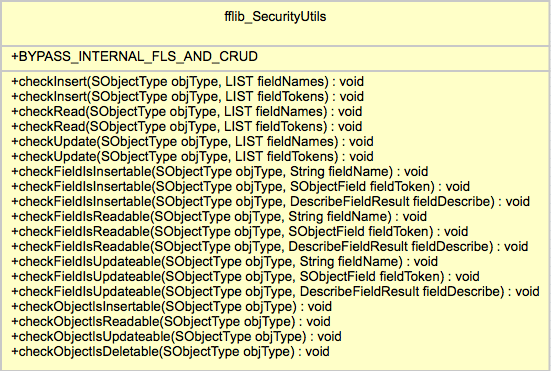
SecurityUtilsThe Salesforce Security Review currently requires that both object level and field level security is enforced by your code. The later of which, field level security has recently stirred up quite a lot of discussion and concern in the ISV community, more on this in the follow up blog post! In the meantime if you read the two Salesforce articles (here and here) describing the requirement and how to implement it in your Apex code (Visualforce offers some built in support for you). If like me, you’ll quickly realise the sample code provided is in reality somewhat verbose for anything more than a single object or field usage!

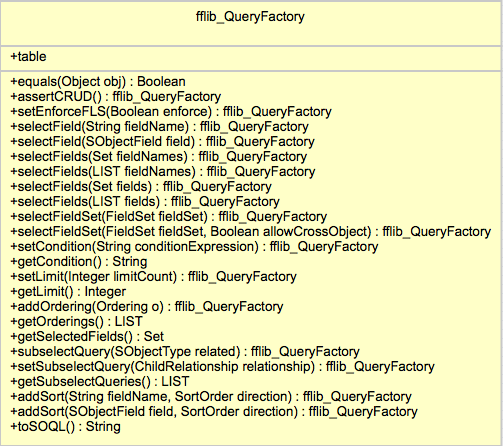
Enter the fflib_SecurityUtils class! As you can see from the UML representation shown here it’s methods are pretty simple and thus easy to use, an Apex exception is thrown if the user does not have access to the given object and/or fields. Here are some examples of it in use, you can choose to check individually or in bulk a set of fields and the object, covering both CRUD and Field Level Security.


fflib_SecurityUtils.checkObjectIsInsertable(Account.SObjectType);

fflib_SecurityUtils.checkInsert(
   Account.SObjectType,
   new List<Schema.SObjectField>{
      Account.Name,
      Account.ParentId, } );

fflib_SecurityUtils.checkUpdate(
   Lead.SObjectType,
   new List<Schema.SObjectField>{
     Lead.LastName,
     Lead.FirstName,
     Lead.Company } );

This class will also help perform object and field read access checks before making SOQL queries, though you may want to check out the features of the QueryFactory class as it also leverages this utility class internally.

New fflib_QueryFactory.cls

QueryFactory

The key purpose of this class is to make building dynamic SOQL queries safer and more robust than traditional string concatenation or String.format approaches. It also has an option to automatically check read security for the objects and fields given to it.

If your using Fieldsets in your Visualforce pages you’ll know that it’s generally up to you to query these fields, as you can see from the UML diagram, the class supports methods that allow you to provide the Fieldset name and have it automatically include those fields for you in the resulting query.


Chris has done an amazing job with this class not only in its feature and function but in its API design, leveraging the fluent model to make coding with it easy to use but also easy to read and understand. He first presented in at the FinancialForce DevTalks event this month, his presentation can be found here. In the presentation he gives some examples and discusses when you should use it and when not. So if your writing code like this currently…

String soql = ‘SELECT ‘;
for(Integer i = 0; i< fieldList.size(); i++){
  soql += fieldList + ‘, ‘;
}
soql = soql.substring(0,soql.length()-2);
soql += conditions != null && conditions.trim().size() > 0 ?  ‘ WHERE ‘ +
    soqlConditions : ‘’;
soql += limit != null && limit.trim().size() > 0 ? ‘ LIMIT ‘+limit;
List<Contact> nonBobs = Database.query(soql);

In it’s simplest form it’s use looks like this..

String soql =
  new fflib_QueryFactory(Contact.SObjectType)
    .selectField(Contact.Name)
    .setLimit(5)
    .toSOQL();

With object and field read security enforcement and Fieldset support would look like this…

String soql =
  new fflib_QueryFactory(Contact.SObjectType)
    .assertIsAccessible().
    .setEnforceFLS(true).
    .selectFields(myFields)
    .selectFieldSet(Contact.fieldSets.ContactPageFieldSet)
    .setCondition(‘Name != “Bob”’)
    .toSOQL();

The class is fully commented and the associated test class has further examples, also Chris is keen to work on API for the SOQL where clause in the future, i look forward to seeing it!

fflib_SObjectSelector.cls (Selector Pattern) Updates

I have updated this base class used to support the Selector pattern, to leverage the fflib_QueryFactory, in doing so you now have the option (as a constructor argument) to enable Field Level Security for fields selected by the selector. The default constructor and prior constructors are still supported, with the addition of the following that now allows you to control Fieldset, object and field level security enforcement respectively. For example…

OpportunitiesSelector oppsSelector =
    new OpportunitiesSelector(includeFieldSetFields, enforceObjectSecurity, enforceFLS);

NOTE: You can of course implement your own Selector default constructor and enable/disable these features by default within that, if you find yourself constantly passing a certain combination of these configurations parameters.

For custom selector methods you can leverage a QueryFactory constructed and initialised based on the Selector information, leaving you to add the additional where clause for the particular query logic the method encapsulates. Because of this you no longer need to add assertIsAccessible as the first line of your custom Selector methods. Prior to adopting QueryFactory a custom selector method might have looked like this…

public Database.QueryLocator queryLocatorReadyToInvoice()
{
  assertIsAccessible();
  return Database.getQueryLocator(
     String.format('SELECT {0} FROM {1} WHERE InvoicedStatus__c = \'\'Ready\'\' ORDER BY {2}',
     new List<String>{getFieldListString(),getSObjectName(),getOrderBy()}));
}

The updated patterns sample applications OpportunitiesSelector example to use the new newQueryFactory base class method, because this method pre-configures the factory with the selector object, fields, order by and fieldsets (if enabled), the new implementation is simplified and more focused on the criteria of the query the method encapsulates.

public Database.QueryLocator queryLocatorReadyToInvoice()
{
  return Database.getQueryLocator(
    newQueryFactory().setCondition('InvoicedStatus__c = \'\'Ready\'\'').toSOQL());
}

This updated fflib_SObjectSelector base class is backwards compatible from the API perspective, so you can choose to continue with the original String.format approach or adopt the newQueryFactory method accordingly. You can further review the old example here, against the new one here.

fflib_SObjectDomain.cls (Domain Pattern) Updates

This base class has to date had minimal functionality in it other than the routing of trigger events to the applicable virtual methods and object security enforcement. To support better configuration of these features and those in the future, i have added a new Domain class configuration feature, accessed via a new Configuration property.

Despite the focus on enforcing security in the above new features and updates, there are times when you want to enforce this in the calling code and not globally. For this reason the base class can now be configured to disable the object security checking (by default performed during the trigger after event), leaving it up to the calling code to enforce. Methods accessed from the new Configuration property can be used to control this.

public class ApplicationLogs extends fflib_SObjectDomain
{
  public ApplicationLogs(List<ApplicationLog__c> records)
  {
    super(records);
    Configuration.disableTriggerCRUDSecurity();
  }
}

Domain Trigger State

I have also been asked to provide a means to maintain member variable state between invocation of the trigger handler methods. Currently if you define a member variable in your Domain class it is reset between the before and after trigger phases. This is due to the default trigger handler recreating your Domain class instance each time.

If you want to retain information or records queried in the before handler methods in your class member variables such that it can be reused in the after handler methods, you can now enable this feature using the following configuration. The following illustrates the behaviour.

public class Opportunties extends fflib_SObjectDomain
{
  public String someState;

  public TestSObjectStatefulDomain(List<Opportunity> sObjectList)
  {
    super(sObjectList);
    Configuration.enableTriggerState();
  }

  public override void onBeforeInsert()
  {
    System.assertEquals(null, someState);
    someState = 'Something';
  }

  public override void onAfterInsert()
  {
    System.assertEquals('Something', someState);
  }
}

This feature is also aware of trigger recursion, meaning if there is such a scenario a new Domain class instance is created (since the records it wraps are new).


12 Comments

MavensMate Templates and Apex Enterprise Patterns

mavensmateI’ve been using MavensMate as alternative IDE for coding on Force.com for the past 6 months and loving it more and more to be honest, it receives a strong stream of updates, feels modern, responsive (as much as the underlying platform API’s permit) and is light weight. I’m also getting to grips with the power of the Sublime Text editor (which hosts MavensMate) and it’s excellent find and replace tools for example.  Recently i’ve been working on a feature with the help of the author of this fantastic tool Joe Ferraro.

One of the cool social features of MavensMate is it’s template engine, when ever you create a Apex class, Apex trigger, Visualforce Page or Visualforce Component, you can elect to start editing from scratch or pick one of a growing number of templates, ranging from Batch Apex, Controllers, Schedulers to Unit test templates, including a new one from a new friend in the push for BDD on Force.com, Paul Hardaker (also a FinancialForce.com employee btw). The whole thing is driven by a GitHub repository, if you contribute to that repository (and your pull request is merged) your template is instantly live across the world! Now that’s a social IDE!

I set about developing templates for the Apex Enterprise Patterns and quickly bumped into a gotcha! The previous template engine only took one parameter, the name of the Metadata component (Apex class or trigger name for example). When creating Domain classes or Selectors, the name of the class and the underlying custom object is required. After a quick Twitter conversation and GitHub issue, Joe had already nailed the design for a new feature to fix this situation! You can read more about how to use it here.

DomainTemplate

I’m pleased to report it worked like a charm the first time, great design and very flexible! The templates have now been submitted and successfully merged by Joe into the repository and are now live and ready to use!

  • DomainClass
  • DomainTrigger
  • SelectorClass
  • ServiceClass

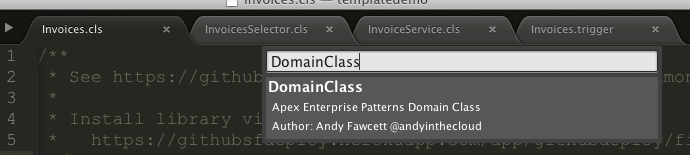
The follow screenshot shows the template selection prompt, just start typing and it narrows the options down as you go, press enter and you are prompted for the template parameters. These parameters default to examples defined in the template configuration file, overwrite these with your own following the examples as a naming convention guide. Press enter again and MavensMate will create your class and present it back to you ready for you to start editing!

NewClassTemplateParametersInvoices

If you want to see a quick from zero to Domain class demo check out my demo video below. Thanks again Joe for such a great community tool and providing great support for it!