
Choice fuels innovation—but it can also tip into analysis paralysis. On Salesforce, the native and often default AI path is Einstein and associated tools such as Prompt Builder and Agent Builder. That works well for many teams, yet cost, usage patterns, the weight of an Einstein dependency or broader strategic preferences can push app developers elsewhere—especially when you want close access and control over the models, data, and processing yourself. So: as a Salesforce developer, can you choose an alternative AI stack without going bare-metal and managing your own AI infrastructure?
In this blog I am use-case driven to help ground (pardon the pun) the exploration of alternatives to Salesforce’s own flavour of AI. The compute use case does not arguably need to be part of this—but it often comes hand in hand with building more complex AI solutions—so I wanted to include it. For this blog, I’ve partnered with DigitalOcean to explore their platform as an alternative to consider—through its own managed AI capabilities, and its FaaS serverless compute offering. Before we dive in—as always, please rest assured, my views are my own!
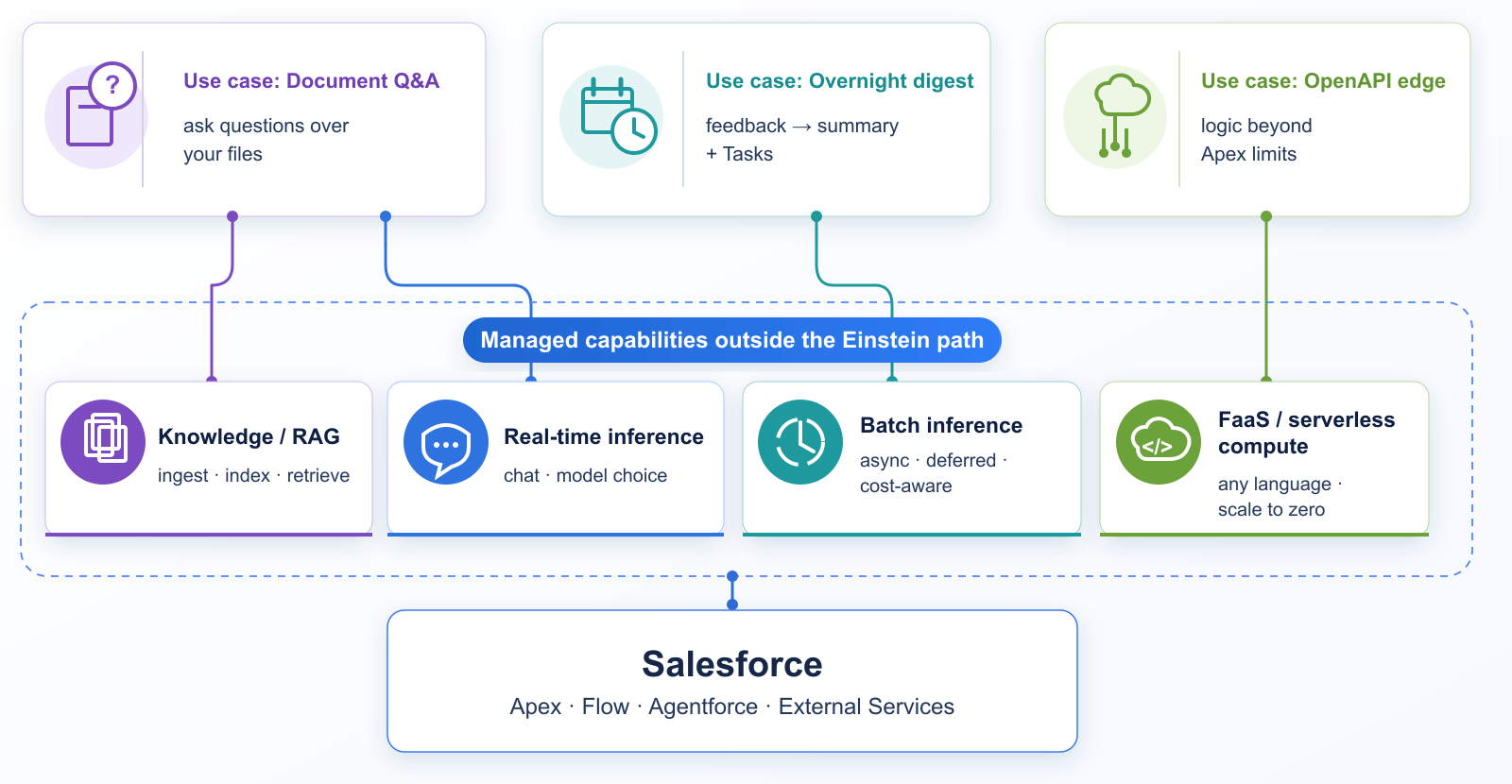
Until recently, Heroku was a good way to go beyond the Einstein based offerings, as Salesforce owned powerful PaaS for developers, with any-language support, scale, and a strong set of AI addons delivered in true Heroku style: fully managed DX and APIs. And even more recently the new AppLink feature that extended Salesforce org computational tasks beyond Apex and its limits to other languages. Alas with Heroku effectively moving to maintenance mode, we are still looking for alternatives.
We’ll explore DigitalOcean’s FaaS and managed inference features and how they can be integrated into Salesforce. What I found is that while the DX is different, the commitment to keep things simple is still present and helps keep us focused on the logic. There is even support for build packs and the recently graduated Cloud Native Buildpack standard. If you want to try the demos yourself, the sample code and deploy steps are in digitalocean-salesforce-demos. Prefer to skip the technical bits? Feel free to jump to the summary at the end.
Functions as a Service
Let’s start with FaaS. This is closer to Heroku apps, but serverless by design and scales to zero. As a result you need far less code and plumbing—no web server in your app or dependencies—just write the code and deploy it. And to ease Salesforce integration, as with Heroku AppLink, the Functions I created also support an OpenAPI schema.
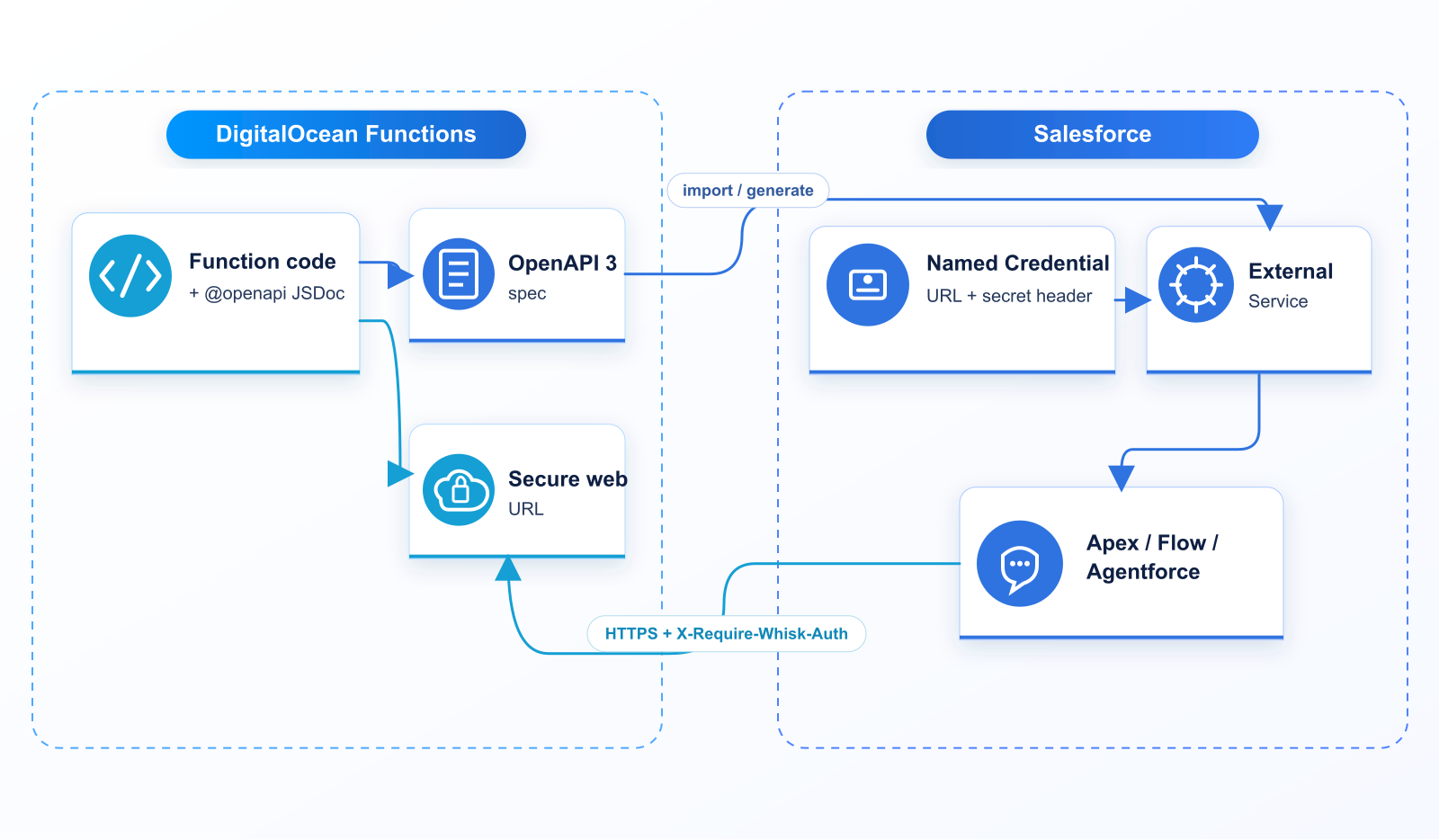
I’m a big fan of contract-driven APIs—and of keeping that contract close to the implementation. So I used Swagger tooling to inline OpenAPI annotations in the function code, then post-process them into the OpenAPI spec External Services needs.
/**
 * @openapi
 * /hello:
 *   get:
 *     operationId: hello
 *     summary: Hello from DigitalOcean
 *     parameters:
 *       - name: name
 *         in: query
 *         schema: { type: string }
 *     responses:
 *       '200':
 *         description: Greeting
 *         content:
 *           application/json:
 *             schema:
 *               $ref: '#/components/schemas/HelloResponse'
 *   post:
 *     operationId: helloPost
 *     # …same greeting via JSON body { "name": "…" }
 */
/**
 * @openapi
 * components:
 *   schemas:
 *     HelloResponse:
 *       type: object
 *       properties:
 *         message: { type: string }
 *         name: { type: string }
 *         source: { type: string }
 */
// Build the greeting payload returned to the caller
function greet(name) {
  const who = (name && String(name).trim()) || 'world'
  return {
    message: `Hello from DigitalOcean, ${who}!`,
    name: who,
    source: 'DigitalOcean Functions',
  }
}
// DigitalOcean Functions entry point
function main(event = {}) {
  return {
    statusCode: 200,
    headers: { 'Content-Type': 'application/json' },
    body: greet(event.name),
  }
}
module.exports.main = main
The required files are incredibly minimal: a single .js file and a project.yml that describes the function(s) in the deployment. At a basic level, our Function looks like this:
packages/sfdemo/
└── hello/
    └── hello.js    # Function + @openapi JSDoc
project.yml         # package/function config for doctl
In our project.yml we declare that it’s a public web Function and requires Secure Web authentication—with the secret stored in an environment variable.
packages:
  - name: sfdemo
    functions:
      - name: hello
        runtime: nodejs:22
        web: true
        # Secure Web Function — callers send X-Require-Whisk-Auth
        webSecure: ${DO_FUNCTIONS_WEB_SECRET}
After that, the following doctl commands stand up an environment and deploy the Functions. Once they’re deployed—and you include the secret—you’re good to start calling your Function.
# Authenticate doctl and install the serverless plugin
doctl auth init
doctl serverless install
doctl serverless namespaces create --label sfdemo --region nyc1

# Project root + Secure Web Function secret
cd blog/playgrounds/functions
echo "DO_FUNCTIONS_WEB_SECRET=$(openssl rand -hex 32)" >> .env

# Build & deploy the Functions package
doctl serverless deploy . --remote-build

# Call with the Secure Web Function secret
SECRET=$(grep '^DO_FUNCTIONS_WEB_SECRET=' .env | cut -d= -f2-)
URL=$(doctl serverless functions get sfdemo/hello --url)
curl -sS -H "X-Require-Whisk-Auth: ${SECRET}" \
  -G "${URL}" --data-urlencode "name=Salesforce" | jq .

# Function response
{
  "message": "Hello from DigitalOcean, Salesforce!",
  "name": "Salesforce",
  "source": "DigitalOcean Functions"
}
Out of the box authentication options are limited. For public Functions you can use a secret-based token, roll your own auth, or you can make Functions private and invokable only via the DigitalOcean Functions APIs. The samples here are public and use secret-based auth—and when they call back into Salesforce, authentication is via admin-approved users.
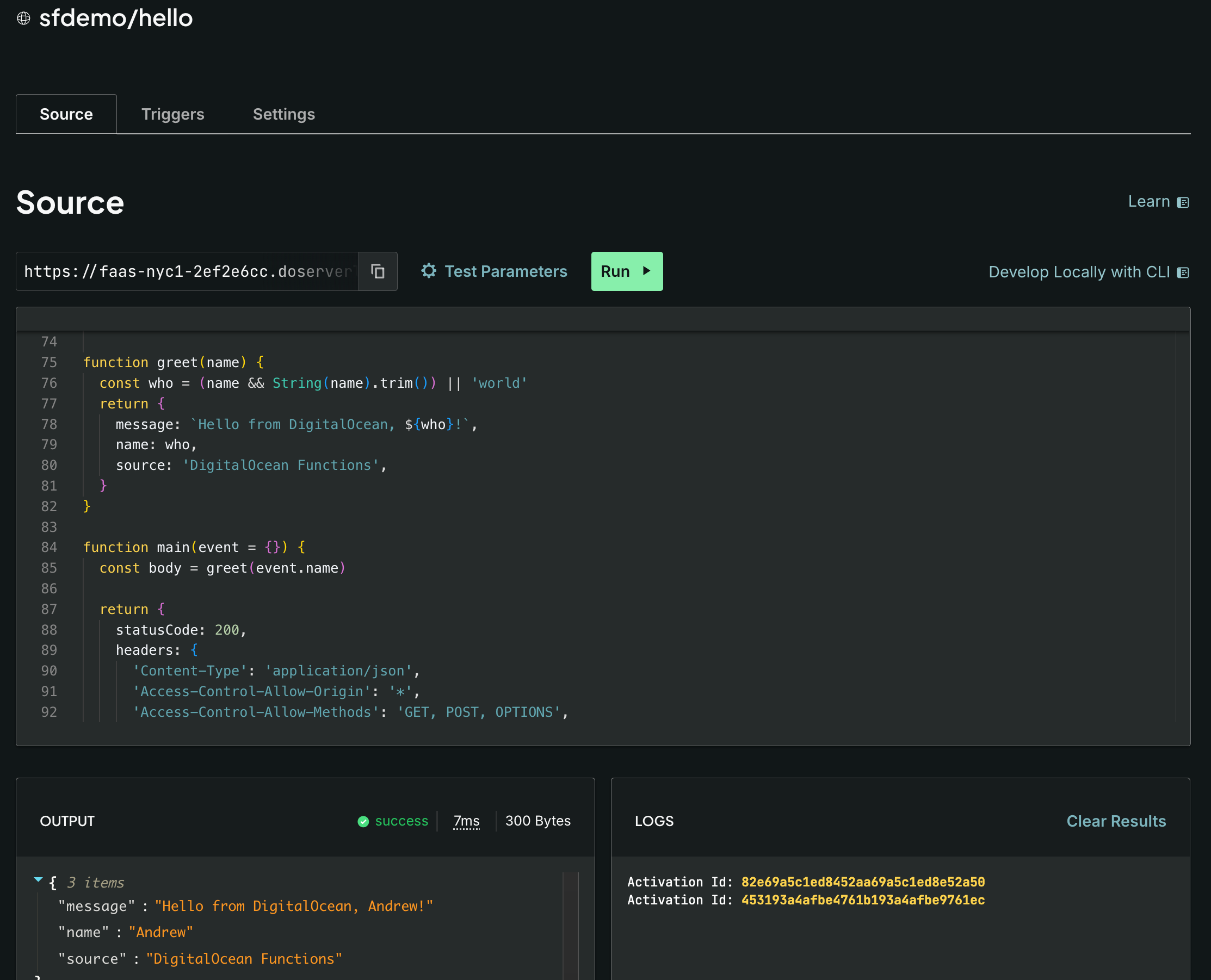
DigitialOcean Dashboard provides a good overview of Functions deployed and allows you to see the code and test them out all within the dashboard – i personally prefer curl and CLI’s but this is a good feature for quick tests for sure:
To invoke this from within Salesforce via an External Service, you need a Named Credential that provides the URL and secret for authentication. I used Swagger tooling to generate an OpenAPI schema. You can click through the Setup pages to wire it all up—but since this is me, and to somewhat replicate what the Heroku AppLink CLI did for us, I automated it.
# Build OpenAPI from the @openapi JSDoc in each Function
npm run generate-openapi

# Sync Named Credential URL from doctl, generate External Service metadata,
# deploy EC/NC/ES, and push DO_FUNCTIONS_WEB_SECRET into the EC principal
./bin/functions-apex.sh setup
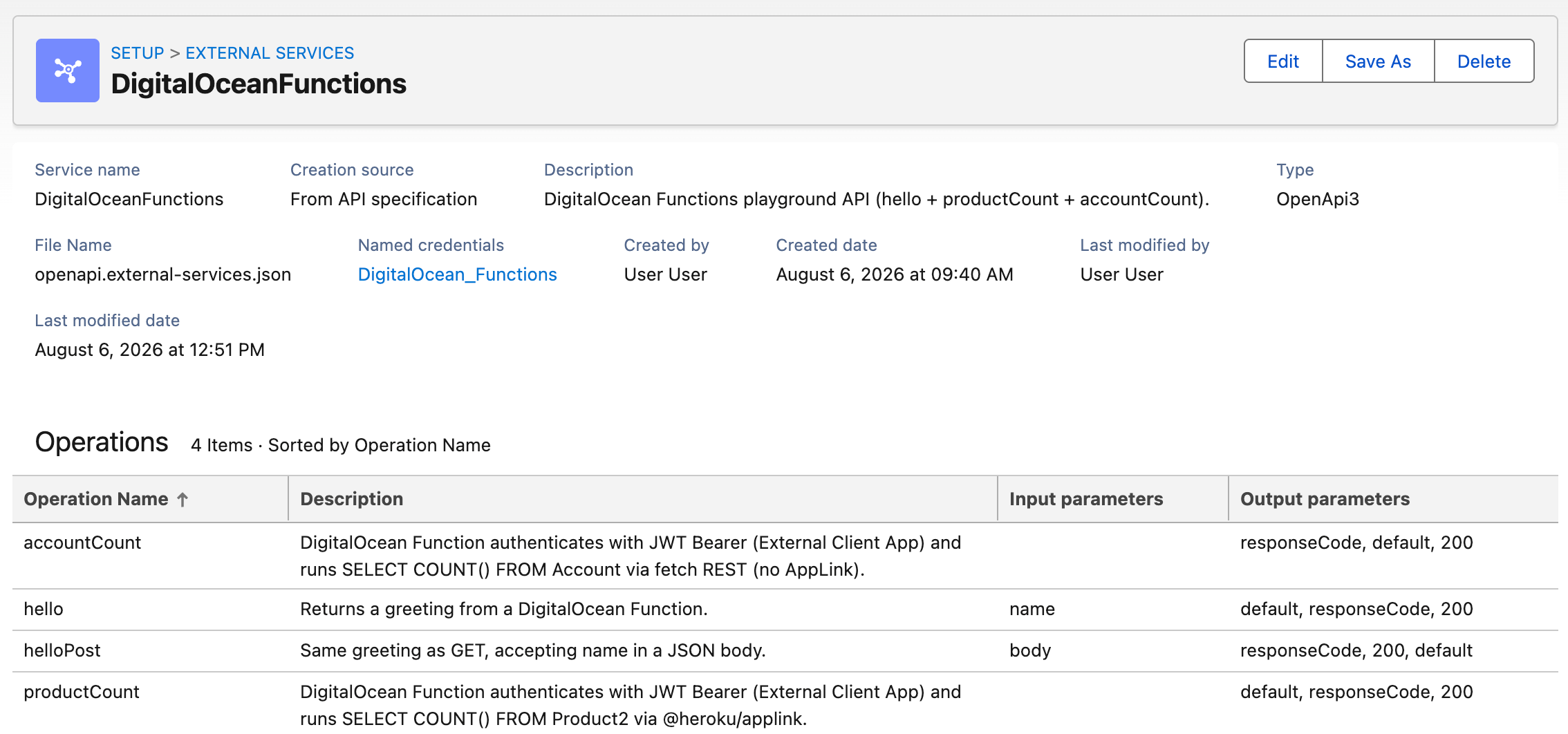
This resulted in an External Service that looks like this—the screenshot also shows the other sample operations wired from the same OpenAPI (helloPost, accountCount, and productCount). The accountCount Function is discussed below:
And under the Named Credential / External Credential, the Secure Web Function secret is passed as a custom header. Salesforce stores the actual credential value elsewhere in the External Credential configuration:

That then lets you call it from Apex like this:
// Generated External Service client for DigitalOceanFunctions
ExternalService.DigitalOceanFunctions svc =
    new ExternalService.DigitalOceanFunctions();

// Build the hello operation request
ExternalService.DigitalOceanFunctions.hello_Request req =
    new ExternalService.DigitalOceanFunctions.hello_Request();
req.name = 'Salesforce';

// Invoke the Function via Named Credential + External Service
ExternalService.DigitalOceanFunctions.hello_Response res = svc.hello(req);
System.debug(res.Code200.message);
// Hello from DigitalOcean, Salesforce!
If you’re not familiar with External Services, you might not know that they don’t just expose your Function to Apex. They also expose it to Flow—and even Agentforce—as actions for declarative builders in your org.
By leveraging External Client Apps (successors to Connected Apps) and OAuth JWT authentication, we can also give Function code callback access into the org—so Function logic can query and update Salesforce data (albeit limited by the current user’s permissions). Here’s a basic example that runs some SOQL to count Account records.
// JWT Bearer + REST helpers (username comes from Named Credential headers)
const sf = require('./salesforce')

// Authenticate as the calling user, then COUNT Accounts
async function countAccounts(event = {}) {
  const username = sf.usernameFromEvent(event)
  const token = await sf.getAccessToken(event, username)
  const result = await sf.query(
    token.access_token,
    token.instance_url,
    'SELECT COUNT() FROM Account',
    event
  )
  return {
    objectName: 'Account',
    count: result.totalSize,
    source: 'DigitalOcean Functions → Salesforce SOQL (JWT Bearer + fetch)',
  }
}

// DigitalOcean Functions entry point
async function main(event = {}) {
  try {
    return {
      statusCode: 200,
      headers: { 'Content-Type': 'application/json' },
      body: await countAccounts(event),
    }
  } catch (err) {
    return {
      statusCode: 500,
      headers: { 'Content-Type': 'application/json' },
      body: { error: err.message || String(err) },
    }
  }
}
module.exports.main = main
Not shown above is a set of helper routines that authenticate with Salesforce based on the calling user. We pass that user via another Named Credential feature—dynamic header values:
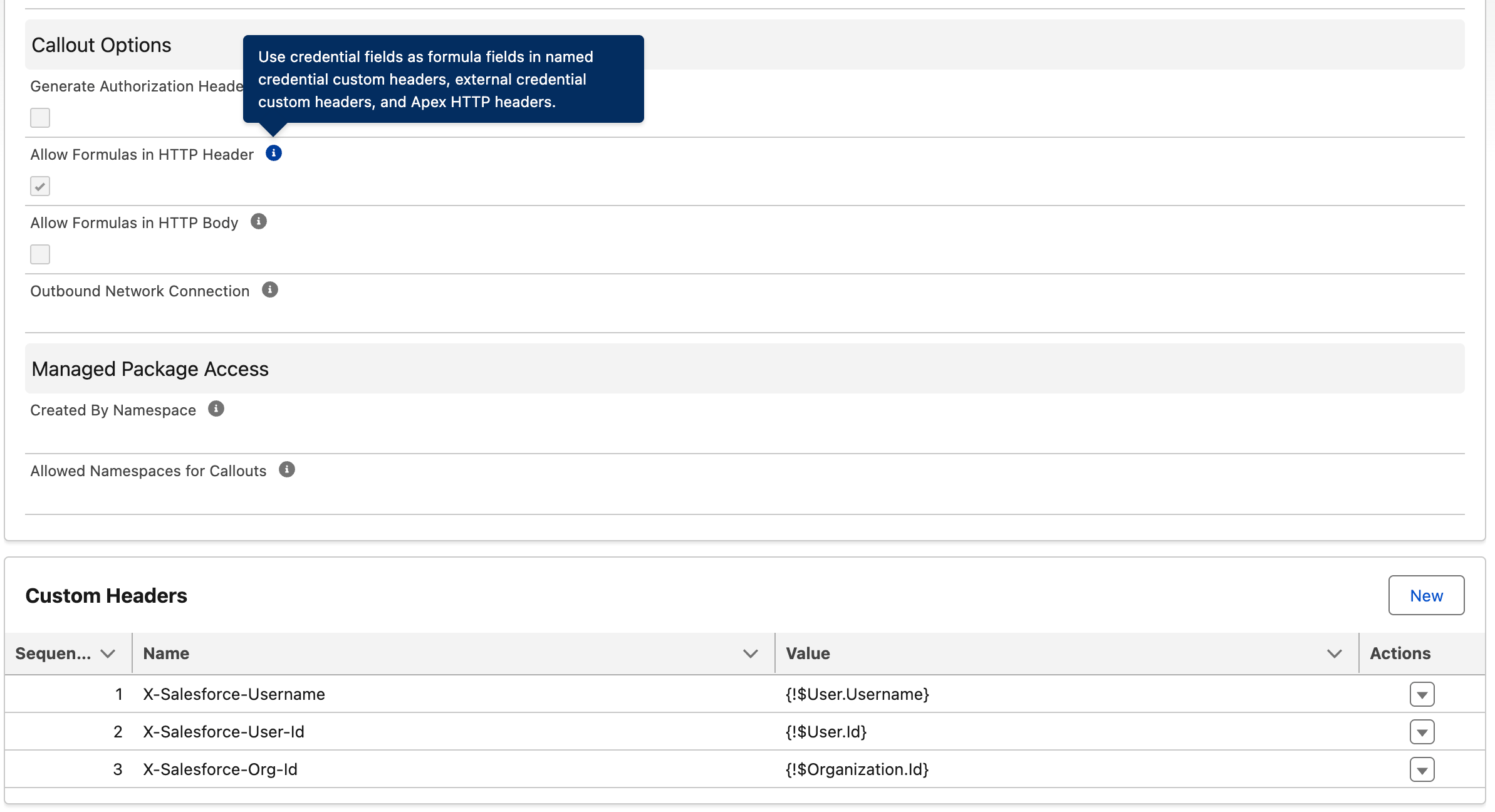
Fun Fact: I got the Heroku AppLink Node.js library working with this setup. That makes it easier to port existing AppLink code—and you get Unit of Work for transactional data access. Salesforce will likely keep shipping security fixes for paying customers, but not new features. To see it in action, check out the productCount Function in the sample repo.
Knowledge Bases – Retrieval Augmented Generation
These days it’s commonplace to have managed databases such as PostgreSQL that support vector similarity search (for example with pgvector). That often becomes the bedrock of pipelines that ingest documents, generate embeddings, and search them. DigitalOcean goes further with Knowledge Bases: an API to provision a knowledge base, upload files as data sources, and have the platform index them for later retrieval and semantic search. That managed path means less plumbing code on your side—so you can spend more time on the actual scenario: answering users’ real inquiries with the right context.
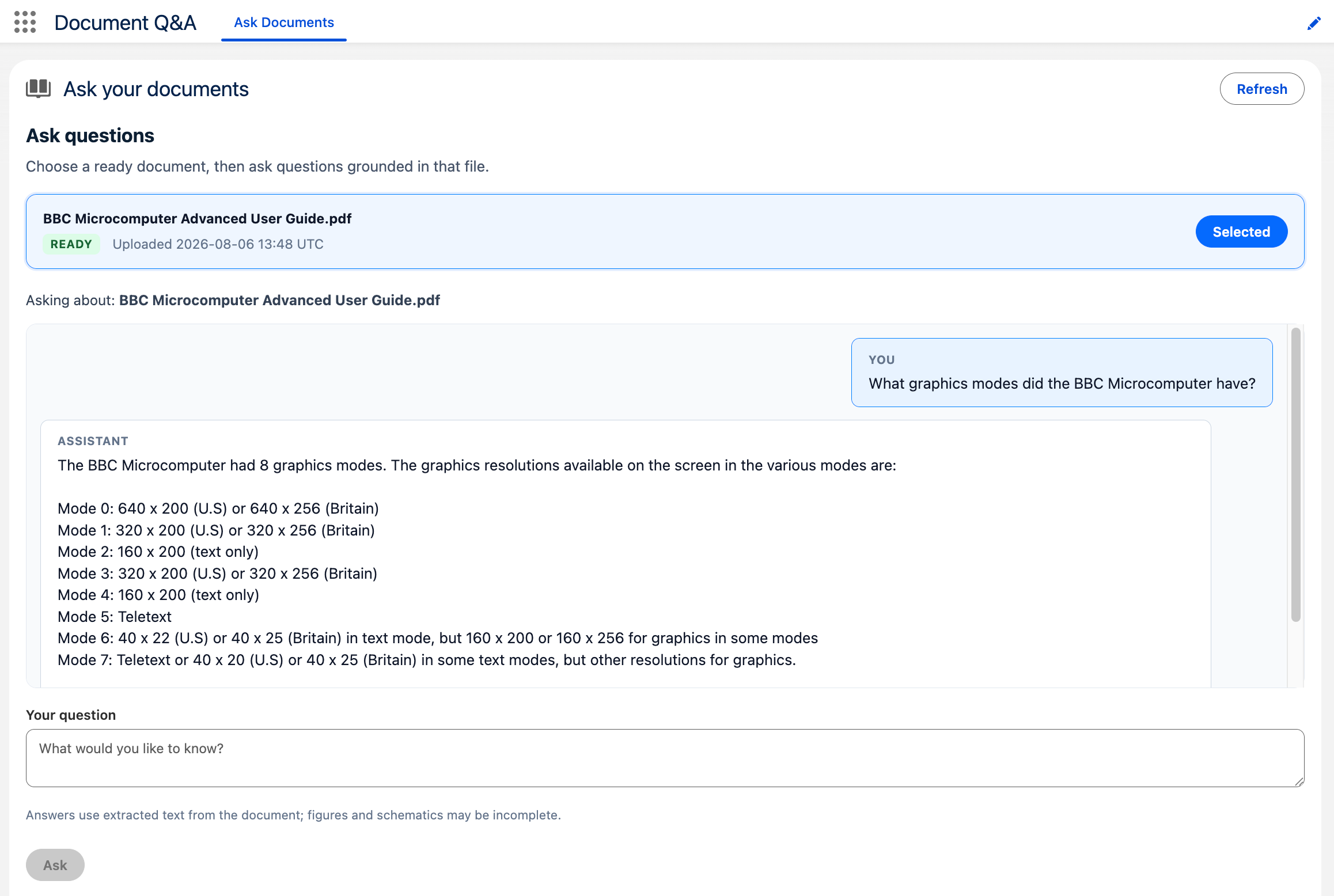
In keeping with the Salesforce integration theme, I wanted to build a native Salesforce experience on top of this—where users can drag and drop files, then ask questions against what was indexed—backed by DigitalOcean Serverless Inference from Apex. I’m aware Salesforce Data 360 can ingest files in a similar way for unstructured data and search indexing—here I’m exploring the DigitalOcean Knowledge Base path instead. Inference also has an interesting Inference Router feature that can route requests across models of your choosing, which can help manage cost if you put the effort into the routing configuration.
Key to my goal here was that DigitalOcean is very API-first in its design. Where I found a feature in the dashboard or CLI, I found an API—and what’s more, those APIs are described with the OpenAPI standard, which makes them ideal for agents and Salesforce to consume. Here’s a simple drag-and-drop experience with a chat box so you can ask questions once the file has been ingested. It again uses External Services—but this time to call DigitalOcean’s native platform APIs directl
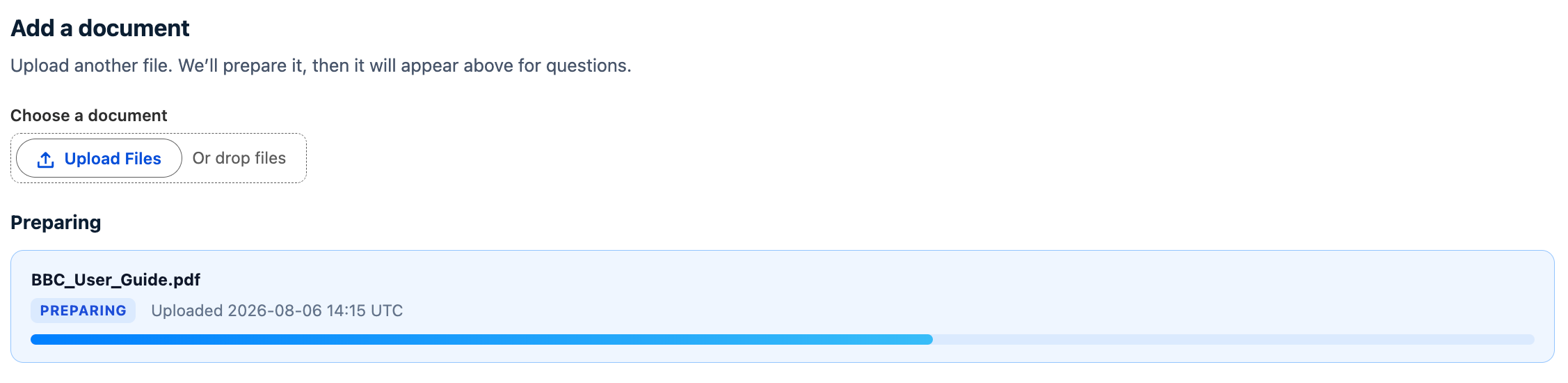
Uploading another file shows preparation status in the same UI while DigitalOcean indexes it:
DigitalOcean’s dashboard also lets you review the uploaded data sources and indexing status—and it includes a RAG Playground tab where you can try retrieve-and-answer prompts against the knowledge base without leaving the console:

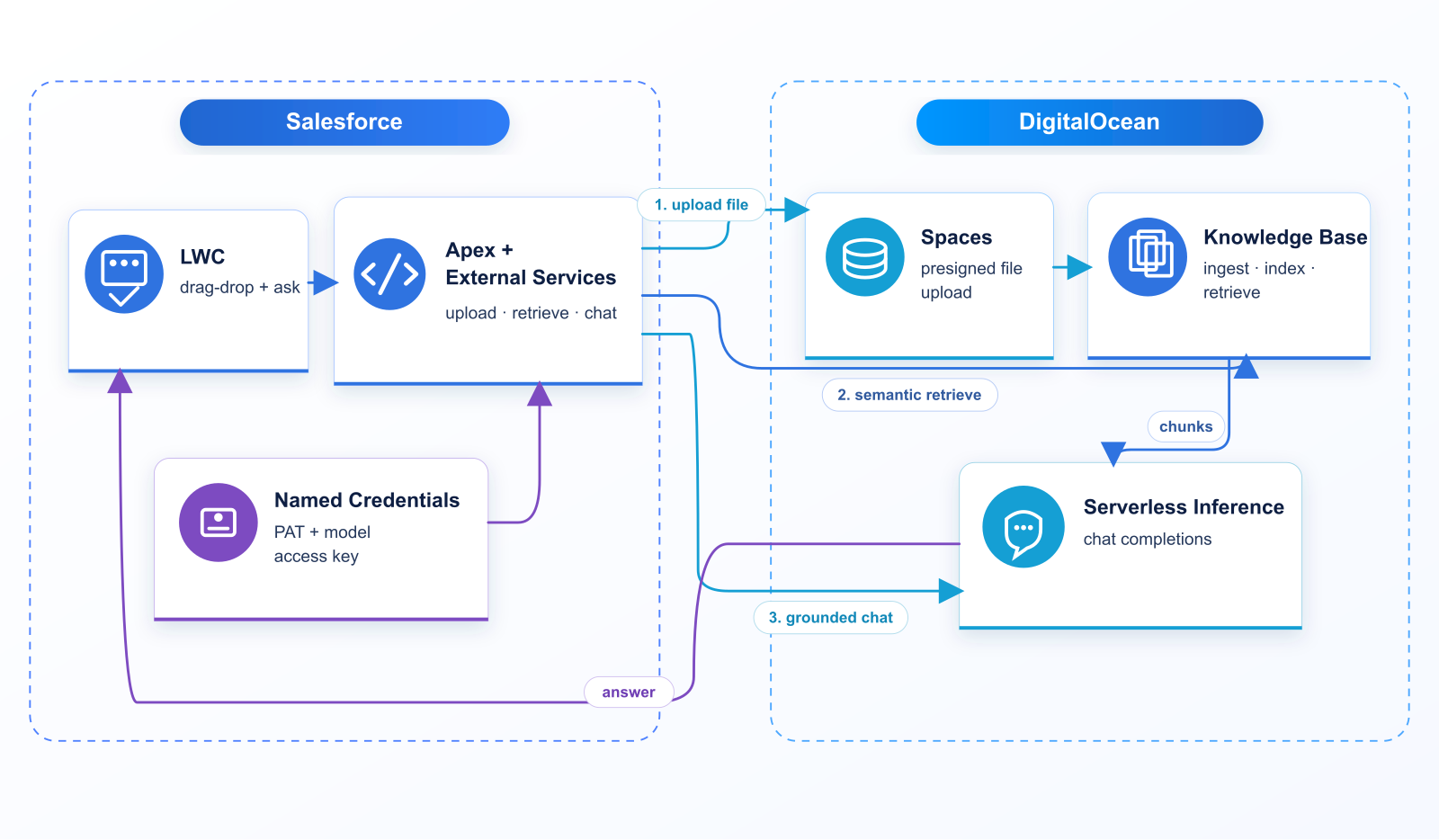
What is impressive about this is we didn’t have to provision our own datastore or set up our own ingest pipeline—we just uploaded our files and started querying against them to drive our chat experience. All of this didn’t require any code deploy off platform; it’s all been done with Apex and LWC. This to me is the closest I get to using Einstein AI and Data 360—I get to use existing managed services and stay within the Salesforce tooling I am familiar with. The architecture looks like this:
To import the DigitalOcean API into External Services I reduced the shipped OpenAPI to the operations this demo needs—after that, those operations show up like this:

There’s a second External Service for the file upload URL, because that PUT targets a different domain (Spaces) than the Platform API. In my case that host stayed static; if it ever varies, you’d be better off proxying the upload through a Function so Salesforce only talks to a stable endpoint.
Here are some snippets of Apex that call those External Services—list a Knowledge Base, run semantic retrieve against it, then pass that text into Serverless Inference. The Document Q&A UI uses a small helper class (DigitalOceanKnowledgeBaseService) that wraps this retrieve-then-answer path end to end.
// List Knowledge Bases (DigitalOceanPlatform → DigitalOcean_API)
ExternalService.DigitalOceanPlatform platform =
    new ExternalService.DigitalOceanPlatform();
ExternalService.DigitalOceanPlatform.listKnowledgeBases_Request listReq =
    new ExternalService.DigitalOceanPlatform.listKnowledgeBases_Request();
listReq.perx5fpage = 100; // OpenAPI per_page → Apex perx5fpage
ExternalService.DigitalOceanPlatform.listKnowledgeBases_Response listRes =
    platform.listKnowledgeBases(listReq);
System.debug(listRes.Code200.properties);
Semantic search is a separate External Service on the Knowledge Base retrieve host (kbaas.do-ai.run). The results from this call are the document excerpts you stuff into the model prompt:
// Retrieve / semantic search (DigitalOceanKBRetrieve → DigitalOcean_KB)
String kbUuid = '3f064852-91a1-11f1-aee4-4e013e2ddde4';
String question = 'What graphics modes are supported?';
ExternalService.DigitalOceanKBRetrieve.retrieveChunks_Request retrieveReq =
    new ExternalService.DigitalOceanKBRetrieve.retrieveChunks_Request();
retrieveReq.knowledgex5fbasex5fuuid = kbUuid;
ExternalService.DigitalOceanKBRetrieve_retrieveChunks_IN_body retrieveBody =
    new ExternalService.DigitalOceanKBRetrieve_retrieveChunks_IN_body();
retrieveBody.query = question;
retrieveBody.numx5fresults = 6;
retrieveBody.alpha = 0.35;
retrieveReq.body = retrieveBody;
ExternalService.DigitalOceanKBRetrieve.retrieveChunks_Response retrieveRes =
    new ExternalService.DigitalOceanKBRetrieve().retrieveChunks(retrieveReq);
// properties.results = matching text snippets (plus metadata such as page numbers)
List<Object> hits = (List<Object>) retrieveRes.Code200.properties.get('results');
String documentText = ''; // join text_content from each hit for the prompt
And here’s the Inference side—chat completions grounded on that retrieved document text:
// Chat completion (DigitalOceanInference → DigitalOcean_Inference)
ExternalService.DigitalOceanInference inference =
    new ExternalService.DigitalOceanInference();
ExternalService.DigitalOceanInference_createChatCompletion_IN_body chatBody =
    new ExternalService.DigitalOceanInference_createChatCompletion_IN_body();
chatBody.properties = new Map<String, Object>{
    'model' => 'llama3.3-70b-instruct',
    'temperature' => 0.2,
    'max_tokens' => 2000,
    'messages' => new List<Object>{
        new Map<String, Object>{
            'role' => 'system',
            'content' => 'Answer using only the document text provided by the user.'
        },
        new Map<String, Object>{
            'role' => 'user',
            'content' => 'Question:\n' + question + '\n\nDocument text:\n' + documentText
        }
    }
};
ExternalService.DigitalOceanInference.createChatCompletion_Request chatReq =
    new ExternalService.DigitalOceanInference.createChatCompletion_Request();
chatReq.body = chatBody;
ExternalService.DigitalOceanInference.createChatCompletion_Response chatRes =
    inference.createChatCompletion(chatReq);
System.debug(chatRes.Code200.properties);
// Helper used by the UI (retrieve + prompt + chat in one call):
// DigitalOceanKnowledgeBaseService.answerFromKnowledgeBase(kbUuid, question, null, null);
For authentication we store two DigitalOcean secrets on separate External Credential principals (same pattern as the Functions scenario—custom auth attributes sent as Bearer headers): a personal access token for the Platform and Knowledge Base APIs, and a model access key for Serverless Inference. Additionally, managing large files has never been a strength of Salesforce, given the heap limits in Apex—however I was able to leverage the latest External Services enhancements for binary uploads (OpenAPI Example 13), which stream a Salesforce File (ContentDocument Id) up to about 16MB without loading the bytes onto the Apex heap. The UI above temporarily creates a File record for that call, then deletes it once the DigitalOcean upload completes.
Batch Inference – managed costs with overnight work
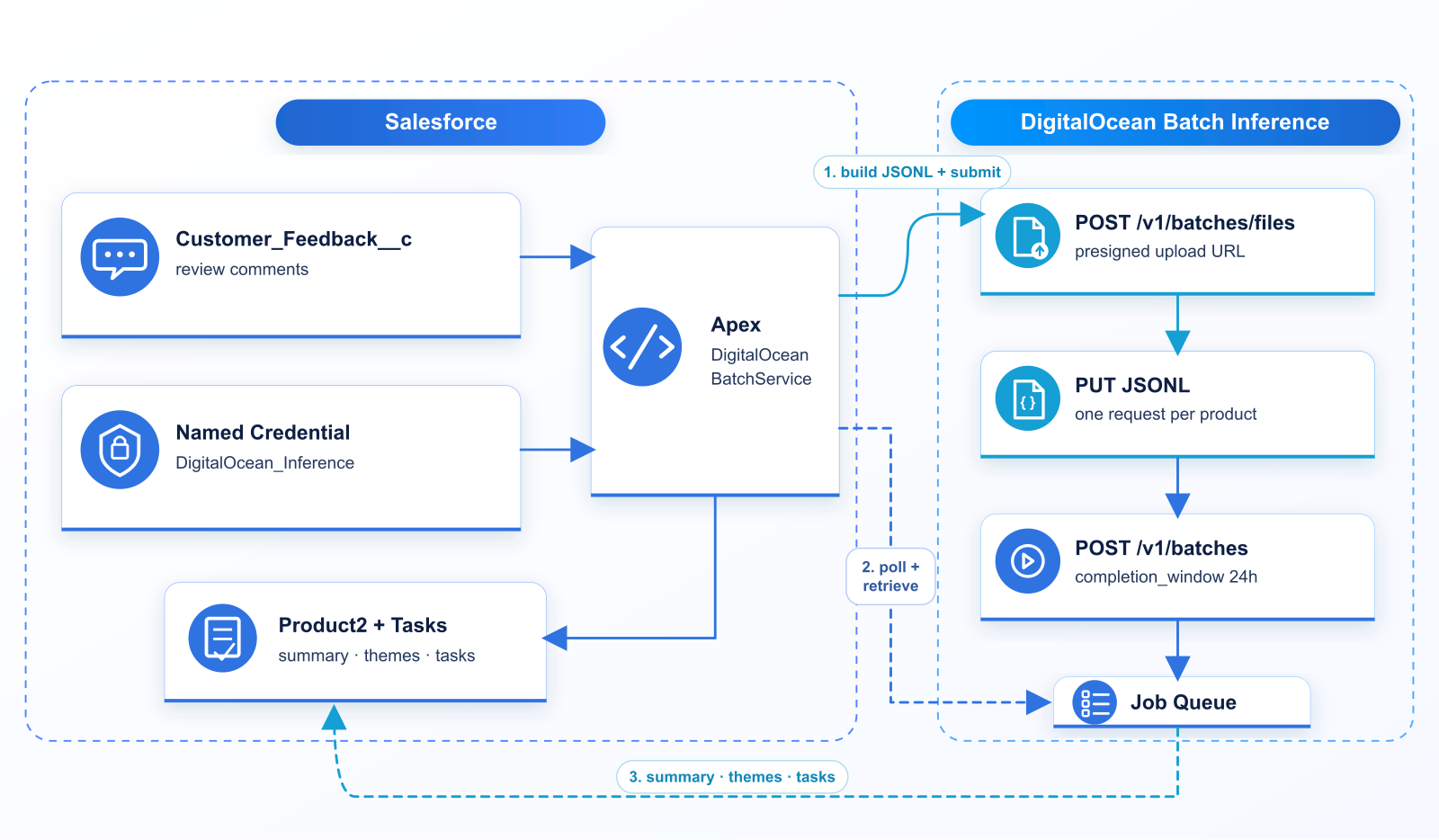
Not every LLM call needs to happen while someone waits. Some AI work loads can be deferred and as a result this can result in reduced costs. Take for example, summarizing a day’s customer feedback and proposing follow-ups is a good fit—Product Owners don’t need a live chat for that; they need a digest and a short list of actions by morning. This is the use case I have explored with DigitalOcean Batch Inference. In Salesforce I seeded products with Customer_Feedback__c comments:
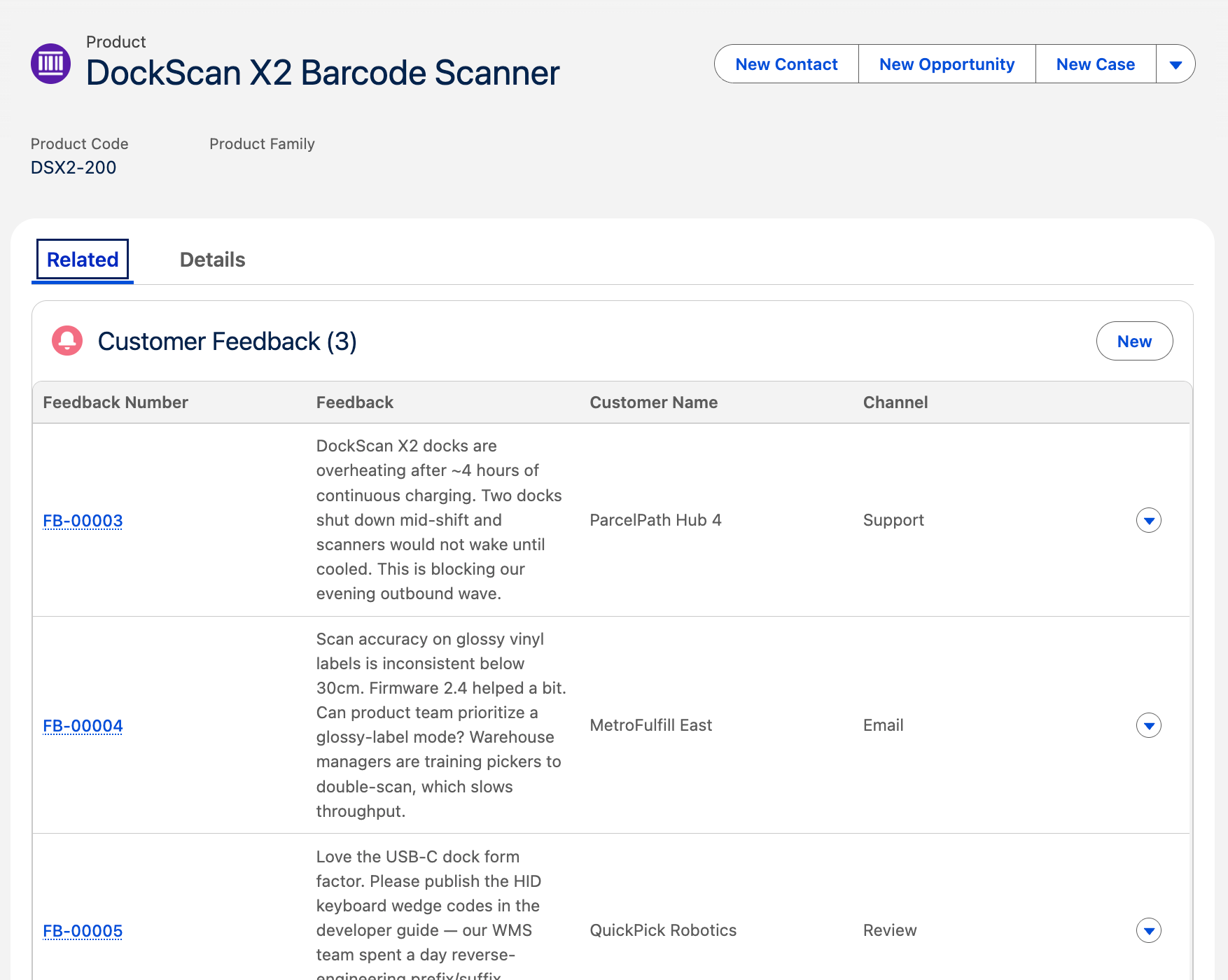
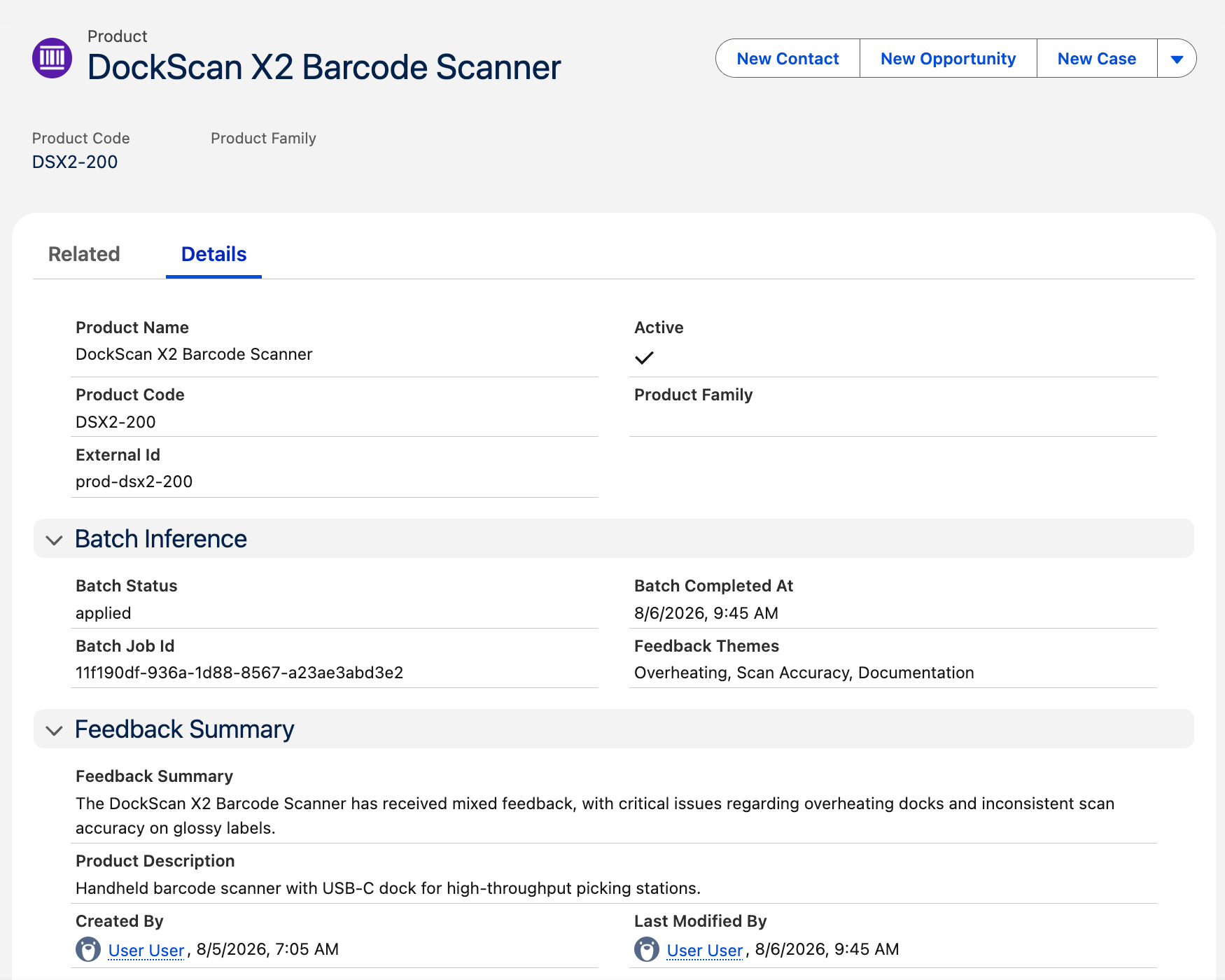
…then asked the model—in batch—to write a summary — which ends up back on the product record:
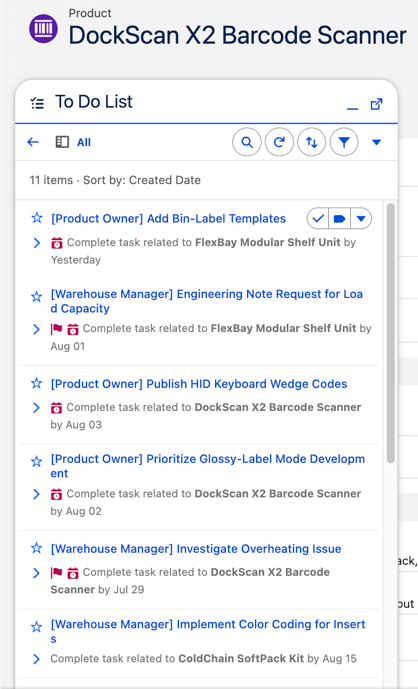
The same apply step also inserts Salesforce Tasks (routed to Product Owner or Warehouse Manager from the model’s JSON), so the overnight digest lands as a real to-do list by morning:
The Batch Inference API is deliberately simple: you don’t call chat completions one product at a time. Apex builds a JSONL file—one JSON object per line, each line a deferred inference request (custom_id, method, url, body)—then:
POST /v1/batches/filesto get a short-lived presigned upload URLPUTthe JSONL bytes to that URLPOST /v1/batcheswith thefile_id, provider, endpoint, and acompletion_window(here24h)- Poll
GET /v1/batches/{batch_id}until the job completes GET /v1/batches/{batch_id}/resultsfor a download link, parse the output JSONL, and write summaries/Tasks back to Salesforce
Auth is the same model access key pattern as Serverless Inference (Named Credential DigitalOcean_Inference). Each JSONL line is essentially a packaged chat-completions call; for this demo Apex groups unprocessed Customer_Feedback__c by product and asks for structured JSON back (summary, themes, tasks). A DockScan line looks like this (system prompt shortened):
{
  "custom_id": "product-prod-dsx2-200",
  "method": "POST",
  "url": "/v1/chat/completions",
  "body": {
    "model": "gpt-4o-mini",
    "temperature": 0.2,
    "response_format": { "type": "json_object" },
    "messages": [
      {
        "role": "system",
        "content": "Respond with ONLY valid JSON: summary, themes[], tasks[] with OwnerRole Product Owner|Warehouse Manager..."
      },
      {
        "role": "user",
        "content": "{\"product\":{\"external_id\":\"prod-dsx2-200\",\"name\":\"DockScan X2 Barcode Scanner\",\"product_code\":\"DSX2-200\"},\"feedback\":[{\"customer\":\"ParcelPath Hub 4\",\"channel\":\"Support\",\"rating\":1,\"feedback\":\"DockScan X2 docks are overheating after ~4 hours...\"},{\"customer\":\"MetroFulfill East\",\"channel\":\"Email\",\"rating\":3,\"feedback\":\"Scan accuracy on glossy vinyl labels...\"},{\"customer\":\"QuickPick Robotics\",\"channel\":\"Review\",\"rating\":4,\"feedback\":\"Love the USB-C dock form factor...\"}]}"
      }
    ]
  }
}
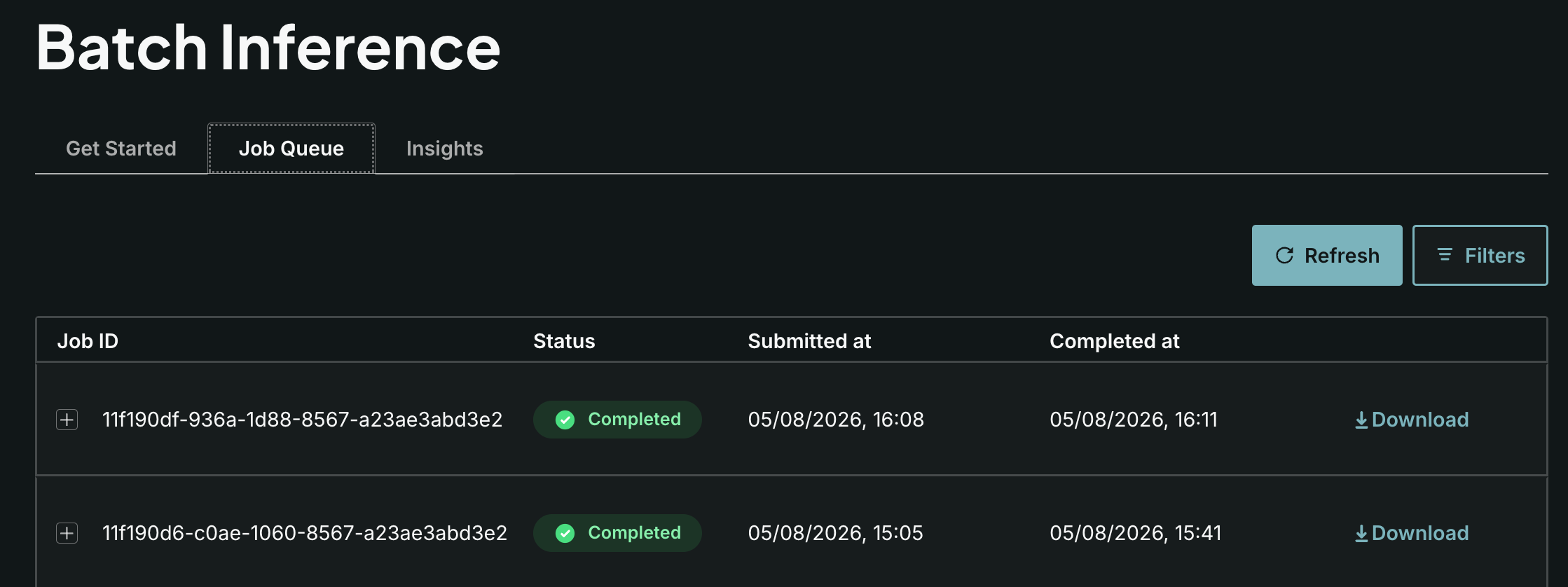
DigitalOcean’s Control Panel also exposes a Job Queue so you can watch those jobs move from queued to completed:
The sample included with this post is Apex-only: submit, poll, and apply are anonymous Apex scripts (or a thin sf apex run wrapper) that call a helper class—SOQL for unprocessed feedback, build/upload the JSONL, create the job, then poll and write summaries and Tasks back onto the products. Those are the building blocks for a Scheduled Apex job and a small UI to monitor batch status. The API is poll-based today; DigitalOcean has signaled webhook notifications are coming, but they’re not in the reference yet. End to end, the architecture looks like this:
Summary
Looking back across these explorations, what I valued most wasn’t any single API call—it was that DigitalOcean kept delivering the same kind of fully managed experience I rely on from Salesforce. I spent my time focusing on the Salesforce use cases, External Services, Named Credentials, Apex, and a bit of LWC—not on standing up servers, vector databases, or GPU fleets.
- Functions — Scale-to-zero compute with almost no ceremony: write the function,
doctl serverless deploy, call it. For Salesforce that meant an OpenAPI-shaped edge I could import into External Services, then call back into the org with JWT when I needed SOQL. I did appreciate not having to scafold middleware such as a web server and scaling to zero so I only pay for what I use. One thing I’d like more of out of the box is orchestration—easy async hand-off from one Function to another without me wiring the glue. You can do that today by calling the Functions API from inside a Function; I’d just like first-class primitives for that pattern. Product extras I’d reach for next include scheduled Functions for light off-platform cron, and App Platform packaging when a function needs to sit beside a small web app.
- Knowledge Bases + Serverless Inference — This was the closest “Einstein+D360-shaped” path and I enjoyed not having to own the pipeline coding and infrastructure. I simply uploaded a file, the platform indexes it (Spaces + OpenSearch under the hood), retrieve chunks, then chat-complete—all from Apex. In the Control Panel, RAG Playground and retrieval testing let me validate answers before I wired the LWC. Features I didn’t need for the demo but that keep the stack managed as you grow: auto-indexing on a schedule, optional reranking for tougher corpora, and more data-source types (URLs, Spaces, S3) without redesigning ingest.
- Batch Inference — I appreciated a dedicated set of services for deferred LLM work that was simple to use: JSONL in, Job Queue in the console, structured JSON out onto Product2 and Tasks. It felt a little like Batch Apex without me provisioning workers. Alongside it, the broader Inference control plane (Model Catalog, Inference Router, model access keys) is how I’d keep choosing models and cost tiers while Salesforce stays the system of engagement.
The experience across all three explorations: DigitalOcean owns the AI operational surface; Salesforce owns the business surface. That’s the alternative I was looking for when Heroku’s new strategic path narrowed—choice of AI and compute, without giving up the managed DX that lets me keep focused on building! And if you want to run through the demos yourself, the sample code and deploy steps are in digitalocean-salesforce-demos.
 Andy in the Cloud