Andy in the Cloud

From BBC Basic to Force.com and beyond…


6 Comments

Apex UML Canvas Tool : Dreamforce Release!

Screen Shot 2013-10-14 at 22.16.58

Update: Dreamforce is over for another year! Thanks to everyone who supported me and came along to the session. Salesforce have now uploaded a recording of the session here and can find the slides here.

As those following my blog will know one of the sessions I’ll be running at this years Dreamforce event is around the Tooling API and Canvas technologies. If you’ve not read about what I’m doing check out my previous blog here. I’ve now uploaded the code to the tool I’ve developed that will be show casing these technologies. I’ll be walking through key parts of it in the session, please do feel free to take a look and give me your thoughts ahead or at the session if your attending!

Installing the Tool

You now also install the tool as a managed package into your development org by following these steps.

  1. Install the package using the package install link from the GitHub repo README file.
  2. Installed is a tab which shows a Visualforce page which hosts the externally hosted (on Heroku) Canvas application.
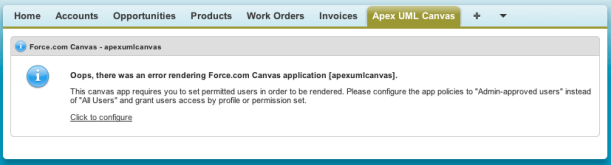
  3. You need to configure access to the Canvas application post installation, you can follow the Salesforce guidelines on screen and/or the ones here.Screen Shot 2013-11-12 at 17.52.55
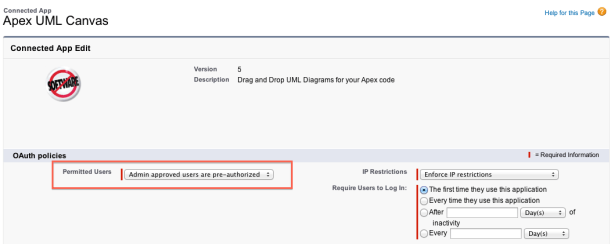
  4. Click the link to configure and edit the “Admin approved users are pre-authorised” option and save.Screen Shot 2013-11-12 at 17.53.54
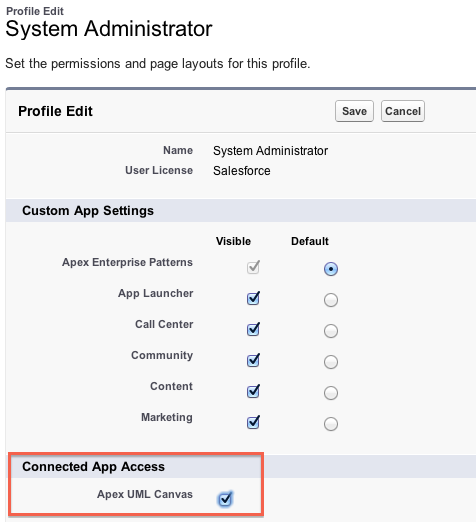
  5. Finally edit your Profile and enable the Connected App (and Tab if needed)Screen Shot 2013-11-12 at 17.57.08

Using the Tool

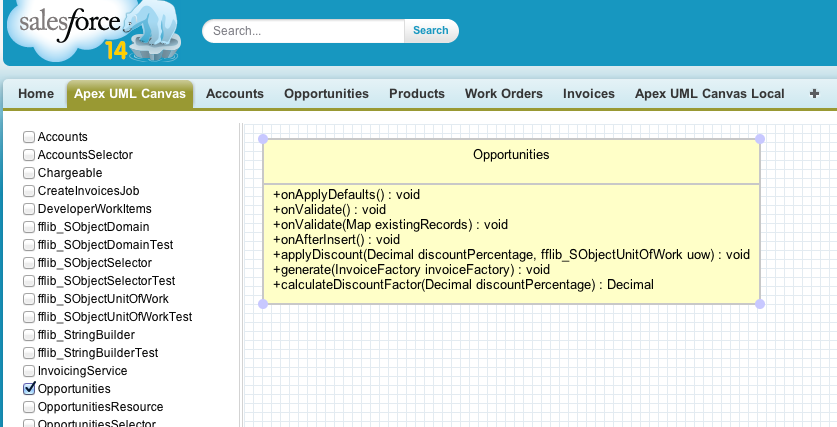
Screen Shot 2013-11-12 at 17.41.16

  • The tool displays a list of the Apex classes (unmanaged) in your org on the left hand side, tick a class to show it in the canvas.
  • Move the Apex class UML representation around with your mouse, if it or other classes reference each other lines will be drawn automatically.
  • There is some issues with dragging, if you get mixed up, just click the canvas to deselect everything then click what you want.

It is quite basic still, only showing methods, properties and ‘usage’ relationships and really needs some further community push behind it to progress a long line of cool features that could be added. Take a look at the comments and discussion on my last post for some more ideas on this. Look forward to see you all at Dreamforce 2013!


15 Comments

Preview: Apex UML Canvas with Tooling API

Regular readers of my blog will recall my last post charting my exploits with the Salesforce Tooling API for a session I’m running at Dreamforce 2013…

Dreamforce 2013 Session: Apex Code Analysis using the Tooling API and Canvas

The Tooling API provides powerful new ways to manage your code and get further insight into how its structured. This session will teach you how to use the Tooling API and its Symbol Table to analyse your code using an application integrated via Force.com Canvas directly into your Salesforce org — no command line or desktop install required! Join us and take your knowledge of how your Apex code is really structured to the next level!

Screen Shot 2013-10-14 at 22.16.58As I hinted at in the last blog I was not 100% happy with the Mind Map visualisation I initially used. It was fun to play with, but I wanted to illustrate the use of the Tooling API with something more functional. So I went searching for a new library. I wanted something that was HML5 based, that would dynamically render as the user selected Apex classes.

Inspired by the ObjectAid tool, as well as some feedback comments describing a very cool PlantUML based Apex tool, impressively written currently without the Tooling API called PlantUML4Force. While PlantUML is a great library, it was not dynamic enough and ultimately I wanted to be able to better illustrate the separation of concerns in the diagrams by having more granular control over the final diagram. I eventually found a bit of hidden gem called UMLCanvas

I’ll eventually share this as a package once I’ve had a chance to work on it a bit more (it’s currently showing only UML Dependency relationships). In the meantime please take a look at the new video below and join me in my Dreamforce Session to hear about how I built it!

Technologies involved so far…


8 Comments

Preview: Demo of Apex Code Analysis using the Tooling API and Canvas

This weekend I’ve been fleshing out the code for my second Dreamforce 2013 session. I’ve been having a lot of fun with various technologies to create the following demo which I’ve shared a short work in progress video below. The JQuery plugin doing the rendering is js-mindmap, it’s got some quirks I’ve discovered so far, but I’m sticky with it for now!

The session highlights the Tooling API via this tool which can be installed directly into your Salesforce environment via the wonderful Salesforce Canvas technology! This is proposed session abstract …

Dreamforce 2013 Session: Apex Code Analysis using the Tooling API and Canvas

The Tooling API provides powerful new ways to manage your code and get further insight into how its structured. This session will teach you how to use the Tooling API and its Symbol Table to analyse your code using an application integrated via Force.com Canvas directly into your Salesforce org — no command line or desktop install required! Join us and take your knowledge of how your Apex code is really structured to the next level!

Technologies involved so far…

I’ve also found the excellent ObjectAid Eclipse plugin (which is sadly a Java source code only tool) to explore the Tooling API data structures in much more detail than the Salesforce documentation currently offers, especially in respect to the SymbolTable structure. I’ll be sharing full code and discussing the following diagram in more detail in my session! In the meantime I’d love to know your thoughts and other ideas around the Tooling API!

Tooling API


7 Comments

Ideas for Apex Enterprise Patterns Dreamforce 2013 Session!

ideaguy

Update: Dreamforce is over for another year! Thanks to everyone who supported me and came along to the session. Salesforce have now uploaded a recording of the session here and can find the slides here.

As part of this years Dreamforce 2013 event I will be once again running a session on Apex Enterprise Patterns, following up on my recent series of developer.force.com articles. Here is the current abstract for the session, comments welcome!

Building Strong Foundations: Apex Enterprise Patterns “Any structure expected to stand the test of time and change, needs a strong foundation! Software is no exception, engineering your code to grow in a stable and effective way is critical to your ability to rapidly meet the growing demands of users, new features, technologies and platform features. You will take away architect level design patterns to use in your Apex code to keep it well factored, easier to maintain and obey platform best practices. Based on a Force.com interpreation of Martin Fowlers Enterprise Architecture Application patterns and the practice of Separation of Concerns.” (Draft)

I’ve recently started to populated a dedicated Github repository that contains only the working sample code (with the library code in separate repo). So that i can build out a real working sample application illustrating in practical way the patterns in action. It already covers a number of features and use cases such as…

  • Layering Apex logic by applying Separation of Concerns
  • Visualforce controllers and the Service Layer
  • Triggers, validation, defaulting and business logic encapsulation via Domain layer
  • Applying object orientated programming inheritance and interfaces via Domain layer
  • Managing DML and automatic relationship ‘stitching’ when inserting records via Unit Of Work pattern
  • Factoring, encapsulating and standardising SOQL query logic via Selector layer

The following are ideas I’ll be expanding on in the sample application in preparation for the session…

  • Batch Apex and Visualforce Remoting (aka JavaScript callers) and the Service Layer
  • Apex testing without SOQL and DML via the Domain Layer
  • Exposing a custom application API, such as REST API or Apex API via Service Layer
  • Reuse and testing SOQL query logic in Batch Apex context via Selector Layer
  • Rich client MVC frameworks such as AngularJS and Service Side SOC

What do you think and what else would you like to see and discuss in this session?

Feel free to comment on this blog below, tweet me, log it on Github or however else you can get in touch.


10 Comments

Apex Enterprise Patterns – Selector Layer

A major theme in this series on Apex Enterprise Patterns has been ensuring a good separation of concerns, making large complex enterprise level code bases more clear, self documenting, adaptable and robust to change, be that refactoring or functional evolution over time.

In the past articles in this series we have seen Service logic that orchestrates how functional sub-domains work together to form the key business processes your application provides. Domain logic breaks down the distinct behaviour of each custom object in your application by bring the power of Object Orientated Programming into your code.

This article introduces the Selector, a layer of code that encapsulates logic responsible for querying information from your custom objects and feeding it into your Domain and Service layer code as well as Batch Apex jobs.

Selectors

You can read the rest of this article on the wiki.developerforce.com here, enjoy!

Series Summary

This completes the current series of articles on Apex Enterprise Patterns. The main goal was to express a need for Separation of Concerns to help make your Apex logic on the platform live longer and maintain its stability. In presenting three of the main patterns I feel help deliver this. If nothing else, I’d like to think you have started to think more about SOC, even if it’s just class naming. Though hopefully beyond that if you use some of the articles’ various base classes great, please feel free to contribute to them. If you don’t, or decide to skip some or use a different pattern implementation that’s also fine, thats what patterns are all about. If you do, I’d love to hear about other implementations.

Martin Fowler’s excellent patterns continue to be referenced on platforms, new and old. I’ve very much enjoyed adapting them to this platform and using them to effect better adoption of Force.com platform best practices along the way. Thanks to everyone for all the great feedback, long may your code live!


12 Comments

Batch Worker, Getting more done with less work…

Batch Apex has been around on the platform for a while now, but I think its fair to say there is still a lot of mystery around it and with that a few baked in assumptions. One such assumption I see being made is that its driven by the database, specifically the records within the database determine the work to be done.

construction_workerAs such if you have some work you need to get done that won’t fit in the standard governors and its not immediately database driven, Batch Apex may get overlooked in favour of @future which on the surface feels like a better fit as its design is not database linked in anyway .  Your code is just an annotation away to getting the addition power it needs! So why bother with the complexities of Batch Apex?

Well for starters, Batch Apex gives you an ID to trace the work being done and thus the key to improving the user experience while the user waits. Secondly, if any of your parameters are lists or arrays to such methods, your already having to consider again scalability. Yes, you say, but its more fiddly than @future isn’t it?

In this blog I’m going to explore a cool feature of the Batch Apex that often gets overlooked. Using it to implement a worker pattern giving you the kind of usability @future offers with the additional scalability and traceability of Batch Apex without all the work. If your not interested in the background, feel free to skip to the Batch Worker section below!

IMPORTANT NOTE: The alternative approach described here is not designed as a replacement to using Batch Apex against the database using QueryLocator. Using QueryLocator gives access to 50m records, where as the Iterator usage only 50k. Thus the use cases for the Batch Worker are more aligned with smaller jobs perhaps driven by end user selections or stitching together complex chunks of work together.

Well I didn’t know that! (#WIDKT)

First lets review something you may not have realised about implementing Batch Apex. The start method can return either a QueryLocator or something called Iterable. You can implement your own iterators, but what is actually not that clear is that Apex collections/lists implement Iterator by default!

Iterable<String> i = new List<String> { 'A', 'B', 'C' };

With this knowledge, implementing Batch Apex to iterate over a list is now as simple as this…

public with sharing class SimpleBatchApex implements Database.Batchable<String>
{
	public Iterable<String> start(Database.BatchableContext BC)
	{
		return new List<String> { 'Do something', 'Do something else', 'And something more' };
	}

	public void execute(Database.BatchableContext info, List<String> strings)
	{
		// Do something really expensive with the string!
		String myString = strings[0];
	}

	public void finish(Database.BatchableContext info) { }
}

// Process the String's one by one each with its own governor context
Id jobId = Database.executeBatch(new SimpleBatchApex(), 1);

The second parameter of the Database.executeBatch method is used to determine how many items from the list are pass to each execute method invocation made by the platform. To get the maximum governors per item and match that of a single @future call, this is set 1.  We can also implement Batch Apex with a generic data type know as Object. Which allows you to process different types or actions in one job, more about this later.

public with sharing class GenericBatchApex implements Database.Batchable<Object>
{
	public Iterable<Object> start(Database.BatchableContext BC) { }

	public void execute(Database.BatchableContext info, List<Object> listOfAnything) { }

	public void finish(Database.BatchableContext info) { }
}

A BatchWorker Base Class

The above simplifications are good, but I wanted to further model the type of flexibility @future gives without dealing with the Batch Apex mechanics each time. In designing the BatchWorker base class used in this blog i wanted to make its use as easy as possible. I’m a big fan of the fluent API model and so if you look closely you’ll see elements of that here as well. You can view the full source code for the base class here, its quite a small class though, extending the concepts above to make a more generic Batch Apex implementation.

First lets take another look at the string example above, but this time using the BatchWorker base class.

public with sharing class MyStringWorker extends BatchWorker
{
	public override void doWork(Object work)
	{
		// Do something really expensive with the string!
		String myString = (String) work;
	}
}

// Process the String's one by one each with its own governor context
Id jobId =
	new MyStringWorker()
            .addWork('Do something')
            .addWork('Do something else')
            .addWork('And something more')
            .run()
            .BatchJobId;

Clearly not everything is as simple as passing a few strings, after all @future methods can take parameters of varying types. The following is a more complex example showing a ProjectWorker class. Imagine this is part of a Visualforce controller method where the user is presented a selection of projects to process with a date range.

	// Create worker to process the project selection
	ProjectWorker projectWorker = new ProjectWorker();
		
	// Add the work to the project worker
	for(SelectedProject selectedProject : selectedProjects)		
		projectWorker.addWork(startDate, endDate, selectedProject.projectId);
			
	// Start the workder and retain the job Id to provide feedback to the user
	Id jobId = projectWorker.run().BatchJobId;		

Here is how the ProjectWorker class has been implemented, once again it extends the BatchWorker class. But this time it provides its own addWork method which takes the parameters as you would normally describe them. Then internally wraps them up in a worker data class. The caller of the class, as you’ve seen above is is not aware of this.

public with sharing class ProjectWorker extends BatchWorker
{	
	public ProjectWorker addWork(Date startDate, Date endDate, Id projectId)
	{
		// Construct a worker object to wrap the parameters		
		return (ProjectWorker) super.addWork(new ProjectWork(startDate, endDate, projectId));
	}
	
	public override void doWork(Object work)
	{
		// Parameters
		ProjectWork projectWork = (ProjectWork) work;
		Date startDate = projectWork.startDate;
		Date endDate = projectWork.endDate;
		Id projectId = projectWork.projectId;		
		// Do the work
		// ...
	}
	
	private class ProjectWork
	{
		public ProjectWork(Date startDate, Date endDate, Id projectId)
		{
			this.startDate = startDate;
			this.endDate = endDate;
			this.projectId = projectId;
		}
		
		public Date startDate;
		public Date endDate;
		public Id projectId;
	}
}

As a final example, recall the fact that Batch Apex can process a list of generic data types. The BatchProcess base class uses this to permit the varied implementations above. It can also be used to create a worker class that can do more than one thing. The equivalent of implementing two @future methods, accept that its managed as one job.

public with sharing class ProjectMultiWorker extends BatchWorker 
{
	// ...

	public override void doWork(Object work)
	{
		if(work instanceof CalculateCostsWork)
		{
			CalculateCostsWork calculateCostsWork = (CalculateCostsWork) work;
			// Do work 
			// ...					
		}
		else if(work instanceof BillingGenerationWork)
		{
			BillingGenerationWork billingGenerationWork = (BillingGenerationWork) work;
			// Do work
			// ...		
		}
	}
}

// Process the selected Project 
Id jobId = 
	new ProjectMultiWorker()
		.addWorkCalculateCosts(System.today(), selectedProjectId)
		.addWorkBillingGeneration(System.today(), selectedProjectId, selectedAccountId)
		.run()
		.BatchJobId;

Summary

Hopefully I’ve provided some insight into new ways to access the power and scalability of Batch Apex for use cases which you may not have previously considered or perhaps used less flexible @future annotation. Keep in mind that using Batch Apex with Iterators does reduce the number of items it can process to 50k, as apposed to the 50m when using database query locator. At the end of the day if you have more than 50k work items, your probably wanting to go down the database driven route anyway. I’ve shared all the code used in this article and some I’ve not shown in this Gist.

Post Credits
Finally, I’d like to give a nod to an past work associate of mine, Tony Scott, who has taken this type of approach down a similar path, but added process control semantics around it. Check out his blog here!