
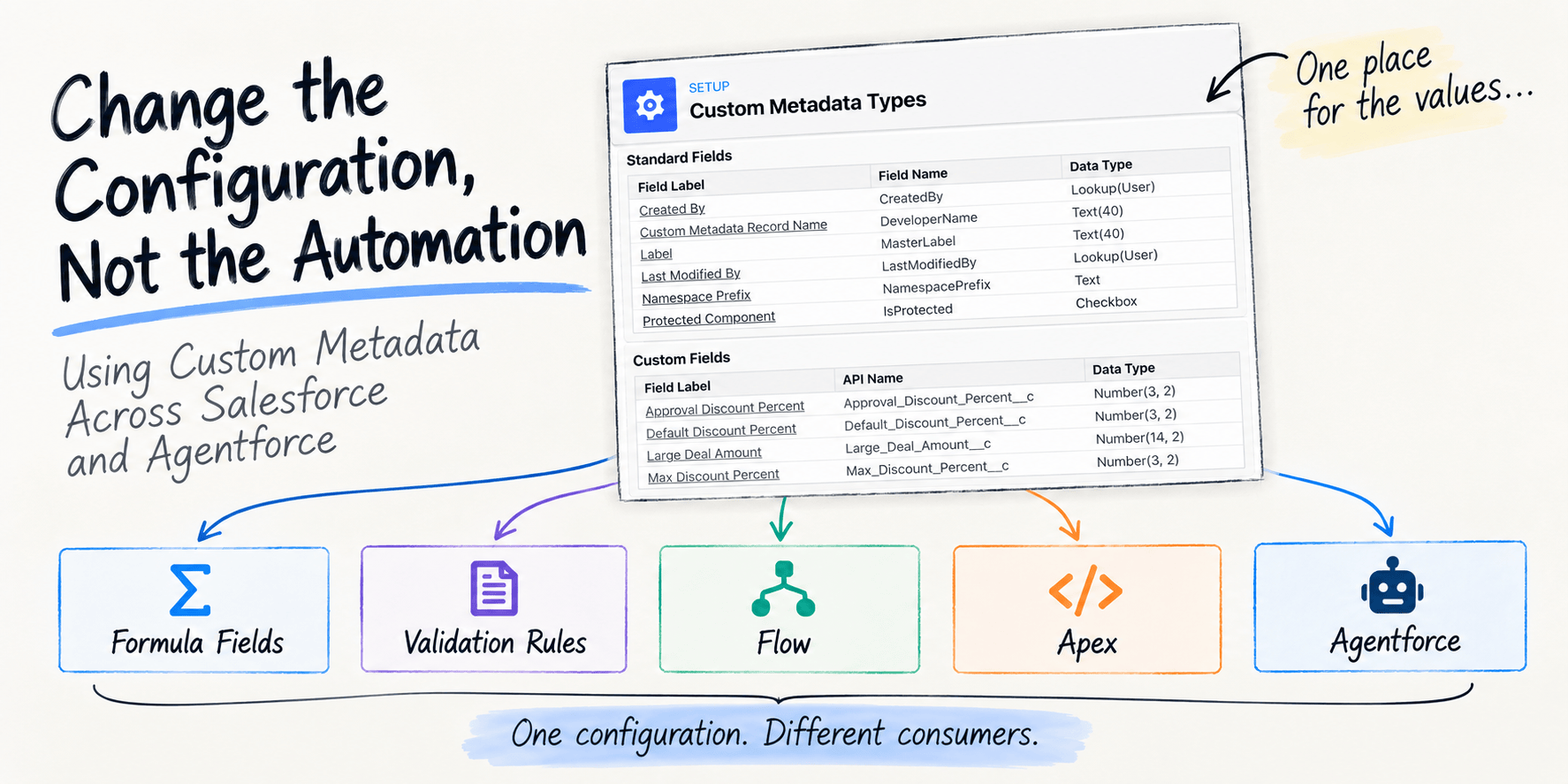
We hard-code configuration into Salesforce all the time — often without really intending to.
A threshold gets typed directly into a formula. A default value is embedded in a Flow. A feature is switched on through some branching logic. A mapping ends up in Apex. None of these decisions necessarily feels like “hard-coding” at the time; we are simply configuring the behaviour in the tool where that logic is being built.
The problem comes later. The business needs to change the threshold, or defaults, and someone has to work out everywhere it was used — and what will behave differently once it does. A finance tweak to a discount ceiling or a regional threshold becomes a hunt as to what other places need updating. What we want is a single place to store configuration that all these places can reference.
Salesforce already gives us a central, deployable and platform-native home for many of these configuration values: Custom Metadata Types. They can be referenced directly by formulas, validation rules and field defaults, queried by Flow, consumed by Apex, and — through those capabilities — provide configuration to Agentforce actions as well. Putting the value in one place is a start. It still leaves a harder question: where is it read, and what breaks if I change it?
History: I have a personal connection to this feature. When Custom Metadata Types reached general availability in Summer ’15, the announcement on the Salesforce Developers Blog opened with a quote from something I had written earlier: “What would be ideal at this stage is a way for us to create custom metadata on the platform, maybe one day….” That day arrived and now over 10 years later lets review its adoption throughout the rest of the platform.
This post walks through where Custom Metadata Type references work — formulas, validation rules, Flow, Apex, Flexipages, and Agentforce — and where they do not, or only with a workaround. The sample project deploys to a scratch org so you can walk the same Setup paths.
Custom Metadata for Deal Policies
This blog uses a Custom Metadata Type that captures the values used when processing deals that are being discounted and how they vary by region. The validation rule or Flow decides what happens when the discount is too high — reject the save, or require approval. This is the rule logic.
Custom Metadata only stores the numbers the rule compares against, such as the maximum allowed discount. What we are externalising are the values such rules operate on: a threshold, a default, a limit, a feature setting, a routing parameter. Custom Metadata gives the value a name, a deployable home, and a place other automation can share.
Note: Custom Metadata is not the same as storing values on a custom object or in Custom Settings. Those hold data — records users create, edit, and load in each org. Custom Metadata holds metadata — configuration that ships with your application code through source control and your CI/CD pipeline. Deploy the project and the policy records arrive with it. You are not moving business data around with import/export jobs after every release.
One configuration source, several consumers
The sample is a deal policy. The numbers live on Deal_Policy__mdt. Finance can change a threshold without editing the formula, the validation rule, the Flow, or the Apex that reads it — provided they know where to change it and the impact of changing it.
| Label | Name | Large deal amount | Max discount | Default discount | Approval threshold |
|---|---|---|---|---|---|
| Global default | Default | 100,000 | 40% | 5% | 10% |
| Europe, Middle East and Africa | EMEA | 80,000 | 40% | 5% | 8% |
| Americas | AMER | 120,000 | 40% | 5% | 15% |
The name is the region. Opportunity.Deal_Region__c stores that name, and Flow and Apex select the record with it. The label is only what you see. The maximum is the same on every record on purpose. The validation rule names the Default record, so that ceiling is org-wide. The approval threshold is the value that varies by record, and Flow can select that record from the opportunity in front of it.
Formula fields
Opportunity.Is_Large_Deal__c compares Amount with the large-deal amount on the named Default record:
Amount > $CustomMetadata.Deal_Policy__mdt.Default.Large_Deal_Amount__c
The reference has three parts: the type, the record, and the field. Salesforce documents this for formula fields, and the same shape works in validation rules and field defaults. Long text area fields on the Custom Metadata type are not supported in that reference. Each long text area field on a type counts as 255 characters toward the org’s 10 million character Custom Metadata allotment, whether or not the field holds that much data.
The formula has to name the record. Is Large Deal therefore uses the Default threshold of 100,000 even when the opportunity’s region is EMEA, whose own large-deal amount is 80,000. That is the boundary of the formula engine. Choosing a record from data on the opportunity is what Flow and Apex are for.

Note: Winter ’27 adds
FORMULA()in SOQLWHEREclauses (beta, API 68+, sandbox and scratch orgs only) for comparing two fields on the same object — for exampleWHERE FORMULA('Amount - Probability') > 400. It is not supported inSELECT, and the expression is limited to field names on the object you are querying:$CustomMetadatareferences and other formula-engine globals are rejected withInvalid formula: no such field.
Field defaults
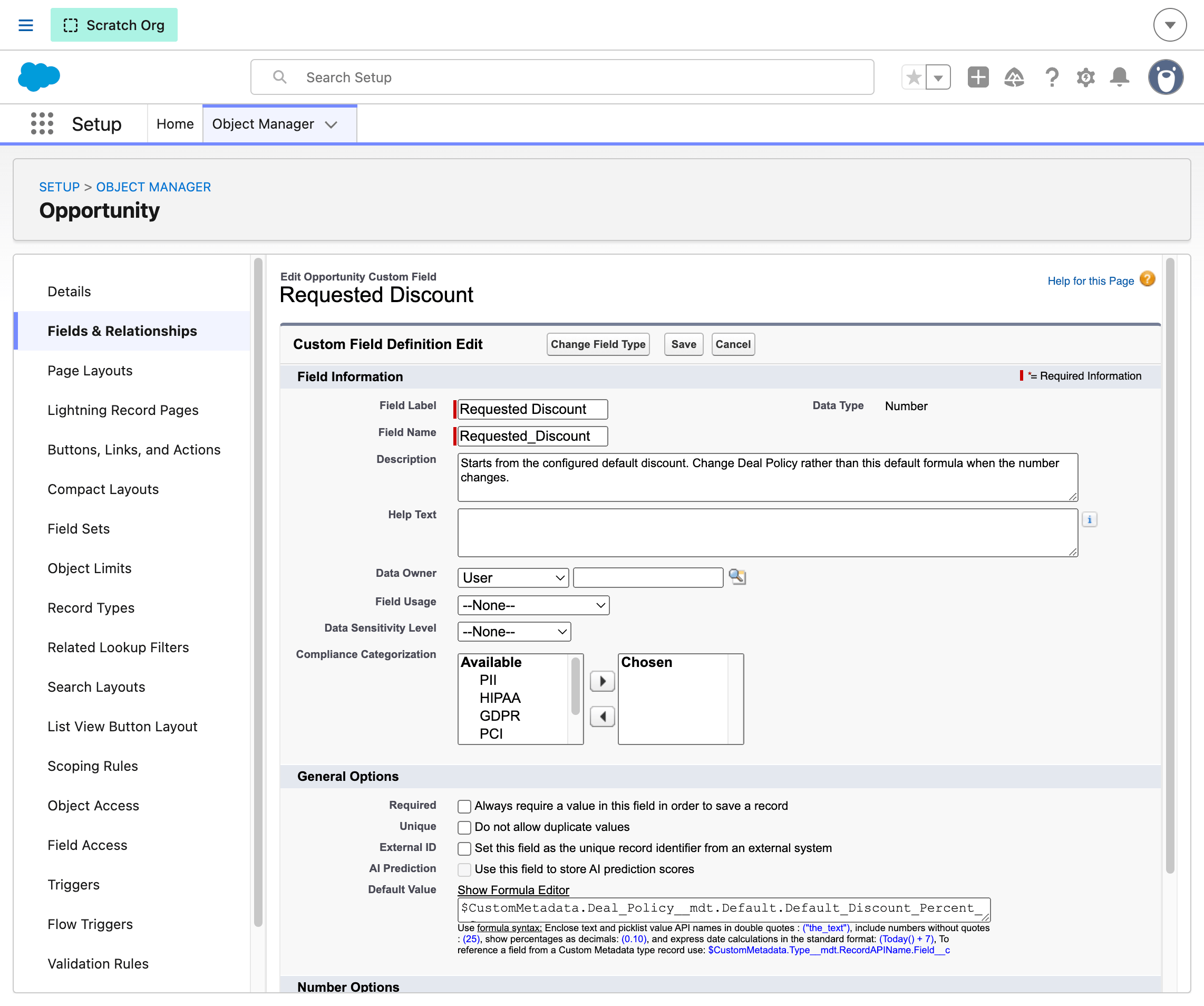
Opportunity.Requested_Discount__c is seeded from configuration, so a new opportunity starts at the configured default rather than a literal typed into the field:
$CustomMetadata.Deal_Policy__mdt.Default.Default_Discount_Percent__c
The formula editor does not offer Custom Metadata field types in the picker for defaults. The reference still works when you type it.
Validation rules
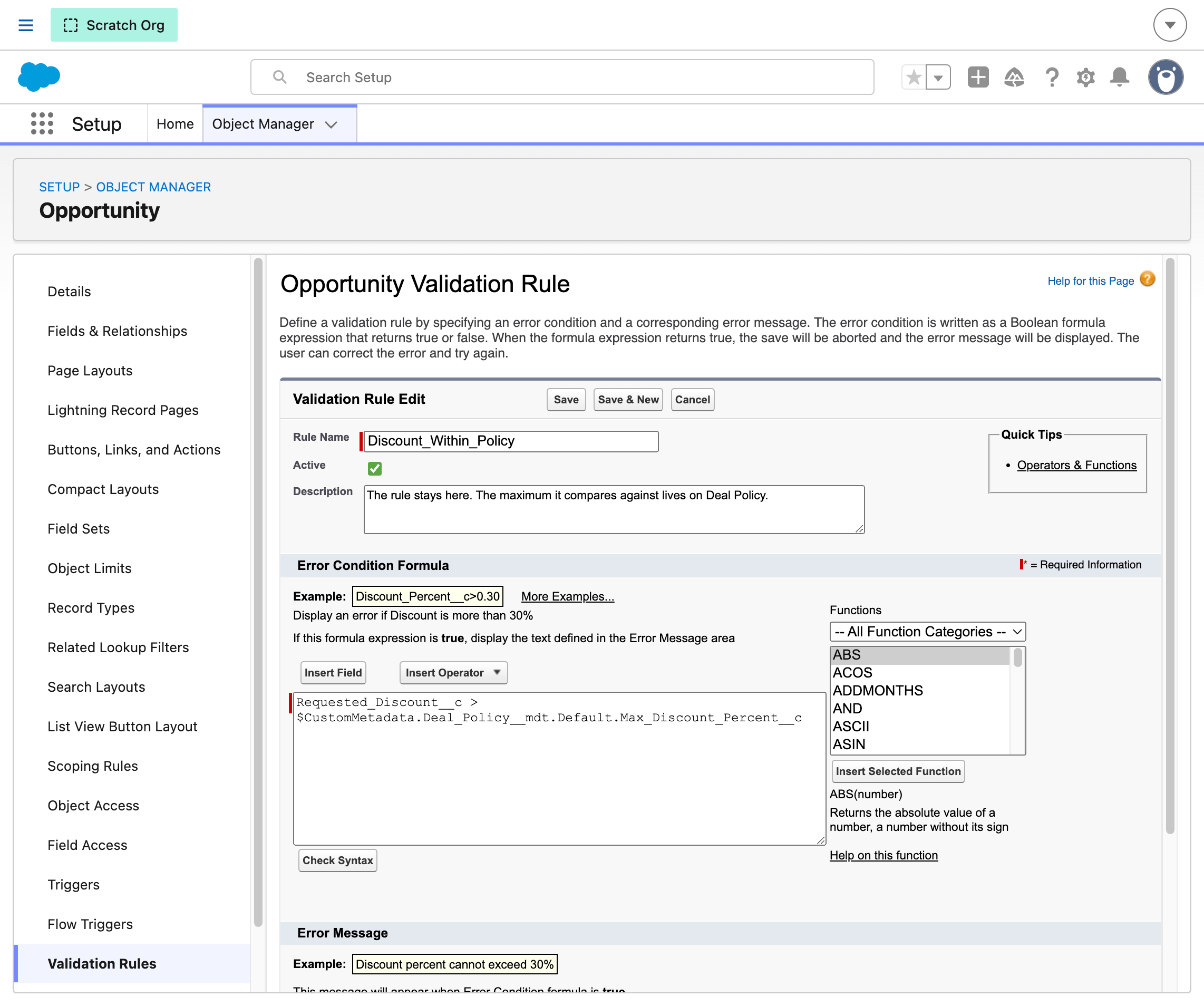
Opportunity.Discount_Within_Policy keeps the rule in the validation rule and the ceiling in Custom Metadata:
Requested_Discount__c > $CustomMetadata.Deal_Policy__mdt.Default.Max_Discount_Percent__c
A requested discount above 40% is rejected. The maximum stays a configured value on the policy record.
Flows
Apply_Deal_Policy is a before-save Flow on Opportunity. It does three things the formula engine cannot do in one expression. It queries Deal_Policy__mdt with Get Records, matching DeveloperName to Opportunity.Deal_Region__c. EMEA’s approval threshold is 8%. AMER’s is 15%. A 12% discount needs approval in EMEA and does not in AMER. A formula would have to name every record to make that choice. When no regional record matches, a Flow formula falls back to the named Default record:
$CustomMetadata.Deal_Policy__mdt.Default.Approval_Discount_Percent__c
Using $CustomMetadata is the literal approach to using the values stored. Get Records is the dynamic path. The Flow demonstrates that $CustomMetadata still works inside a Flow formula when the record name is known, which is what the fallback uses. In Flow Builder, Apply Deal Policy shows the Get Records step on Deal_Policy__mdt, the Default fallback, and the branch that sets Requires_Approval__c:

When the requested discount exceeds the regional approval threshold, the Flow sets Requires_Approval__c. It runs in system context so it can read the policy and update the flag for whoever is saving the opportunity.
The Flow also checks $Permission.Approve_Above_Policy. That is a Custom Permission — metadata about whether this user may skip the approval flag, not what the threshold is. Custom Metadata holds the configured numbers; Custom Permissions hold capability. Assign Approve_Above_Policy through the Deal_Approver permission set and a user above the regional threshold can save without being flagged — the validation rule maximum is unchanged.
Apex classes
DealPolicy.forRegion is the same lookup for code: Deal_Policy__mdt.getInstance with the record name, and if nothing matches, getInstance('Default'). Apex can issue unlimited Custom Metadata SOQL queries per transaction; a bulk query still respects the platform cap of 50,000 records returned per transaction.
public with sharing class DealPolicy {
    public static Deal_Policy__mdt forRegion(String region) {
        if (String.isBlank(region)) {
            return Deal_Policy__mdt.getInstance('Default');
        }
        Deal_Policy__mdt match = Deal_Policy__mdt.getInstance(region);
        return match == null ? Deal_Policy__mdt.getInstance('Default') : match;
    }
}
Agentforce
Agentforce does not read $CustomMetadata references directly (please consider upvoting this idea). The workaround is an invocable Apex action that loads the policy record and returns the values the agent needs. The sample agent calls that action before answering, maps the outputs into agent variables, and responds from those variables — so the thresholds still come from Deal_Policy__mdt, not from hard-coded numbers in the agent script.
LoadDealPolicyForAgent is a thin wrapper around DealPolicy.forRegion:
@InvocableMethod(label='Load Deal Policy' category='Deal Policy')
public static List<Result> execute(List<Request> requests) {
    List<Result> results = new List<Result>();
    for (Request req : requests) {
        Deal_Policy__mdt policy = DealPolicy.forRegion(req.region);
        Result result = new Result();
        result.region = policy.DeveloperName;
        result.maxDiscountPercent = policy.Max_Discount_Percent__c;
        result.defaultDiscountPercent = policy.Default_Discount_Percent__c;
        result.approvalDiscountPercent = policy.Approval_Discount_Percent__c;
        result.largeDealAmount = policy.Large_Deal_Amount__c;
        results.add(result);
    }
    return results;
}
The Deal_Policy_Advisor agent script shows the full path from variables to action call. Mutable variables hold the loaded configuration; the router sends policy questions to a subagent; that subagent declares the Apex-backed action and binds it in its reasoning block so outputs populate the variables before the reply is composed:
config:
   developer_name: "Deal_Policy_Advisor"
   agent_type: "AgentforceEmployeeAgent"
   ...

variables:
   deal_region: mutable string = "Default"
   max_discount_percent: mutable number = 0
   approval_discount_percent: mutable number = 0
   ...

start_agent agent_router:
   reasoning:
      actions:
         go_to_policy_advisor: @utils.transition to @subagent.policy_advisor
            description: "User asks about deal policy, discount limits, or approval thresholds"

subagent policy_advisor:
   actions:
      load_deal_policy:
         inputs:
            region: string
               is_required: False
         outputs:
            region: string
            maxDiscountPercent: number
            approvalDiscountPercent: number
            ...
         target: "apex://LoadDealPolicyForAgent"

   reasoning:
      instructions:->
         | You must call {!@actions.load_deal_policy} once before every answer.
           Pass region EMEA, AMER, or Default depending on what the user asked.
           ...
      actions:
         load_deal_policy: @actions.load_deal_policy
            with region=...
            set @variables.deal_region = @outputs.region
            set @variables.max_discount_percent = @outputs.maxDiscountPercent
            set @variables.approval_discount_percent = @outputs.approvalDiscountPercent
            set @variables.large_deal_amount = @outputs.largeDealAmount
            ...
In Agentforce Studio, ask “What is the deal policy for EMEA?” The preview shows the router handing off to policy_advisor, the load_deal_policy action running, and variables populated from the EMEA record — 8% approval threshold, 80,000 large-deal amount — the same Custom Metadata the Flow and validation rule use:
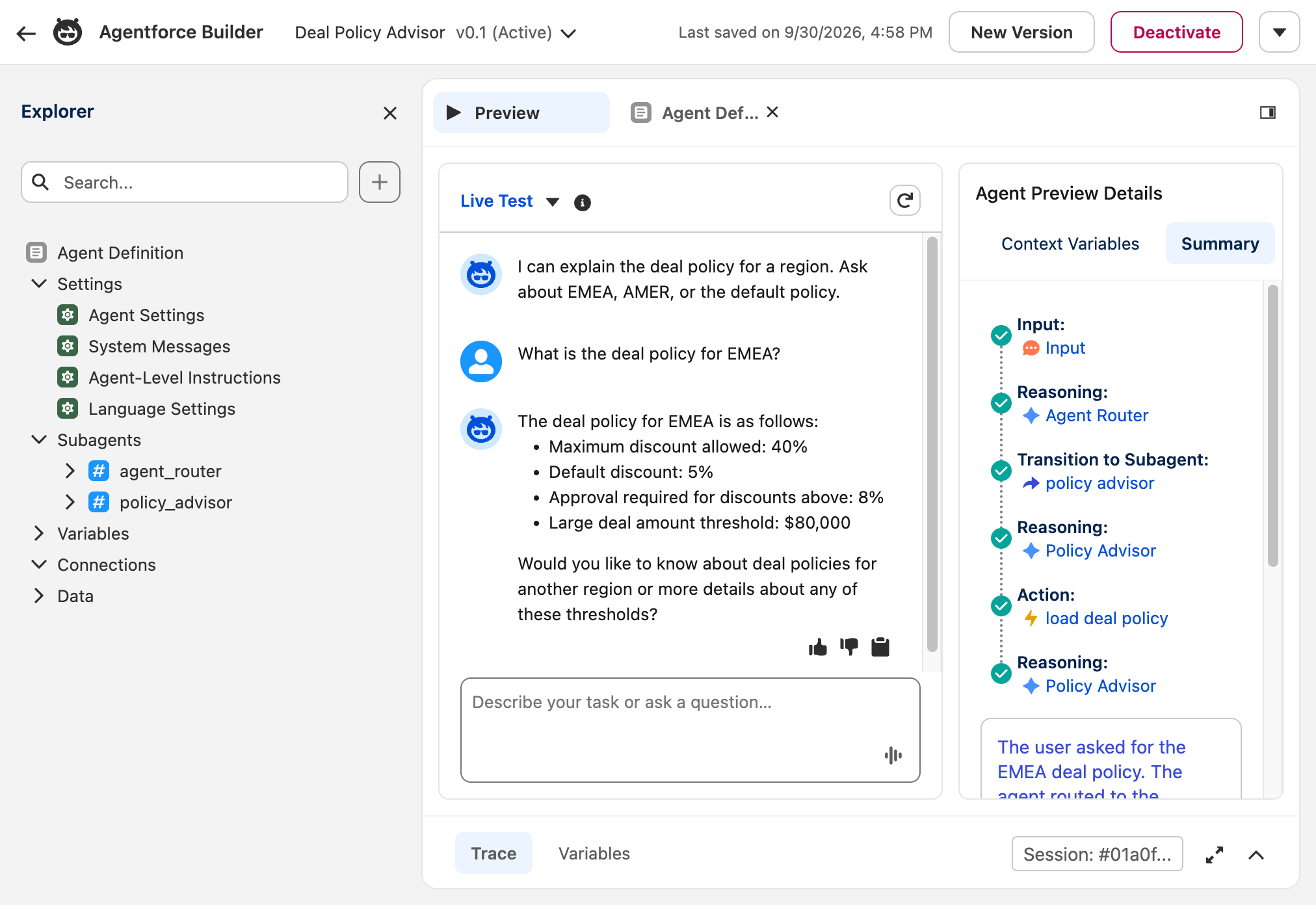
Change the EMEA record in Setup or deploy an updated metadata file, and the agent picks up the new numbers on the next call without editing the agent definition.
Note: The sample repository README includes how to run agent tests for this sample.
Flexipages
Lightning App Builder component visibility, including Dynamic Forms field visibility, evaluates record fields, related fields, user context, and permissions. It does not take a $CustomMetadata reference. The Salesforce community has open IdeaExchange requests to close that gap: Allow Custom Metadata Types in Conditional Visibility for Lightning Pages and Refer custom metadata to control component visibility in lightning app builder.
On record pages, the workable pattern is a formula-field bridge — the same indirection Is_Large_Deal__c uses here. The formula reads Custom Metadata; component visibility rules filter on the Opportunity field. The formula still has to name the record, and you may be adding a field whose only job is to carry configuration onto the page. That is easier to justify when the field already belongs on the record for other reasons.
On App and Home pages there is no record to host that bridge. The component reads Custom Metadata itself — in Apex or @wire — or an App page uses Dynamic Interactions to wire behaviour at runtime.
Understanding configuration change impact
Centralising the value only helps if you can still see what reads it. Setup’s Object Manager lists the Deal Policy fields, and Where is this used? on a field answers the impact question for a small sample like this.

Open a field and choose Where is this used? Setup lists the metadata that references it. For Max Discount Percent, the sample shows the validation rule and the Apex class the agent calls:

The same dependency data is available from the CLI through the Tooling API. Add --json if you want structured output to parse or pipe elsewhere. Resolve the field id, then query MetadataComponentDependency:
sf data query -t --json -q \
  "SELECT Id FROM CustomField \
   WHERE EntityDefinition.QualifiedApiName = 'Deal_Policy__mdt' \
   AND DeveloperName = 'Max_Discount_Percent'"

sf data query -t --json -q \
  "SELECT MetadataComponentName, MetadataComponentType \
   FROM MetadataComponentDependency \
   WHERE RefMetadataComponentId = '00Ncb00000nejqHEAQ'"
The first query returns the field id. The second returns the consumers — in this sample:
{
  "result": {
    "records": [
      {
        "MetadataComponentName": "LoadDealPolicyForAgent",
        "MetadataComponentType": "ApexClass"
      },
      {
        "MetadataComponentName": "Discount_Within_Policy",
        "MetadataComponentType": "ValidationRule"
      }
    ],
    "totalSize": 2,
    "done": true
  }
}
Field-level dependency answers what breaks if I change this value? for this sample.
Note: Originally I tried building a LWC Custom Metadata editor where users can change the values and then see what uses them before saving. Alas, calling Salesforce REST APIs from Apex to drive that still involves quite a dance — OAuth, Named Credentials, External Credentials, and External Client App setup, sigh…
Platform limits
Custom Metadata is deployable and cache-friendly, but not unbounded — Salesforce’s allocation guide is the place to check the detail. An org gets up to 200 types (350 with certified managed packages), 100 fields per type, and a 10 million character budget counted against each field’s maximum capacity, not the value you store or the number of rows. Size field types deliberately: a text area reserves 255 characters whether you fill it or not. Process Builder still caps Custom Metadata formula references at 15 per process. A small deal-policy table like this sample does not come close; the limits matter when configuration becomes a product surface — many types, wide rows, or large policy tables shipped in ISV packages. Setup → System Overview shows current use.
Conclusion
Before typing a literal business value into a formula, a Flow, an Apex class, or an agent action, ask whether it is configuration. If it is, give it a name and a home.
Custom Metadata gives configuration a deployable home and a consistent reference pattern across formulas, validation rules, Flow, and Apex. Staying aware of where those references work — and where they do not, such as Lightning App Builder visibility — is as important as centralising the values themselves. Keep capability separate from configuration: Custom Permissions, as the Flow shows, govern what a user may do; Custom Metadata governs the values the automation runs on.