Andy in the Cloud

From BBC Basic to Force.com and beyond…


16 Comments

Doing more work with the Unit Of Work

In a previous post I introduced the Unit Of Work class, which is part of the Apex Enterprise Patterns series. As the original post describes it helps you simplify your code when it comes to performing multiple DML statements over related objects, as well as providing a bulkification and transaction management. In this post i would like to share information on a new feature that adds some extensibility to the fflib_SObjectUnitOfWork class.

This new feature addresses use cases where the work you want it to do, does not fit with the use of the existing registerDirty, registerNew or registerDeleted methods. But you do want that work to only be performed during the commitWork method, along with other registered work and within thesame transaction it manages.

Some examples of such situations are…

  • Sending Emails
    You want to register the sending an email once the work has completed and have that email only be sent if the entire unit of work completes.
  • Upsert
    You want to perform an upsert operation along with other insert, update and delete operations performed by the existing functionality.
  • Database class methods
    You want to utilise the Database class methods for additional functionality and/or granularity on some database operations, e.g. emptyRecycleBin, convertToLead, or perform an insert with allOrNothing set to false.
  • Self referencing objects
    You want to perform DML work relating to self referencing objects, something which is currently not supported by the registerNew and registerRelationship methods.
  • Nested Unit Of Works
    Though generally not recommended, if you do happen to have created another fflib_SObjectUnitOfWork instance, you might want to nest another unit of work instance commitWork call with another.

In these cases the class now contains a new Apex Interface, called IDoWork, it is an incredibly simple interface!

/**
* Interface describes work to be performed during the commitWork method
**/
public interface IDoWork
{
   void doWork();
}

To use this interface you implement it and register an instance of the implementing class through the new registerWork method. When the commitWork method is called it will callback on the doWork method for each registered implementations once it has completed the work given to it by the existing methods. In other words after all the DML on the dirty, new or deleted records have been processed.

A SendEmailWork implementation of this interface actually resides internally within the fflib_SObjectUnitOfWork class and is used to support another new method called, registerEmail. I added this to experiment with the feature during development but felt its worth leaving in as an added bonus feature if your writing code thats doing DML and sending emails!

The following example integrates the upsert method on the Database class (which needs a concreate SObject list), but you can really do anything you want in the doWork method!

	public class UpsertUnitOfWorkHelper implements fflib_SObjectUnitOfWork.IDoWork
	{ 		
		public Database.UpsertResult[] Results {get; private set;}
		
		private List<Account> m_records;
		
		public UpsertUnitOfWorkHelper()
		{  
			m_records = new List<Account>();
		}
		
		public void registerAccountUpsert(Account record)
		{
			m_records.add(record);
		}
		
		public void doWork()
		{
			Results = Database.upsert(m_records, false);				
		}
	}

The following is an example of this in use…

		// Create Unit Of Work as normal
		fflib_SObjectUnitOfWork uow =
			new fflib_SObjectUnitOfWork( 
				new Schema.SObjectType[] { 
					Product2.SObjectType, 
					PricebookEntry.SObjectType, 
					Opportunity.SObjectType, 
					OpportunityLineItem.SObjectType });
		
		// Register some custom work
		UpsertUnitOfWorkHelper myUpsertWork = new UpsertUnitOfWorkHelper();
		uow.registerWork(myUpsertWork);
				
		// Do standard work via...		
		
		// uow.registerNew(...)
		
		// uow.registerDeleted(...)
		
		// uow.registerDirty(...)
		
		// Register some custom work via...
		myUpsertWork.registerAccountUpsert(myAccountRecordToUpsert);
		
		// Commit work as normal
		uow.commitWork();
		
		// Optionally, determine the results of the custom work...
		List<Database.UpsertResult> myUpsertResults = myUpsertWork.Results;		

In summary, the unit of work helps co-ordinate many things we do that in essence are part of a transaction of work we want to happen as a single unit. This enhancement helps integrate other “work” items your code might have been performing outside the unit of work into that single unit of work and transaction. It also helps bridge some gaps in the unit of work that exist today such as self referencing objects.

Please let me know your thoughts on this new feature and how you see yourself using it!


11 Comments

FinancialForce Apex Common Updates

This blog starts a series of updates leading up to Dreamforce 2014, where I am pleased to announce that my Advanced Apex Enterprise Patterns session has just been selected! In the coming series of blogs I will be covering enhancements to the existing base classes supporting the Apex Enterprise Patterns and highlighting some of the more general classes from within the FinancialForce Apex Common repository both reside in.

This time I will be highlighting some excellent contributions from fellow Force.com MVP Chris Peterson who has recently added more general utility classes to support security and dynamic queries. As well as some improvements from myself to the existing Domain and Selector classes.

In a following blog I’ll be going over in more detail the current results of some experimental work I’ve been doing relating to generic Field Level Security enforcement within the patterns base classes, meanwhile enjoy the new fflib_SecurityUtils class..

New fflib_SecurityUtils.cls

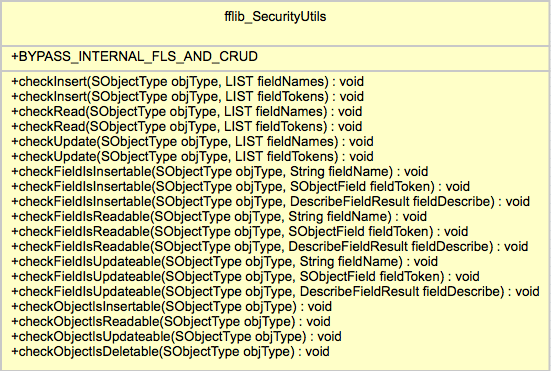
SecurityUtilsThe Salesforce Security Review currently requires that both object level and field level security is enforced by your code. The later of which, field level security has recently stirred up quite a lot of discussion and concern in the ISV community, more on this in the follow up blog post! In the meantime if you read the two Salesforce articles (here and here) describing the requirement and how to implement it in your Apex code (Visualforce offers some built in support for you). If like me, you’ll quickly realise the sample code provided is in reality somewhat verbose for anything more than a single object or field usage!

Enter the fflib_SecurityUtils class! As you can see from the UML representation shown here it’s methods are pretty simple and thus easy to use, an Apex exception is thrown if the user does not have access to the given object and/or fields. Here are some examples of it in use, you can choose to check individually or in bulk a set of fields and the object, covering both CRUD and Field Level Security.


fflib_SecurityUtils.checkObjectIsInsertable(Account.SObjectType);

fflib_SecurityUtils.checkInsert(
   Account.SObjectType,
   new List<Schema.SObjectField>{
      Account.Name,
      Account.ParentId, } );

fflib_SecurityUtils.checkUpdate(
   Lead.SObjectType,
   new List<Schema.SObjectField>{
     Lead.LastName,
     Lead.FirstName,
     Lead.Company } );

This class will also help perform object and field read access checks before making SOQL queries, though you may want to check out the features of the QueryFactory class as it also leverages this utility class internally.

New fflib_QueryFactory.cls

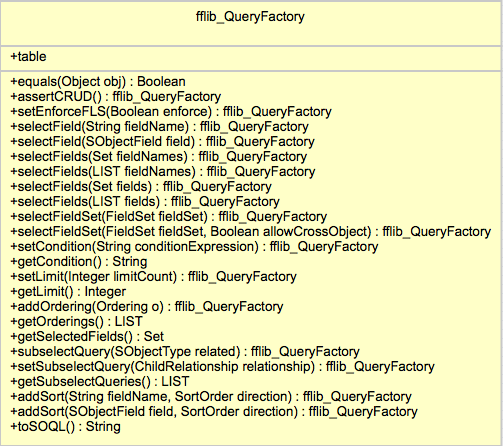
QueryFactory

The key purpose of this class is to make building dynamic SOQL queries safer and more robust than traditional string concatenation or String.format approaches. It also has an option to automatically check read security for the objects and fields given to it.

If your using Fieldsets in your Visualforce pages you’ll know that it’s generally up to you to query these fields, as you can see from the UML diagram, the class supports methods that allow you to provide the Fieldset name and have it automatically include those fields for you in the resulting query.


Chris has done an amazing job with this class not only in its feature and function but in its API design, leveraging the fluent model to make coding with it easy to use but also easy to read and understand. He first presented in at the FinancialForce DevTalks event this month, his presentation can be found here. In the presentation he gives some examples and discusses when you should use it and when not. So if your writing code like this currently…

String soql = ‘SELECT ‘;
for(Integer i = 0; i< fieldList.size(); i++){
  soql += fieldList + ‘, ‘;
}
soql = soql.substring(0,soql.length()-2);
soql += conditions != null && conditions.trim().size() > 0 ?  ‘ WHERE ‘ +
    soqlConditions : ‘’;
soql += limit != null && limit.trim().size() > 0 ? ‘ LIMIT ‘+limit;
List<Contact> nonBobs = Database.query(soql);

In it’s simplest form it’s use looks like this..

String soql =
  new fflib_QueryFactory(Contact.SObjectType)
    .selectField(Contact.Name)
    .setLimit(5)
    .toSOQL();

With object and field read security enforcement and Fieldset support would look like this…

String soql =
  new fflib_QueryFactory(Contact.SObjectType)
    .assertIsAccessible().
    .setEnforceFLS(true).
    .selectFields(myFields)
    .selectFieldSet(Contact.fieldSets.ContactPageFieldSet)
    .setCondition(‘Name != “Bob”’)
    .toSOQL();

The class is fully commented and the associated test class has further examples, also Chris is keen to work on API for the SOQL where clause in the future, i look forward to seeing it!

fflib_SObjectSelector.cls (Selector Pattern) Updates

I have updated this base class used to support the Selector pattern, to leverage the fflib_QueryFactory, in doing so you now have the option (as a constructor argument) to enable Field Level Security for fields selected by the selector. The default constructor and prior constructors are still supported, with the addition of the following that now allows you to control Fieldset, object and field level security enforcement respectively. For example…

OpportunitiesSelector oppsSelector =
    new OpportunitiesSelector(includeFieldSetFields, enforceObjectSecurity, enforceFLS);

NOTE: You can of course implement your own Selector default constructor and enable/disable these features by default within that, if you find yourself constantly passing a certain combination of these configurations parameters.

For custom selector methods you can leverage a QueryFactory constructed and initialised based on the Selector information, leaving you to add the additional where clause for the particular query logic the method encapsulates. Because of this you no longer need to add assertIsAccessible as the first line of your custom Selector methods. Prior to adopting QueryFactory a custom selector method might have looked like this…

public Database.QueryLocator queryLocatorReadyToInvoice()
{
  assertIsAccessible();
  return Database.getQueryLocator(
     String.format('SELECT {0} FROM {1} WHERE InvoicedStatus__c = \'\'Ready\'\' ORDER BY {2}',
     new List<String>{getFieldListString(),getSObjectName(),getOrderBy()}));
}

The updated patterns sample applications OpportunitiesSelector example to use the new newQueryFactory base class method, because this method pre-configures the factory with the selector object, fields, order by and fieldsets (if enabled), the new implementation is simplified and more focused on the criteria of the query the method encapsulates.

public Database.QueryLocator queryLocatorReadyToInvoice()
{
  return Database.getQueryLocator(
    newQueryFactory().setCondition('InvoicedStatus__c = \'\'Ready\'\'').toSOQL());
}

This updated fflib_SObjectSelector base class is backwards compatible from the API perspective, so you can choose to continue with the original String.format approach or adopt the newQueryFactory method accordingly. You can further review the old example here, against the new one here.

fflib_SObjectDomain.cls (Domain Pattern) Updates

This base class has to date had minimal functionality in it other than the routing of trigger events to the applicable virtual methods and object security enforcement. To support better configuration of these features and those in the future, i have added a new Domain class configuration feature, accessed via a new Configuration property.

Despite the focus on enforcing security in the above new features and updates, there are times when you want to enforce this in the calling code and not globally. For this reason the base class can now be configured to disable the object security checking (by default performed during the trigger after event), leaving it up to the calling code to enforce. Methods accessed from the new Configuration property can be used to control this.

public class ApplicationLogs extends fflib_SObjectDomain
{
  public ApplicationLogs(List<ApplicationLog__c> records)
  {
    super(records);
    Configuration.disableTriggerCRUDSecurity();
  }
}

Domain Trigger State

I have also been asked to provide a means to maintain member variable state between invocation of the trigger handler methods. Currently if you define a member variable in your Domain class it is reset between the before and after trigger phases. This is due to the default trigger handler recreating your Domain class instance each time.

If you want to retain information or records queried in the before handler methods in your class member variables such that it can be reused in the after handler methods, you can now enable this feature using the following configuration. The following illustrates the behaviour.

public class Opportunties extends fflib_SObjectDomain
{
  public String someState;

  public TestSObjectStatefulDomain(List<Opportunity> sObjectList)
  {
    super(sObjectList);
    Configuration.enableTriggerState();
  }

  public override void onBeforeInsert()
  {
    System.assertEquals(null, someState);
    someState = 'Something';
  }

  public override void onAfterInsert()
  {
    System.assertEquals('Something', someState);
  }
}

This feature is also aware of trigger recursion, meaning if there is such a scenario a new Domain class instance is created (since the records it wraps are new).


32 Comments

More power to your Flows in Summer’14

Since an earlier blog post describing how to hookup a Flow to a Custom Button, I have been promoting this #clicksnotcode platform feature further at my local DUG and recently the Salesforce1 World Tour London and internally within FinancialForce, the response has been great.

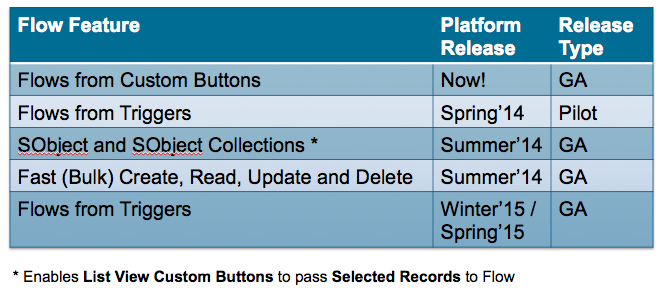
I have also been working on some new use cases showing the use of Flow from Workflow which is capability in pilot for Spring’14. Then before i knew it I had i had found even more new Flow features in my hands delivered via the upcoming Summer’14 release! You can read all about these features in the excellent Visual Workflow Implementation Guide. This blog provides step by step guide as to how I’ve explored these new features and a summary of their current and general availability. Note: The Flow Trigger functionality looks to remain in Pilot beyond Summer’14.

Flow SObject Collections Summer’14 (GA)

NewElements

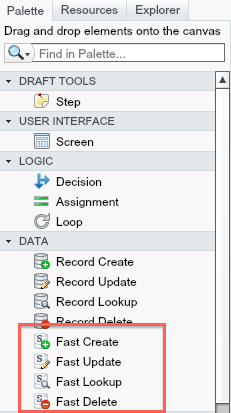
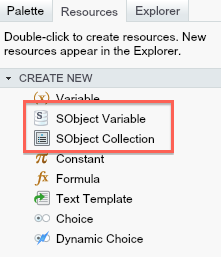
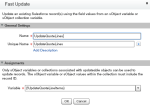
Lets take a look at two new Resource types in Flow and how they work in conjunction with four new Data elements, known as Fast Create, Fast Read, Fast Update and Fast Delete. With these new elements you can drag them onto the Flow canvas as with the previous ones. The difference is these allow you to basically manage multiple records at once, or in bulk to use Apex term.

NewVariables

The Fast prefix comes from a reflection on what you would have to have done in the past to manipulate several records of the same object. The previous alternative was to create your own loop around the existing Create element creating a single record at time. Which in general is much slower and gives greater rise to hitting platform governors around the number of database operations that can be performed in a single Flow execution. Flow is grow up for greater volumes!

EnterAmountTo illustrate these new features i decide to implement in Flow something i have previously written using Apex code. The following use case is to Apply a user entered discount to selected Quote Line Items from the Related list. The flow will prompt the user for the Discount amount and they apply it, before returning the user back to the Quote detail page.
ApplyDiscount

Here is the high level steps i took to achieve this.

  1. Created a Flow that exposes an Input only variable of type SObject Collection and used by the new  Loop and Fast Update elements to perform the calculations and update the rows passed in.
  2. Created a Visualforce page (no Apex required) that uses the standard platform Selected field to pass in the users selected records (from a List View or Related List). This was a little more Visualforce than i wanted personally, but is still a pretty good template for other use cases with minimal changes required.
  3. Created a List View Custom Button and associated it with the above Visualforce page.
  4. Edited the Quote layout to add the above button the Quote Line Items related list


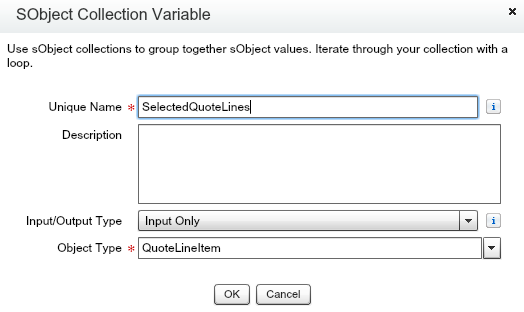
Lets take a look at the Flow I created and then I’ll go into some more detail on the Visualforce page needed to call it. First things first is to create an SObject Collection variable of the appropriate object type, in this case QuoteLineItem.

SObjectCollection

Keep a note of the Unique Name used, it will be important when we create the Visualforce page to call this flow. The next step is to loop over the SObject (or QuoteLineItem) records and apply the discount. The new Loop element is super easy to use, it has two arrows, one for each iteration and another arrow to point to the next step once all records in the collection have been processed.

ApplyDiscountFlow

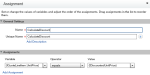
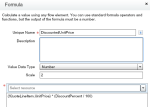
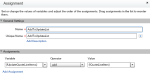
The following screenshots show the elements in more detail. The Loop element uses new SObject Variable QuoteLineItem, for each record, which allows you to operate at the field level using the existing Assignment element. I also used the existing Formula functionality in Flow to perform the discount calculation. After this i added the record to a another SObject Collection variable that i would later pass to the Fast Update method.

The Visualforce page that runs the Flow looks similar to the one i used in the previous blog to invoke a Flow from the Detail Page Custom Button. The difference is passes in multiple record from those selected by the user via the Selected binding. There is some magic above the flow:interview element that ensures the fields used by the Flow are queried by the platform, otherwise an error occurs when the Assignment steps are executed stating the UnitPrice field has not been queried (I’m open to better ways of resolving this!).

<apex:page standardController="QuoteLineItem" recordSetVar="Quotes">
    <apex:repeat value="{!Selected}" var="SelectedRow" rendered="false">
        {!SelectedRow.QuoteId}{!SelectedRow.UnitPrice}
    </apex:repeat>
    <apex:variable var="QuoteId" value="{!Selected[0].QuoteId}"/>
    <flow:interview name="ApplyDiscount" finishLocation="/{!QuoteId}">
        <apex:param name="SelectedQuoteLines" value="{!Selected}"/>
    </flow:interview>
</apex:page>

Flow Triggers via Spring’14 (Pilot)

CreateElementThe use case I chose here was one i found on IdeasExchange, it related to someone who wanted to use Workflow to create a new child record when a parent record was inserted. In this demo i create a new Task child record whenever an Account is created, this could be for example, to ensure a follow up is made on the Account. The Flow i created was insanely simple, just one Flow variable (set to Input Only) and a Create element!

RecordCreate

Once this is created in my pilot org i found a new Workflow Action, called Flow Trigger. This Workflow action allowed me to pick the Flow and define any parameters i wanted to pass in. In this case the WhatId parameter which would later be used by the Flow when populating the Task fields to associate the task with the Account being created. Finally (not shown) i linked this new Workflow Action with a Workflow Rule to try it out.

FlowTriggers
FlowTriggerEdit

Any that was it! I created a new Account and sure enough my new Task appeared, no Apex code in sight!

TaskChild

Some thoughts and observations…

  • No UI Flows. Flow’s used in this context cannot use any Screen elements, and are thus known sometimes as “Headless” flows. The platform will automatically validate for this and prevent you assigning a UI Flow to a Flow Trigger.
  • Bulkification of Flow Triggers or not? Normally when doing things at a record level Apex developers have it drummed into them to think about bulk or multiple record situations (for example Data Loader use cases) not just a single record at a time. However you will notice this was not the case above? I did expect the new SObject Collection to take a role here but not so. What Salesforce attempts to do is internally bulk insert Tasks for you by running your Flow in parallel and synchronising the executions at the time they all need to insert a record to ensure it’s done optimally. This is cleverly transparent from the Flow designer and i think intentionally so, as it is quite an advanced topic for the target user of Flow. However i do wonder how well this will stand up to more complex Flow’s. No doubt why Salesforce is being so careful over how long this remains in Pilot.

When are these features available (Safe Harbour)?

FlowRoadmap


12 Comments

MavensMate Templates and Apex Enterprise Patterns

mavensmateI’ve been using MavensMate as alternative IDE for coding on Force.com for the past 6 months and loving it more and more to be honest, it receives a strong stream of updates, feels modern, responsive (as much as the underlying platform API’s permit) and is light weight. I’m also getting to grips with the power of the Sublime Text editor (which hosts MavensMate) and it’s excellent find and replace tools for example.  Recently i’ve been working on a feature with the help of the author of this fantastic tool Joe Ferraro.

One of the cool social features of MavensMate is it’s template engine, when ever you create a Apex class, Apex trigger, Visualforce Page or Visualforce Component, you can elect to start editing from scratch or pick one of a growing number of templates, ranging from Batch Apex, Controllers, Schedulers to Unit test templates, including a new one from a new friend in the push for BDD on Force.com, Paul Hardaker (also a FinancialForce.com employee btw). The whole thing is driven by a GitHub repository, if you contribute to that repository (and your pull request is merged) your template is instantly live across the world! Now that’s a social IDE!

I set about developing templates for the Apex Enterprise Patterns and quickly bumped into a gotcha! The previous template engine only took one parameter, the name of the Metadata component (Apex class or trigger name for example). When creating Domain classes or Selectors, the name of the class and the underlying custom object is required. After a quick Twitter conversation and GitHub issue, Joe had already nailed the design for a new feature to fix this situation! You can read more about how to use it here.

DomainTemplate

I’m pleased to report it worked like a charm the first time, great design and very flexible! The templates have now been submitted and successfully merged by Joe into the repository and are now live and ready to use!

  • DomainClass
  • DomainTrigger
  • SelectorClass
  • ServiceClass

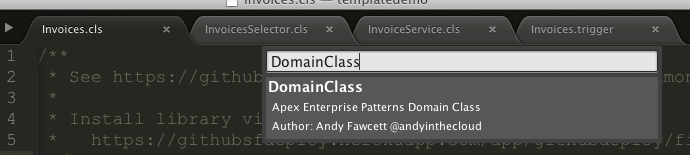
The follow screenshot shows the template selection prompt, just start typing and it narrows the options down as you go, press enter and you are prompted for the template parameters. These parameters default to examples defined in the template configuration file, overwrite these with your own following the examples as a naming convention guide. Press enter again and MavensMate will create your class and present it back to you ready for you to start editing!

NewClassTemplateParametersInvoices

If you want to see a quick from zero to Domain class demo check out my demo video below. Thanks again Joe for such a great community tool and providing great support for it!


14 Comments

Account Hierarchy Rollups #ClicksNotCode

clicksnotcodeinthesunThe Declarative Lookup Rollup Summary Tool is holding up to quite an onslaught of requirements at the moment. When this one came in, i thought it may have met its match! However it has taken just less than a day in the Spanish sunshine to get my head round it and work with the poster to find a solution!

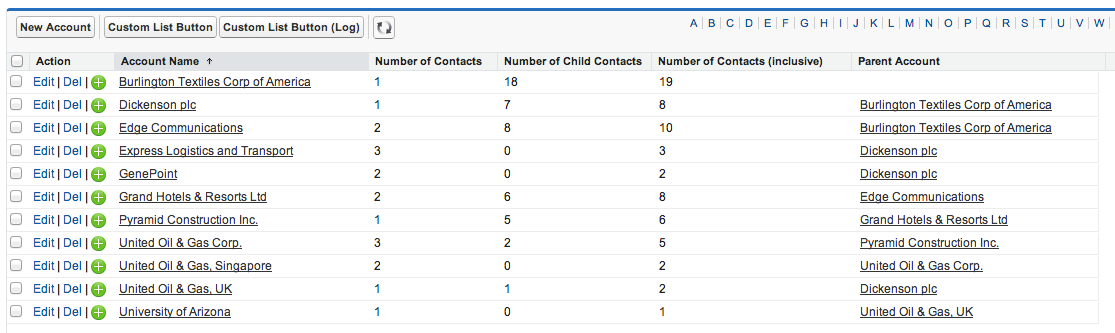
Use Case: Rollup a Count of Contacts to the related Account (which is pretty straight forward rollup for the tool), but then within the Account hierarchy rollup a Sum of Account Contacts at each level, so each Account shows the total Contacts for itself and all its child Accounts. The Number of Contacts (Inclusive) field shown below shows the Contact count rolled up at each level in the Account hierarchy. Burlington Textiles is the root account in this case.

accountrollups
accounthierarchy

Having realised it is a solution to the general requirement for Account Hierarchy Rollups (or in fact any Custom Object hierarchy type relationship) i thought i would share how it was eventually achieved in true “clicks not code” style! Note that while we are rolling up Contacts per Account here, this could effectively be any numeric field on Account.

First you will need to install the Declarative Lookup Rollup Summary tool from the latest package install link here. Then in the case of Account create the following Custom Field‘s.

accountfields

  • Number of Contacts,
    Results of a Count rollup of the number of Contacts associated with an Account.
  • Number of Child Contacts,
    Results of a Sum rollup of the Number of Contacts on each child Account to the parent Account.
  • Number of Contacts (inclusive),
    Formula field that adds the above two fields together and is actually used as the Field to Aggregate when calculating the Number of Child Contacts rollup.
    numberofcontactsformula

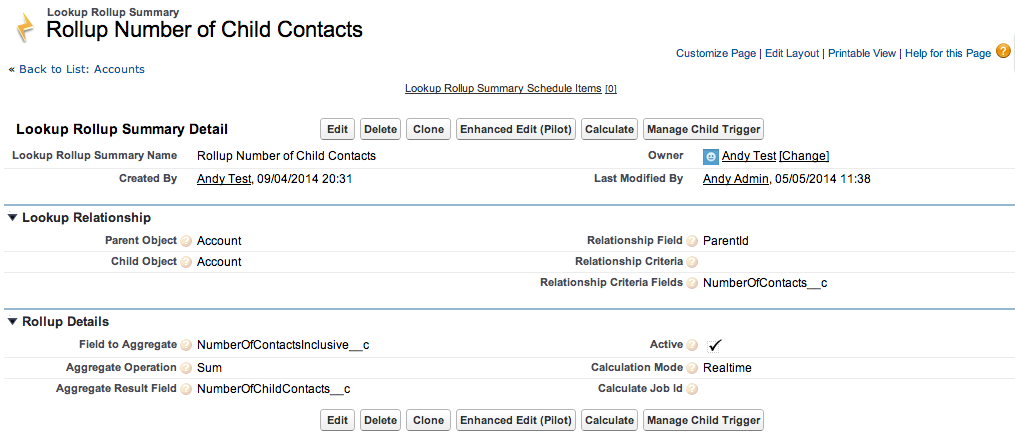
To populate these fields we are actually using two rollups, one to count the Contacts on each Account, then another to Sum the total Contacts on each child Account to each parent Account, any numeric fields on the Accounts will work the same way. Note that both these rollups are done Realtime and that the second rollup is using the Relationship Criteria Fields feature to ensure a change made by the first rollup triggers a recalculation of the second.

rollupaccountcontacts

rollupnumberofchildcontacts

Two rollups have been used here, only because the information we wanted to rollup in the Account hierarchy was not readily available on the Account record itself. So is a more complex setup than it needs to be if your just for example rolling up an existing Account field, such as Annual Revenue. However it does show nicely how two rollups can be used and have one trigger the recalculation of the other.

Scheduled Rollups: I have yet to try this with Scheduled mode, i suspect there maybe some dependency issues in the processing of two rollups in the correct order (something the tool can be taught about in the future if this is proven to be an issue), however a single independent rollup will work just fine in Scheduled or Realtime mode.


3 Comments

A Declarative Rollup Summary Tool for Force.com Lookup Relationships

I’ve recently been asked to share the motivation and vision that emerged around an open source package I’ve been developing over the last year or so. It all started with a bunch of code and an API looking for a problem to solve to be honest! Here I will take you through the journey that led to the Declarative Rollup Summary Tool being born and ended up helping to fill a 6 year old platform feature itch. Relating to the desire to roll up values between records related via standard Lookup fields and not just Master-Detail (where platform support already exists), the related Salesforce Idea has over 20k upvotes btw!

Read more at developer.salesforce.com

Figure1_rollup


40 Comments

New Release: Declarative Rollup Summary Tool Community Powered!

blog_chart1Since i created the Declarative Rollup Tool back in July last year, it has received some really positive feedback from Admins and Developers wanting a way to maintain that #ClickNotCode feel a little longer when faced with lack of platform support for rollup summaries between lookup relationships.

The tool is open source and free for anyone to consume as a package or deploy the code into their development or sandbox orgs using my GitSFDeploy tool, see the Readme. Because of this its not just up to me what happens to it or who contributes to it…

So the reason I have called this the Community Powered release, is because a major new feature of the release was designed and contributed by a member of the Salesforce community, Wes Weingartner (Twitter), who submitted via a Pull Request to the GitHub repository. I’ve now merged it in and uploaded it into the latest release of the managed package. So without further rambling, here is what’s in the new release…

  • Usability, Enhanced New and Edit UI for setting up Rollup Summary (Pilot)
  • Installation, Improved installation and configuration in subscriber org via Permission Sets
  • Various fixes, relating to using the Max option with Date fields and parent objects with Private Sharing configured.

Lets walkthrough these features…

Enhanced New and Edit UI

Wes raised the idea of having a nice front end page that improves the user experience when selecting the parent, child objects and related fields. In his subsequent submission he has done a great job of designing a UI that makes it much easier to setup the rollups! Here is a screenshot, which does not really do it justice in terms of just how easy it is to point and click from the dynamically updated drop down boxes instead of entering those fiddly API names!

Screen Shot 2014-04-09 at 19.17.51

Screen Shot 2014-04-09 at 19.33.13What i found really cool about his design, is that he combined entering the Child Object and Relationship Field information into one operation, the Child Object (Field) drop down automatically shows all valid child relationships for the selected  parent object you select.
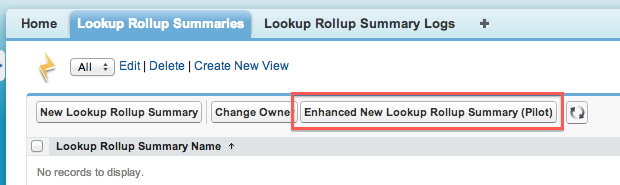
For the moment the new UI does not have all of the related information or buttons on it from the native UI, so for this release to access this enhanced UI when creating rollups, use the Enhanced New Lookup Rollup Summary (Pilot) button from the List View and for editing existing rollups there is an alternative Enhanced Edit (Pilot) button on the Detail Page.

Screen Shot 2014-04-09 at 19.17.07
Screen Shot 2014-04-09 at 19.18.11

NOTE: If your upgrading you will need to manually add these two buttons to your List View and Detail page layouts.

Installation Improvements

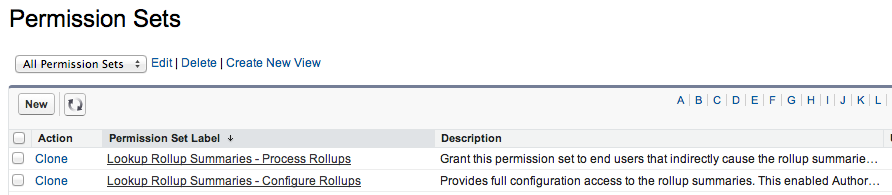
I have added two new Permission Sets to the package, this allows you to grant either the ability to Configure Rollups (for Administrators) or Process Rollups to all your users that will be editing child records that cause the rollups to be execute (either Realtime or Scheduled). Assign the Permission Sets as usual but follow the following manual permissions on a custom Permission Set or Profile (Salesforce still doesn’t package these!).

  • Lookup Rollup Summaries – Process Rollups,
    manually grant Lookup Rollup Summary App and Tab permissions accordingly.
  • Lookup Rollup Summaries – Configure Rollups,
    manually grant Lookup Rollup Summary App, Tab and Author Apex permissions accordingly.

Screen Shot 2014-04-09 at 19.59.01

Various fixes

A collection of minor fixes and improvements have been made, review the Readme release section for more details.

Installation, Documentation and Thank you!

As before see the release section of the Readme for installation options, please feel free to leave comments here and/or log any bugs or enhancement ideas in GitHub here. You can find a full list of past blogs covering the features of this tool here. Finally i would just like to say a big thank you to all the kind feedback and ideas I’ve received about this tool, it is really appreciated and motivational for me!


Leave a comment

Unit Testing with the Domain Layer

Writing true Apex unit tests that are quite granular can be hard in Apex, especially when the application gets more complex, as their is limited mocking support, meaning you have to create all your test data and move it through stages in its life cycle (by calling other methods) to get to the logic your unit test needs to test. Which of course is in itself a valid test approach of definitely needed, this blog is certainly not aiming to detract from those. But these are more of an integration or functional test. Wikipedia has this to say about unit tests…

In computer programmingunit testing is a method by which individual units of source code, sets of one or more computer program modules together with associated control data, usage procedures, and operating procedures are tested to determine if they are fit for use.[1] Intuitively, one can view a unit as the smallest testable part of an application. In procedural programming, a unit could be an entire module, but it is more commonly an individual function or procedure. In object-oriented programming, a unit is often an entire interface, such as a class, but could be an individual method.[2] Unit tests are short code fragments[3] created by programmers or occasionally by white box testers during the development process.

If as a developer you want to write these kind of low level unit tests around your domain classes (part of the Apex Enterprise Patterns), perhaps trying out a broader number of data input scenarios to your validation or defaulting code its hard using the conventional DML approach approach for the same reasons. Typically the result is you compromise on the tests you really want to write. The other downside is eventually your test class starts to take longer and longer to execute, as the DML overhead is expensive. Thus most developers I’ve spoken to, including myself, start to comment out test methods to speed things up while they work on a specific test method. Or perhaps you are a TDD fan, where incremental dev and unit test writing is important.

Stephen Willcock and I often discuss this balance, he is a big fan of DML’less testing and structuring code for testability, having presented a few times at Dreamforce on the topic. There is a framework thats been in the fflib_SObjectDomain base class for a while now that presents its own take on this in respect to Domain layer unit testing. This allows you to emulate DML statements and use the same base class trigger handler method to invoke your Domain methods in the correct sequence from tests. While also performing more granular assertions without actually doing any DML.

As most of you who are using the patterns know the Apex Trigger code is tiny, one line…

fflib_SObjectDomain.triggerHandler(Opportunities.class);

The mocking approach to DML statements used by the Domain layer here leverages this line of code directly in your tests (emulating the Apex Trigger invocation directly) without having to execute DML or setup any dependent database state information the record might not need for the given test scenario. But first you must setup your mock database with the records you want to test against.

fflib_SObjectDomain.Test.Database.onInsert(
   new Opportunity[] { new Opportunity ( Name = 'Test', Type = 'Existing Account' ) } );

The next thing you’ll want to do is use a slightly different convention when setting errors on your records or fields, this allows for you to assert what errors have been raised. This convention also improves from the less than ideal convention of try/catch and doing a .contains(‘The driods i’m looking for!’) in the exception text for the message you are looking for. So instead of doing this on your onValidate

opp.AccountId.addError(
   'You must provide an Account for Opportunities for existing Customers.');

You use the error method, this registers in a list of errors that can be asserted later in the test. Like the ApexPages.getMessages() method, it is request scope so contains all errors raised on all domain objects executed during the test incrementally.

opp.AccountId.addError(
   error('You must provide an Account for Opportunities for existing Customers.',
            opp, Opportunity.AccountId) );

The full test then looks like this…

@IsTest
private static void testInsertValidationFailedWithoutDML()
{
    // Insert data into mock database
    Opportunity opp = new Opportunity ( Name = 'Test', Type = 'Existing Account' );
    fflib_SObjectDomain.Test.Database.onInsert(new Opportunity[] { opp } );

    // Invoke Trigger handler and thus appropriate domain methods
    fflib_SObjectDomain.triggerHandler(Opportunities.class);

    // Assert results
    System.assertEquals(1,
        fflib_SObjectDomain.Errors.getAll().size());
    System.assertEquals('You must provide an Account for Opportunities for existing Customers.',
        fflib_SObjectDomain.Errors.getAll()[0].message);
    System.assertEquals(Opportunity.AccountId,
        ((fflib_SObjectDomain.FieldError)fflib_SObjectDomain.Errors.getAll()[0]).field);
}

NOTE:  The above error assertion approach still works when your using the classic DML and Apex Trigger approach to invoking your Domain class handlers, just make sure to utilise the error method convention as described above.

There are also methods on the fflib_SObjectDomain.Test.Database to emulate other DML operations such as onUpdate and onDelete. As I said at the start of this blog, this is really not ment as an alternative to your normal testing, but might help you get a little more granular on your testing, allowing for more diverse use cases and not to mention speeding up the test execution!