Andy in the Cloud

From BBC Basic to Force.com and beyond…


3 Comments

Preview : Apex Enterprise Patterns – Domain Layer

I’ve been busy writing the next article in my series on Apex Enterprise Patterns. This weekend I completed the draft for review before submitting to Force.com. Its the biggest article yet, with over three and half thousand words. And an update to the Dreamforce 2012 sample code to support some additional OO and test aspects I wanted to highlight.

The following is a sneak preview of the upcoming article. Also if your interested in taking a look at some of the updated sample code you’ll find this in the Github repo here. Enjoy!

Domain Model, “An object model of the domain that incorporates both behavior and data.”, “At its worst business logic can be very complex. Rules and logic describe many different cases and slants of behavior, and it’s this complexity that objects were designed to work with…” Martin Fowler, EAA Patterns

Who uses the Domain layer?

There are two ways in which “Domain layer logic” is invoked.

  • Database Manipulation. CRUD operations, or more specifically Create, Update and Delete operations, occur on your Custom Objects. As users or tools interact via the standard Salesforce UI or via one of the platforms API’s. These can be routed to the appropriate Domain class code corresponding to that object and operation.

  • Service Operations. The Service layer implementations should be easily able to identify and reuse code relating to one or more of the objects each of its operations interact with via Domain classes. This also helps keep the code in the service layer focused on orchestrating whatever business process or task its exposing.

This diagram brings together the Service Layer and Domain Layer patterns and how they interact with each other as well other aspects of the application architecture.

Screen Shot 2013-04-07 at 12.21.32

To be continued on developer.force.com….


1 Comment

Meanwhile….On BrickInTheCloud…It’s Alive!

After a few late nights / mornings I finally got my second robot chatting with me via Salesforce Chatter! I chose to switch designs as it was easier to mount the Wifi sensor and move this robot around than the Alpha Rex. You cannot see it in the video but I was controlling it via the Chatter app on my iPhone, I took some screenshots after the video.

See the video on BrickInTheCloud….

photo  photo1 (1)


Leave a comment

New Blog : Brick in the Cloud!

I’ve always been a big fan of Lego, mainly Lego Technic. Since the introduction of Lego Mindstorms I’ve been exploring the possibilities of combining Lego Mindstorms with my current personal and professional interest in Salesforce.com. Read more at my new project blog here

cropped-brickinthecloud_1


38 Comments

Spring Cleaning Apex Code with the Tooling API

I love API’s! How do I know I really love an API? When I sit down on an evening and the next thing I know the birds start singing, thats how!

So when Salesforce first announced the Tooling API I’ve been following it closely and I am really pleased with the first version and what I’ve been able to achieve thus far with it. In the Spring’13 release it will be GA! Unsurprisingly like the Metadata API it provides CRUD  (Create, Cread, Update and Delete) access to some of the key component types such as ApexClass,  ApexTrigger and ApexPage. This list will grow in time. So whats the big deal you say? Well….

KEY FEATURES

The real magic is what this API brings in terms of the tasks and information around authoring and executing Apex and Visualforce. Such as Debug logs, Heap dumps and my personal favourite Symbol Tables!

A Symbol Table breaks down the code you write and gives you a kind of analytics over your code. Listing all the properties  methods defined and also references elsewhere being made. This information is useful for all kinds of analysis, such as code refactoring and code complexity such as Cyclomatic complexity.

APEX CODE ANALYSIS TOOL

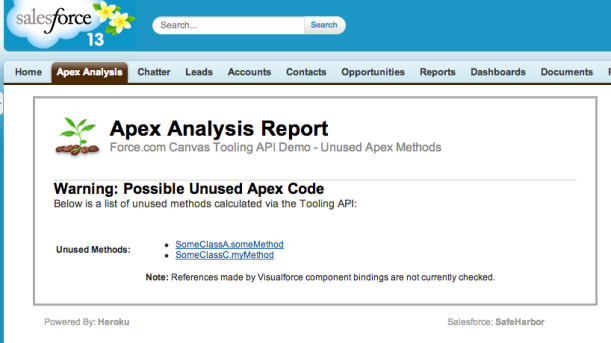
This blog presents the beginnings of a Apex Code Analysis Tool. While also showing via Force.com Canvas thats its now possible to add such a tool directly into your DE environment, no software download required!

When refactoring code, its import to know what dependencies exist between your classes, methods and properties. So that you can decide on where to trim or  consolidate code accordingly. I started with the requirement of wanting to know what methods are now no longer being referenced at all, and thus could be removed. This would also improve test code coverage as well. After achieving this analysis, the tool would have the data to be easily extended.
apexanalysis

Installing

Before we get into the nitty gritty, I do want to say that I do plan once Spring’13 is out and the API is fully GA. To provide the usual Canvas app install link to make it a little easier for those of you that just want to try it out directly and not have to worry about compiling and deploying it, watch “this” space!

THE NUTS AND BOLTS

The code is written in Java and is essentially invoked via a JSP binding on the page shown above to list the methods. The tool itself uses the Force.com Canvas SDK running on Heroku to host the logic.  The Canvas SDK provides access to the oAuth token to authenticate the Tooling API calls. The Canvas Developers Guide is an excellent place to learning more about this. The SDK itself is quite light and easy to use, only a few Java classes are needed, good job guys!

The next thing I needed, as Java is type safe language, was to download the Tooling API WSDL (there is also a REST interface for the Tooling API). This can be downloaded via [Your Name] > Setup > Develop > API. As this is Canvas app from the SDK, it uses Maven to build the code. I found WSDL2Java tool that would plugin into my pom.xml file in the form of JAX-WS xsimport. Armed with my client stubs I could access the Tooling API natively in Java. I’ve given more details on this on the github repo associated with this blog.

THE CODE

This first part of the code shows the Canvas SDK in action providing the oAuth token (line 6) from the information Canvas POST’s to the page. We need to create the usual SessionHeader (standard Salesforce API approach for authentication) and populate it with the token. We also create our client service  (line 10) to call the Tooling API on. These classes have been created earlier by integrating the Tooling API WSDL via the WSDL2Java tool via the pom.xml file.

public class ToolingAPI {

	public static String getUnusedApexMethods(String input, String secret)
	{
		// Get oAuth token
		CanvasRequest request =
			SignedRequest.verifyAndDecode(input, secret);
		String oAuthToken = request.getClient().getOAuthToken();

		// Connect to Tooling API
		SforceServiceService service = new SforceServiceService();
		SforceServicePortType port = service.getSforceService();
		SessionHeader sessionHeader = new SessionHeader();
		sessionHeader.setSessionId(oAuthToken);

Next we need to understand a little about the Tooling API and how to get things done with it. The Tooling API Developers Guide is a good read to get you started. Its is essentially a matter using CRUD operations on a set of new SObject’s it exposes. To setup whats described as a MetadataContainer, which I suspect relates to a Workspace if your used to using the Developer Console (which is now widely known to have been using the Tooling API for a while now).

  • ApexClass, if your familiar with the Metadata API you will know about this object. Also if you have poked around with Schema tools will also know it as a means to query the Apex classes in an org. 
  • MetadataContainer. This is in a sense a parent object to the ApexClassMember object described below and is kind of your working environment in which you add other components to. It is pretty simple to create, it just needs a unique name.
  • ApexClassMember. Not to be confused with a ‘member’ variable of an Apex class btw! This object is associated with the MetadataContainer via the MetadataContainerId field. It must also be associated with the related ApexClass, via its ContentEntityId field. After that you simply provide it a Body of the code you want the Tooling API to deal with. In this use case I’ve read that directly from the ApexClass object. This object also exposes an important child object, the SymbolTable. But only after we have asked the Tooling API to process it.
  • ContainerAsyncRequest. So far the above objects have helped you set out your stall in respect to the code you want the Tooling API to deal with. Records inserted into this object will actually get it to do some processing. Again those familiar with the Metadata API will see some old favourites on here field wise. The key one for this use case, is the IsCheckOnly field. Setting this to True ensures we don’t actually update anything, all we need is the calculated SymbolTable!

The following code queries the ApexClass‘s we want to obtain the SymbolTable‘s for. Creates/recreates the MetadataContainer. Then creates and associates with it a number ApexClassMember’s for each of the ApexClass’s queried. After this stage we are ready for the magic!

		// Query visible Apex classes (this query does not support querying in packaging orgs)
		ApexClass[] apexClasses =
			port.query("select Id, Name, Body from ApexClass where NamespacePrefix = null", sessionHeader)
				.getRecords().toArray(new ApexClass[0]);

		// Delete existing MetadataContainer?
		MetadataContainer[] containers =
			port.query("select Id, Name from MetadataContainer where Name = 'UnusedApexMethods'", sessionHeader)
				.getRecords().toArray(new MetadataContainer[0]);
		if(containers.length>0)
			port.delete(Arrays.asList(containers[0].getId()), sessionHeader);

		// Create new MetadataContainer
		MetadataContainer container = new MetadataContainer();
		container.setName("UnusedApexMethods");
		List saveResults = port.create(new ArrayList(Arrays.asList(container)), sessionHeader);
		String containerId = saveResults.get(0).getId();

		// Create ApexClassMember's and associate them with the MetadataContainer
		List apexClassMembers = new ArrayList();
		for(ApexClass apexClass : apexClasses)
		{
			ApexClassMember apexClassMember = new ApexClassMember();
			apexClassMember.setBody(apexClass.getBody());
			apexClassMember.setContentEntityId(apexClass.getId());
			apexClassMember.setMetadataContainerId(containerId);
			apexClassMembers.add(apexClassMember);
		}
		saveResults = port.create(new ArrayList(apexClassMembers), sessionHeader);
		List apexClassMemberIds = new ArrayList();
		for(SaveResult saveResult : saveResults)
			apexClassMemberIds.add(saveResult.getId());

The following code creates a ContainerAysncRequest record, which has the effect of kicking off a background process in the Salesforce servers to begin to process the members of the MetadataContainer provided to it. Note that we set the CheckOnly field to True here, as we don’t want to actual update anything. In this sample code we simply ask Java to wait for this operation to complete.

		// Create ContainerAysncRequest to deploy the (check only) the Apex Classes and thus obtain the SymbolTable's
		ContainerAsyncRequest ayncRequest = new ContainerAsyncRequest();
		ayncRequest.setMetadataContainerId(containerId);
		ayncRequest.setIsCheckOnly(true);
		saveResults = port.create(new ArrayList(Arrays.asList(ayncRequest)), sessionHeader);
		String containerAsyncRequestId = saveResults.get(0).getId();
		ayncRequest = (ContainerAsyncRequest)
			port.retrieve("State", "ContainerAsyncRequest", Arrays.asList(containerAsyncRequestId), sessionHeader).get(0);
		while(ayncRequest.getState().equals("Queued"))
		{
			try {
				Thread.sleep(1 * 1000); // Wait for a second
			} catch (InterruptedException ex) {
				Thread.currentThread().interrupt();
			}
			ayncRequest = (ContainerAsyncRequest)
				port.retrieve("State", "ContainerAsyncRequest", Arrays.asList(containerAsyncRequestId), sessionHeader).get(0);
		}

Next we requery the ApexClassMember‘s, requesting the SymbolTable information in the query. The code then scans through the SymbolTable information for each ApexClassMember looking for methods declared and methods referenced. Adding the resulting qualified method names in one of two Java Set’s accordingly for later processing.

		// Query again the ApexClassMember's to retrieve the SymbolTable's
		ApexClassMember[] apexClassMembersWithSymbols =
			port.retrieve("Body, ContentEntityId, SymbolTable", "ApexClassMember", apexClassMemberIds, sessionHeader)
				.toArray(new ApexClassMember[0]);

		// Map declared methods and external method references from SymbolTable's
		Set declaredMethods = new HashSet();
		Set methodReferences = new HashSet();
		for(ApexClassMember apexClassMember : apexClassMembersWithSymbols)
		{
			// List class methods defined and referenced
			SymbolTable symbolTable = apexClassMember.getSymbolTable();
			if(symbolTable==null) // No symbol table, then class likely is invalid
				continue;
			for(Method method : symbolTable.getMethods())
			{
				// Annotations are not exposed currently, following attempts to detect test methods to avoid giving false positives
				if(method.getName().toLowerCase().contains("test") &&
				   method.getVisibility() == SymbolVisibility.PRIVATE &&
				   (method.getReferences()==null || method.getReferences().size()==0))
					continue;
				// Skip Global methods as implicitly these are referenced
				if( method.getVisibility() == SymbolVisibility.GLOBAL)
					continue;
				// Bug? (public method from System.Test?)
				if( method.getName().equals("aot"))
					continue;
				// Add the qualified method name to the list
				declaredMethods.add(symbolTable.getName() + "." + method.getName());
				// Any local references to this method?
				if(method.getReferences()!=null && method.getReferences().size()>0)
					methodReferences.add(symbolTable.getName() + "." + method.getName());
			}
			// Add any method references this class makes to other class methods
			for(ExternalReference externalRef : symbolTable.getExternalReferences())
				for(ExternalMethod externalMethodRef : externalRef.getMethods())
					methodReferences.add(externalRef.getName() + "." + externalMethodRef.getName());
		}

There is some filtering applied to the methods processed. To filter out test methods (sadly for now at least annotations are not visible, so some assumptions are made here). Also methods marked as Global will not likely be referenced but of course are logically referenced by code outside of the org, so these methods are also skipped. Finally on occasion in my Sandbox I did get my SymbolTable populated with methods from System.Test, I’ve raised this with Salesforce.

Finally its a matter of looping over the declared methods and checking if they are present in the referenced methods set. Then outputting our list of unreferenced methods back through the JSP page binding.

		// List declaredMethods with no external references
		TreeSet unusedMethods = new TreeSet();
		for(String delcaredMethodName : declaredMethods)
			if(!methodReferences.contains(delcaredMethodName))
				unusedMethods.add(delcaredMethodName);

		// Render HTML table to display results
		StringBuilder sb = new StringBuilder();
		sb.append("<table>");
		for(String methodName : unusedMethods)
			sb.append("<tr><td>" + methodName + "</td></tr>");
		sb.append("</table>");
		return sb.toString();
	}

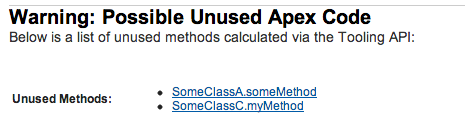
You can view the latest version of the code above in the Github repo here. In this screenshot I’ve enhanced the above a little to provide hyper links to the classes. You can view the Apex code used to test this here.
unusedapex

SUMMARY

It should be noted that the Tooling API does also appear to support Visualforce ‘components’ ( I am assuming this to mean in a general sense, so thus VF pages). The principles appear the same in terms of how you interact with it, see the ApexComponentMember object in the docs. As such currently the above code does not consider references to methods on VF pages, a topic for another blog and/or fellow contributor to the Github repo perhaps…

So there you have it! The possibilities are now finally open for the tools we’ve all been waiting for. As our Apex code bases grow along with the demands of our apps and our customers. I for one am looking forward to see what happens next from tools vendors with this API.

Links


49 Comments

Handling Office Files and Zip Files in Apex – Part 2

In part 1 of this blog I talked about using the Salesforce Metadata API, Static Resources the PageReference.getContent method to implement a native unzip. This blog completes the series by introducing two Visualforce Components (and subcomponents) that provide full zip and unzip capabilities. By wrapping the excellent JSZip library behind the scenes. I gave myself three main goals…

  • Easy of use for none JavaScript Developers
  • Abstraction of the storage / handling of file content on the server
  • Avoiding hitting the Viewstate Governor!

While this audience and future developers I hope will be the judge of the first, the rest was a matter of selecting JavaScript Remoting. As the primary means to exchange the files in the zip or to be zipped between the client and server.

Unzip Component

The examples provided in the Github repo utilise a Custom Object called Zip File and Attachments on that record to manage the files within. As mentioned above, this does not have to be the case, you could easily implement something that dynamically handles and/or generates everything if you wanted!

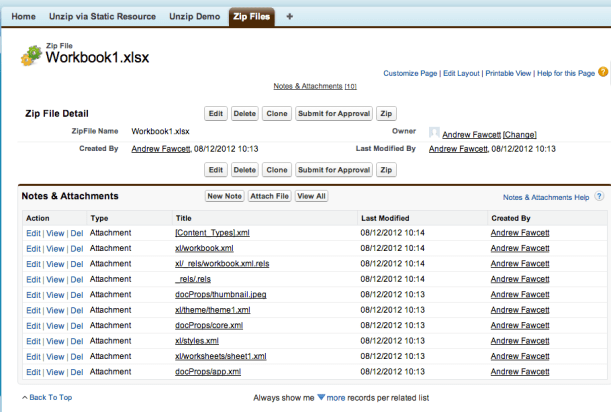
As Open Office files are zip files themselves, the following shows the result of using the Unzip Demo to unzip a xlsx file. The sheet1.xml Attachment is the actual Sheet in the file, in its uncompressed XML form. Thus unlocking access to the data within! From this point you can parse it and update it ready for zipping.

Screen Shot 2012-12-08 at 10.20.47

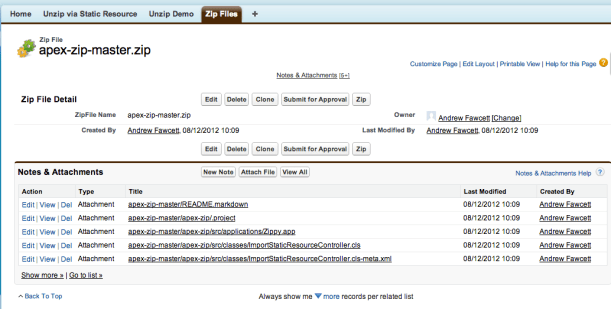
As a further example, the following screenshot shows the results of unzipping the GitHub repo zip download

Screen Shot 2012-12-08 at 10.10.12

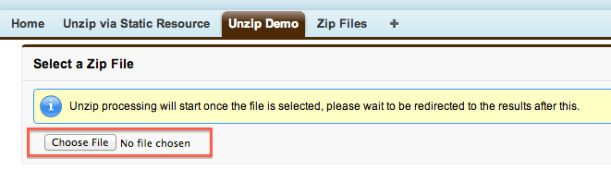
The c:unzipefile component renders a HTML file upload control to capture the file. Once the user selects a file, the processing starts. It then uses the HTML5 file IO support (great blog here) to read the data and pass it to the JSZip library. This is all encapsulated in the component of course! The following shows the component in action on the Unzip Demo page.

<c:unzipfile name="somezipfile" oncomplete="unzipped(state);"
 onreceive=
 "{!$RemoteAction.UnzipDemoController.receiveZipFileEntry}" />

Screen Shot 2012-12-08 at 10.09.02

As mentioned above it uses JavaScript Remoting, however as I wanted to make the component extensible in how the file entries are handled. I have allowed the page to pass in the RemoteAction to call back on. Which should look like this..

@RemoteAction
 public static String receiveZipFileEntry(
    String filename, String path, String data, String state)

In addition to the obvious parameters, the ‘state’ parameter allows for some basic state management between calls. Since of course JavaScript Remoting is stateless. Basically what this method returns is what gets sent back in the ‘state’ parameter on subsequent calls. In the demo provided, this contains the Id of the ZipFile record used to store the incoming zip files as attachments.

The other key attribute on the component is ‘oncomplete’. This can be any fragment of JavaScript you choose (the ‘state’ variable is in scope automatically). In the demo provided it calls out to an Action Function to invoke a controller method to move things along UI flow wise, in this case redirect to the Zip File record created during the process.

Zip Component

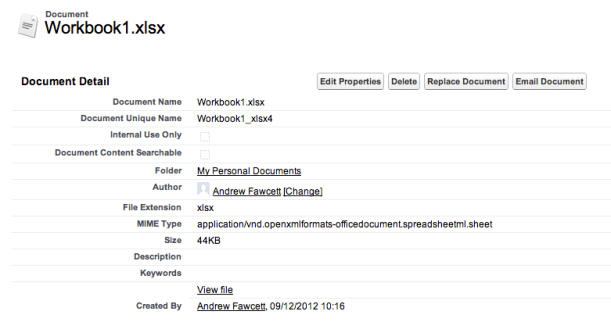
You may have noticed on the above screenshots I have placed a ‘Zip’ custom button on the Zip File objects layout. This effectively invokes the Zip Demo page. The use cases here is to take all the attachments on the record, zip them up, and produce a Document record and finally redirect to that for download.

Screen Shot 2012-12-09 at 10.16.11

Screen Shot 2012-12-09 at 10.17.02

The c:zipfile component once again wraps the JSZip library and leverages JavaScript Remoting to request the data in turn for each zip file entry. The page communicates the zip file entries via the c:zipentry component. These can be output explicitly at page rendering time (complete with inline base64 data if you wish) or empty leaving the component to request them via JS Remoting.

<c:zipfile name="someZipfile" state="{!ZipFile__c.Id}" 
  oncomplete="receiveZip(data);"
  getzipfileentry=
     "{!$RemoteAction.ZipDemoController.getZipFileEntry}">
   <apex:repeat value="{!paths}" var="path">
     <c:zipentry path="{!path}" base64="true"/>
   </apex:repeat>
</c:zipfile>

This component generates a JavaScript method on the page based on the name of the component, e.g. someZipfileGenerate. This must be called  at somepoint by the page to start the zip process.

The action method in the controller needs to look like this.

@RemoteAction
 public static String getZipFileEntry(String path, String state)

Once again the ‘state’ parameter is used. Except in this case it is only providing what was given to the c:zipfile component initially, it cannot be changed. Instead the method returns the Base64 encoded data of the requested zip file entry.

Finally the ‘oncomplete’ attributes JavaScript is executed and the resulting data is passed back (via apex:ActionFunction) to the controller for storage (not the binding in this case is transient, always good to avoid Viewstate issues when receiving large data) and redirects the user to the resulting Document page.

Summary

Neither components are currently giving realtime updates on the zip entries they are processing, so as per the messaging in the demo pages the user has to wait patiently for the next step to occur. Status / progress messages is something that can easily be implemented within the components at a future date.

These components utilise some additional components, I have not covered. Namely the c:zip and c:unzip components. If you have been following my expliots in the Apex Metdata API you may have noticed early versions of these in use in those examples, check out the Deploy and Retrieve demos in that repo.

I hope this short series on Zip file handling has been useful to some and once again want to give a big credit to the JSZip library. If you want to study the actual demo implementations more take a look at the links below. Thanks and enjoy!

Links


19 Comments

Generic Native SObject Data Loader

I’ve been wanting for a while now to explore using the Apex JSON serialize and deserialize support with SObject’s. I wanted to see if it was possible to build a generic native import/export solution natively, that didn’t just handle a single record was able to follow relationships to other records. Such as master-detail and lookup relationships. Effectively to give a means to extract and import a set of related records as one ‘bundle’ of record sets. With the flexibility of something like this, one could consider a number of uses…

  • Import/Export. Provide Import and Export solutions directly a native application without having to use Data Loader.
  • Generic Super Clone. Provide a super Clone button that can be applied to any object (without further coding), that not only clones the master record but any related child detail records.
  • Post Install Setup. Populate default data / configuration as part of a Package post installation script.
  • Org 2 Org Data Transfer. Pass data between orgs, perhaps via an attachment in an email received via an Apex Email Handler that receives an email from Apex code in anthor org?

For me, some interesting use cases and touch apone a number of topics I see surfacing now and again on Salesforce StackExchange and in my own job. However before having a crack at those I felt I first needed to crack open the JSON support in Apex in a generic way or at least with some minimal config.

Background and Credit

A fellow developer Agustina García had recently done some excellent research into Apex JSON support. She found that while JSON.serialise would in fact work with SObject’s containing related child records (queried using subqueries), by outputting the child records within the JSON (as nested JSON objects). Sadly however, the JSON.deserialize method ignores them. The solution was to utilise some wrapper Apex classes to contain the SObject records and provide the necessary relationship structure. This gave me the basis to develop something more generic that would work with any object.

Introducing SObjectDataLoader

Like the JSON class, the SObjectDataLoader class has two main methods, ‘serialize‘ and ‘deserialize‘. To serialize records all you need give it is a list of ID’s. It will automatically discover the fields to include and query the records itself. Seeking out (based on some default rules) related child and lookup relationship records to ‘follow’ as part of the recursive serialisation process. Outputting a serialised RecordsBundle. Due to how the serialisation process executes the RecordSetBundle’s are output in dependency order.

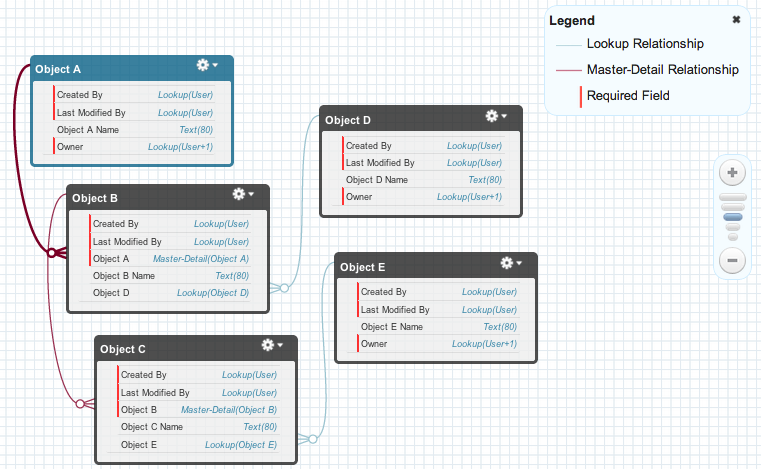
Consider the following objects and relationships with a mix of master-detail and lookup relationships as shown using the Schema Builder tool.

Here is a basic example (utilising auto configure mode) that will export records in the above structure, when given the Id of the root object, Object A.

String serialisedData =
  SObjectDataLoader.serialize(
      new Set<Id>; { 'a00d0000007kUms' });

The abbreviated resulting JSON looks like this (see full example here)…

{
    "RecordSetBundles": [
        {
            "Records": [
                {
                    "Id": "a00d0000007kUmsAAE",
                    "Name": "Object A Record"
                }
            ],
            "ObjectType": "ObjectA__c"
        },
        {
            "Records": [
                {
                    "Id": "a03d000000EHi6tAAD",
                    "Name": "Object D Record",
                }
            ],
            "ObjectType": "ObjectD__c"
        },
        {
            "Records": [
                {
                    "Id": "a01d0000006JdysAAC",
                    "Name": "Object B Record",
                    "ObjectA__c": "a00d0000007kUmsAAE",
                    "ObjectD__c": "a03d000000EHi6tAAD"
                }
            ],
            "ObjectType": "ObjectB__c"
        },
        {
            "Records": [
                {
                    "Id": "a04d00000035cFAAAY",
                    "Name": "Object E Record"
                }
            ],
            "ObjectType": "ObjectE__c"
        },
        {
            "Records": [
                {
                    "Id": "a02d000000723fvAAA",
                    "Name": "Object C Record",
                    "ObjectB__c": "a01d0000006JdysAAC",
                    "ObjectE__c": "a04d00000035cFAAAY"
                }
            ],
            "ObjectType": "ObjectC__c"
        }
    ]
}

The ‘deserialize‘ method takes a JSON string representing a RecordsBundle (output from the ‘serialize’ method). This will insert the records in the required order and take care of making new relationships (as you can see the original Id’s are retained in the JSON to aid this process) as each record set is processed.

Set<Id> recordAIds =
    SObjectDataLoader.deserialize(serialisedData);

The auto configuration route has its limitations and assumptions, so a manual configuration mode is available. This can be used if you know more about the objects. Though you can merge both configuration modes. The test methods in the class utlise some more advanced usage. For example…

String serializedData =
    SObjectDataLoader.serialize(createOpportunities(),
       new SObjectDataLoader.SerializeConfig().
        // Serialize any related OpportunityLineItem's
        followChild(OpportunityLineItem.OpportunityId).
          // Serialize any related PricebookEntry's
          follow(OpportunityLineItem.PricebookEntryId).
            // Serialize any related Products's
            follow(PricebookEntry.Product2Id).
            // Skip UnitPrice in favour of TotalPrice
            omit(OpportunityLineItem.UnitPrice));

The deserialize method in this case takes an implementation of SObjectDataLoader.IDeserializerCallback. This allows you to intercept the deserialization process and populate any references before the objects are inserted into the database. Useful if the exported data is incomplete.

Set<ID>; resultIds =
   SObjectDataLoader.deserialize(
      serializedData, new ApplyStandardPricebook());

Some interesting aspects of the implementation…

  • It discovers the SObjectType via the new method Id.getSObjectType.
  • It uses the SObject.clone method to remove the old Id (after making a note of it for later reference) from the deserialized SObject allowing it to be inserted.
  • The native JSON.serialize and JSON.deserialize are used only once to serialise and deserialize the internal RecordsBundle object.
  • The SerializeConfig object uses the Fluent API model.
  • JSONLint rocks!
  • Unit tests with over 95% code coverage are included in the same class, so the single class is ready to drop in your projects!

Summary

I hope this will be of use to people and would love to hear about more use cases and/or offers to help extend (see TODO’s below if you fancy helping) or fix any bugs in it to grow it further. Maybe one day Salesforce might even consider implementing into the Apex runtime! In the meantime, enjoy! GitHub repo link.

TODO’s

This is an initial release that I think will suite some use cases within the current tolerances of the implementation. As always, life and work commitments prevent me from spending as much time on this as I would really like. So here are a few TODO’s, until next time…

  • Support Recursive Lookup References, e.g. Custom Object A has a lookup to Custom Object A.
  • Scalability, Improve scalability via Batch Apex
  • More Extensibility and Callbacks, I add a deserialization Apex callback interface to resolve dynamically required references that have not been included in the serialised output. This can be extended further to customise additional fields or change existing ones.
  • Optimise queries and ‘fields’ usage, (for repeat references to the same object further down the follow chain).


7 Comments

Apex Enterprise Patterns – Separation of Concerns

Software is often referred to as living thing that changes and evolves over time. As with complex organisms that are expected to endure and evolve over time, it is important to understand what role each part of the organism plays. To keep the organism growing while still remaining strong and support its evolution or even rapid growth through in take of more resources. And so the same is true for complex applications, often categorised as Enterprise level, reflecting the complexity and scale of importance to the ‘eco-system’ the application lives within. So what can we learn from this when engineering such applications?

Separation of Concerns

Complex code gets out of hand when you don’t partition it properly and it becomes heavily intermixed. Making it hard to work from, error prone and worst still hard to learn, only serving to worsen the problem as you bring new developers into the party! Avoiding this to some degree at the basic level is often referred to as ‘code re-use’. Which is of course a very good thing as well! The act of creating modules or libraries to share common calculations or processes amongst different parts of your application.

Is SOC just a posh word for ‘code re-use’ then?

If your considering SOC properly, your doing some upfront thinking about the internal plumbing of your application (down to class naming conventions and coding guidelines) that you feel will endure and hopefully be somewhat self describing to others going forward. Rather than the usual adhoc approach to code re-use which sees fragments of code get moved around once two or more areas start to need it. Often just placed in MyUtil classes or some other generic dumping area. Which is fine, and certainly recommended vs copy and paste!

So what are the benefits of SOC?

At a high level applications have storage, logic and one or more means to interact with them, be that by humans and/or other applications. Once you outline these, you can start to define layers within your application each with its own set of concerns and responsibilities to the application and other layers. Careful consideration and management of such layers is important to adopting SOC.

  • Evolution. Over time, as technology, understandings and requirements (both functional and technical) evolve, any one of these layers may need to be significantly extended, reworked or even dropped. Just look at UI technology over the last 10 years as a prime example of this.
  • Impact Management. Performing work or even dropping one or more of these layers  should not unduly impact (if at all) the others, unless the requirements of course lead to that.
  • Roles and Responsibility. Each layer has its own responsibility and should not drop below or over extend that responsibility. For example dropping one client technology / library in favour of another, should not mean loosing business logic, as this is the responsibility of another layer. If the lines of responsibility get blurred it erodes the purpose and value of SOC.

The typical SOC layers are shown below. On the Force.com platform, there are two distinct approaches to development, both can be used standalone or to complement each together. The Declarative and traditional Coding style approaches, broadly speaking, fit into the standard SOC layers like so…

why CONSIDER SOC on Force.com?

One of the key benefits of Force.com, is its declarative development model, the ability to create objects, fields, layouts, validation rules, workflows, formula fields etc without a single line of code. So these for sure should be your first port of call, typically if your app is heavily data centric in its use cases, you’ll get by with delivering a large portion of your application this way! So while not code, what you can achieve with declarative development is still very much an architecture layer in your application, one that I will talk about more later.

So if your app is process centric and/or getting pushed to implement more complex calculations, validations or richer UI experiences. You’ll be dipping into the land of Apex and thus code. Out of all the logic you invest developer and testing hours in, it is the business logic that you should be most concerned about protecting. Force.com provides many places to place Apex code, Triggers, VF Controllers, Web Services, REST Services, Batch Apex, Email Handlers, the list goes on. We will start to explore some rules for defining what goes into these in the further parts of this series. For now consider the following…

  1. If you had to replace or add another UI to your app (e.g. Mobile) how much of that code would you be rewriting / porting that is effectively nothing to do with the UI’s responsibility? But more to do with inserting, updating, validating and calculating in your app.
  2. If you wanted to provide a public facing API (such as REST) to your logic how would you do this? What parts of your existing code base would you call to implement the API? Action methods in your VF controllers, passing in bits of view state?!?!
  3. If you got asked to scale your application logic via Batch Apex as well continue to provide an interactive experience (for smaller volumes) via your existing UI (VF controllers). How would you share logic between the two to ensure the user gets consistant results regardless.
  4. Visualforce provides a means for you to partition your code via MVC (a form of SOC for client development), but simply using Visualforce and Controllers does not guarantee you have implemented it.  For example how complex are your action methods in your controllers? Do you have any code does more than just deal with handling content to and from the user?
  5. How easily can new developers find their way around your code base? How much time would they need to learn where to put new code and where to find existing behaviour?

Depending on how you have or plan to partition / placed your code you may already be in good shape to tackle some of the above. If not or just curious, hopefully the upcoming articles will help shed a bit of light for further thought.

Summary

This blog entry is the first describing Enterprise Application Architecture patterns, particularly focused on applying them on the Force.com platform. If you attended Dreamforce 2012 this year, you may have caught a presentation on this topic. In the meantime, if you missed the session and fancy a preview of the patterns that help support SOC. You can find the Github repo here along with slides and a recent re-run recording I did. For now, please feel free to comment, make suggestions and requests for topics / use cases you would like to be covered and I’ll do my best to include and answer them!

LINKS

Here are a few links to other resources, the DF12 session and discussions of late that relate to this post. These will give you some foresight into upcoming topics I’ll be discussing here. Enjoy!


25 Comments

Handling Office Files and Zip Files in Apex – Part 1

I recently found a number of developers asking questions about Zip file handling in Apex, which as most find out pretty soon, does not exist. Statement governor concerns aside, nor is there any binary data types to make implementing support for it possible. Most understandably most want to stay on platform and not call out to some external service for this. And rightly so!

Another developer and I recently had the same need before the API provider decided to handle compression over HTTP. However while subsequently doing some work to get the Metadata API working from Apex, which also requires zip support in places. I came across a partial native solution and in addition to that I’ve also had in mind to try out some day the JSZip Javascript library.

And so I decided to write some blog entries covering these two approaches and hopefully help a few people out…

Approach A: Using Static Resources and Metadata API

A static resource is as the name suggests some that changes rarely in your code, typically used for .js, .css and images. Salesforce allows you to upload these type of files individually or within a zip file. Using its development UI and tools.

Allowing you then reference in your Visualforce pages like this

$URLFOR($Resource.myzip, '/folder/file.js').

Further more you can also do this in Apex.

PageReference somefileRef = 
   new PageReference('/resource/myzip/folder/file.js');
Blob contentAsBlob = somefileRef.getContent();
String contentAsText = contextAsBlob.toString();

So in effect Salesforce does have a built in Zip handler, at least for unzipping files anyway. The snag is, uploading a zip file dynamically once your user has provided it to you. If you review the example code that calls the Metadata API from Apex you might have spotted an example of doing just this. To create a Static Resource you can do the following.

MetadataService.MetadataPort service = createService(); 
MetadataService.StaticResource staticResource = 
    new MetadataService.StaticResource();
staticResource.fullName = 'test';
staticResource.contentType = 'text';
staticResource.cacheControl = 'public';
staticResource.content = 
   EncodingUtil.base64Encode(Blob.valueOf('Static stuff'));
MetadataService.AsyncResult[] results = 
    service.create(
      new List; { staticResource });

They key parts are the assignment of the ‘contentType’ and ‘content’ members. The ‘content’ member is a Base64 encoded string. In the example above its a static peace of text, however this could easily be the zip file the user has just uploaded for you and then Base64 encoded using the Apex EncodingUtil. You also need to set the ‘contentType’ to ‘application/zip’.

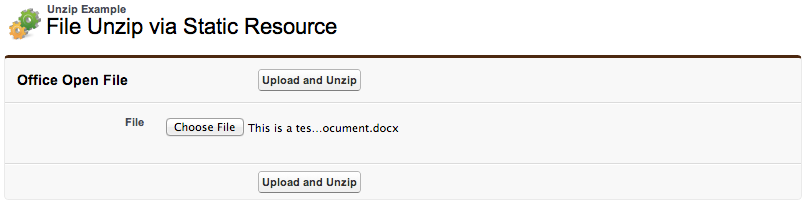
This example presents a user with the usual file upload, you will also need to ask or know what the path of the file is you want to extract. Of course if you know this or can infer it e.g. via file extension such as .docx or .xslx, which uses the Office Open XML format, then your good to go.

I’ve shared the code for this here.

Known Issues: If your zip file contains files with names that contain spaces or special characters, I have found issues with this approach. Since this also applies to URLFOR and generating links in VF pages, I plan to raise a support case to see if this is a bug or limitation. Also keep in mind the user will need to have the Author Apex permission enabled on their profile to call the Metadata API.

Summary and Part 2

This blog entry covered only unzip for known file types, but what if you wanted to have the code inspect the zip contents? Part 2 will extend some of the components I’ve been using in the apex-mdapi to use the JSZip library, examples of which are here and here. In extending those components, I’ll be looking at making them use JavaScript Remoting and local HTML5 file handling to unzip the file locally in the page and transmit the files to the server via an Apex Interface the controller implements. Likewise I want to use the same approach to prepare a zipped file by requesting zip content from the server.


2 Comments

Salesforce StackExchange : Addiction Warning

Those of you following my new blog please don’t worry, I have a number of posts in various states ready to go soon! In the meantime I thought I would share another outlet I’ve been using to help and share ideas in the ever growing community that is Salesforce. Salesforce StackExchange.

It is an increasingly more popular place to ask questions and get answers (in some cases in minutes!), than the usual Salesforce developer forums. If you have not given it a try I recommend you do! There are many experts and also Salesforce employees watching the site and eager to help. It features the ability to rank questions and answers, so unlike typical forums you get a better feel for the quality of both!

Here is a list of a few I’ve been helping with over the last couple of weeks. Of course if you find any of these answers useful feel free to give them whats called an upvote via the little arrows show to the left of the answer. Or even contribute to improve or comment on what you see!

But be warned, if you start contributing, it gets addictive! So don’t leave me any comments saying its taken over my life and my wife / partner is no longer speaking to me! You have been warned!

I’ve added my StackExchange profile to the links in the sidebar.

Enjoy!