Andy in the Cloud

From BBC Basic to Force.com and beyond…


3 Comments

Improving User Response Time with Heroku AppLink

An app is often judged by its features, but equally important is its durability, confidence, and predictability in the tasks it performs – especially as a business grows; without these, you risk frustrating users with unpredictable response times or worse random timeouts. As Apex developers we can reach out to Queuables and Batch Apex for more power – though usage of these can also be required purely to work around the lower interactive governor limits – making programming interactive code more complex. I believe you should still include Apex in your Salesforce architecture considerations – however now we have an additional option to consider! This blog revisits Heroku AppLink and how it can help and without having to move wholesale away from Apex as your primary language!

This blog comes with full source code and setup instructions here.

Why Heroku AppLink?

In my prior blog I covered Five ways Heroku AppLink Enhances Salesforce Development Capabilities – if you have not read that and need a primer please check it out. Heroku AppLink has a flexible points of integration with Salesforce, among those is a way to stay within a flow of control driven by Apex code (or Flow for that matter), yet seamlessly offload certain code execution to Heroku, once complete revert back to Apex control. In contrast to Apex async workloads, this allows code to run immediately and uninterrupted until complete. In this mode there is no competing with Apex CPU, heap, or batch chunking constraints. As a result the overall flow of execution can be simpler to design and completion times are faster, largely only impacted by org data access times (no escaping slow Trigger logic). For the end user and overall business the application scales better, is more predictable and timely – and critically, grows more smoothly in relation to business data volumes.

Staying within Apex flow of control, allows you to leverage existing investments and skills in Apex, while when needed hooking into additional skills and Heroku’s more performant compute layer. All while maintaining the correct flow of the user identity (including their permissions) and critically without leaving the Salesforce (inclusive of Heroku) DX tool chains and overall fully managed services. The following presents two examples, one expanding what can be done in an interactive (synchronous) use case and the second moving to a full background (asynchronous) use case.

Improving Interactive Tasks – Synchronous Invocation

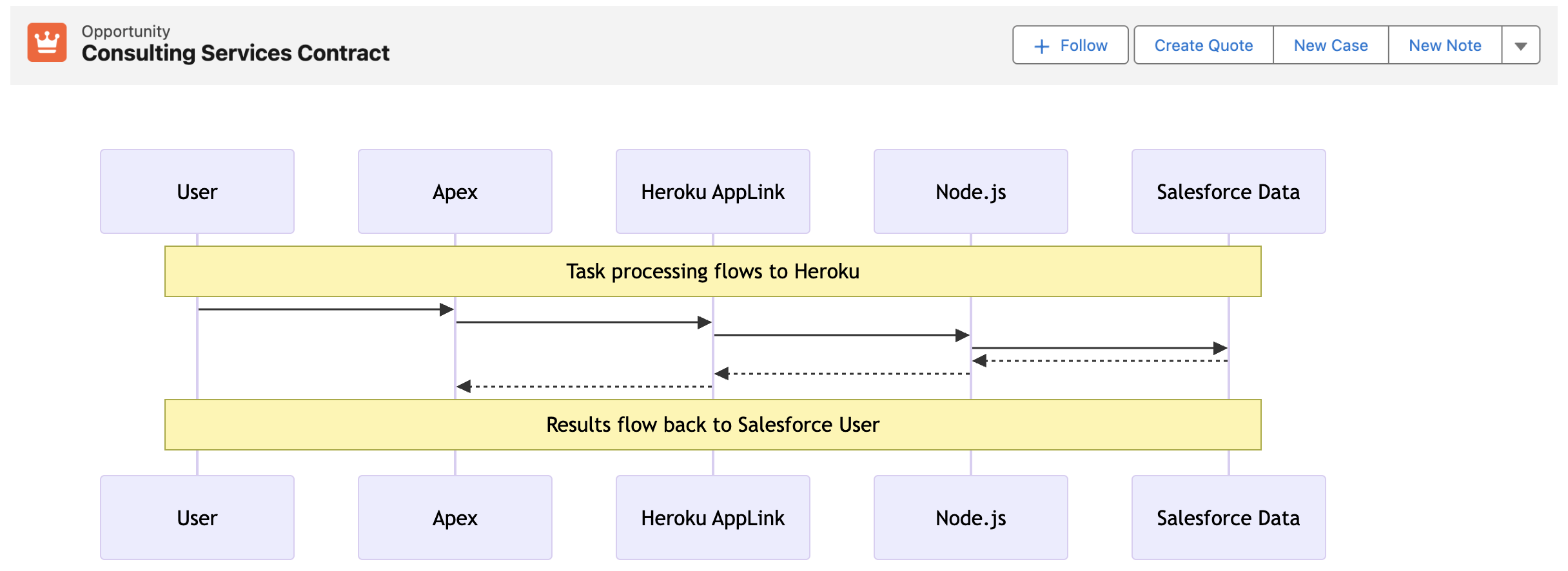
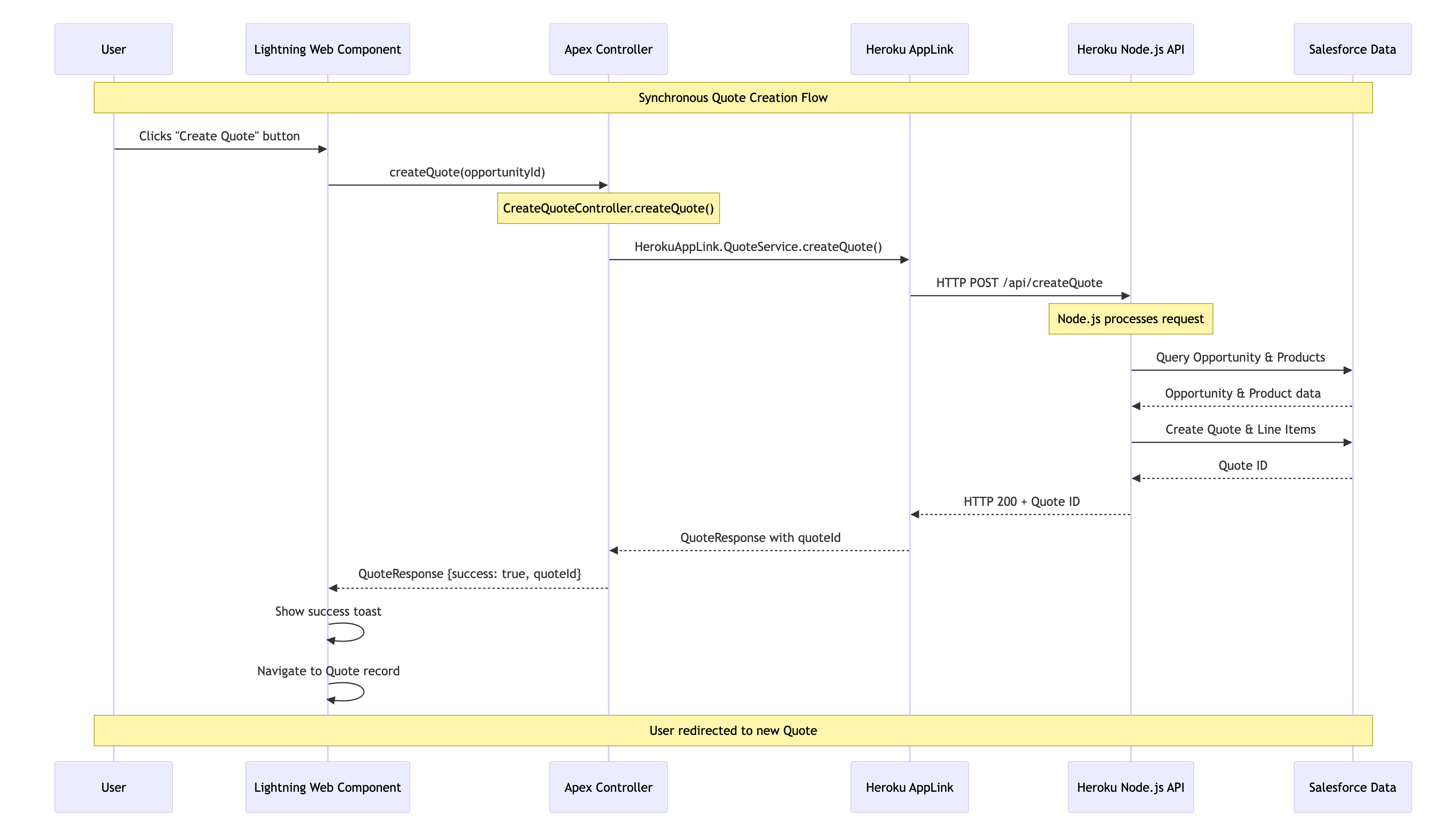
In this interactive (synchronous) example we are converting an Opportunity to a Quote – a task that can, depending on discount rules, size of the opportunity and additional regional tweaks, become quite compute heavy – sometimes in Apex hitting CPU or Heap limits. The sequence diagram below illustrates the flow of control from the User, through Apex, Heroku and back again. As always full code is supplied, but for now lets dig into the key code snippets below.

We start out with an Apex Controller that is attached to the “Create Quote” LWC button on the Opportunity page. This Apex Controller calls the Heroku AppLink exposed conversion logic (in this case written in Node.js – more on this later) – and waits for a response before returning control back to Lighting Experience to redirect the user to the newly created Quote. As you can see the HerokuAppLink namespace contains dynamically generated types for the service.

    @AuraEnabled(cacheable=false)
    public static QuoteResponse createQuote(String opportunityId) {
        try {
            // Create the Heroku service instance
            HerokuAppLink.QuoteService service = new HerokuAppLink.QuoteService();            
            // Create the request
            HerokuAppLink.QuoteService.createQuote_Request request = 
               new HerokuAppLink.QuoteService.createQuote_Request();
            request.body = new HerokuAppLink.QuoteService_CreateQuoteRequest();
            request.body.opportunityId = opportunityId;    
            // Call the Heroku service
            HerokuAppLink.QuoteService.createQuote_Response response = 
               service.createQuote(request);            
            if (response != null && response.Code200 != null) {
                QuoteResponse quoteResponse = new QuoteResponse();
                quoteResponse.opportunityId = opportunityId;
                quoteResponse.quoteId = response.Code200.quoteId;
                quoteResponse.success = true;
                quoteResponse.message = 'Quote generated successfully';                
                return quoteResponse;
            } else {
                throw new AuraHandledException('No response received from quote service');
            }            
        } catch (HerokuAppLink.QuoteService.createQuote_ResponseException e) {
            // Handle specific Heroku service errors
            // ...
        } catch (Exception e) {
            // Handle any other exceptions
            throw new AuraHandledException('Error generating quote: ' + e.getMessage());
        }
    }

The Node.js logic (show below) to convert the quote uses the Fastify library to expose the code via a HTTP endpoint (secure by Heroku AppLink). In the generateQuote method the Heroku AppLink SDK is used to access the Opportunity records and create the Quote records – notably in one transaction via its Unit Of Work interface. Again it is important to note that none of this requires handling authentication thats all done for you – just like Apex – and just like Apex (when you apply USER _MODE) – the SOQL and DML has permissions applied.

// Synchronous quote creation
  fastify.post('/createQuote', {
    schema: createQuoteSchema,
    handler: async (request, reply) => {
      const { opportunityId } = request.body;
      try {
        const result = await generateQuote({ opportunityId }, request.salesforce);
        return result;
      } catch (error) {
        reply.code(error.statusCode || 500).send({
          error: true,
          message: error.message
        });
      }
    }
  });
//
// Generate a quote for a given opportunity
// @param {Object} request - The quote generation request
// @param {string} request.opportunityId - The opportunity ID
// @param {import('@heroku/applink').AppLinkClient} client - The Salesforce client
// @returns {Promise<Object>} The generated quote response
//
export async function generateQuote (request, client) {
  try {
    const { context } = client;
    const org = context.org;
    const dataApi = org.dataApi;
    // Query Opportunity to get CloseDate for ExpirationDate calculation
    const oppQuery = `SELECT Id, Name, CloseDate FROM Opportunity WHERE Id = '${request.opportunityId}'`;
    const oppResult = await dataApi.query(oppQuery);
    if (!oppResult.records || oppResult.records.length === 0) {
      const error = new Error(`Opportunity not found for ID: ${request.opportunityId}`);
      error.statusCode = 404;
      throw error;
    }    
    const opportunity = oppResult.records[0].fields;
    const closeDate = opportunity.CloseDate;
    // Query opportunity line items
    const soql = `SELECT Id, Product2Id, Quantity, UnitPrice, PricebookEntryId FROM OpportunityLineItem WHERE OpportunityId = '${request.opportunityId}'`;
    const queryResult = await dataApi.query(soql);
    if (!queryResult.records.length) {
      const error = new Error(`No OpportunityLineItems found for Opportunity ID: ${request.opportunityId}`);
      error.statusCode = 404;
      throw error;
    }
    // Calculate discount based on hardcoded region (matching createQuotes.js logic)
    const discount = getDiscountForRegion('NAMER'); // Use hardcoded region 'NAMER'
    // Create Quote using Unit of Work
    const unitOfWork = dataApi.newUnitOfWork();
    // Add Quote
    const quoteName = 'New Quote';
    const expirationDate = new Date(closeDate);
    expirationDate.setDate(expirationDate.getDate() + 30); // Quote expires 30 days after CloseDate
    const quoteRef = unitOfWork.registerCreate({
      type: 'Quote',
      fields: {
        Name: quoteName, 
        OpportunityId: request.opportunityId,
        Pricebook2Id: standardPricebookId,
        ExpirationDate: expirationDate.toISOString().split('T')[0],
        Status: 'Draft'
      }
    });
    // Add QuoteLineItems
    queryResult.records.forEach(record => {
      const quantity = parseFloat(record.fields.Quantity);
      const unitPrice = parseFloat(record.fields.UnitPrice);
      // Apply discount to QuoteLineItem UnitPrice (matching createQuotes.js exactly)
      const originalUnitPrice = unitPrice;
      const calculatedDiscountedPrice = originalUnitPrice != null 
                                        ? originalUnitPrice * (1 - discount)
                                        : originalUnitPrice; // Default to original if calculation fails
      unitOfWork.registerCreate({
        type: 'QuoteLineItem',
        fields: {
          QuoteId: quoteRef.toApiString(),
          PricebookEntryId: record.fields.PricebookEntryId,
          Quantity: quantity,
          UnitPrice: calculatedDiscountedPrice
        }
      });
    });
    // Commit all records in one transaction
    try {
      const results = await dataApi.commitUnitOfWork(unitOfWork);
      // Get the Quote result using the reference
      const quoteResult = results.get(quoteRef);
      if (!quoteResult) {
        throw new Error('Quote creation result not found in response');
      }
      return { quoteId: quoteResult.id };
    } catch (commitError) {
      // Salesforce API errors will be formatted as "ERROR_CODE: Error message"
      const error = new Error(`Failed to create quote: ${commitError.message}`);
      error.statusCode = 400; // Bad Request for validation/data errors
      throw error;
    }
  } catch (error) {
    // ...
  }
}

This is a secure way to move from Apex to Node.js and back. Note certain limits still apply: callout timeout is 120 seconds max (applicable when calling Heroku per above) – additionally, the Node.js code is leveraging the Salesforce API, so API limits still apply. Despite the 120 seconds timeout, you get practically unlimited CPU, heap, and the speed of the latest industry language runtimes – in the case of Java – compilation to the machine code level if needed!

The decision to use AppLink here really depends on identifying the correct bottle neck; if some Apex logic is bounded (constrained to grow) by CPU, memory, execution time, or even language, then this is a good approach consider – without going off doing integration plumbing and risking security. For example, if you’re doing so much processing in memory you’re hitting Apex CPU limits – then even with the 120-second callout limit to Heroku – the alternative Node.js (or other lang) code will likely run much faster – keeping you in the simpler synchronous mode for longer as your compute and data requirements grow.

Improving Background Jobs – Asynchronous Invocation

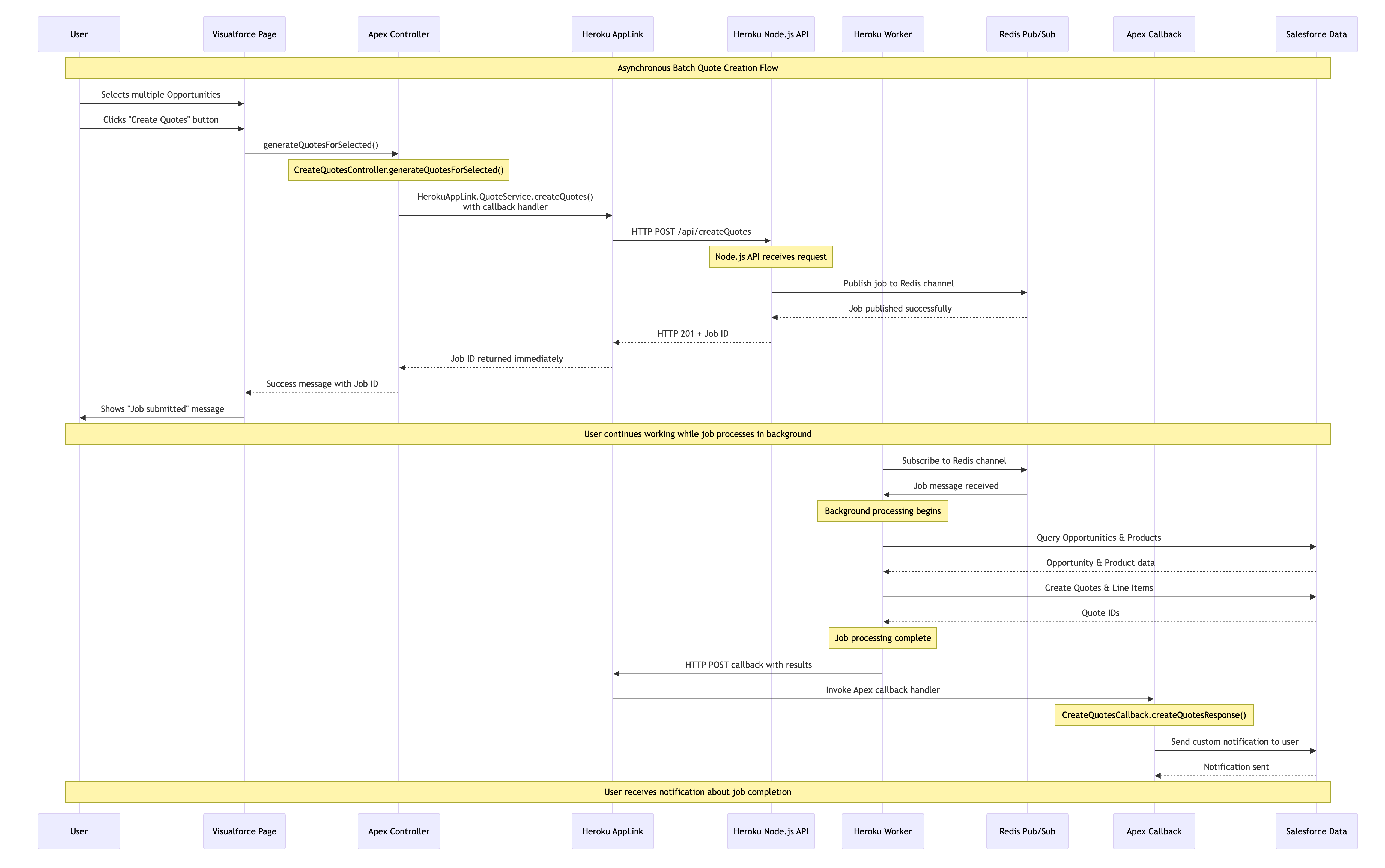
When processing needs to operate over a number of records (user selected or filtered) we can apply the same expansion of the Apex control flow – by having Node.js do the heavy lifting in the middle and then once complete passing control back to Apex to complete user notifications, logging, or even further non-compute heavy work. The diagram shows two processes; the first is the user interaction, in this case, selecting the records that Apex passes over to Heroku to enqueue a job to handle the processing. Heroku compute is your org’s own compute, so will begin execution immediately and run until it’s done. Thus, in the second flow, we see the worker taking over, completing the task, and then using an AppLink Apex callback, sending control back to the org where a user notification is sent.

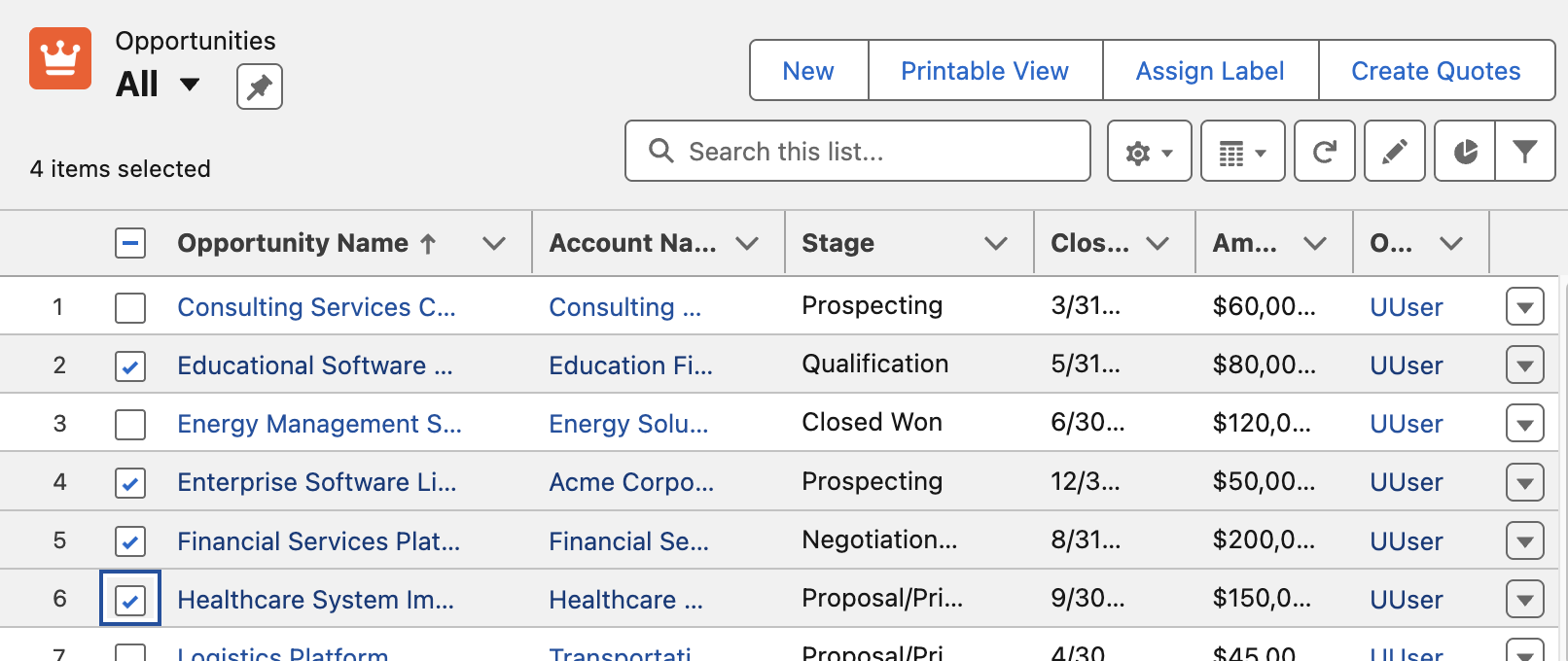
In this example we have the Create Quotes button that allows the user to select which Opportunities to be converted to Quotes. The Apex Controller shown below takes the record Ids and passes those over to Node.js code for processing in Heroku – however in this scenario it also passes an Apex class that implements a callback interface – more on this later. Note you can also invoke via Apex Scheduled jobs or other means such as Change Data Capture.

    public PageReference generateQuotesForSelected() {
        try {
            // Get the selected opportunities
            List<Opportunity> selectedOpps = (List<Opportunity>) this.stdController.getSelected();
            // Extract opportunity IDs
            List<String> opportunityIds = new List<String>(selectedOpps.keySet());
            // Call the Quotes service with an Apex callback
            try {
                HerokuAppLink.QuoteService service = new HerokuAppLink.QuoteService();
                HerokuAppLink.QuoteService.createQuotes_Request request = new HerokuAppLink.QuoteService.createQuotes_Request();
                request.body = new HerokuAppLink.QuoteService_CreateQuotesRequest();
                request.body.opportunityIds = opportunityIds;                
                // Create callback handler for notifications
                CreateQuotesCallback callbackHandler = new CreateQuotesCallback();                
                // Set callback timeout to 10 minutes from now (max 24hrs)
                DateTime callbackTimeout = DateTime.now().addMinutes(10);                
                // Call the service with callback
                HerokuAppLink.QuoteService.createQuotes_Response response = 
                   service.createQuotes(request, callbackHandler, callbackTimeout);                
                if (response != null && response.Code201 != null) {
                    // Show success message
                    // ....
            } catch (HerokuAppLink.QuoteService.createQuotes_ResponseException e) {
                // Handle specific service errors
                // ...
            }            
        } catch (Exception e) {
            // Show error message
            //  ...
        }        
        return null;
    }

Note: You may have noticed the above Apex Controller is that of a Visualforce page controller and not LWC! Surprisingly it seems (as far as I can see) this is still the only way to implement List View buttons with selection. Please do let me know of other native alternatives. Meanwhile the previous button is a modern LWC based button, but this is only supported on detail pages.

As before you can see Fastify used to expose the Node.js code invoked from the Apex controller – except that it is returning immediately to the caller (your Apex code) rather than waiting for the work to complete. This is because the work has been spun off in this case into another Heroku process known as a Worker. This pattern means that control returns to the Apex Controller and to the user immediately while the process continues in the background. Note that the callbackURL is automatically supplied by AppLink you just need to retain it for later.

// Asynchronous batch quote creation
  fastify.post('/createQuotes', {
    schema: createQuotesSchema,
    handler: async (request, reply) => {
      const { opportunityIds, callbackUrl } = request.body;
      const jobId = crypto.randomUUID();
      const jobPayload = JSON.stringify({
        jobId,
        jobType: 'quote',
        opportunityIds,
        callbackUrl
      });
      try {
        // Pass the work to the worker and respond with HTTP 201 to indicate the job has been accepted
        const receivers = await redisClient.publish(JOBS_CHANNEL, jobPayload);
        request.log.info({ jobId, channel: JOBS_CHANNEL, payload: { jobType: 'quote', opportunityIds, callbackUrl }, receivers }, `Job published to Redis channel ${JOBS_CHANNEL}. Receivers: ${receivers}`);
        return reply.code(201).send({ jobId }); // Return 201 Created with Job ID
      } catch (error) {
        request.log.error({ err: error, jobId, channel: JOBS_CHANNEL }, 'Failed to publish job to Redis channel');
        return reply.code(500).send({ error: 'Failed to publish job.' });
      }
    }
  });

The following Node.js is running in the Heroku Worker and performs the same work as the example above, querying Opportunities and using the Unit Of Work to create the Quotes. However in this case when it completes it calls the Apex Callback handler. Note that you can support different types of callbacks – such as an error state callback.

/**
 * Handles quote generation jobs.
 * @param {object} jobData - The job data object from Redis.
 * @param {object} logger - A logger instance.
 */
async function handleQuoteMessage (jobData, logger) {
  const { jobId, opportunityIds, callbackUrl } = jobData;
    try {
    // Get named connection from AppLink SDK
    logger.info(`Getting 'worker' connection from AppLink SDK for job ${jobId}`);
    const sfContext = await sdk.addons.applink.getAuthorization('worker');      
    // Query Opportunities 
    const opportunityIdList = opportunityIds.map(id => `'${id}'`).join(',');
    const oppQuery = `
      SELECT Id, Name, AccountId, CloseDate, StageName, Amount,
             (SELECT Id, Product2Id, Quantity, UnitPrice, PricebookEntryId FROM OpportunityLineItems)
      FROM Opportunity
      WHERE Id IN (${opportunityIdList})
    // ... 
    logger.info(`Processing ${opportunities.length} Opportunities`);
    const unitOfWork = dataApi.newUnitOfWork();
    // Create the Quotes and commit Unit Of Work
    // ...
    const commitResult = await dataApi.commitUnitOfWork(unitOfWork);
    // Callback to Apex Callback class
    if (callbackUrl) {
      try {
        const callbackResults = {
          jobId,
          opportunityIds,
          quoteIds: Array.from(quoteRefs.values()).map(ref => {
            const result = commitResult.get(ref);
            return result?.id || null;
          }).filter(id => id !== null),
          status: failureCount === 0 ? 'completed' : 'completed_with_errors',
          errors: failureCount > 0 ? [`${failureCount} quotes failed to create`] : []
        };
        const requestOptions = {
          method: 'POST',
          body: JSON.stringify(callbackResults),
          headers: { 'Content-Type': 'application/json' }
        };
        const response = await sfContext.request(callbackUrl, requestOptions);
        logger.info(`Callback executed successfully for Job ID: ${jobId}`);
      } catch (callbackError) {
        logger.error({ err: callbackError, jobId }, `Failed to execute callback for Job ID: ${jobId}`);
      }
    }
  } catch (error) {
    logger.error({ err: error }, `Error executing batch for Job ID: ${jobId}`);
  }
}

Finally the following code shows us what the CreateQuotesCallback Apex Callback (provided in the Apex controller logic) is doing. For this example its using the custom notifications to notify the user via UserInfo.getUserId(). It can do this because it is running as the original user that started the work. Also meaning that if it needed to do any further SOQL or DML these run in context of the correct user. Also worth noting that handler is bulkified – indicating that Salesforce will likely batch up callbacks if they arrive in close timing.

/**
 * Apex Callback handler for createQuotes asynchronous operations
 * Extends the generated AppLink callback interface to handle responses
 */
public class CreateQuotesCallback 
      extends HerokuAppLink.QuoteService.createQuotes_Callback {

    /**
     * Handles the callback response from the Heroku worker
     * Sends a custom notification to the user with the results
     */
    public override void createQuotesResponse(List<HerokuAppLink.QuoteService.createQuotes_createQuotesResponse_Callback> callbacks) {
        // Send custom notification to the user
        for (herokuapplink.QuoteService.createQuotes_createQuotesResponse_Callback callback : callbacks) {
            if (callback.response != null && callback.response.body != null) {
                Messaging.CustomNotification notification = new Messaging.CustomNotification();
                notification.setTitle('Quote Generation Complete');
                notification.setNotificationTypeId(notificationTypeId);                
                String message = 'Job ' + callback.response.body.jobId + ' completed with status: ' + callback.response.body.status;
                if (callback.response.body.quoteIds != null && !callback.response.body.quoteIds.isEmpty()) {
                    message += '. Created ' + callback.response.body.quoteIds.size() + ' quotes.';
                }
                if (callback.response.body.errors != null && !callback.response.body.errors.isEmpty()) {
                    message += ' Errors: ' + String.join(callback.response.body.errors, ', ');
                }                                
                notification.setBody(message);
                notification.setTargetId(UserInfo.getUserId());                    
                notification.send(new Set<String>{ UserInfo.getUserId() });
            }
        }
    }
}

Configuration and Monitoring

In general the Node.js code runs as the user invoking the actions – which is very Apex like and gives you confidence your code only does what the user is permitted. There is also an elevation mode thats out the scope of this blog – but is covered in the resources listed below. The technical notes section in the README covers an exception to running as the user – whereby the asynchronous Heroku worker logic is running as a named user. Note that the immediate Node.js logic and Apex Callbacks both still run as the invoking user so if needed you can do “user mode” work in those contexts. You can read more about the rational for this this in the README for this project.

Additionally there are subsections in the README that cover the technical implementation of Heroku AppLink asynchronous callbacks. Configuration for Heroku App Async Callbacks provides the OpenAPI YAML structure required for callback definitions, including dynamic callback URLs and response schemas that Salesforce uses to generate the callback interface. Monitoring and Other Considerations explains AppLink’s External Services integration architecture, monitoring through the BackgroundOperation object, and the 24-hour callback validity constraint with Platform Event alternatives for extended processing times or in progress updates.

Summary

As always I have shared the code, along with a more detailed README file on how to set the above demos up for yourself. This is just one of many ways to use Heroku AppLink, others are covered in the sample patterns here – including using Platform Events to trigger Heroku workers and transition control back to Apex or indeed Flow. This Apex Callback pattern is unique to using Heroku AppLink with Apex and is not yet that deeply covered in the official docs and samples – you can also find more information about this feature by studying the general External Services callback documentation.

Finally, the most important thing here is that this is not a DIY integration like you may have experienced in the past – though I omitted here the CLI commands (you can see them in the README) – Salesforce and Heorku are taking on a lot more management now. And overall this is getting more and more “Apex” like with user mode context explicitly available to your Heroku code. This blog was inspired by feedback on my last blog, so please keep it coming! There is much more to explore still – I plan to get more into the DevOps integration side of things and explore ways to automate the setup using the AppLink API.

Meanwhile, enjoy some additional resources!


Leave a comment

Five ways Heroku AppLink Enhances Salesforce Development Capabilities

Over the years through this blog I have enjoyed covering various advancements in Salesforce APIs, Apex, Flow, and more recently, Agentforce. While I have featured Heroku quite a bit – despite it being a Salesforce offering, the reality has been that access to Heroku for a Salesforce developer has felt like plugging in another platform – not just because on the surface its DX is different from SFDX, but because in a more material sense, it has not been integrated with the rest of the platform and its existing tools – in the same way Apex and Flow are. Requiring you to do the integration plumbing before you can access its value.

Now with a new “free” Heroku AppLink add-on, Heroku has now been tangibly integrated by Salesforce into the Salesforce platform – it and code deployed to it even sits under the Setup menu. So now it is finally time to reflect on what Heroku brings to the party!

This blog starts a series on what this new capability means for Salesforce development. Choosing the best tool for the job is crucial for maximizing the holistic development approach the Salesforce platform offers. Apex, Flow, LWC, etc., are still important tools in your toolkit. In my next blog in this series, I’ll share hands-on content, but for now, let’s explore five reasons to be aware of what Heroku and Heroku AppLink can do for Salesforce development:

1. Seamlessly and Securely Attach Unlimited Compute to your Orgs

At times, certain automations or user interactions demand improved response times and/or abiility handle increasing data volumes. While Apex and Flow have a number of options here, they are inherently always constrained by the multi-tenant nature of the core platform that runs their respective logic. The core platform’s first priority is a stable environment for all – thus, largely we see the continued realities of the infamous governor limits. Going beyond some, though not all, of the governor limits that either stop or at least slow things down is now possible – and without leaving the Salesforce family of services.

You can deploy code to Heroku with git push heroku main, which works in much the same way as sf project deploy to upload your code and run it, then you declaratively assign your compute needs, and attach (using the publish command) access to it for use within your Flow, Apex, LWC or Agentforce implementations – across as many orgs as you like using the connect command.

Heroku supports both credit card (pay as you go) and contract billing for compute usage – with the smallest plan at $5 a month already able to run complex and lengthy compute tasks easily – though milage of course varies on usecase.

2. Tap into the worlds most popular languages and frameworks within Salesforce

Salesforce has some history of embracing industry languages such as Node.js for Lightning Web Components and, with that, taps into wider skill set pools, and also commercial and open-source web component libraries. With Heroku AppLink, this is now true for backend logic – and in fact, it extends language support to Python, .NET, Ruby, Java, and many more languages, all with their own rich communities, libraries, and frameworks. Does this mean I am suggesting you port all your Apex code to other languages? No – remember this is a best tool for the job mindset – so if what you need can be better served with existing skills, code, or libraries available in such languages, then with AppLink you can now tap into these while staying within the Salesforce services.

Note: Heroku AppLink provides additional SDK support presently only for Node.js and Python. That said its API is available to any language – and is fully documented. Java samples included with AppLink illustrate how to access the API directly – along with existing Salesforce API libraries.

You may also think that with this flexibility comes more complexity; well, like the rest of Salesforce, Heroku keeps things powerful yet simple. Its buildpacks and simple CLI command git push heroku main remove the heavy lifting of building, deploying, and scaling your code that would otherwise require skills in AWS, GCP, or other platforms – what’s more, Heroku also curates the latest operating system versions, and build tools for you.

3. More power to existing Apex, Flow and Agentforce investments

As we are practicing choosing the best tool for the job – for complex solutions it’s typically not a case of one size fits all – that’s why we have a spectrum of tools to choose from – while one solution, for example, might be mostly delivered through Flow, the most complex parts of it might depend on some code – and thus having interoperability between each approach is important.

Heroku AppLink draws on the use of platform actions – which has over the years become the de facto means to decompose logic/automations – allow reusable logic to be built in code via Apex or declaratively in Flow. Now with Heroku AppLink, you can also effectively write actions in any of the aforementioned languages and also if needed scale that code beyond traditional limits such as CPU timeout and heap – while benefiting from increased execution times.

What is also critical to such code, is user context, so that data access honors the current user, both in terms of their object, field, sharing permissions but also audit information retaining a trail of who did what and when to the data. Thus, Heroku AppLink has the ability to run code in Salesforce “user mode” – much like Apex and Flow – this means the same – your SOQL and DML all operate in this mode – in fact, that’s the default – no need to qualify it as with Apex. This approach follows the industry pattern of the Principle of Least Privilege – there is also a way to selectively elevate permissions as needed using permission sets.

4. Make External Integrations more Secure

Heroku is also known to the wider world as a Paas (Platform-as-a-Service) providing easy to use compute, data and more recently AI services without the infrastructure hassle. This leads to Heroku customers building practically any application or service they desire – again in any language they desire. For example, a web/mobile experience can be hosted along with required data storage – both able to scale to global event needs. Heroku AppLink, joins Heroku Connect to start a family of add-ons that also help such consumer facing or even internal experiences tap into Salesforce org or even Data Cloud data – by effectively managing the connection details securely in one place – elevating the complexity of managing oAuth, JWT, certifications etc.

5. Leverage additional data and AI services

If all your data resides within a Salesforce org or Data Cloud, Heroku AppLink provides an easy to use SDK to make using the most popular APIs easy and even provides a long time favorite of mine, Martin Fowlers, Unit of Work over the relatively complex composite Salesforce APIs to manage multi-object updates within a single transaction.

Beyond this, you can also take advantage of Heroku Postgres to store additional data that does not need to be in the org but needs to be close at hand to your code – likewise attach to data services elsewhere in AWS, DynamoDB for example. Heroku also provides new AI services that provide a set of simple to use AI tooling primitives on top of the latest industry LLM’s. All these Heroku services exist with the same trust and governance as other Salesforce services and thus leveraging them means you don’t have to move data or compute outside of Salesforce if thats something your business is particularly sensitive to.

Summary

Salesforce continues to bring new innovations to its no-code and code tools that are exciting but yet broaden the burden of choice and making the right choice. With Heroku AppLink, this has indeed added to the mix – and expands the classic vs. question – to – when to use Flow vs. Apex vs. Heroku?

I’ve noticed that the Flow vs. Apex debate is still strong at community events this year. When it comes to “code,” whether it’s Apex, Python, Java, or .NET—excluding Triggers, which AppLink doesn’t support—my opinion on no-code versus code remains the same – consider wisely use of one or both accordingly. In respect to coded needs, I still would still generally recommend Apex first, that is unless your project needs align with the points above – then it’s worth further discussion. Ultimately, it’s about finding a suitable mix instead with all three supporting actions, it’s easier to blend and evolve as needed.

As I hinted at the start of this blog, I plan to get into more hands-on blogs on Heroku AppLink and some reflections on ISV usage. Between these, I also have other Apex-related topics I want to explore—such as the new Apex Cursors feature. In the meantime, here below are some useful links about Heroku AppLink available as of the time of this blog.

Thanks for readying, hope it was useful!


Leave a comment

New job, a tool update and a bit of coding reflection

Hello everyone! It’s been a little while since I last added a blog, and today is an exciting day. This post covers some personal news about a new chapter in my life, an update to one of my oldest tools, and a reflection on object-oriented programming that I recently encountered and wanted to share.

New Location and New Role

I am excited to share that after nearly 8 years in the USA, my family and I are back in the UK, and wow, did we choose a great time of year with some fantastic weather recently. With a new location comes a new role as well. I am thrilled to continue at Heroku within Salesforce, but this time in the role of VP, Developer Advocacy. As you can see from the picture, it’s not without the influence of one of my other fond pastimes! Warning: some craggle was involved!

In my new role, I’ll be engaging with the developer community, focusing on Heroku and, depending on the audience, how Heroku applies to the rest of the Salesforce portfolio as well. I am thrilled to return to coding, which brings me to my next topic! I’ve been working on an update to the long-standing Salesforce GitHub Deployment Tool, which has been dutifully hosted on Heroku and serving the community’s deployment requests since 2013. After a bit more testing, I will be releasing it later this month.

Screenshot

Upgrading older code

For those not aware, the Salesforce GitHub Deployment Tool allows you to easily add a button to your GitHub repository, enabling others to deploy your latest and greatest library or tool directly to their production or sandbox org. It is built with the Java Spring framework and uses some Salesforce libraries for the API connections. Since Salesforce routinely deprecates its older APIs, an upgrade was in order! Not only that, but I also chose to upgrade its Spring framework, which went largely to plan—apart from one hitch…

Learning: When overriding base class logic be careful

In OOP (object-oriented programming) languages, it’s a convention, of course, to allow overrides of base class methods to facilitate extensibility and reuse. However, with great power comes great responsibility. Consider the code below for a moment, knowing that the base class this class extends is actually from another library being upgraded. Spot anything that could potentially be an issue?

Screenshot

In the above case, once I upgraded the Spring framework, an important new part of the base class initialization was bypassed, resulting in a null pointer exception in the base class logic. It is, of course, perfectly optional when overriding a base class to call the base class logic or not, and this code specifically chose not to. This brings me to reflect on why some languages explicitly require base methods to be flagged as overridable—it’s because sometimes, just because you can, doesn’t mean you should.

The code above is not necessarily wrong; it did what was needed at the time, and my issue was par for the course when upgrading. Clearly, the base class permitted it at the time. It was an easy fix in the end, though it’s something I still want to revisit, as I plan to do more with the Spring library and some of its new AI integration features. The moral of this story, I guess, is to be careful when taking over too much control from a base class you don’t own—if its implementation details change, your assumptions may become invalid. It’s not always easy to avoid, but it’s something to consider.

Whats next?

With my new role, I’ll be doing more coding, writing and sharing so please keep an eye on this blog and of course the Heroku blog. The Heroku team are out and about at various events as well, so please drop by the events page on the Heroku website to check the latest. As for myself, if you are in the London area, I will be attending DevOpsDays London in September.

Andy


1 Comment

New Book – Salesforce Platform Enterprise Architecture 4th Edition

It has been nearly 10 years back in 2014 when the first edition of my book Force.com Enterprise Architecture was first published and clearly a lot has moved on since then and not just the platform capabilities. Keeping pace with branding changes resulted in the second edition of the book being called Lightning Platform Enterprise Architecture. This latest 4th edition, Salesforce Platform Enterprise Architecture has probably the most accurate and I hope enduring title! This 4th edition is also nearly twice the size of the first edition, coming in at 681 pages. So much so, its 16 chapters is now split over 4 parts to make digesting the book easier. As is tradition by now, this blog will cover some of latest updates and additions and what to expect in general from the book.

Links: Amazon | Packt Publishing

Motivation and what to expect…

I first came to the platform with a lot of experience and understanding of architecture principles from other platforms, including leveraging platform agnostic patterns such as those of Martin Fowler. Applying patterns to the platform requires some nuance at times, thus this book is about enterprise architecture considerations as applied to the Salesforce Platform and much more in respect to its capabilities that accelerate traditional application development concerns and tasks for you – and can hinder if not considered upfront in your architecture design.

The book dedicates 3 of its 16 chapters to Apex code separation of concerns, how to layout your code, while the rest covers the full spectrum of app concerns such as designing for code and database performance, profiling, testing, data storage design, building apis, extensibility and more and of course how to write much less code by harnessing the declarative aspects. All this is driven throughout the book via a fictitious reference application known as FormulaForce based on Formula1 motor racing – full source is included. Also included are numerous tips and tricks and info blocks pitted among the pages that highlight learnings from my own experiences, and latterly that of the many amazing reviewers.

As good as the platform is at abstracting a huge amount of the complexity of managing and securing modern day applications for you, there is no escaping having to fully understand good architecture principles that would, and do, in most cases apply elsewhere, such as query optimization and indexing.

If you are developing a lot on the Salesforce Platform, have a few years experience and are passionate about creating applications that are enduring and empathetic to the platform itself – this book is for you. Read on for further highlights!

Is it for ISVs or anyone?

This edition is the first to split out the motivations of packaging in respect to internal distribution needs within your own company vs distributing a commercial solution on AppExchange. Regardless of which motivation you fit into, the chapters will callout which bits are relevant vs not. Even if you are not into packaging at all right now, much of the content on Apex, Lightning, Flow, APIs etc is of course agnostic to how you choose to distribute your application. Regardless who you are sharing it with, the book gives you an appreciation of advantages and limits of packaged based distribution and in my view is a key aspect of your overall architecture considerations checklist.

Have the Apex coding patterns evolved given recent features?

The advent of user mode capabilities has had a big impact on the approach taken within the sample application of the book when it comes to using the Apex Enterprise Patterns Library (fflib), specifically in how the Unit of Work and Selector patterns are used when updating and querying for data respectively.

Additionally, the Domain pattern chapter now reflects on how Domain logic, can, if desired allow the developer to split Domain and Trigger logic into separate classes and thus introduces a new pattern (SDCL) to captured this approach. Thats not to say the original model has gone, it is still very much present, but it felt appropriate to include something in the book that reflects how the library usage has also evolved over the years – thanks to my good friend John M. Daniel for pushing for this!

Apply skills in other languages and additional scaling options

A brand new chapter in the book is dedicated to how Heroku and Functions can be used to leverage existing skills or indeed investments in open source or internally for code written in other languages such as Java or Node.js. These technologies also open up further scaling options. The chapter breaks down the approaches using the books sample application as a basis. Thus it continues the Formula1 motor racing theme by introducing Web and API interfaces for race fans and vendors (authentication scenario) to interact with the application backend APIs. Later in the book the integration chapter doubles down further on authoring APIs via OpenAPI standards and how that simplifies integration with the platform.

Lightning Web Components and Lightning Experience expansion

Since the third book, all but one of the Aura components have now been removed as many only existed at the time as workarounds to the lack of LWC enabled integration points. Two large chapters are dedicated to the Lightning framework itself, how it handles separation of concerns, eventing, security and its alignment with the industry Web Component standard. Completing with a section covering the ever expanding possibilities to extend vs build when thinking about your applications user experience, regardless if thats desktop, mobile or driven through the native UIs and tools such as Lightning Pages or Flow. And yes, I still love the Utility Bar integration the most – as you can see from the number of historic posts and tools on the topic here.

APIs, APIs and APIs…

Many years ago a product manager once thanked me for pushing an API strategy internally, since they appreciated first hand as a past buyer that APIs are effectively an insurance policy for buyers when it comes to unexpected feature gaps post or during implementation. Thus several of the chapters highlight the many Salesforce APIs in contextual ways.

Though its not until the integration and extensibility chapter the book really doubles down on building your own application APIs, versioning, naming and design and the value they bring to your fellow developers, customers and/or partner ecosystems. External Services is one of the most impressive aspects of integrating with the Salesforce Platform for me and it was my pleasure to update the book with an updated Heroku based API leveraging OpenAPI to get the full power of the feature – the two are a perfect combo!

And …

This blog is already in danger of becoming chapter size itself, so I will leave it here with the above highlights and before I close share my deepest thanks to this editions reviewers John M. Daniel, Sebastiano Costanzo, Arvind Narasimhan and foreword author Daniel J. Peter.

I will be popping up in the not to distant future in ApexHours (https://www.apexhours.com/) and perhaps other locations to talk in more depth about the book and likely other side topics of interest. I will update this blog as those resources arrive. Thank you all in the meantime, the Salesforce community is the best and remains very close to my heart, enjoy!

AndyInTheCloud

P.S. Suffice to say this 4th edition is an evolution of the prior three books! I would like to also thank the following fine folks for their support as past reviewers and foreword authors!

Past Reviewers and Forewords:
Matt Bingham, Steven Herod, Matt Lacey, Andrew Smith, Rohit Arora, Karanraj Samkaranarayanan, Jitendra Zaa, Joshua Burk, Peter Knolle, John Leen, Aaron Slettenhaugh, Avrom Roy-Faderman, Michael Salem, Mohith Shrivastava and Wade Wegner


3 Comments

The Third Edition

bookI’m proud to announce the third edition of my book has now been released. Back in March this year I took the plunge start updates to many key areas and add two brand new chapters. Between the 2 years and 8 months since the last edition there has been several platform releases and an increasing number of new features and innovations that made this the biggest update ever! This edition also embraces the platforms rebranding to Lightning, hence the book is now entitled Salesforce Lightning Platform Enterprise Architecture.

You can purchase this book direct from Packt or of course from Amazon among other sellers.  As is the case every year Salesforce events such as Dreamforce and TrailheaDX this book and many other awesome publications will be on sale. Here are some of the key update highlights:

  • Automation and Tooling Updates
    Throughout the book SFDX CLI, Visual Studio Code and 2nd Generation Packaging are leverage. While the whole book is certainly larger, certain chapters of the book actually reduced in size as steps previously reflecting clicks where replaced with CLI commands! At one point in time I was quite a master in Ant Scripts and Marcos, they have also given way to built in SFDX commands.
  • User Interface Updates
    Lightning Web Components is a relative new kid on the block, but benefits greatly from its standards compliance, meaning there is plenty of fun to go around exploring industry tools like Jest in the Unit Testing chapter. All of the books components have been re-written to the Web Component standard.
  • Big Data and Async Programming
    Big data was once a future concern for new products, these days it is very much a concern from the very start. The book covers Big Objects and Platform Events more extensibility with worked examples, including ingest and calculations driven by Platform Events and Async Apex Triggers. Event Driven Architecture is something every Lightning developer should be embracing as the platform continues to evolve around more and more standard platforms and features that leverage them.
  • Integration and Extensibility
    A particularly enjoyed exploring the use of Platform Events as another means by which you can expose API’s from your packages to support more scalable invocation of your logic and asynchronous plugins.
  • External Integrations and AI
    External integrations with other cloud services are a key part to application development and also the implementation of your solution, thus one of two brand new chapters focuses on Connected Apps, Named Credentials, External Services and External Objects, with worked examples of existing services or sample Heroku based services. Einstein has an ever growing surface area across Salesforce products and the platform. While this topic alone is worth an entire book, I took the time in the second new chapter, to enumerate Einstein from the perspective of the developer and customer configurations. The Formula1 motor racing theme continued with the ingest of historic race data that you can run AI over.
  • Other Updates
    Among other updates is a fairly extensive update to the CI/CD chapter which still covers Jenkins, but leverages the new Jenkins Pipeline feature to integrate SFDX CLI. The Unit Testing chapter has also been extended with further thoughts on unit vs integration testing and a focus on Lightening Web Component testing.

The above is just highlights for this third edition, you can see a full table of contents here. A massive thanks to everyone involving for providing the inspiration and support for making this third edition happen! Enjoy!


24 Comments

Swagger / Open API + Salesforce = LIKE

In my previous blog i covered an exciting new integration tool from Salesforce, which consumes API’s that have a descriptor (or schema) associated with them. External Services allows point and click integration with API’s. The ability for Salesforce to consume API’s complying with API schema standards is a pretty huge step forward. Extending its ability to integrate with ease in a way that is in-keeping with its low barrier to entry development and clicks not code mantra.

swaggerlike

At the time of writing my previous blog, only Interagent schema was supported by External Services. However as of the Winter’18 release this is no longer the case. In this blog i will explore the more widely adopted Swagger / Open API 2.0 standard, using Node.js and Heroku and External Services. As bonus topic, i will also touch on using Swagger Code Generator with Apex!

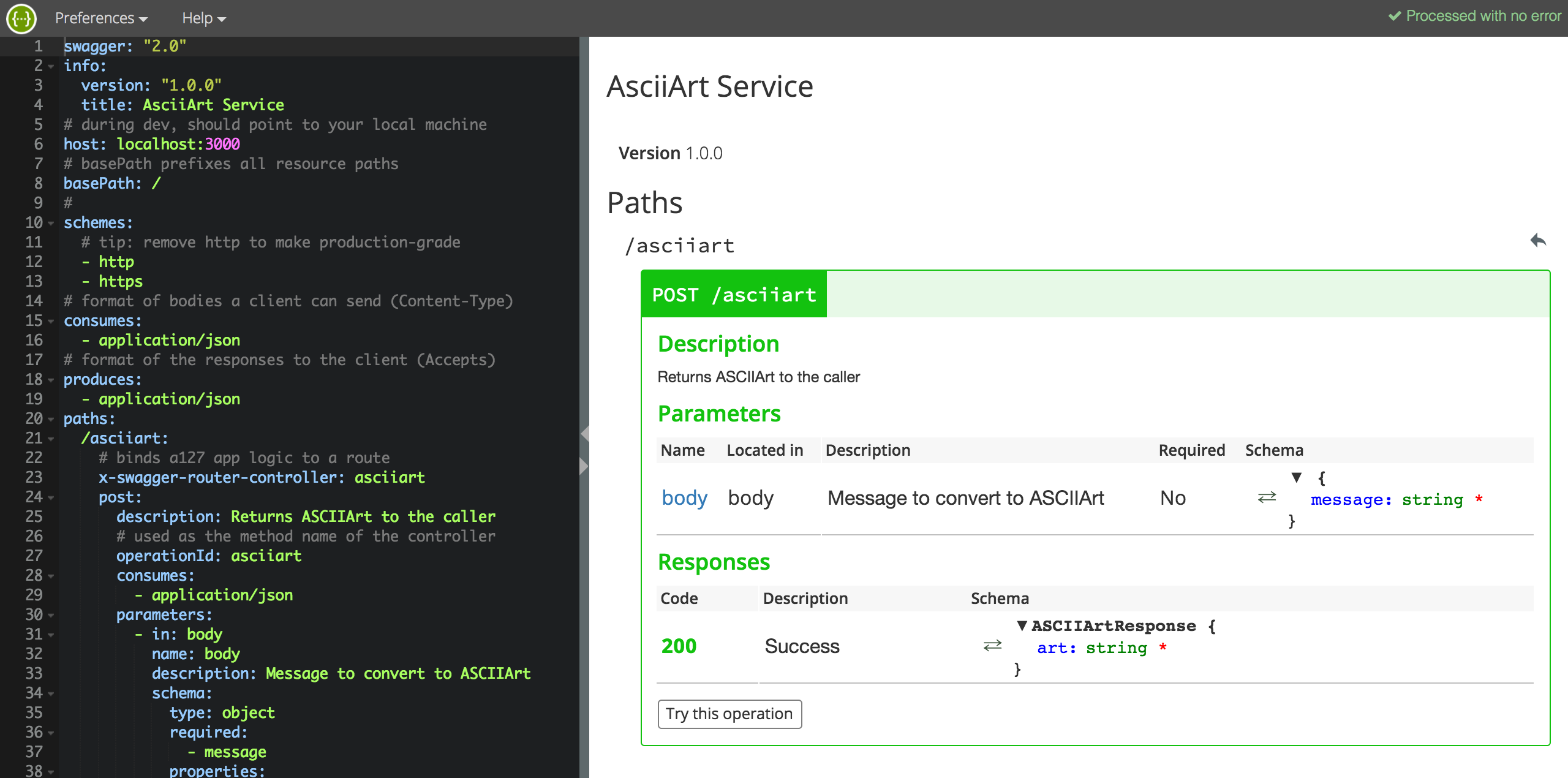
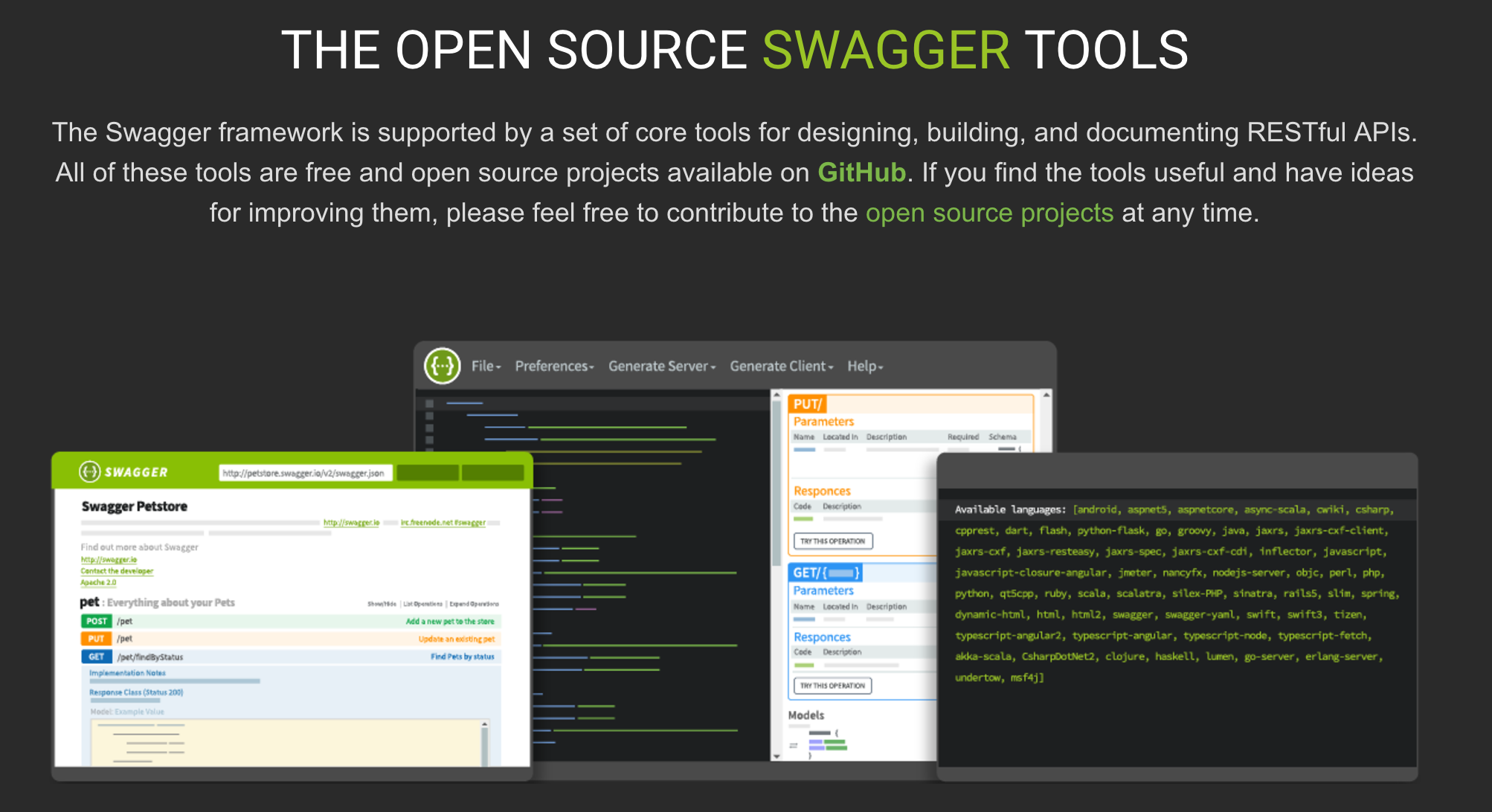
One of the many benefits of supporting the Swagger / Open API standard is the ability to generate documentation for it. The following screenshot shows the API schema on the left and generated documentation on the right. What is also very cool about this, is the Try this operation button. Give it a try for yourself now!

asciiartswagger

oai

Whats the difference between Swagger and Open API  2.0? This was a question i asked myself and thought i would cover the answer here. Basically as at, Swagger v2.0, there is no difference, the Open API Initiative is a rebranding, born out of the huge adoption Swagger has seen since its creation. This move means its future is more formalised and seems to have more meaningful name. You can read more about this amazing story here.

Choosing your methodology for API development

The schema shown above might look a bit scary and you might well want to just get writing code and think about the schema when your ready to share your API. This is certainly supported and there are some tools that support generation of the schema via JSDoc comments in your code or via your joi schema here (useful for existing API’s).

However to really embrace an API first strategy in your development team i feel you should start with the requirements and thus the schema first. This allows others in your team or the intended recipients to review the API before its been developed and even test it out with stub implementations. In my research i was thus drawn to Swagger Node, a tool set, donated by ApiGee, that embraces API-design-first. Read more pros and cons here. It is also the formal Node.js implementation associated with Swagger.

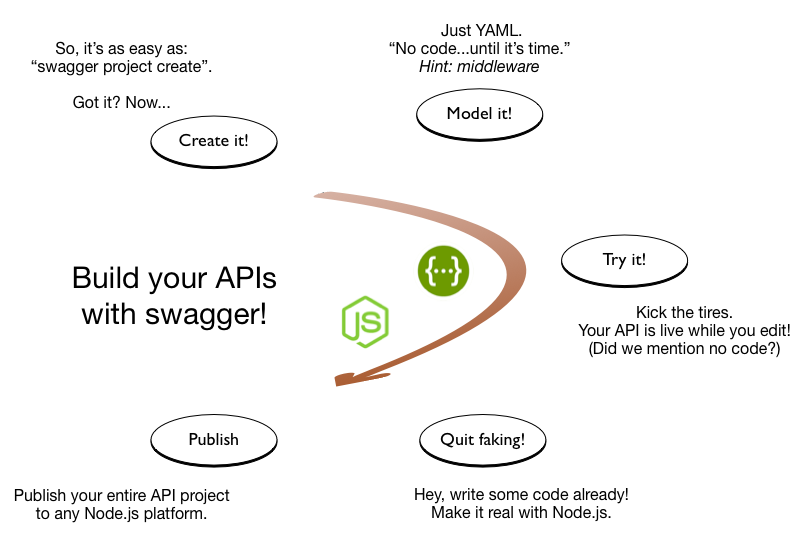
The following describes the development process of API-design-first.

overview2

(ref: Swagger Node README)

Developing Open API’s with “Swagger Node” 

Swagger Node is very easy to get started with and is well documented here. It supports the full API-design-first development process show in the diagram above. The editor (also shown above) is really useful for getting used to writing schemas and the UI is dynamically refreshed, including errors.

The overall Node.js project is still pretty simple (GitHub repo here), now consisting of three files. The schema is edited in YAML file format (translated to JSON when served up to tools). The schema for the ASCIIArt service now looks like the following and is pretty self describing. For further documentation on Swagger / Open API 2.0 see here.

https://createasciiart.herokuapp.com/schema/
swagger: "2.0"
info:
  version: "1.0.0"
  title: AsciiArt Service
# during dev, should point to your local machine
host: localhost:3000
# basePath prefixes all resource paths 
basePath: /
# 
schemes:
  # tip: remove http to make production-grade
  - http
  - https
# format of bodies a client can send (Content-Type)
consumes:
  - application/json
# format of the responses to the client (Accepts)
produces:
  - application/json
paths:
  /asciiart:
    # binds a127 app logic to a route
    x-swagger-router-controller: asciiart
    post:
      description: Returns ASCIIArt to the caller
      # used as the method name of the controller
      operationId: asciiart
      consumes:
        - application/json
      parameters:
        - in: body
          name: body
          description: Message to convert to ASCIIArt
          schema:
            type: object
            required: 
              - message
            properties:
              message:
                type: string
      responses:
        "200":
          description: Success
          schema:
            # a pointer to a definition
            $ref: "#/definitions/ASCIIArtResponse"
  /schema:
    x-swagger-pipe: swagger_raw
# complex objects have schema definitions
definitions:
  ASCIIArtResponse:
    required:
      - art
    properties:
      art:
        type: string

The entry point of the Node.js app, the server.js file now looks like this…

'use strict';

var SwaggerExpress = require('swagger-express-mw');
var app = require('express')();
module.exports = app; // for testing
var config = {
  appRoot: __dirname // required config
};

SwaggerExpress.create(config, function(err, swaggerExpress) {
  if (err) { throw err; }
  // install middleware for swagger ui
  app.use(swaggerExpress.runner.swaggerTools.swaggerUi());
  // install middleware for swagger routing
  swaggerExpress.register(app);
  var port = process.env.PORT || 3000;
  app.listen(port);
});

Note: I changed the Node.js web server framework from hapi (used in my previous blog) to express. As I could not get the Swagger UI to integrate with hapi.

The code implementing the API has been moved to its asciiart.js file.

var figlet = require('figlet');

function asciiart(request, response) {
    // Call figlet to generate the ASCII Art and return it!
    const msg = request.body.message;
    figlet(msg, function(err, data) {
        response.json({ art: data});
    });
}

module.exports = {
    asciiart: asciiart
};

Note: There is no parameter validation code written here, the Swagger Node module dynamically implements parameter validation for you (based on what you define in the schema) before the request reaches your code! It also validates your responses.

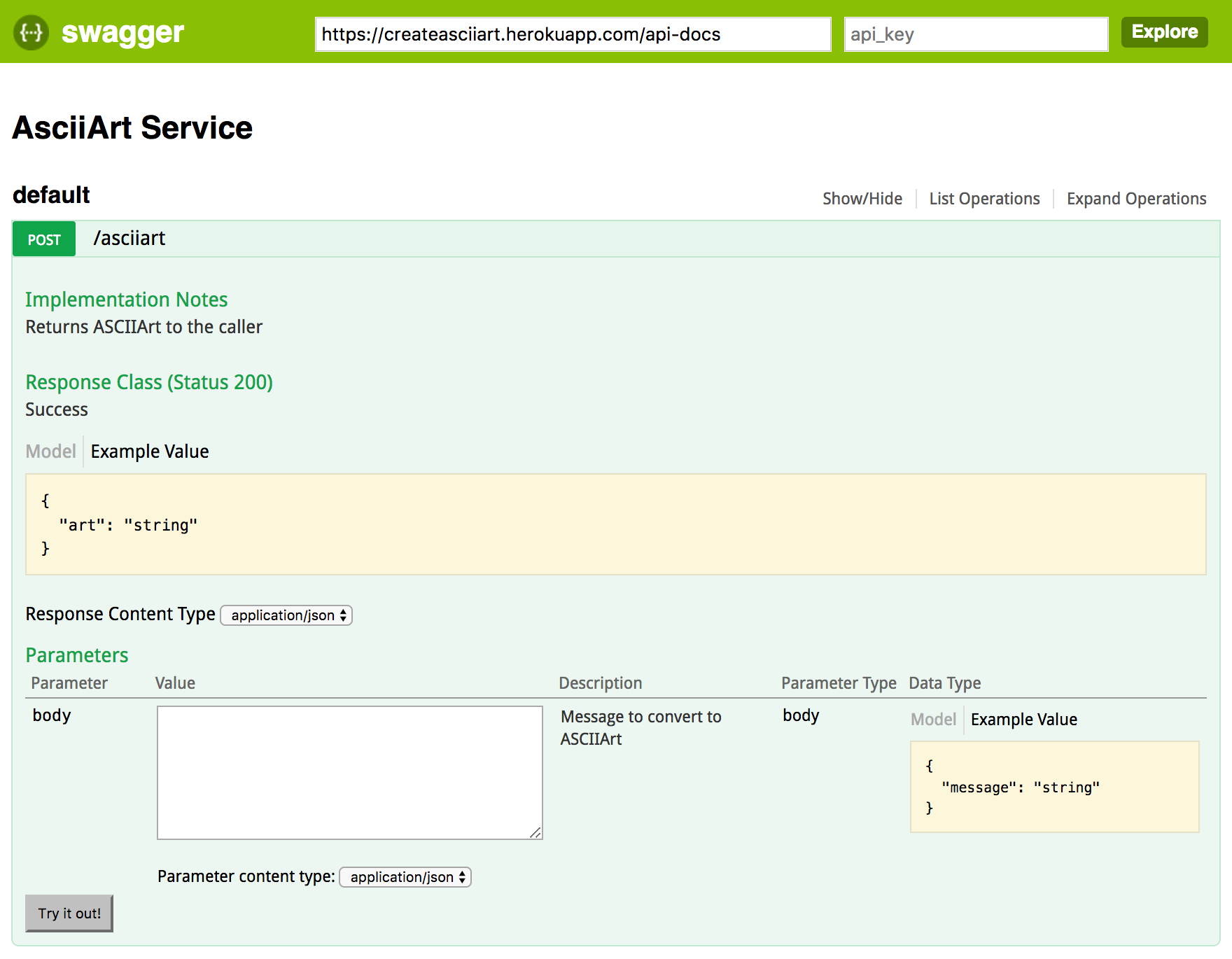
To access the documentation simply use the path /docs. The documentation is generated automatically, no need to manage static HTML files. I have hosted my sample AsciiArt service in Heroku so you can try it by clicking the link below.

https://createasciiart.herokuapp.com/docs/

swaggerui

Consuming Swagger API’s with External Services

The process described in my earlier blog for using the above API via External Services has not changed. External Services automatically recognises Swagger API’s.

externalservicesasciiart

NOTE: There is a small bug that prevents the callout if the basePath is specified as root in the schema. Thus this has been commented out in the deployed version of the schema for now. Salesforce will likely have fixed this by the time you read this.

Swagger Tools

  • SwaggerToolsSwagger Editor, the interactive editor shown in the first screenshot of this blog.
  • Swagger Code Generator, creates server stubs and clients for implementing and calling Swagger enabled API’s.
  • Swagger UI, the browser based UI for generating documentation. You can call this from the command line and upload the static HTML files or use frameworks like the one used in this blog to generated it on the fly.

Can we use Swagger to call or implement API’s authored in Apex?

Swagger Tools are available on a number of platforms, including recently added support for Apex clients. This gives you another option to consume API’s directly in Apex. Its not clear if this is going to a better route than consuming the classes generated by External Services, i suspect it might have some pros and cons tbh. Time will tell!

Meanwhile i did run the Swagger Code Generator for Apex and got this…

public class SwagDefaultApi {
    SwagClient client;

    public SwagDefaultApi(SwagClient client) {
        this.client = client;
    }

    public SwagDefaultApi() {
        this.client = new SwagClient();
    }

    public SwagClient getClient() {
        return this.client;
    }

    /**
     *
     * Returns ASCIIArt to the caller
     * @param body Message to convert to ASCIIArt (optional)
     * @return SwagASCIIArtResponse
     * @throws Swagger.ApiException if fails to make API call
     */
    public SwagASCIIArtResponse asciiart(Map<String, Object> params) {
        List<Swagger.Param> query = new List<Swagger.Param>();
        List<Swagger.Param> form = new List<Swagger.Param>();

        return (SwagASCIIArtResponse) client.invoke(
            'POST', '/asciiart',
            (SwagBody) params.get('body'),
            query, form,
            new Map<String, Object>(),
            new Map<String, Object>(),
            new List<String>{ 'application/json' },
            new List<String>{ 'application/json' },
            new List<String>(),
            SwagASCIIArtResponse.class
        );
    }
}

The code is also generated in a Salesforce DX compliant format, very cool!


21 Comments

Simplified API Integrations with External Services

Salesforce are on a mission to make accessing off platform data and web services as easy as possible. This helps keep the user experience optimal and consistent for the user and also allows admins to continue to leverage the platforms tools such as Process Builder and Flow, even if the data or logic is not on the platform.

Starting with External Objects, they added the ability to see and also update data stored in external databases. Once setup, users can manipulate external records without leaving Salesforce, by staying within the familiar UI’s. With External Services, currently in Beta, they have extended this concept to external API services.

UPDATE: The ASCIIArt Service covered in this blog has since been updated to use the Swagger schema standard. However this blog is still a very useful introduction to External Services. Once you have read it, head on over to this blog!

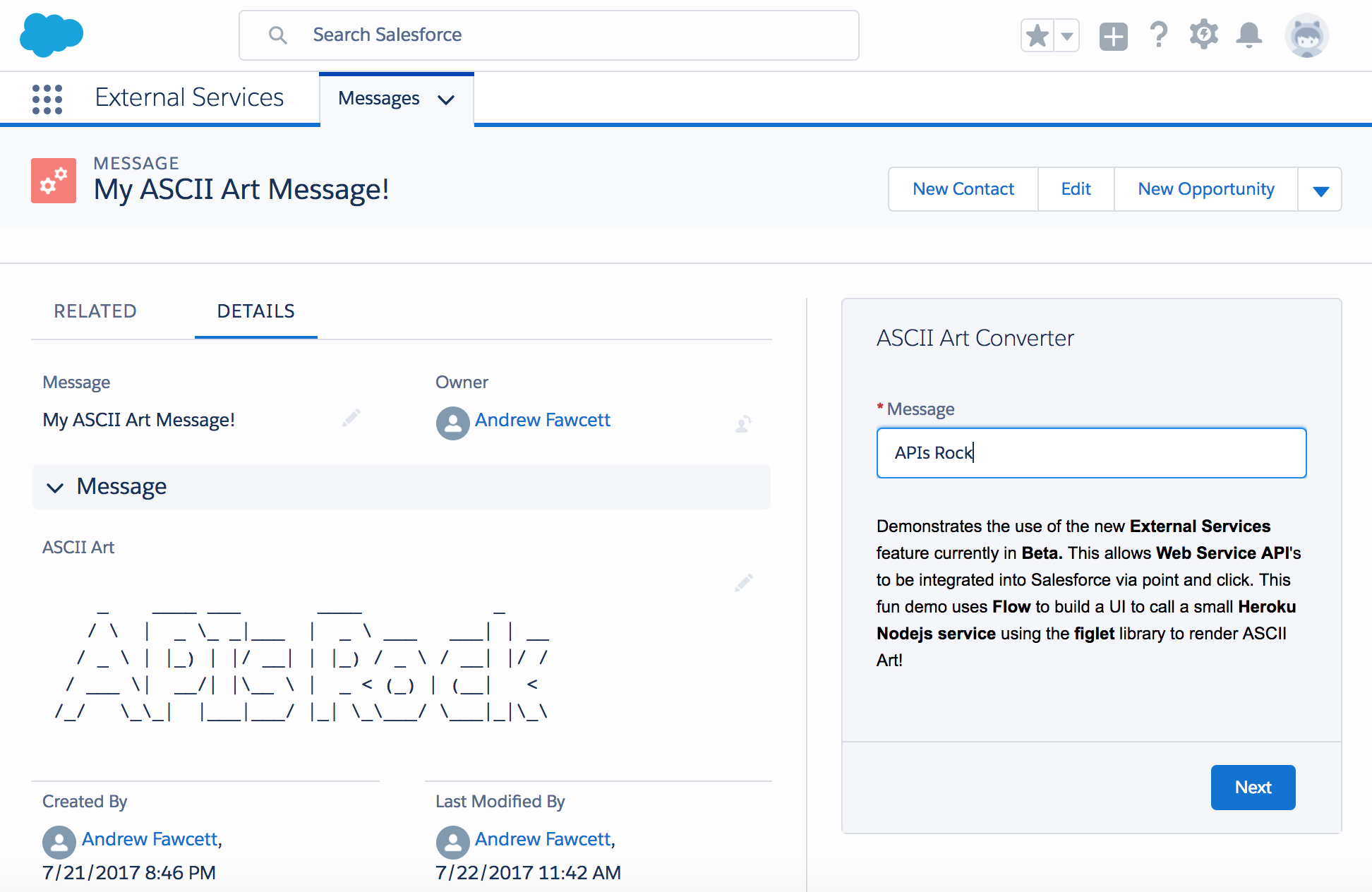
In this blog lets first focus on the clicks-not-code steps you can repeat in your own org, to consume a live ASCII Art web service API i have exposed publicly. The API is simple, it takes a message and returns it in ASCII art format. The following steps result in a working UI to call the API and update a record.

ExternalServicesDemo.png

After the clicks not code bit i will share how the API was built, whats required for compatibility with this feature and how insanely easy it is to develop Web Services in Heroku using Nodejs. So lets dive in to External Services!

Building an ASCII Art Converter in Lightning Experience and Flow

The above solution was built with the following configurations / components. All of which are accessible under the LEX Setup menu (required for External Services) and takes around 5 minutes maximum to get up and running.

  1. Named Credential for the URL of the Web Service
  2. External Service for the URL, referencing the Named Credential
  3. Visual Flow to present a UI, call the External Service and update a record
  4. Lightning Record Page customisation to embed the Flow in the UI

I created myself a Custom Object, called Message, but you can easily adapt the following to any object you want, you just need a Rich Text field to store the result in. The only other thing you need to know of course is the web service URL.

https://createasciiart.herokuapp.com

Can i use External Services with any Web Service then?

In order to build technologies that simplify what are normally things developers have to interpret and code manually. Web Service APIs must be documented in a way that External Services can understand. In this Beta release this is the Interagent schema standard (created by Heroku as it happens).  Support for the more broadly adopted Swagger / OpenId will be added in the Winter release (Safe Harbour).

For my ASCII Art service above, i authored the Interagent schema based on a sample the Salesforce PM for this feature kindly shared, more on this later. When creating the External Service in moment we will provide a schema to this service.

https://createasciiart.herokuapp.com/schema

Creating a Named Credential

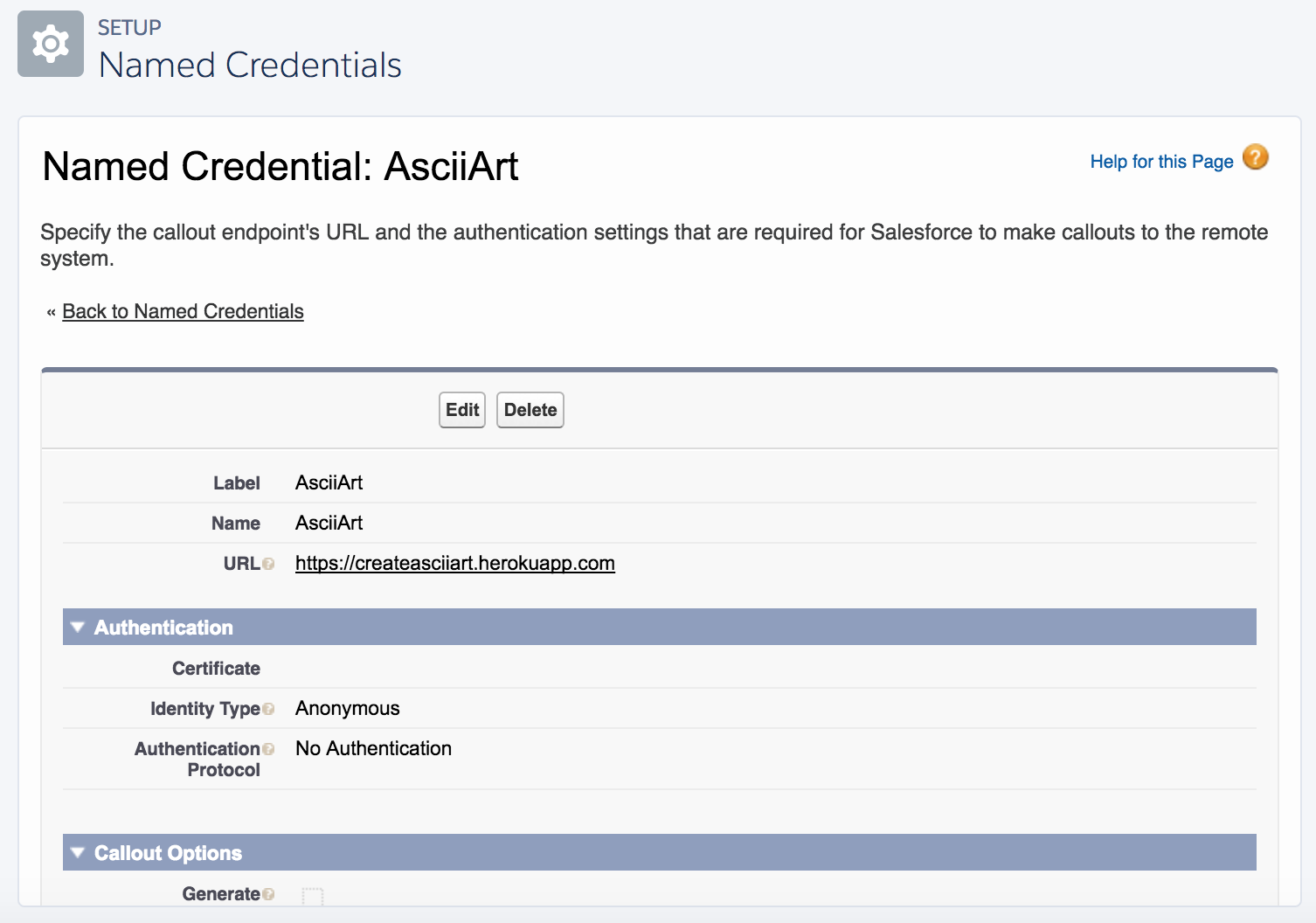
From the setup menu search for Named Credential and click New. This is a simple Web Service that requires no authentication. Basically provide only the part of the above URL that points to the Web Service endpoint.

ESNamedCred.png

Creating the External Service

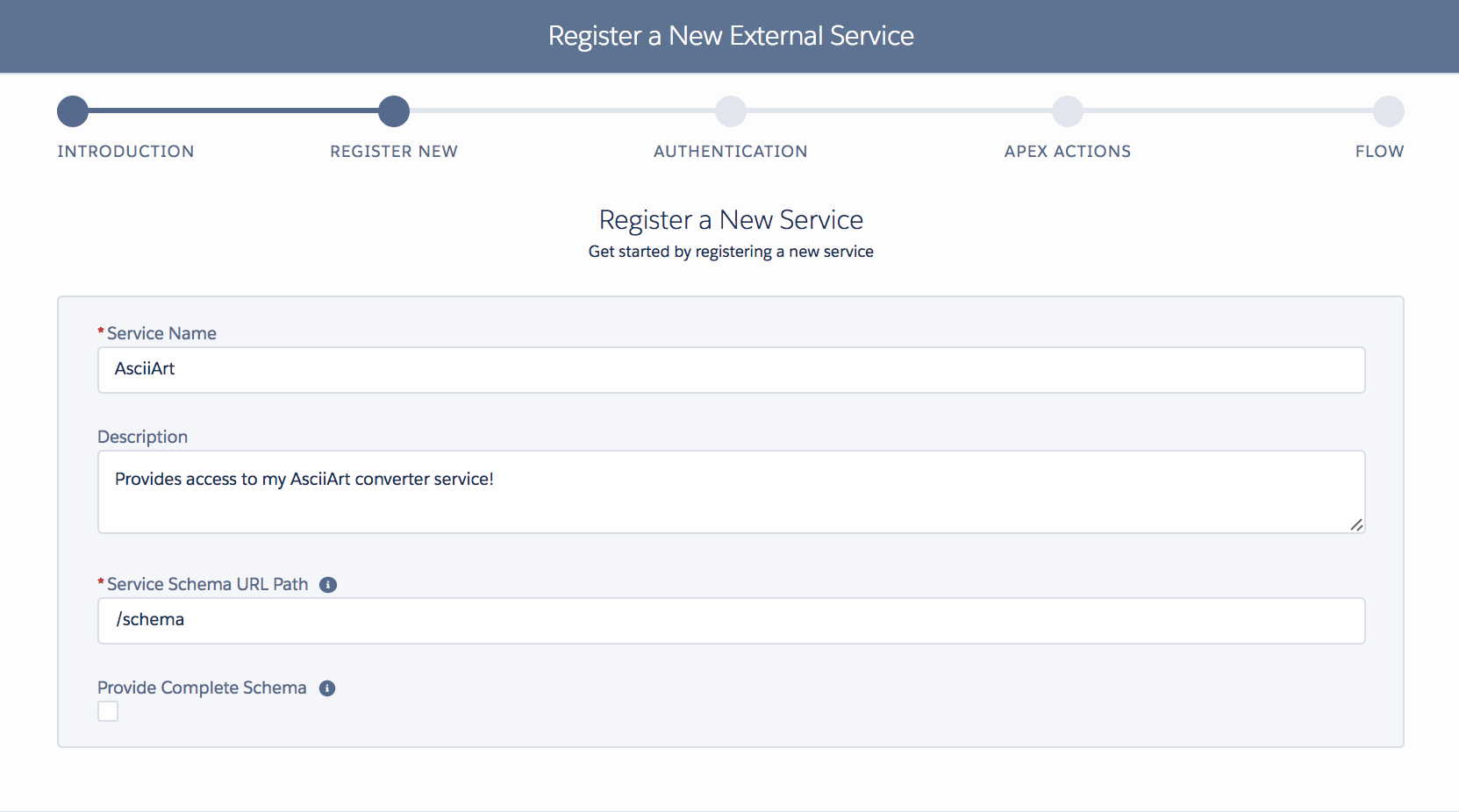
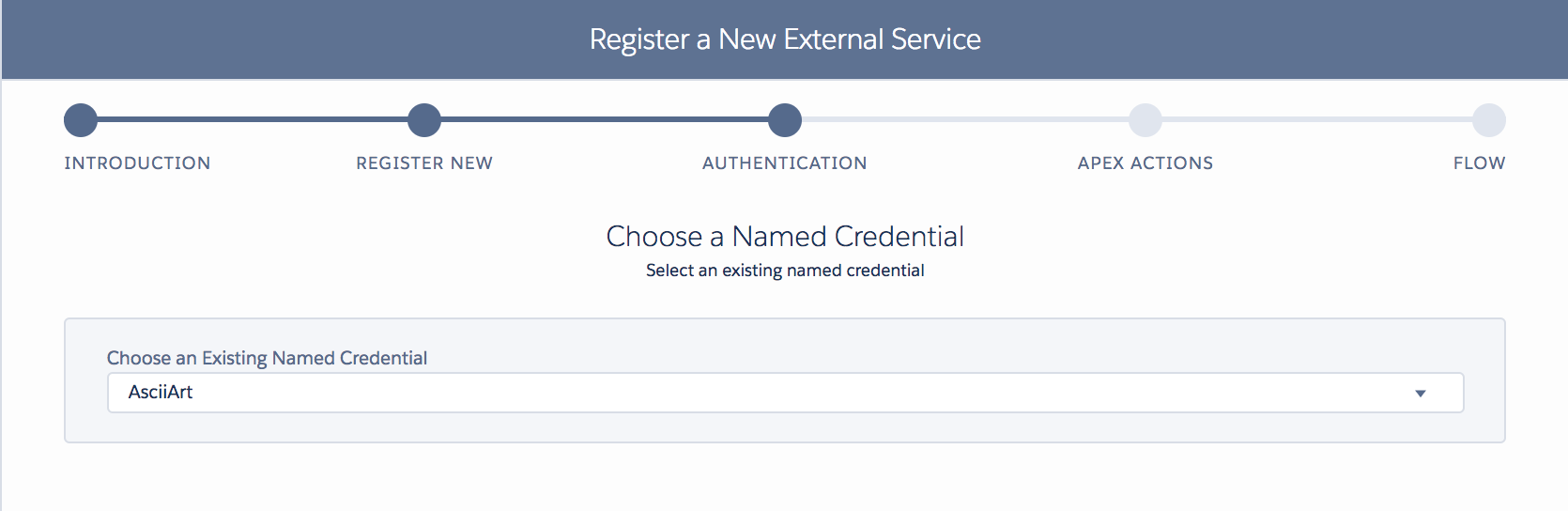
Now for the magic! Under the Setup menu (only in Lightning Experience) search for Integrations and start the wizard. Its a pretty straight forward process, of selecting the above Named Credential, then telling it the URL for the schema. If thats not exposed by the service you want to use, you can paste a Schema in directly (which lets a developer define a schema yourself if one does not already exist).

esstep1.png

esstep2.png

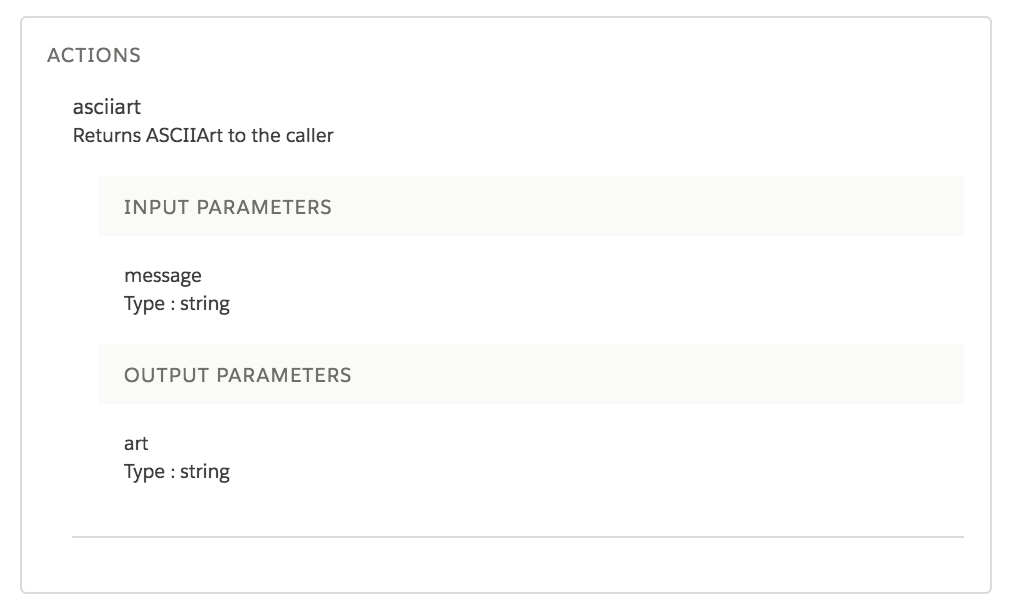
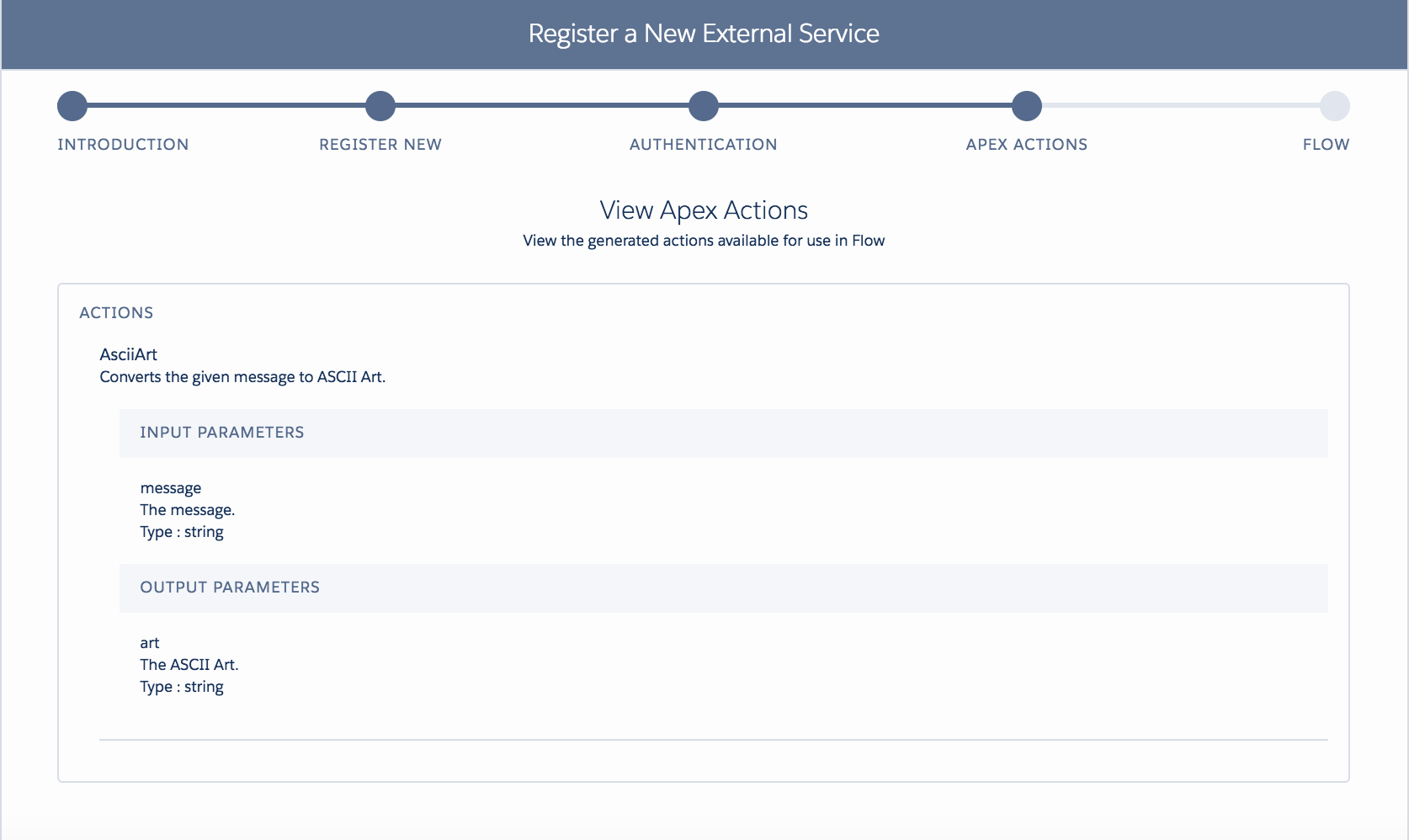
Once you have created the External Service you can review the operations it has discovered. Salesforce uses the documentation embedded in the given schema to display a rather pleasing summary actually.

esstep3.png

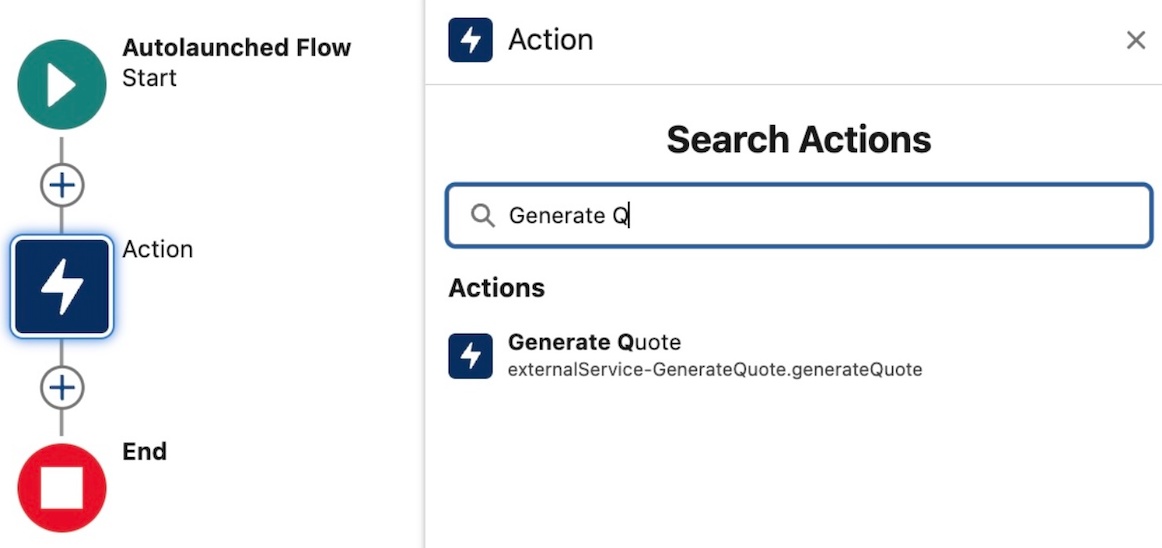
So what just happened? Well… internally the wizard wrote some Apex code on your behalf and implemented the Invocable Method annotations to enable that Apex code to appear in tools like Process Builder (not supported in Beta) and Flow. Pretty cool!

Whats more interesting for those wondering, is you cannot actually see this Apex code, its there but some how magically managed by the platform. Though i’ve not confirmed, i would assume it does not require code coverage.

Update: According to the PM, in Winter’18 it will be possible “see” the generated class from other Apex classes and thus reuse the generated code from Apex as well. Kind of like a Api Stub Generator.

Creating a UI to call the External Service via Flow

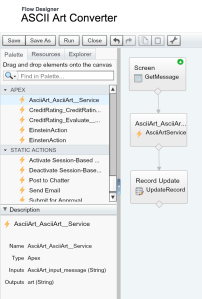
This simple Flow prompts the user for a message to convert, calls the External Service and updates a Rich Text field on the record with the response. You will see in the Flow sidebar the generated Apex class generated by the External Service appears.

esflow

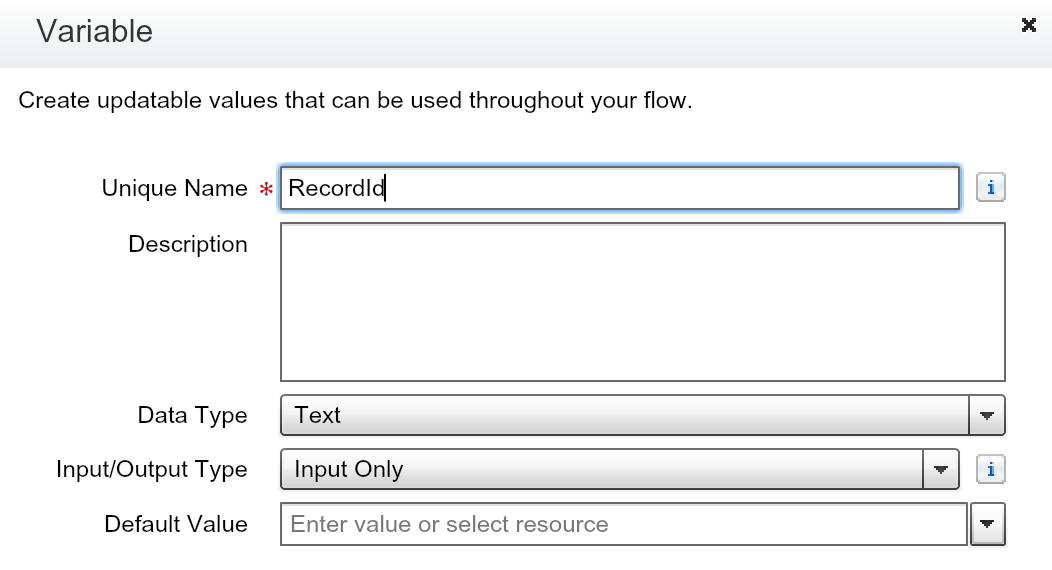
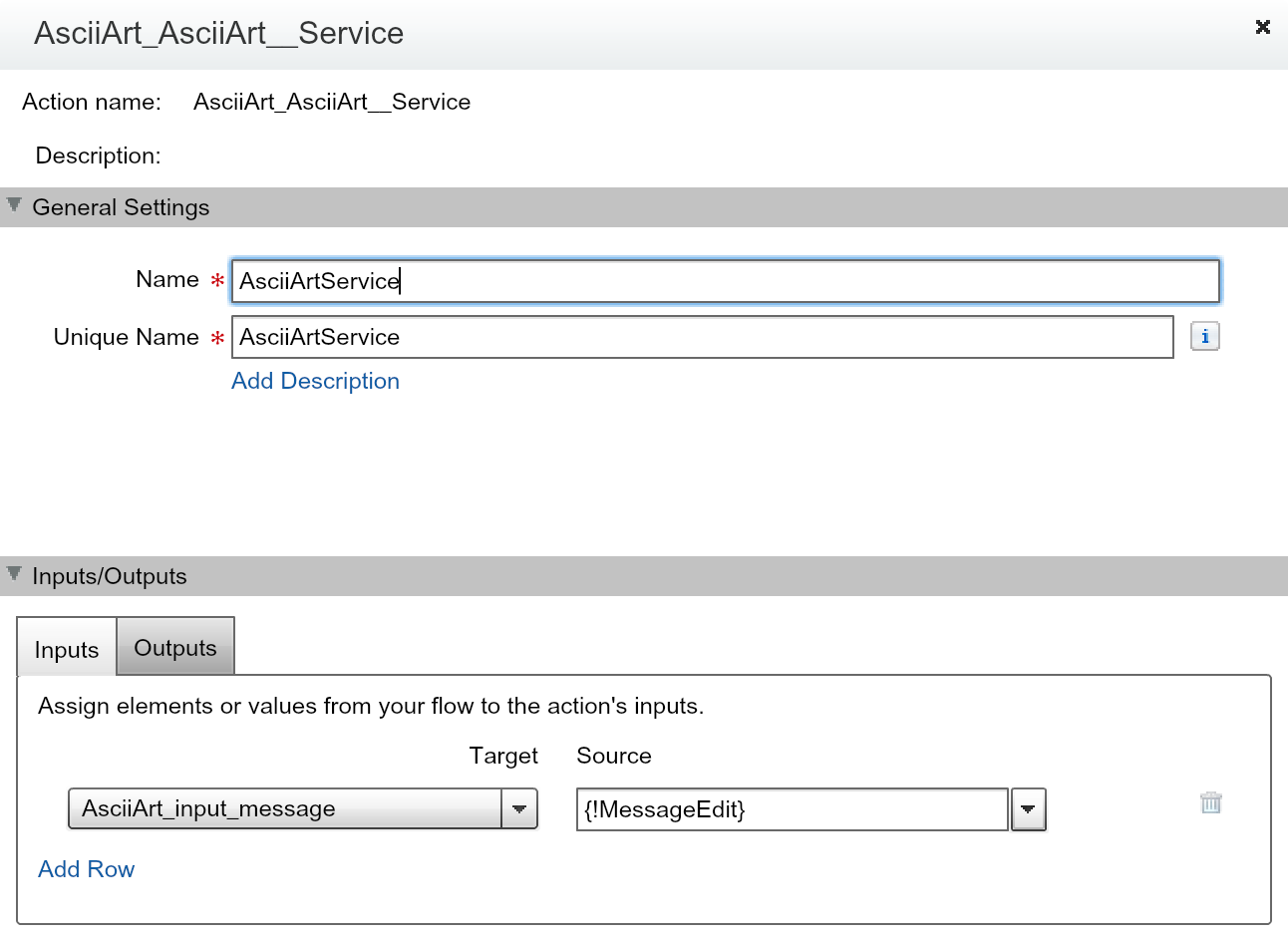
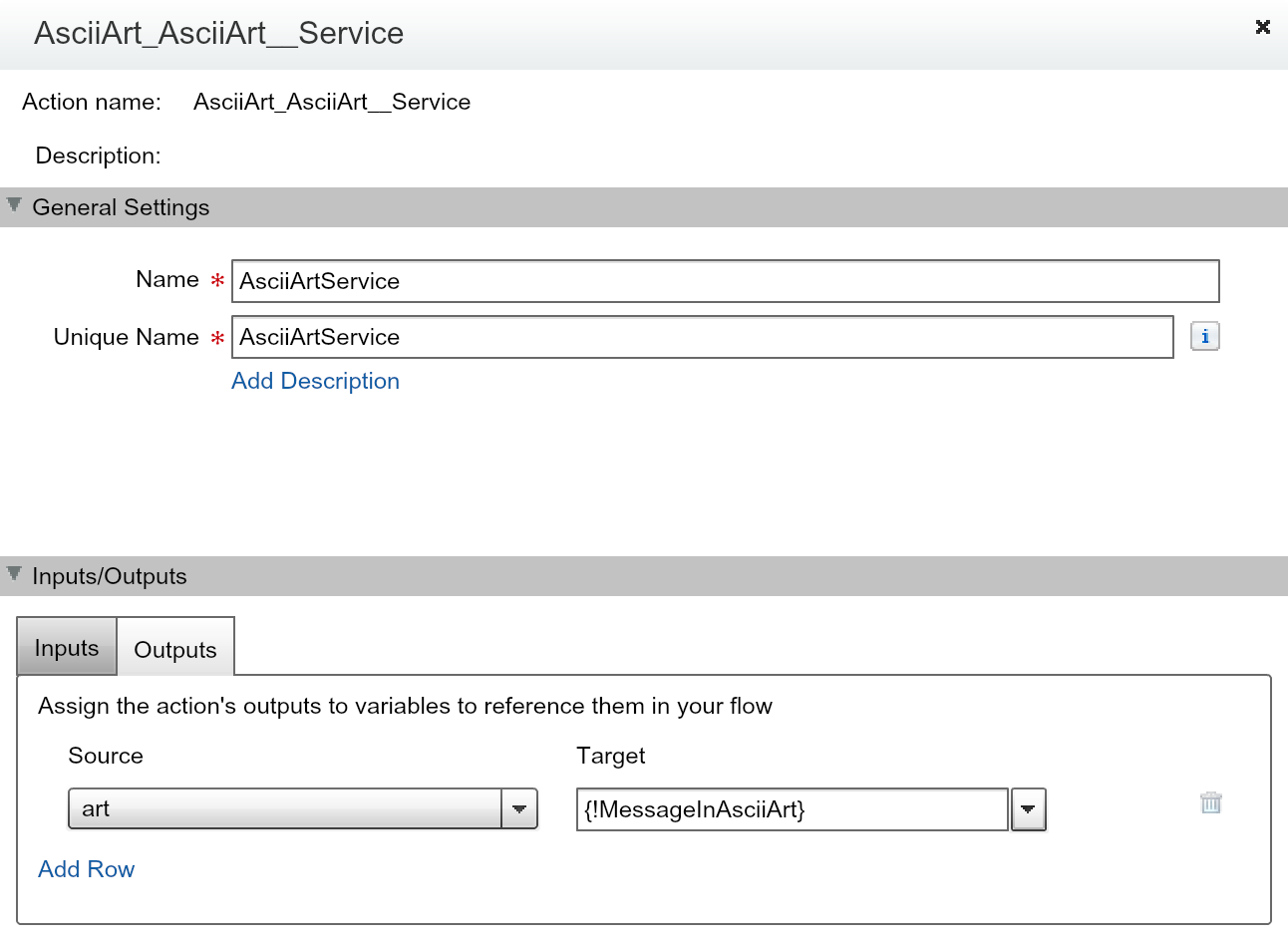
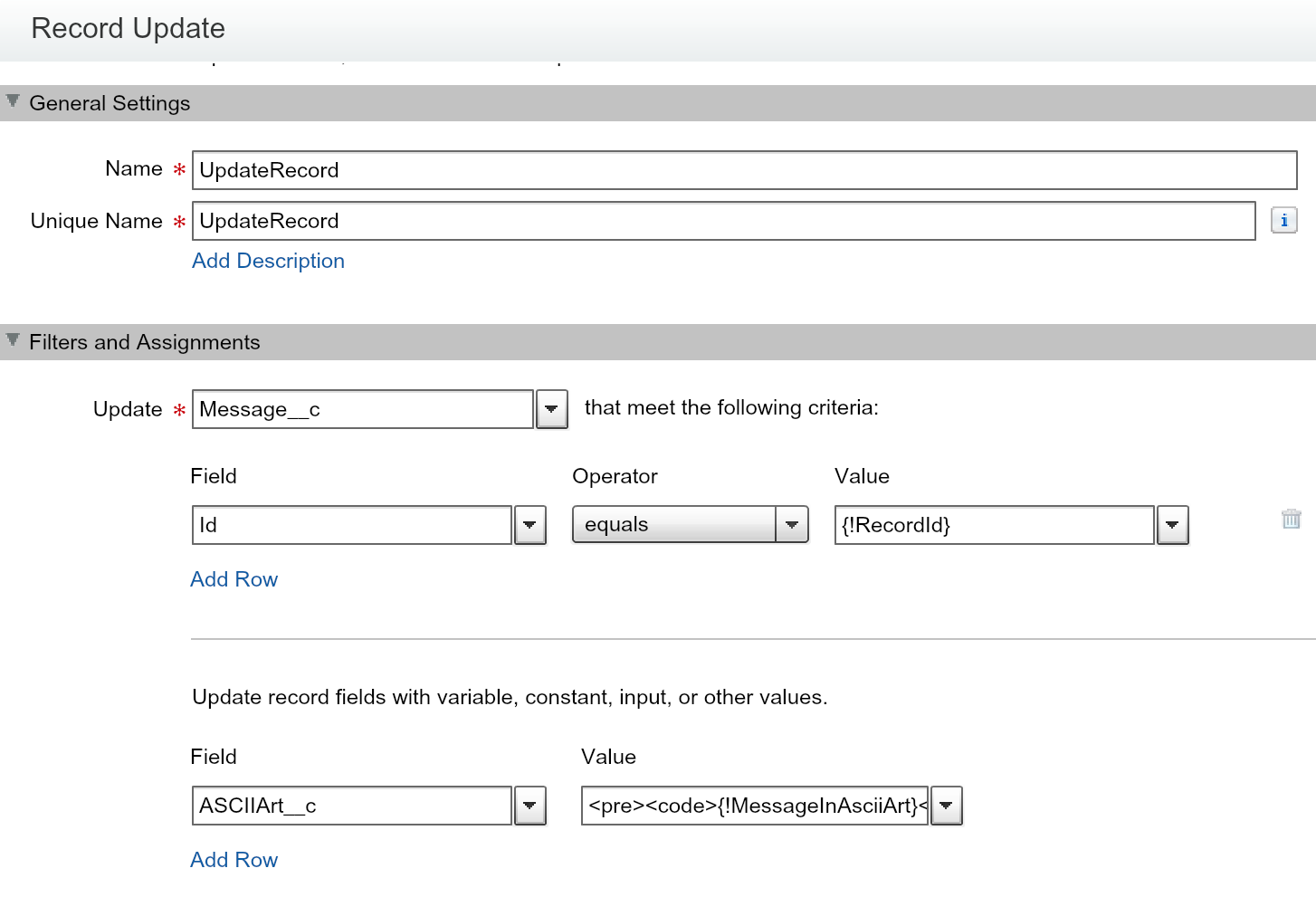
The following screenshots show some of the key steps involved in setting up the Flow and its three steps, including making a Flow variable for the record Id. This is later used when embedding the Flow in Lightning Experience in the next step.

esflow1

RecordId used by Flow Lightning Component

esflow2

Assign the message service parameter

esflow3

Assign the response to variable

esflow4

Update the Rich Text field

TIP: When setting the ASCII Art service response into the field, i wrapped the value in the HTML elements, pre and code to ensure the use of a monospaced font when the Rich Text field displayed the value.

Embedding the Flow UI in Lightning Experience

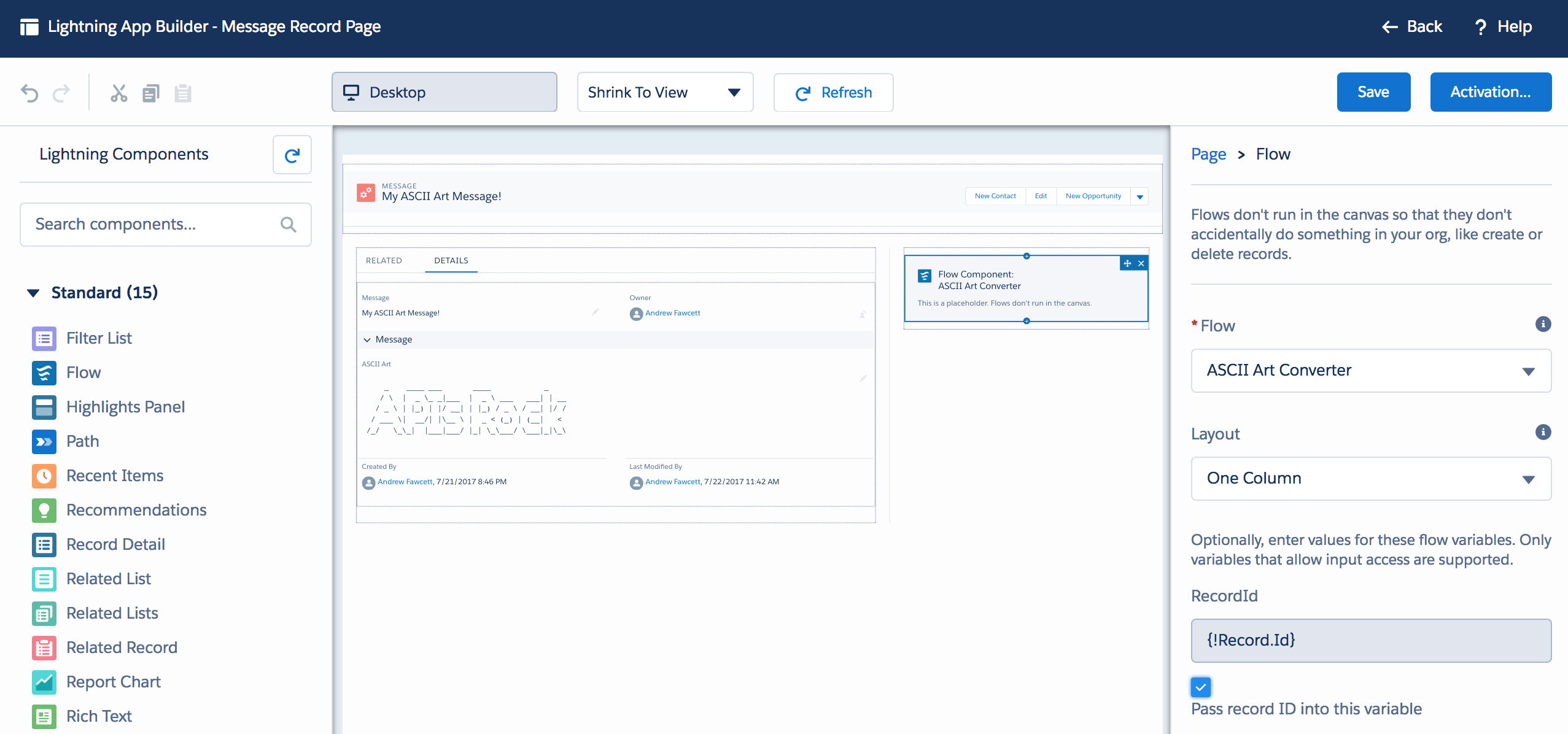
Navigate to your desired objects record detail page and select Edit Page from the cog in the top right of the page to open the Lightning App Builder. Here you can drag the Flow component onto the page and configure it to call the above flow. Make sure to map the Flow variable for the record Id as shown in the screenshot, to ensure the current record is passed.

esflowlc.png

Thats it, your done! Enjoy your ASCII Art messages!

Creating your own API for use with External Services

Belinda, the PM for this feature was also kind enough to share the sample code for the example shown in TrailheaDX, from which the service in this blog is based. However i did wanted to build my own version to do something different from the credit example. Also extend my personal experience with Heroku and Nodejs more.

The NodeJS code for this solution is only 41 lines long. It runs up a web server (using the very easy to use hapi library), and registers a couple of handlers. One handler returns the statically defined schema.json file, the other implements the service itself. As side note, the joi library is an easy way add validation to the service parameters.

var Hapi = require('hapi');
var joi = require('joi');
var figlet = require('figlet');

// initialize http listener on a default port
var server = new Hapi.Server();
server.connection({ port: process.env.PORT || 3000 });

// establish route for serving up schema.json
server.route({
  method: 'GET',
  path: '/schema',
  handler: function(request, reply) {
    reply(require('./schema'));
  }
});

// establish route for the /asciiart resource, including some light validation
server.route({
  method: 'POST',
  path: '/asciiart',
  config: {
    validate: {
      payload: {
        message: joi.string().required()
      }
    }
  },
  handler: function(request, reply) {
    // Call figlet to generate the ASCII Art and return it!
    const msg = request.payload.message;
    figlet(msg, function(err, data) {
        reply(data);
    });
  }
});

// start the server
server.start(function() {
  console.log('Server started on ' + server.info.uri);
});

I decided i wanted to explore the diversity of whats available in the Nodejs space, through npm. To keep things light i chose to have a bit of fun and quickly found an ASCIIArt library, called figlet. Though i soon discovered that npm had a library for pretty much every other use case i came up with!

Finally the hand written Interagent schema is also shown below and is reasonably short and easy to understand for this example. Its not all that well documented in layman’s terms as far as i can see. See my thoughts on this and upcoming Swagger support below.

{
  "$schema": "http://interagent.github.io/interagent-hyper-schema",
  "title": "ASCII Art Service",
  "description": "External service example from AndyInTheCloud",
  "properties": {
    "asciiart": {
      "$ref": "#/definitions/asciiart"
    }
  },
  "definitions": {
    "asciiart": {
      "title": "ASCII Art Service",
      "description": "Returns the ASCII Art for the given message.",
      "type": [ "object" ],
      "properties": {
        "message": {
          "$ref": "#/definitions/asciiart/definitions/message"
        },
        "art": {
          "$ref": "#/definitions/asciiart/definitions/art"
        }
      },
      "definitions": {
        "message": {
          "description": "The message.",
          "example": "Hello World",
          "type": [ "string" ]
        },
        "art": {
          "description": "The ASCII Art.",
          "example": "",
          "type": [ "string" ]
        }
      },
      "links": [
        {
          "title": "AsciiArt",
          "description": "Converts the given message to ASCII Art.",
          "href": "/asciiart",
          "method": "POST",
          "schema": {
            "type": [ "object" ],
            "description": "Specifies input parameters to calculate payment term",
            "properties": {
              "message": {
                "$ref": "#/definitions/asciiart/definitions/message"
              }
            },
            "required": [ "message" ]
          },
          "targetSchema": {
            "$ref": "#/definitions/asciiart/definitions/art"
          }
        }
      ]
    }
  }
}

Finally here is the package.json file that brings the whole node app together!

{
  "name": "asciiartservice",
  "version": "1.0.0",
  "main": "server.js",
  "dependencies": {
    "figlet": "^1.2.0",
    "hapi": "~8.4.0",
    "joi": "^6.1.1"
  }
}

Other Observations and Thoughts…

  • Error Handling.
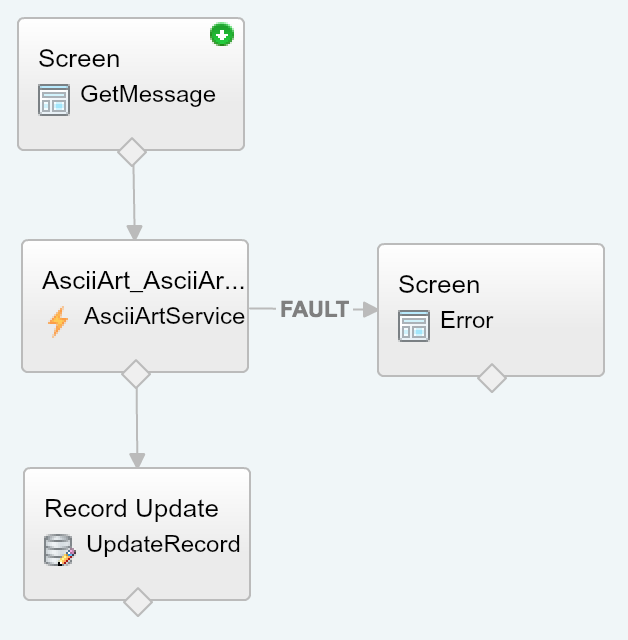
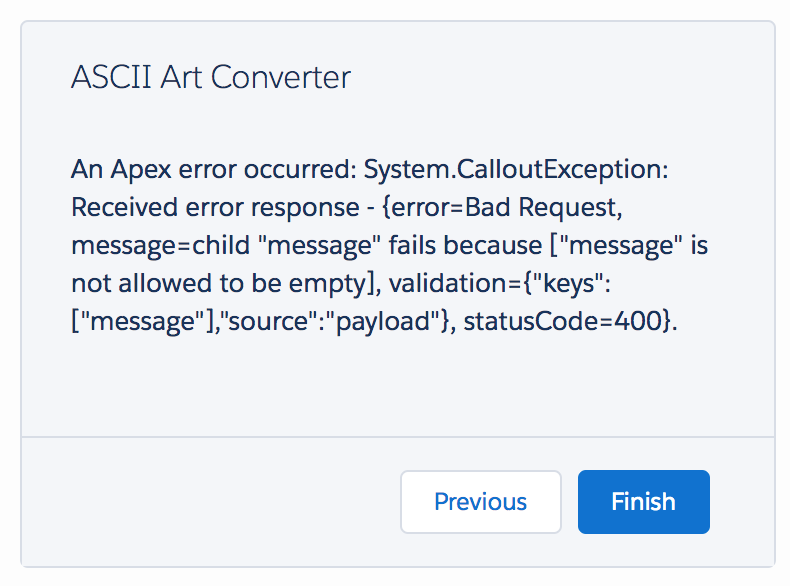
    You can handle errors from the service in the usual way by using the Fault path from the element. The error shown is not all that pretty, but then in fairness there is not really much of a standard to follow here.
    eserrorflow.pngeserror.png
  • Can a Web Service called this way talk back to Salesforce?
    Flow provides various system variables, one of which is the Session Id. Thus you could pass this as an argument to your Web Service. Be careful though as the running user may not have Salesforce API access and this will be a UI session and thus will be short lived. Thus you may want to explore another means to obtain an renewable oAuth token for more advanced uses.
  • Web Service Callbacks.
    Currently in the Beta the Flow is blocked until the Web Service returns, so its good practice to make your service short and sweet. Salesforce are planning async support as part of the roadmap however.
  • Complex Parameters.
    Its unclear at this stage how complex a web service can be supported given Flows limitations around Invocable Methods which this feature depends on.
  • The future is bright with Swagger support!
    I am really glad Salesforce are adding support for Swagger/OpenID, as i really struggled to find good examples and tutorials around Interagent. Really what is needed here is for the schema and code to be tied more closely together, like this!UPDATE: See my other blog entry covering Swagger support

Summary

Both External Objects and External Services reflect the reality of the continued need for integration tools and making this process simpler and thus cheaper. Separate services and data repositories are for now here to stay. I’m really pleased to see Salesforce doing what it does best, making complex things easier for the masses. Or as Einstein would say…Everything should be made as simple as possible, but no simpler.

Finally you can read more about External Objects here and here through Agustina’s and laterally Alba’s excellent blogs.


2 Comments

Highlights from TrailheaDX 2017

IMG_2857.JPGThis was my first TrailheaDX and what an event it was! With my Field Guide in hand i set out into the wilderness! In this blog i’ll share some of my highlights, thoughts and links to the latest resources. Many of the newly announced things you can actually get your hands on now which is amazing!

Overall the event felt well organized, if a little frantic at times. With smaller sessions of 30 minutes each, often 20 mins after intros and questions, each was bite sized, but quite well tuned with demos and code samples being shown.

SalesforceDX, Salesforce announced the public beta of this new technology aimed at improving the developer experience on the platform. SalesforceDX consist of several modules that will be extended further over time. Salesforce has done a great job at providing a wealth of Trailhead resources to get you started.

Einstein, Since its announcement, myself and other developers have been waiting to get access to more custom tools and API’s, well now that wait is well and truly over. As per my previous blogs we’ve had the Einstein Vision API for a little while now. Announced at the event where no less than three other new Einstein related tools and API’s.

  • Einstein Discovery. Salesforce demonstrated a very slick looking tool that allows you to point and click your way through to analyzing various data sets, including those obtained from your custom objects! They have provided a Trailhead module on it here and i plan on digging in! Pricing and further info is here.
  • Einstein Sentiment API. Allows you to interpret text strings for terms that indicate if its a positive, neutral or negative statement / sentiment. This can be used to scan case comments, forum posts, feedback, twitter posts etc in an automated way and respond or be alerted accordingly to what is being said.
  • Einstein Intent API.  Allows you to interpret text strings for meanings, such as instructions or requests. Routing case comments or even implementing bots that can help automate or propose actions to be taken without human interpretation.
  • Einstein Object Detection API. Is an extension of the Einstein Vision API, that allows for individual items in a picture to be identified. For example a pile of items on a coffee table, such as a mug, magazine, laptop or pot plant! Each can then be recognized and classified to build up more intel on whats in the picture for further processing and analysis.
  • PredictionIO on Heroku. Finally, if you want to go below the declarative tools or intentional simplified Einstein API’s, you can build your own machine learning models using Heroku and the PredictionIO build pack!

Platform Events. These allow messages to be published and subscribed to using a new object known as an Event object, suffixed with __e. Once created you can use a new Apex API’s or REST API’s to send messages and use either Apex Triggers or Streaming API to receive them. There is also a new Process Builder action or Flow element to send messages. You can keep your messages within Force.com or use them to integrate between other cloud platforms or the browser. The possibilities are quite endless here, aysnc processing, inter app comms, logging, ui notifications…. i’m sure myself and other bloggers will be exploring them in the coming months!

External Services. If you find a cool API you want to consume in Force.com you currently have to write some code. No longer! If you have a schema that describes that API you use the External Services wizard to generate some Apex code that will call out to the API. Whats special about this, is the Apex code is accessible via Process Builder and Flow. Making clicks not code API integration possible. Its an excellent way to integrate with complementary services you or others might develop on platforms such as Heroku. I have just submitted a session to Dreamforce 2017 to explore this further, fingers crossed it gets selected! You can read more about it here in the meantime.

Sadly i did have to make a key decision to focus on the above topics and not so much on Lightning. I heard from other attendees these sessions where excellent and i did catch a brief sight of dynamic component rendering in Lightning App Builder, very cool!

Thanks Salesforce for filling my blog backlog for the next year or so! 😉