Andy in the Cloud

From BBC Basic to Force.com and beyond…


31 Comments

Spring’14 Visualforce Remote Objects Introduction

Salesforce have provided further support for JavaScript in the upcoming Spring’14 release. With a new flavour of the popular Visualforce Remoting facility. Visualforce Remote Objects is a pilot feature I have been trying out in a pre-release org. It’s aim is effectively to make performing database operations, like create, read, update and delete in JavaScript as easy as possible without the need for Apex, and without consuming the orgs daily API limits. This blog introduces the feature and contrasts it with its very much still relevant Visualforce Remoting brother.

Consider a master detail relationship between WorkOrder__c and WorkOrderLineItem__c. The first thing you need to do is declare your intent to access these objects via JavaScript on your Visualforce page with some new tags.

	<apex:remoteObjects >
	    <apex:remoteObjectModel name="WorkOrder__c" fields="Id,Name,AccountName__c,Cost__c"/>
	    <apex:remoteObjectModel name="WorkOrderLineItem__c" fields="Id,Name,Description__c,Hours__c,WorkOrder__c"/>
	</apex:remoteObjects>

The following JavaScript can now be used to access the JavaScript objects the above automatically injects into the page (note that while not shown there is further control over object and field naming, i used the defaults here).

It is an async API, so you provide a function call back to handle the result of the operations (create, update, delete and select are supported), it does not throw exceptions. In the example below if the insert of the Work Order master record is successful the child is then inserted. Note the event parameter actually contains the Id of the inserted record.

		function doSomethingJS(answer)
		{
			// Create work order
			var workOrder = new SObjectModel.WorkOrder__c();
			workOrder.set('AccountName__c','Hitchhikers.com');
			workOrder.set('Cost__c', answer * 100);
			workOrder.create(function(error, result, event)
				{
					// Success?
					if(error == null)
					{
						// Create work order line item
						var workOrderLineItem = new SObjectModel.WorkOrderLineItem__c();
						workOrderLineItem.set('Description__c', 'Answering the question');
						workOrderLineItem.set('Hours__c', answer);
						workOrderLineItem.set('WorkOrder__c', result[0]);
						workOrderLineItem.create(function(error, result, event)
							{
								// Errors?
								if(error!=null)
									alert(error);
								else
									alert('Success');
							} );
						return;
					}
					// Display error
					alert(error);
				} );
		}

As per the documentation, this means you no longer need an Apex controller to do this. You can also query using this object model as well, as per this the pre-release documentation querying a Wharehouse object. However before we cast aside our Apex thoughts, lets look at what the above would like implemented via a Remote Action.

		function doSomethingApex(answer)
		{
			// Create work order and line item via Apex
			Visualforce.remoting.Manager.invokeAction(
				'{!$RemoteAction.RemoteObjectDemoController.doSomething}',
				answer,
				function(result, event){
					alert(event.status ? 'Success' : event.message);
				});
		}

The following Apex code implements the remote action.

	@RemoteAction
	public static void doSomething(Integer answer)
	{
		WorkOrder__c workOrder = new WorkOrder__c();
		workOrder.AccountName__c = 'Hitchhikers.com';
		workOrder.Cost__c = answer * 100;
		insert workOrder;
		WorkOrderLineItem__c workOrderLineItem = new WorkOrderLineItem__c();
		workOrderLineItem.Description__c = 'Answering the question';
		workOrderLineItem.Hours__c = answer;
		workOrderLineItem.WorkOrder__c = workOrder.Id;
		insert workOrderLineItem;
	}

On the face of it, it may appear both accomplish the same thing, but there is a very important and critical architecture difference between them. To help illustrate this i created a page to invoke both of these options. Screen Shot 2014-01-22 at 08.48.56
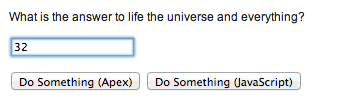
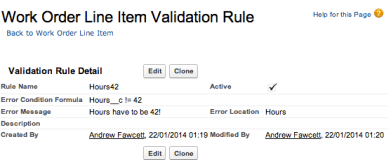
Screen Shot 2014-01-22 at 09.03.07While also creating a strategically placed  Validation Rule on the Work Order Line item, one which would fail the insert if anything other than 42 was entered in the UI.

So given the validation rule in place, lets perform a test.

  1. Ensure there are no Work Order records present
  2. Enter an invalid value, say 32, click the buttons, observe the expect error
  3. Correct the value to 42, click the button again and observe the outcome on the database.
  4. The expected result is one Work Order record with a single Work Order Line Item record.

Testing the ‘Do Something (Apex)’ Button

After going through the test above, the button initially gives the error as expected…
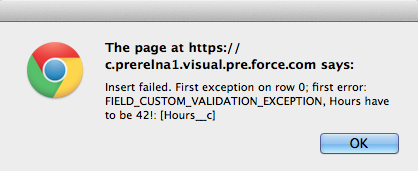
Screen Shot 2014-01-22 at 09.00.05

When the value is corrected and button pressed again, the result is this…
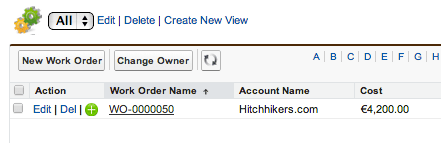
Screen Shot 2014-01-22 at 08.54.07

The test passed.

Testing the ‘Do Something (JavaScript)’ Button

Going through the tests again, this button initially gives the error as expected…
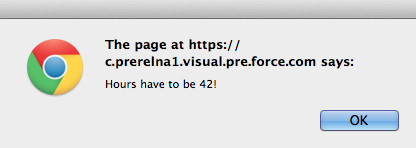
Screen Shot 2014-01-22 at 09.00.25

When the value is corrected and button pressed again, the result is this…
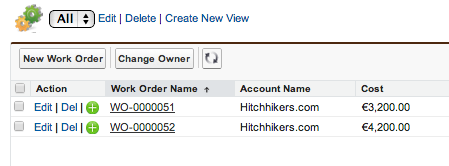
Screen Shot 2014-01-22 at 08.56.54
While Visualforce Remote Objects technically performed as I believe Salesforce intended, this functional tests expectation failed. Since we have two Work Order records, one with no Work Order Lines and one that is what we expected. So why did this additional rogue Work Order record get created, what did we do wrong?

The answer lies in the scope of the database transaction created…

  • In the Visualforce Remote @RemoteAction use case the platform automatically wraps a transaction around the whole of the Apex code and rolls back everything if an error occurs, you can read more about this here.
  • In the Visualforce Remote Objects use case the database transaction is only around the individual database operations not around the whole JavaScript function. Hence by the time the Work Order Line Item fails to insert the Work Order has already been committed to the database. The user then corrects their mistake and tries again, hence we end up with two Work Orders and not one as the user expected.

Since Apex transaction management is so transparent most of the time (by design), its likely that the same assumption might be made of Remote Objects, however as you can see its not a valid one. Those of you that know core thoughts on patterns will also be thinking something else at this point, that presents a potentially even more compelling reason to be watchful over what logic you implement this way…

Separation of Concerns

As you may have gathered by now if you’ve been reading my blog for the last year, my other passion is Apex Enterprise Patterns. A key foundation of this is Separation of Concerns or SOC for short. SOC sees us layer our code so that aspects such as business logic are located in the same place, easily accessible and reusable (not mention easily testable) from other existing and future parts of our applications, such as API’s, Batch Apex etc.

While the above example is not that complex it illustrates when code in your JavaScript layer might start to become business logic and if so something you should ideally (if not solely for the reason above) consider keeping in your Service Layer and accessing via JavaScript Remoting @RemoteAction.

Summary

Despite this new feature the use of Visualforce Remoting with @RemoteAction Apex should still very much factor in your decision making.  And nor despite the issue above should we necessarily let the lack of transaction management count against our use of Visualforce Remote Objects either.

For sure this will become the best and lightest way to perform rapid client side querying without impacting API limits, and I am sure the alias feature (see docs) will be welcome to those preferring more elegant AngularJS or other bindings. All very nice! Furthermore if you are developing client logic that is essentially doing simple record editing then by all means let your Apex Triggers (Domain Layer) do its job and enforce the validity of those records.

Just keep in mind when your starting to write more and more JavaScript code that is orchestrating the updating, inserting or deleting of a set of  related records, you really need to be sure be sure you and your testers understand the transaction scope differences between the two approaches described here or switch over to Apex and let the platform manage the transaction scope for you. Finally its worth keeping in mind if you don’t have a client side automated testing strategy your automatically adding manual testing overhead to your backlog.

The full source code for this blog can be found here.

UPDATE: Since publishing this blog, Salesforce documentation team have written up an excellent additional topic covering some best practices and outlining the transactional differences described above. Its really great to see this type of content appearing in the standard Salesforce developer documentation, thank you Salesforce!

Other Notes and Observations

Here are some final points of note, given this is still pilot hopefully of use to Salesforce as feedback.

  • It does buffer requests to the server like Visualforce Remoting, very cool!
  • It does not complain when you set the wrong field or get the name wrong, like SObject.put and SObject.get do, maybe to be expected, though since we gave it the field list might have been nice?
  • It differs slightly from Dynamic Apex, it uses SObject.put, here WorkOrder__c.set is used
  • Success is expressed in ‘error’ being null, not quite what i expected, and different from Visualforce Remoting.
  • It does not implement field defaulting
  • Errors need to be hanlded by callbacks (as per VF Remoting), though by default errors are not emitted to the JavaScript console like Visualforce Remoting
  • References to fields on via the apex:remoteObjectModel fields attribute do not seem to surface as dependencies on the fields, which would be good given how soft references within the JavaScript are.

87 Comments

Querying Custom Object and Field IDs via Tooling API

There are quite a few blogs describing a means to build Salesforce URL’s to standard pages for creating records, that can be applied to Custom Buttons in order to pre-populate field values when a user clicks a button. For example replacing the New button on a Related list.

IMPORTANT NOTE: The URL format Salesforce uses for the standard UI is not a supported API and thus subject to change. Though it has become quite common practice in order to improve the usability of the standard UI.

Making things a little more Robust

Other than URL format assumption, there is an area of further fragility shared amongst the solutions I’ve seen to-date. Which is how to obtain and manage the custom field Id’s needed on the URL’s (since they don’t take field API names). Either via discovering these manually or dynamically via using REGEX parsing of the HTML source code of the Salesforce standard pages. Although there is a Salesforce IdeaExchange submission to have Salesforce expose these Id’s via Apex Describe, it apparently has not been addressed… or so it would seem that is….

Tooling API support for Custom Object and Custom Fields

Probably the least obvious aspect of the Tooling API is its ability to actually query (via REST or SOAP) the CustomObject and CustomField objects (which are not accessible via Apex SOQL). As we know every object in Salesforce has an ID, this got me wondering if in this case its the same ID’s needed by the approaches used above. And thus if so, would serve as a more supported and less risky means to obtain the custom field Id’s. I have also wanted to start building out a Apex wrapper for the Tooling API for a while now. The following Apex code shows the library in action…

UPDATE: Please use the Apex code that wraps the REST version of the API in order to be compatible with the statements in this blog.

// Constructs the Tooling API wrapper (default constructor uses user session Id)
ToolingAPI toolingAPI = new ToolingAPI();

// Query CustomObject object by DeveloperName (note no __c suffix required)
List<ToolingAPI.CustomObject> customObjects = (List<ToolingAPI.CustomObject>)
     toolingAPI.query('Select Id, DeveloperName, NamespacePrefix From CustomObject Where DeveloperName = \'Test\'').records;

// Query CustomField object by TableEnumOrId (use CustomObject Id not name for Custom Objects)
ToolingAPI.CustomObject customObject = customObjects[0];
Id customObjectId = customObject.Id;
List<ToolingAPI.CustomField> customFields = (List<ToolingAPI.CustomField>)
     toolingAPI.query('Select Id, DeveloperName, NamespacePrefix, TableEnumOrId From CustomField Where TableEnumOrId = \'' + customObjectId + '\'').records;

// Dump field names (reapply the __c suffix) and their Id's
System.debug(customObject.DeveloperName + '__c : ' + customObject.Id);
for(ToolingAPI.CustomField customField : customFields)
     System.debug(
          customObject.DeveloperName + '__c.' +
          customField.DeveloperName + '__c : ' +
          customField.Id);

This results in the following list of fields and Id’s against my test custom object…

00:27:38.845 (845882069)|USER_DEBUG|[45]|DEBUG|Test__c : 01IG00000021cXoMAI
00:27:38.846 (846249350)|USER_DEBUG|[47]|DEBUG|Test__c.A_Number__c : 00NG0000009Y0I9MAK
00:27:38.846 (846305290)|USER_DEBUG|[47]|DEBUG|Test__c.Colours__c : 00NG0000009prwyMAA
00:27:38.846 (846328856)|USER_DEBUG|[47]|DEBUG|Test__c.Date__c : 00NG0000009BrnxMAC
00:27:38.846 (846513094)|USER_DEBUG|[47]|DEBUG|Test__c.Message__c : 00NG0000009Y0IOMA0
00:27:38.846 (846535746)|USER_DEBUG|[47]|DEBUG|Test__c.MultiPick__c : 00NG000000AcULrMAN
00:27:38.846 (846558753)|USER_DEBUG|[47]|DEBUG|Test__c.MyCheckbox__c : 00NG0000009Y5C8MAK
00:27:38.846 (846741056)|USER_DEBUG|[47]|DEBUG|Test__c.RichText__c : 00NG0000009XaRJMA0
00:27:38.846 (846816183)|USER_DEBUG|[47]|DEBUG|Test__c.Text__c : 00NG0000009prxwMAA

Summary

This blog serves as a means to demonstrate an initial starting point for a Apex wrapper around the Tooling API (the GitHub repo has the full code with tests to deploy direct via the usual link). Be sure to setup the appropriate Remote Site setting for the Tooling API end point (easiest way is to run the code and note the URL given in the exception). Finally a means for for the various authors of the solutions above to update their code. Enjoy!


6 Comments

Apex UML Canvas Tool : Dreamforce Release!

Screen Shot 2013-10-14 at 22.16.58

Update: Dreamforce is over for another year! Thanks to everyone who supported me and came along to the session. Salesforce have now uploaded a recording of the session here and can find the slides here.

As those following my blog will know one of the sessions I’ll be running at this years Dreamforce event is around the Tooling API and Canvas technologies. If you’ve not read about what I’m doing check out my previous blog here. I’ve now uploaded the code to the tool I’ve developed that will be show casing these technologies. I’ll be walking through key parts of it in the session, please do feel free to take a look and give me your thoughts ahead or at the session if your attending!

Installing the Tool

You now also install the tool as a managed package into your development org by following these steps.

  1. Install the package using the package install link from the GitHub repo README file.
  2. Installed is a tab which shows a Visualforce page which hosts the externally hosted (on Heroku) Canvas application.
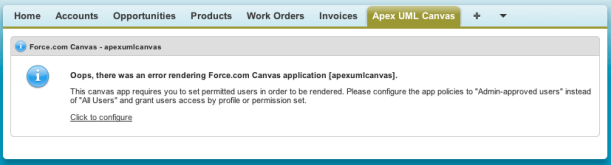
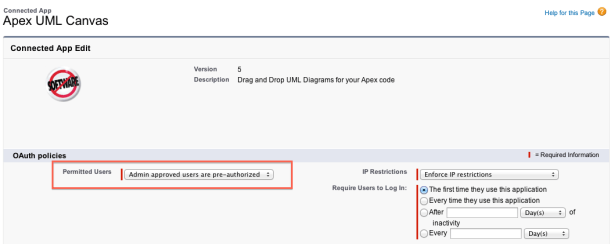
  3. You need to configure access to the Canvas application post installation, you can follow the Salesforce guidelines on screen and/or the ones here.Screen Shot 2013-11-12 at 17.52.55
  4. Click the link to configure and edit the “Admin approved users are pre-authorised” option and save.Screen Shot 2013-11-12 at 17.53.54
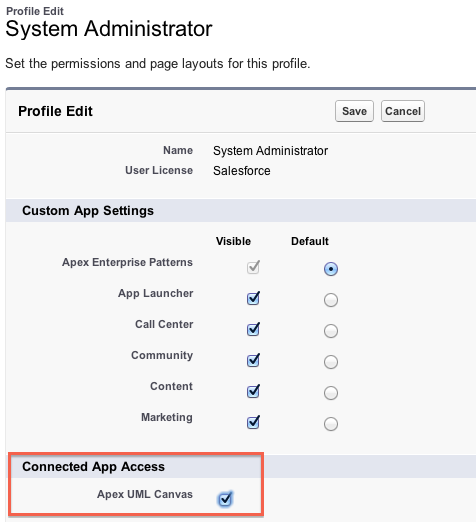
  5. Finally edit your Profile and enable the Connected App (and Tab if needed)Screen Shot 2013-11-12 at 17.57.08

Using the Tool

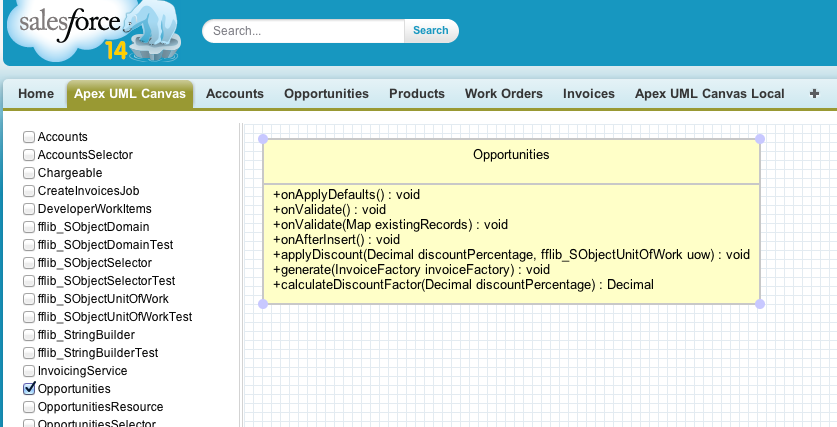
Screen Shot 2013-11-12 at 17.41.16

  • The tool displays a list of the Apex classes (unmanaged) in your org on the left hand side, tick a class to show it in the canvas.
  • Move the Apex class UML representation around with your mouse, if it or other classes reference each other lines will be drawn automatically.
  • There is some issues with dragging, if you get mixed up, just click the canvas to deselect everything then click what you want.

It is quite basic still, only showing methods, properties and ‘usage’ relationships and really needs some further community push behind it to progress a long line of cool features that could be added. Take a look at the comments and discussion on my last post for some more ideas on this. Look forward to see you all at Dreamforce 2013!


15 Comments

Preview: Apex UML Canvas with Tooling API

Regular readers of my blog will recall my last post charting my exploits with the Salesforce Tooling API for a session I’m running at Dreamforce 2013…

Dreamforce 2013 Session: Apex Code Analysis using the Tooling API and Canvas

The Tooling API provides powerful new ways to manage your code and get further insight into how its structured. This session will teach you how to use the Tooling API and its Symbol Table to analyse your code using an application integrated via Force.com Canvas directly into your Salesforce org — no command line or desktop install required! Join us and take your knowledge of how your Apex code is really structured to the next level!

Screen Shot 2013-10-14 at 22.16.58As I hinted at in the last blog I was not 100% happy with the Mind Map visualisation I initially used. It was fun to play with, but I wanted to illustrate the use of the Tooling API with something more functional. So I went searching for a new library. I wanted something that was HML5 based, that would dynamically render as the user selected Apex classes.

Inspired by the ObjectAid tool, as well as some feedback comments describing a very cool PlantUML based Apex tool, impressively written currently without the Tooling API called PlantUML4Force. While PlantUML is a great library, it was not dynamic enough and ultimately I wanted to be able to better illustrate the separation of concerns in the diagrams by having more granular control over the final diagram. I eventually found a bit of hidden gem called UMLCanvas

I’ll eventually share this as a package once I’ve had a chance to work on it a bit more (it’s currently showing only UML Dependency relationships). In the meantime please take a look at the new video below and join me in my Dreamforce Session to hear about how I built it!

Technologies involved so far…


8 Comments

Preview: Demo of Apex Code Analysis using the Tooling API and Canvas

This weekend I’ve been fleshing out the code for my second Dreamforce 2013 session. I’ve been having a lot of fun with various technologies to create the following demo which I’ve shared a short work in progress video below. The JQuery plugin doing the rendering is js-mindmap, it’s got some quirks I’ve discovered so far, but I’m sticky with it for now!

The session highlights the Tooling API via this tool which can be installed directly into your Salesforce environment via the wonderful Salesforce Canvas technology! This is proposed session abstract …

Dreamforce 2013 Session: Apex Code Analysis using the Tooling API and Canvas

The Tooling API provides powerful new ways to manage your code and get further insight into how its structured. This session will teach you how to use the Tooling API and its Symbol Table to analyse your code using an application integrated via Force.com Canvas directly into your Salesforce org — no command line or desktop install required! Join us and take your knowledge of how your Apex code is really structured to the next level!

Technologies involved so far…

I’ve also found the excellent ObjectAid Eclipse plugin (which is sadly a Java source code only tool) to explore the Tooling API data structures in much more detail than the Salesforce documentation currently offers, especially in respect to the SymbolTable structure. I’ll be sharing full code and discussing the following diagram in more detail in my session! In the meantime I’d love to know your thoughts and other ideas around the Tooling API!

Tooling API


7 Comments

Ideas for Apex Enterprise Patterns Dreamforce 2013 Session!

ideaguy

Update: Dreamforce is over for another year! Thanks to everyone who supported me and came along to the session. Salesforce have now uploaded a recording of the session here and can find the slides here.

As part of this years Dreamforce 2013 event I will be once again running a session on Apex Enterprise Patterns, following up on my recent series of developer.force.com articles. Here is the current abstract for the session, comments welcome!

Building Strong Foundations: Apex Enterprise Patterns “Any structure expected to stand the test of time and change, needs a strong foundation! Software is no exception, engineering your code to grow in a stable and effective way is critical to your ability to rapidly meet the growing demands of users, new features, technologies and platform features. You will take away architect level design patterns to use in your Apex code to keep it well factored, easier to maintain and obey platform best practices. Based on a Force.com interpreation of Martin Fowlers Enterprise Architecture Application patterns and the practice of Separation of Concerns.” (Draft)

I’ve recently started to populated a dedicated Github repository that contains only the working sample code (with the library code in separate repo). So that i can build out a real working sample application illustrating in practical way the patterns in action. It already covers a number of features and use cases such as…

  • Layering Apex logic by applying Separation of Concerns
  • Visualforce controllers and the Service Layer
  • Triggers, validation, defaulting and business logic encapsulation via Domain layer
  • Applying object orientated programming inheritance and interfaces via Domain layer
  • Managing DML and automatic relationship ‘stitching’ when inserting records via Unit Of Work pattern
  • Factoring, encapsulating and standardising SOQL query logic via Selector layer

The following are ideas I’ll be expanding on in the sample application in preparation for the session…

  • Batch Apex and Visualforce Remoting (aka JavaScript callers) and the Service Layer
  • Apex testing without SOQL and DML via the Domain Layer
  • Exposing a custom application API, such as REST API or Apex API via Service Layer
  • Reuse and testing SOQL query logic in Batch Apex context via Selector Layer
  • Rich client MVC frameworks such as AngularJS and Service Side SOC

What do you think and what else would you like to see and discuss in this session?

Feel free to comment on this blog below, tweet me, log it on Github or however else you can get in touch.


10 Comments

Apex Enterprise Patterns – Selector Layer

A major theme in this series on Apex Enterprise Patterns has been ensuring a good separation of concerns, making large complex enterprise level code bases more clear, self documenting, adaptable and robust to change, be that refactoring or functional evolution over time.

In the past articles in this series we have seen Service logic that orchestrates how functional sub-domains work together to form the key business processes your application provides. Domain logic breaks down the distinct behaviour of each custom object in your application by bring the power of Object Orientated Programming into your code.

This article introduces the Selector, a layer of code that encapsulates logic responsible for querying information from your custom objects and feeding it into your Domain and Service layer code as well as Batch Apex jobs.

Selectors

You can read the rest of this article on the wiki.developerforce.com here, enjoy!

Series Summary

This completes the current series of articles on Apex Enterprise Patterns. The main goal was to express a need for Separation of Concerns to help make your Apex logic on the platform live longer and maintain its stability. In presenting three of the main patterns I feel help deliver this. If nothing else, I’d like to think you have started to think more about SOC, even if it’s just class naming. Though hopefully beyond that if you use some of the articles’ various base classes great, please feel free to contribute to them. If you don’t, or decide to skip some or use a different pattern implementation that’s also fine, thats what patterns are all about. If you do, I’d love to hear about other implementations.

Martin Fowler’s excellent patterns continue to be referenced on platforms, new and old. I’ve very much enjoyed adapting them to this platform and using them to effect better adoption of Force.com platform best practices along the way. Thanks to everyone for all the great feedback, long may your code live!