Andy in the Cloud

From BBC Basic to Force.com and beyond…


4 Comments

Improved Infinite Data Scrolling with the new Apex Pagination Cursors GA

Last year, Salesforce launched the Beta of Apex Cursors, allowing you to traverse up to 50M records using SOQL-derived datasets – fast forward to the upcoming Spring ’26 release and it’s now GA! Since Beta, Salesforce has been busy introducing a whole new cursor type dedicated to UI use cases. In this blog, I will cover the new UI pagination cursor type and its differences from the standard cursors; included is an updated version of the sample I provided in last year’s blog – that allows you to use LWCs infinite scrolling component to explore both modes and try them out for yourself.
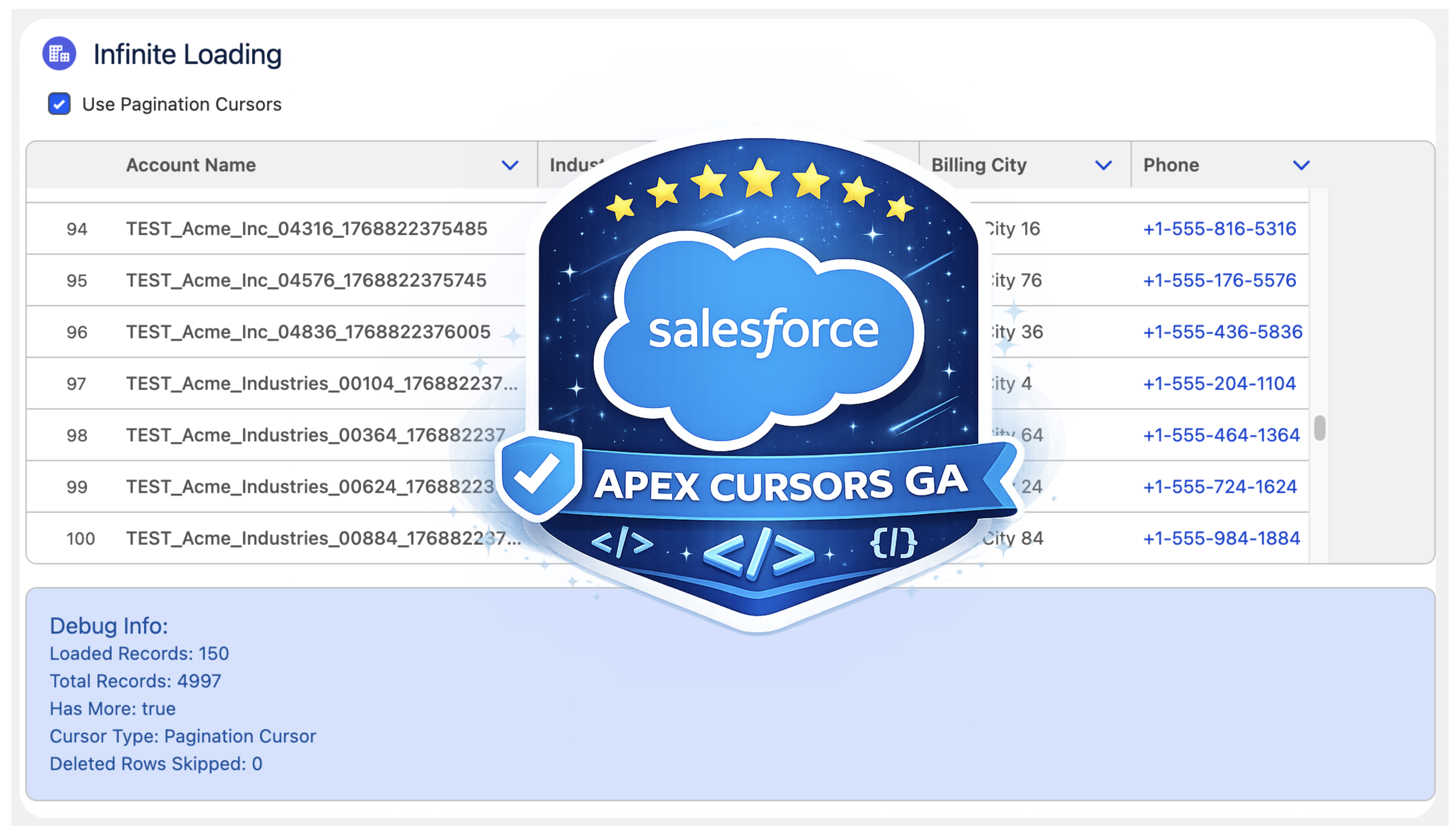
Why add a new pagination cursor type?

The beta experience was simple and effective but had some limitations and buried within it a corner case of additional complexity that was not great for UI use cases – there are three key differences:

  • More Cursors per 24hrs. Standard cursors have a limit of 100k active cursors per 24-hour period; this is now 200k to cater to more active users. If this is not enough, see my further thoughts below.
  • Deleted Record Handling. Perhaps more subtly, some UI helper logic that the standard cursor would otherwise leave to you is handled for you. This means that it would not always retrieve a full page of results in cases when records had been deleted after the cursor was created. If your logic was not paying attention to this, it could skip records unintentionally.
  • Reduction in Total Records. Lastly, there is now a new row limit on pagination cursors of 100k records (down from 50m of standard cursors).
  • Overall Total Records per 24hr Remains. Regardless of individual cursor row limits, both types of cursors share the same 100m 24hr limit. Read more about the limits and Apex limits methods here.

At first, it may seem like Salesforce has given with one hand and taken away with the other here… but it’s sometimes easy to forget we are also entrusting them to manage a shared service for us as well – it’s a balance. This statement from the docs is quite well framed:

"This higher instance limit supports many users accessing records lists that rely on smaller pagination cursors."

Are standard cursor types now not allowed for use in an UI?

I was also pleased to see that Salesforce has not blocked us from using ‘standard’ cursors in the UI – even making a GA fix to allow the Database.Cursor type to be serialized in LWC. So we do get to choose depending on the use case and cursor sharing strategy. As an architect, I appreciate the flexibility here from Salesforce; thank you!

Which should I use for my UIs?

I would recommend using pagination cursors for your UIs unless you have a good reason to go beyond the record limit of 100k. Also applicable to both types is the ability to consider if cursors can be shared between sessions/users via platform cache – thus helping to work within the 100k/200k active cursor limit if that applies to the size of your target users. On this last point, please pay attention to record-sharing requirements if you go down this path – I covered this a little further in my prior blog as well.

Using the new Pagination Cursor API

My previous blog covered the now ‘standard’ cursors API quite well and made a few tweaks in that blog as well to update it for GA – as such, I will not repeat further here. Instead, let’s dive into the pagination API – firstly, this is what the Apex Controller for the above LWC looks like:

    @AuraEnabled(cacheable=false)
    public static LoadMoreRecordsResult loadMoreRecordsWithPagination(Database.PaginationCursor paginationCursor, Integer start, Integer pageSize) {
        try {
            if(paginationCursor == null) {
                paginationCursor = Database.getPaginationCursor('SELECT Id, Name, Industry, Type, BillingCity, Phone FROM Account WHERE Name LIKE \'TEST%\' ORDER BY Name', AccessLevel.USER_MODE);
            }
                        
            LoadMoreRecordsResult result = new LoadMoreRecordsResult();
            Database.CursorFetchResult fetchResult = 
                paginationCursor.fetchPage(start, pageSize);
            result.paginationCursor = paginationCursor;
            result.records = fetchResult.getRecords();
            result.offset = fetchResult.getNextIndex();
            result.totalRecords = paginationCursor.getNumRecords();
            result.hasMore = result.offset < result.totalRecords;
            result.deletedRows = fetchResult.getNumDeletedRecords();
            return result;
        } catch (Exception e) {
            throw new AuraHandledException('Error loading records with pagination: ' + e.getMessage());
        }
    }
    
    public class LoadMoreRecordsResult {
        @AuraEnabled public Database.PaginationCursor paginationCursor;
        @AuraEnabled public List<Account> records;
        @AuraEnabled public Integer offset;
        @AuraEnabled public Boolean hasMore;
        @AuraEnabled public Integer totalRecords;
        @AuraEnabled public Integer deletedRows;
    }

The API design approach mostly follows parallel with standard cursors Apex API, but with the introduction of ‘Pagination‘ or ‘P‘ to distinguish new limits. There is, however, an additional type Database.CursorFetchResult (link); despite its name, it is only used by the pagination fetchPage method. This additional class helps encapsulate the logic that skips deleted records and thus ensures (albeit for the last page potentially) you always get a page full of data – nice!

If you’re curious or want to warn the user that records have been deleted since then, you have the ability to call the getNumDeletedRecords. Finally, watch out for the isDone method – I initially mapped this to the isDone of my client, and it stopped loading records. This is because the scope of the CursorFetchResult.isDone method is at the page level, not the overall cursor level – hence, this method is not used in the Apex code above – I just used the offset < total records calculation instead.

Here is what the corresponding LWC client controller looks like:

    async onLoadMoreRecords() {
        if(this.isLoading) 
            return;
        this.isLoading = true;
        try {
            let result;
            result = await loadMoreRecordsWithPagination({
                paginationCursor: this.paginationCursor,
                start: this.offset,
                pageSize: 50
            });
            this.paginationCursor = result.paginationCursor;
            this.deletedRows = result.deletedRows || 0;
            this.records = [...this.records, ...result.records];
            this.offset = result.offset;
            this.hasMore = result.hasMore;
            this.totalRecords = result.totalRecords;            
        } catch (error) {
            console.error('Error fetching next records:', error);
            this.error = error.body?.message || error.message || 'Unknown error occurred';
            this.hasMore = false;
        } finally {
            this.isLoading = false;
        }
    }

The controller above shows the above Apex controller method in use when the LWC lightning-datatable component reaches out for more records to load. As you can see, Database.PaginationCursor (and now Database.Cursor) is serializable via Aura serialization and thus permits the LWC to manage the scope and state of the cursor:

Summary

In summary, I am glad to have such an architectural primitive supported on the Salesforce Platform and appreciative of the design here that supports two different modalities, indicating a good understanding of the general use cases. Yes, it has its limits, but then, as I mentioned above, we trust Salesforce to give us innovation and manage the shared resources—often both don’t balance out in what we think is to our favor at times—and in those times, we can respond with new ideas, feedback supported by those ideas—those are the most powerful ways to make change. Certainly in this case, given the Trailblazer group community feedback, I see that happening between Beta and GA for this offering—so well done product and engineering team! Thank you!

Useful Resources:


1 Comment

New Book – Salesforce Platform Enterprise Architecture 4th Edition

It has been nearly 10 years back in 2014 when the first edition of my book Force.com Enterprise Architecture was first published and clearly a lot has moved on since then and not just the platform capabilities. Keeping pace with branding changes resulted in the second edition of the book being called Lightning Platform Enterprise Architecture. This latest 4th edition, Salesforce Platform Enterprise Architecture has probably the most accurate and I hope enduring title! This 4th edition is also nearly twice the size of the first edition, coming in at 681 pages. So much so, its 16 chapters is now split over 4 parts to make digesting the book easier. As is tradition by now, this blog will cover some of latest updates and additions and what to expect in general from the book.

Links: Amazon | Packt Publishing

Motivation and what to expect…

I first came to the platform with a lot of experience and understanding of architecture principles from other platforms, including leveraging platform agnostic patterns such as those of Martin Fowler. Applying patterns to the platform requires some nuance at times, thus this book is about enterprise architecture considerations as applied to the Salesforce Platform and much more in respect to its capabilities that accelerate traditional application development concerns and tasks for you – and can hinder if not considered upfront in your architecture design.

The book dedicates 3 of its 16 chapters to Apex code separation of concerns, how to layout your code, while the rest covers the full spectrum of app concerns such as designing for code and database performance, profiling, testing, data storage design, building apis, extensibility and more and of course how to write much less code by harnessing the declarative aspects. All this is driven throughout the book via a fictitious reference application known as FormulaForce based on Formula1 motor racing – full source is included. Also included are numerous tips and tricks and info blocks pitted among the pages that highlight learnings from my own experiences, and latterly that of the many amazing reviewers.

As good as the platform is at abstracting a huge amount of the complexity of managing and securing modern day applications for you, there is no escaping having to fully understand good architecture principles that would, and do, in most cases apply elsewhere, such as query optimization and indexing.

If you are developing a lot on the Salesforce Platform, have a few years experience and are passionate about creating applications that are enduring and empathetic to the platform itself – this book is for you. Read on for further highlights!

Is it for ISVs or anyone?

This edition is the first to split out the motivations of packaging in respect to internal distribution needs within your own company vs distributing a commercial solution on AppExchange. Regardless of which motivation you fit into, the chapters will callout which bits are relevant vs not. Even if you are not into packaging at all right now, much of the content on Apex, Lightning, Flow, APIs etc is of course agnostic to how you choose to distribute your application. Regardless who you are sharing it with, the book gives you an appreciation of advantages and limits of packaged based distribution and in my view is a key aspect of your overall architecture considerations checklist.

Have the Apex coding patterns evolved given recent features?

The advent of user mode capabilities has had a big impact on the approach taken within the sample application of the book when it comes to using the Apex Enterprise Patterns Library (fflib), specifically in how the Unit of Work and Selector patterns are used when updating and querying for data respectively.

Additionally, the Domain pattern chapter now reflects on how Domain logic, can, if desired allow the developer to split Domain and Trigger logic into separate classes and thus introduces a new pattern (SDCL) to captured this approach. Thats not to say the original model has gone, it is still very much present, but it felt appropriate to include something in the book that reflects how the library usage has also evolved over the years – thanks to my good friend John M. Daniel for pushing for this!

Apply skills in other languages and additional scaling options

A brand new chapter in the book is dedicated to how Heroku and Functions can be used to leverage existing skills or indeed investments in open source or internally for code written in other languages such as Java or Node.js. These technologies also open up further scaling options. The chapter breaks down the approaches using the books sample application as a basis. Thus it continues the Formula1 motor racing theme by introducing Web and API interfaces for race fans and vendors (authentication scenario) to interact with the application backend APIs. Later in the book the integration chapter doubles down further on authoring APIs via OpenAPI standards and how that simplifies integration with the platform.

Lightning Web Components and Lightning Experience expansion

Since the third book, all but one of the Aura components have now been removed as many only existed at the time as workarounds to the lack of LWC enabled integration points. Two large chapters are dedicated to the Lightning framework itself, how it handles separation of concerns, eventing, security and its alignment with the industry Web Component standard. Completing with a section covering the ever expanding possibilities to extend vs build when thinking about your applications user experience, regardless if thats desktop, mobile or driven through the native UIs and tools such as Lightning Pages or Flow. And yes, I still love the Utility Bar integration the most – as you can see from the number of historic posts and tools on the topic here.

APIs, APIs and APIs…

Many years ago a product manager once thanked me for pushing an API strategy internally, since they appreciated first hand as a past buyer that APIs are effectively an insurance policy for buyers when it comes to unexpected feature gaps post or during implementation. Thus several of the chapters highlight the many Salesforce APIs in contextual ways.

Though its not until the integration and extensibility chapter the book really doubles down on building your own application APIs, versioning, naming and design and the value they bring to your fellow developers, customers and/or partner ecosystems. External Services is one of the most impressive aspects of integrating with the Salesforce Platform for me and it was my pleasure to update the book with an updated Heroku based API leveraging OpenAPI to get the full power of the feature – the two are a perfect combo!

And …

This blog is already in danger of becoming chapter size itself, so I will leave it here with the above highlights and before I close share my deepest thanks to this editions reviewers John M. Daniel, Sebastiano Costanzo, Arvind Narasimhan and foreword author Daniel J. Peter.

I will be popping up in the not to distant future in ApexHours (https://www.apexhours.com/) and perhaps other locations to talk in more depth about the book and likely other side topics of interest. I will update this blog as those resources arrive. Thank you all in the meantime, the Salesforce community is the best and remains very close to my heart, enjoy!

AndyInTheCloud

P.S. Suffice to say this 4th edition is an evolution of the prior three books! I would like to also thank the following fine folks for their support as past reviewers and foreword authors!

Past Reviewers and Forewords:
Matt Bingham, Steven Herod, Matt Lacey, Andrew Smith, Rohit Arora, Karanraj Samkaranarayanan, Jitendra Zaa, Joshua Burk, Peter Knolle, John Leen, Aaron Slettenhaugh, Avrom Roy-Faderman, Michael Salem, Mohith Shrivastava and Wade Wegner


3 Comments

The Third Edition

bookI’m proud to announce the third edition of my book has now been released. Back in March this year I took the plunge start updates to many key areas and add two brand new chapters. Between the 2 years and 8 months since the last edition there has been several platform releases and an increasing number of new features and innovations that made this the biggest update ever! This edition also embraces the platforms rebranding to Lightning, hence the book is now entitled Salesforce Lightning Platform Enterprise Architecture.
You can purchase this book direct from Packt or of course from Amazon among other sellers.  As is the case every year Salesforce events such as Dreamforce and TrailheaDX this book and many other awesome publications will be on sale. Here are some of the key update highlights:

  • Automation and Tooling Updates
    Throughout the book SFDX CLI, Visual Studio Code and 2nd Generation Packaging are leverage. While the whole book is certainly larger, certain chapters of the book actually reduced in size as steps previously reflecting clicks where replaced with CLI commands! At one point in time I was quite a master in Ant Scripts and Marcos, they have also given way to built in SFDX commands.
  • User Interface Updates
    Lightning Web Components is a relative new kid on the block, but benefits greatly from its standards compliance, meaning there is plenty of fun to go around exploring industry tools like Jest in the Unit Testing chapter. All of the books components have been re-written to the Web Component standard.
  • Big Data and Async Programming
    Big data was once a future concern for new products, these days it is very much a concern from the very start. The book covers Big Objects and Platform Events more extensibility with worked examples, including ingest and calculations driven by Platform Events and Async Apex Triggers. Event Driven Architecture is something every Lightning developer should be embracing as the platform continues to evolve around more and more standard platforms and features that leverage them.
  • Integration and Extensibility
    A particularly enjoyed exploring the use of Platform Events as another means by which you can expose API’s from your packages to support more scalable invocation of your logic and asynchronous plugins.
  • External Integrations and AI
    External integrations with other cloud services are a key part to application development and also the implementation of your solution, thus one of two brand new chapters focuses on Connected Apps, Named Credentials, External Services and External Objects, with worked examples of existing services or sample Heroku based services. Einstein has an ever growing surface area across Salesforce products and the platform. While this topic alone is worth an entire book, I took the time in the second new chapter, to enumerate Einstein from the perspective of the developer and customer configurations. The Formula1 motor racing theme continued with the ingest of historic race data that you can run AI over.
  • Other Updates
    Among other updates is a fairly extensive update to the CI/CD chapter which still covers Jenkins, but leverages the new Jenkins Pipeline feature to integrate SFDX CLI. The Unit Testing chapter has also been extended with further thoughts on unit vs integration testing and a focus on Lightening Web Component testing.

The above is just highlights for this third edition, you can see a full table of contents here. A massive thanks to everyone involving for providing the inspiration and support for making this third edition happen! Enjoy!


4 Comments

FinancialForce Apex Common Community Updates

This short blog highlights a batch of new features recently merged to the FinancialForce Apex Common library aka fflib. In addition to the various Dreamforce and blog resources linked from the repo, fans of Trailhead can also find modules relating to the library here and here. But please read this blog first before heading out to the trails to hunt down badges! It’s really pleasing to see it continue to get great contributions so here goes…

Added methods for detecting changed records with given fields in the Domain layer (fflib_SObjectDomain)

First up is a great new optimization feature for your Domain class methods from Nathan Pepper aka MayTheSForceBeWithYou based on a suggestion by Daniel Hoechst. Where applicable its a good optimization practice to considering comparing the old and new values of fields relating to processing you are doing in your Domain methods to avoid unnecessary overheads. The new fflib_SObjectDomain.getChangedRecords method can be used as an alternative to the Records property to just the records that have changed based on the field list passed to the method.

// Returns a list of Account where the Name or AnnaulRevenue has changed
List<Account> accounts =
  (List<Account>) getChangedRecords(
     new List<SObjectField> { Account.Name, Account.AnnualRevenue });

Supporting EventBus.publish(list<SObject>) in Unit of Work (fflib_SObjectUnitOfWork)

Platform Events are becoming ever popular in many situations. If you regard them as logically part of the unit of work your code is performing, this enhancement from Chris Mail is for you! You can now register platform events to be sent based on various scenarios. Chris has also provided bulkified versions of the following methods, nice!

    /**
     * Register a newly created SObject (Platform Event) instance to be published when commitWork is called
     *
     * @param record A newly created SObject (Platform Event) instance to be inserted during commitWork
     **/
    void registerPublishBeforeTransaction(SObject record);
    /**
     * Register a newly created SObject (Platform Event) instance to be published when commitWork has successfully
     * completed
     *
     * @param record A newly created SObject (Platform Event) instance to be inserted during commitWork
     **/
    void registerPublishAfterSuccessTransaction(SObject record);
    /**
     * Register a newly created SObject (Platform Event) instance to be published when commitWork has caused an error
     *
     * @param record A newly created SObject (Platform Event) instance to be inserted during commitWork
     **/
    void registerPublishAfterFailureTransaction(SObject record);

Add custom DML for Application.UnitOfWork.newInstance call (fflib_Application)

It’s been possible for a while now to override the default means by which the fflib_SObjectUnitOfWork.commitWork method performs DML operations (for example if you wanted to do some additional pre/post processing or logging). However, if you have been using the Application class pattern to access your UOW (shorthand and helps with mocking) then this has not been possible. Thanks to William Velzeboer you can now get the best of both worlds!

fflib_SObjectUnitOfWork.IDML myDML = new MyCustomDMLImpl();
fflib_ISObjectUnitOfWork uow = Application.UnitOfWork.newIntance(myDML);

Added methods to Unit of Work to be able to register record for upsert (fflib_SObjectUnitOfWork)

Unit Of Work is a very popular class and receives yet another enhancement in this batch from Yury Bondarau. These two methods allow you to register records that will either be inserted or updated as automatically determined by the records having an Id populated or not, aka a UOW upsert.

    /**
     * Register a new or existing record to be inserted or updated during the commitWork method
     *
     * @param record An new or existing record
     **/
    void registerUpsert(SObject record);
    /**
     * Register a list of mix of new and existing records to be upserted during the commitWork method
     *
     * @param records A list of mix of existing and new records
     **/
    void registerUpsert(List&lt;SObject&gt; records);
    /**
     * Register an existing record to be deleted during the commitWork method
     *
     * @param record An existing record
     **/

Alleviates unit-test exception when Org’s email service is limited

Finally, long term mega fan of the library John Storey comes in with an ingenious fix to an Apex test failure which occurs when the org’s email deliverability’s ‘Access Level’ setting is not ‘All Email’. John leveraged an extensibility feature in the Unit Of Work to avoid the test being dependent on this org config all while not losing any code coverage, sweet!

Last but not least, thank you Christian Coleman for fixing those annoying typos in the docs! 🙂


5 Comments

Adding Clicks not Code Extensibility to your Apex with Lightning Flow

Building solutions on the Lightning Platform is a highly collaborative process, due to its unique ability to allow Trailblazers in a team to operate in no code, low code and/or code environments. Lightning Flow is a Salesforce native tool for no code automation and Apex is the native programming language of the platform — the code!

A flow author is able to create no-code solutions using the Cloud Flow Designer tool that can query and manipulate records, post Chatter posts, manage approvals, and even make external callouts. Conversely using Salesforce DX, the Apex developer can, of course, do all these things and more! This blog post presents a way in which two Trailblazers (Meaning a flow author and an Apex developer) can consider options that allow them to share the work in both building and maintaining a solution.

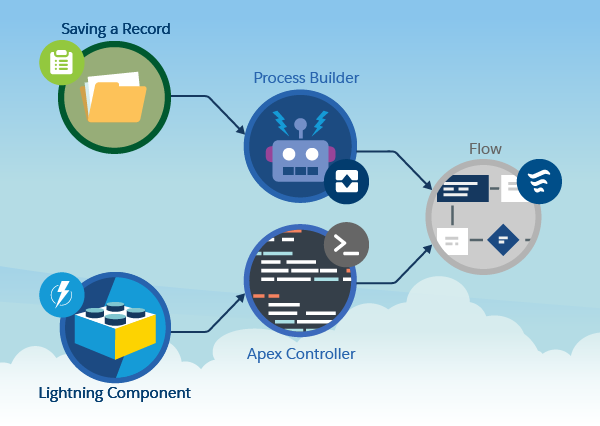
Often a flow is considered the start of a process — typically and traditionally a UI wizard or more latterly, something that is triggered when a record is updated (via Process Builder). We also know that via invocable methods, flows and processes can call Apex. What you might not know is that the reverse is also true! Just because you have decided to build a process via Apex, you can still leverage flows within that Apex code. Such flows are known as autolaunched flows, as they have no UI.

Blog_Graphic_01_v01-02_abpx5x.png

I am honored to have this blog hosted on the Salesforce Blog site.  To continue reading the rest of this blog head on over to Salesforce.com blog post here.


4 Comments

Tips for Migrating to Apex Enterprise Patterns

splitOne of the common questions i get asked is, “How do i adopt Apex Enterprise Patterns within an existing code base?“.

Often its also folks who have not owned the code base from the start and are inheriting it. Your also not likely to be blessed with a empty cheque of time to sort the code out before your asked to start adding new features or fixing issues. So how do you find time to crack open an old code base and start introducing Separation of Concerns?

Tip 1. Pick and choose and go incrementally! You can pick and choose what layer you want to work on first and incrementally split out further. For example Service layer implementations don’t have to use Unit of Work, Domain or Selector initially. Typically I find the Service layer the most value add to get in place first. Going incrementally over a few release iterations perhaps, across the tips below can help you and your team walk before you start to run with the patterns and gain confidence and support across the team in the approach.

Tip 2. Get a basic Service layer going. Even if you don’t adopt any other aspect, try to look for opportunities to move code from controllers, batch classes etc into a service layer. Remember that technically it is essentially a class ending in Service with some static methods in it, its the meaning and responsibility of it thats important here. If you don’t have time to follow all the conventions such as bulkification don’t worry, by moving it a Service you’ve already made a big step! For sure however, don’t apply global to your service until your happy with it’s methods.

Tip 3. Sweeping out inlined SOQL. Again if your not ready to use the base classes in the library here, just start naming classes with the Selector suffix and re-home your code performing SOQL into methods on that class. You won’t get all the benefits of consistency, but you will start getting those from reuse and encapsulation. That said the Selector pattern does not really need you to have other things setup so do consider extending the base class where you can, doing for some Selectors and not others is also fine if some are a bigger challenge.

Tiincrementalp 4. Moving your Trigger code into Domain class. The Domain class does support all the Apex Trigger events, and has several overrides to invoke code that applies to multiple events. So you should be able to find a home for your trigger code amongst the various overrides given by the base class. If you have got some recursive stuff going on you’ll want to look at the Statefull configuration in the Domain class.

You may want to start with this one over tips 2 and 3 if your code is heavily Apex Trigger driven, it often the best way to show other developers the value as well, as the code starts to become more OO and more factored for typically little risk so long as you have good Apex tests in place. Finally developers familiar with so called Wrapper Patterns elsewhere in the community should warm to this pattern more quickly.

Tip 5. Adding Application Factory and Mocking support Incrementally. This is possibly easier to add in areas of the solution where most of the patterns are starting to fall into place so don’t rush into adding this to soon. Separation of Concerns is key to making mocking work. So don’t try to introduce this to soon if you’ve not got things factored out well enough. That said, you may find adding support just for mocking the Service layer gives you some initial boosts in writing tests around controllers and batches classes and the like. The Unit of Work does not need to be fully configured either, its fine to have only have a subset of your objects representative of the areas its used in.

So there you have it, some food for thought, i’m interested to know of approaches and processes others have ended up taking and if there is any neat short cuts or evening tooling options perhaps?


Leave a comment

Great Contributions to Apex Enterprise Patterns!

Just one week before the start of Dreamforce 2015, the Apex Enterprise Pattern library will be 2 years old since it was first published. My community time is increasingly busy these days not only answering questions around this and other GitHub repositories, but also reviewing Pull Requests. Both are a sign of a healthy open source project for sure! In this short blog i just wanted to call out some of the new features added by the community. So lets get started…

  • Unit of Work, register Method flexibility.  
    The initial implementation of Unit Of Work used a List to contain the records registered with it. This ment that in some cases if the code path registered the same record twice an error would occur. This change means you don’t have to worry about this and if complex code paths happen to register the same record again, it will be handled without error.Thanks to: Thomas Fuda for this enhancement!
  • Unit of Work, customisable DML implementation via IDML interface. 
    This improvement allows you to implement the IDML interface to implement your own calls to the platforms DML methods. The use case that prompted this enhancement was to allow for fine grained control using the Database methods that permit options such as all or nothing control (the default being all).Thanks to: David Esposito for this enhancement!
  • Unit of Work and Application Factory, new newInstance(Set<SObjectType> types) method
    This enhancement provides the ability to leverage the factory but have it provide Unit of Work instances configured using a specific set of SObjectType’s and not the default one. In cases where you have only a few objects to register, perhaps dynamically or those different from the default Application set for a specific use case. Please read the comments for this method for more details.Thanks to: John Davis for this enhancement!
  • Unit of Work, Eventing API
    New virtual methods have been added to the Unit of Work class, allowing those that want to subclass it, to hook special handling code to be executed during commitWork. This allows you to extend in very custom way your application or services own work to be done at various stages, start, end and during the DML operations. For example common validation that can only occur once everything has been written but not before the request ends.Thanks to: John Davis for this enhancement!
  • Unit of Work, Bulkified Register Methods
    Its now possible to register lists of SObject’s with the Unit of Work in one method call rather than one per call. While the Unit of Work has always been internally bulkified, this enhancement helps callers who are dealing with lists or maps interact with the Unit Of Work more easily.Thanks to: MayTheSForceBeWithYou (now a FinancialForce employee) for this enhancement!
  • Selector, Better default Order By handling
    Not all Standard objects have a Name field, this excellent enhancement helped ensure that if this was the case the base class would look for the next best thing to sequence your records against by default. Alex has also made numerous other tweaks to the Selector layer in addition to this btw!Thanks to: Alex Tennant for this enhancement!

In addition to the above there has been numerous behind the scenes improvements to library as well, making it more stable, support various non standard aspects of standard objects and such like. I based the above on GitHub’s report of commits to the repository here.

In addition to code changes, there are also some great discussions and ideas in the pipeline…

  • Unit of Work and Cyclic Dependencies
    This limitation doesn’t come up often, but for complex situations is causing fans of the UOW some pain having to leave it behind when it does. This is the long standing request by Seth Stone, but has seen a few attempts since via Alex Tennant and more recently some upcoming efforts by john-m in the pipeline. Watch this space!
  • Helper methods to fflib_SObjectDomain for Changed Fields
    Another Force.com MVP, Daniel Hoechst, suggested this feature, inspired from those present in other trigger frameworks, join the conversation here.
  • Support for undelete Trigger events to Domain layer
    This idea raised by our good friends over at @MattAndNeil, is seeing some recent interest for contribution by Autobat, see here for more discussion.

Thank you one and all for being social and contributing to a growing community around this library!


13 Comments

Where to place Validation code in an Apex Trigger?

Quite often when i answer questions on Salesforce StackExchange they prompt me to consider future blog posts. This question has been sat on my blog list for a while and i’m finally going to tackle the ‘performing validation in the after‘ comment in this short blog post, so here goes!

Salesforce offers Apex developers two phases within an Apex Trigger, before and after. Most examples i see tend to perform validation code in the before phase of the trigger, even the Salesforce examples show this. However there can be implications with this, that is not at first that obvious. Lets look at an example, first here is my object…

Screen Shot 2015-04-19 at 09.31.05

Now the Apex Trigger doing some validation…

trigger LifeTheUniverseAndEverythingTrigger1 on LifeTheUniverseAndEverything__c
   (before insert) {

	// Make sure if there is an answer given its always 42!
	for(LifeTheUniverseAndEverything__c record : Trigger.new) {
		if(record.Answer__c!=null && record.Answer__c != 42) {
			record.Answer__c.addError('Answer is not 42!');
		}
	}
}

The following test method asserts that a valid value has been written to the database. In reality you would also have tests that assert invalid values are rejected, though the test method below will suffice for this blog.

	@IsTest
	private static void testValidSucceeds() {

		// Insert a valid answer
		LifeTheUniverseAndEverything__c
			lifeTheUniverseAndEverything = new LifeTheUniverseAndEverything__c();
		lifeTheUniverseAndEverything.Answer__c = 42;
		insert lifeTheUniverseAndEverything;

		// Is the answer still the same, surely nobody could have changed it right?
		System.assertEquals(42,
			[select Answer__c
			   from LifeTheUniverseAndEverything__c
			   where Id = :lifeTheUniverseAndEverything.Id][0].Answer__c);
	}

This all works perfectly so far!

Screen Shot 2015-04-19 at 10.46.51

What harm can a second Apex Trigger do?

Once developed Apex Triggers are either deployed into a Production org or packaged within an AppExchange package which is then installed. In the later case such Apex Triggers cannot be changed. The consideration being raised here arises if a second Apex Trigger is created on the object. There can be a few reasons for this, especially if the existing Apex Trigger is managed and cannot be modified or a developer simply chooses to add another Apex Trigger.

So what harm can a second Apex Trigger on the same object really cause? Well, like the first Apex Trigger it has the ability to change field values as well as validate them. As per the additional considerations at the bottom of the Salesforce trigger invocation documentation, Apex Triggers are not guaranteed to fire in any order. So what would happen if we add a second trigger like the one below which attempts to modify the answer to an invalid value?

trigger LifeTheUniverseAndEverythingTrigger2 on LifeTheUniverseAndEverything__c
  (before insert) {

	// I insist that the answer is actually 43!
	for(LifeTheUniverseAndEverything__c record : Trigger.new) {
		record.Answer__c = 43;
	}
}

At time of writing in my org, it appears that this new trigger (despite its name) is actually being run by the platform before my first validation trigger. Thus since the validation code gets executed after this new trigger changes the value we can see the validation is still catching it. So while thats technically not what this test method was testing, it shows for the purposes of this blog that the validation is still working, phew!

Screen Shot 2015-04-19 at 10.50.12

Apex Trigger execution order matters…

So while all seems well up until this point,  remember that we cannot guarantee that Salesforce will always run our validation trigger last. What if ours validation trigger ran first? Since we cannot determine the order of invocation of triggers, what we can do to illustrate the effects of this is simply switch the code in the two examples triggers like this so.

trigger LifeTheUniverseAndEverythingTrigger2 on LifeTheUniverseAndEverything__c
  (before insert) {

  	// Make if there is an answer given its always 42!
	for(LifeTheUniverseAndEverything__c record : Trigger.new) {
		if(record.Answer__c!=null && record.Answer__c != 42) {
			record.Answer__c.addError('Answer is not 42!');
		}
	}
}

trigger LifeTheUniverseAndEverythingTrigger1 on LifeTheUniverseAndEverything__c
  (before insert, before update) {

	// I insist that the answer is actually 43!
	for(LifeTheUniverseAndEverything__c record : Trigger.new) {
		record.Answer__c = 43;
	}
}

Having effectively emulated the platform running the two triggers in a different order, validation trigger first, then the field modify trigger second. Our test asserts are now showing the validation logic in this scenario failed to do its job and invalid data reached the database, not good!

Screen Shot 2015-04-19 at 10.53.51

So whats the solution to making my triggers bullet proof?

So what is the solution to avoiding this, well its pretty simple really, move your logic into the after phase. Even though the triggers may still fire in different orders, one thing is certain. Nothing and i mean nothing, can change in the after phase of a trigger execution, meaning you can reliably check the field values without fear of them changing later!

trigger LifeTheUniverseAndEverythingTrigger2 on LifeTheUniverseAndEverything__c
  (after insert) {

  	// Make if there is an answer given its always 42!
	for(LifeTheUniverseAndEverything__c record : Trigger.new) {
		if(record.Answer__c!=null && record.Answer__c != 42) {
			record.Answer__c.addError('Answer is not 42!');
		}
	}
}

Thus with this change in place, even though the second trigger fires afterwards and attempts to change the value an inserted to 43, the first trigger validation still prevents records being inserted to the database, success!

Screen Shot 2015-04-19 at 10.50.12

Summary

This approach is actually referenced in a few Trigger frameworks such as Tony Scott’s ‘Trigger Pattern for Tidy, Streamlined, Bulkified Triggers‘ and the Apex Enterprise Patterns Domain pattern.

One downside here is that for error scenarios the record is executing potentially much more platform features (for workflow and other processes) before your validation eventually stops proceedings and asks for the platform to roll everything back. That said, error scenarios, once users learn your system are hopefully less frequent use cases.

So if you feel scenario described above is likely to occur (particularly if your developing a managed package where its likely subscriber developers will add triggers), you should seriously consider leveraging the after phase of triggers for validation. Note this also applies with the update and delete events in triggers.