Andy in the Cloud

From BBC Basic to Force.com and beyond…


Leave a comment

Building Beyond What You Know: Apex Extensibility

Extensibility is a means for others to extend, for customisation purposes, your application operations in a clear and defined way – it’s a key consideration for supporting unique customisation use cases both known and unknown. It’s an approach many Salesforce products leverage, an Apex Trigger being the most obvious – though limited to data manipulation use cases – but what about your UIs and processes?

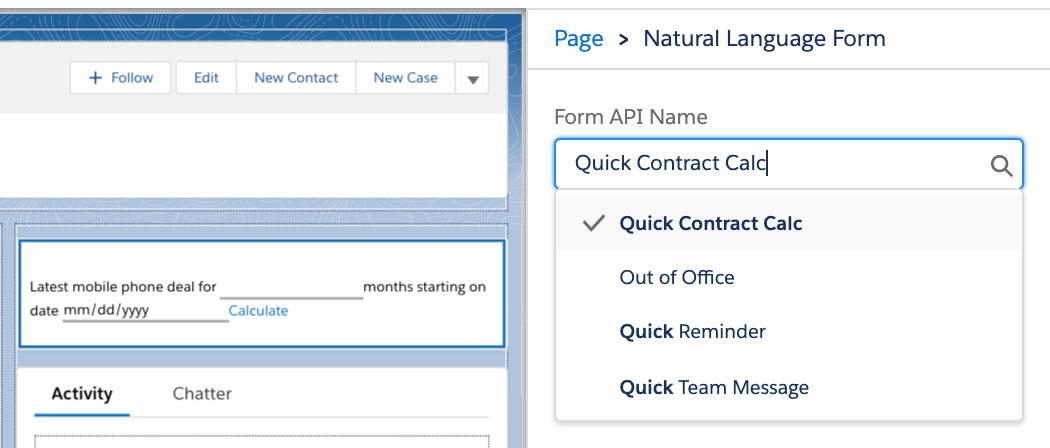
This blog will take a look at two approaches to providing extensibility points within application logic, including automatically discovering compatible integrations – allowing you to make it easier and less error-prone for admins when configuring your application. For ease our use case is inspired by the calculator app on the Mac that allows you to pick modes suitable for different user types – imagine you have built a basic Salesforce calculator app – how do you ensure it can be extended further after you deliver it?

The first approach is via Apex interfaces, the second approach helps Admins extend your code with no code tools via Actions (created via Flow). There are many places and ways in which configuration is performed, here we will explore customising Lightning App builder to render dynamic drop down lists vs the traditional input fields when configuring your Calculators Lightning Web Component properties. Finally I created a small helper class that encapsulates the discovery logic – should you wish to take this further it might helpful – it comes complete with test coverage as well.

Apex Interfaces and Discovery

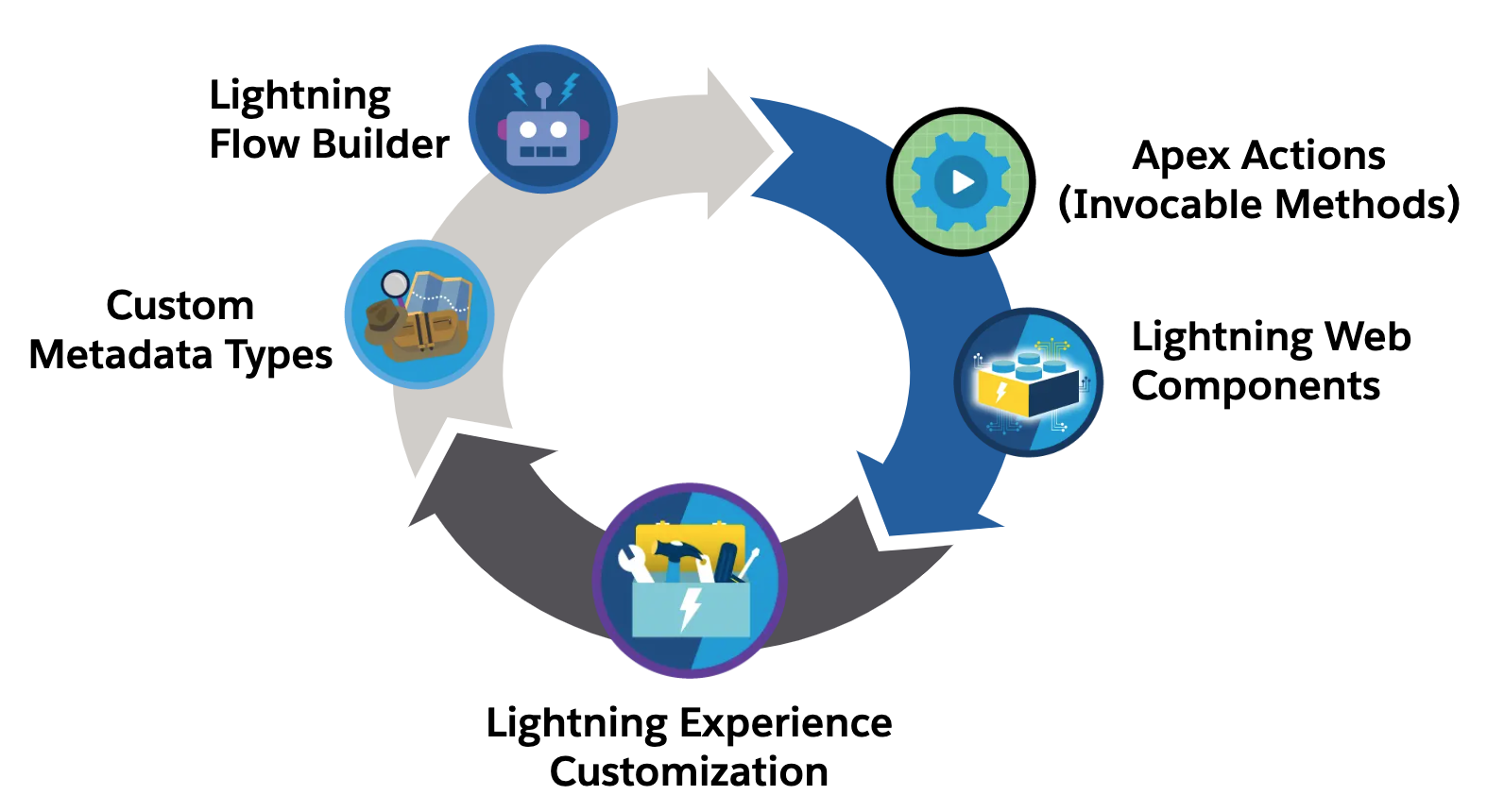
The principle here is straight forward, firstly identify places where you want to allow extensibility, for example calculation, validation or display logic and then define the information exchange required via an Apex Interface. Depending on where your calculator is being used you might use Custom Metadata Types or other configuration means such as configuration data stored in Flows and Lightning Page metadata. In the later two cases Salesforce tools also offer extensibility points to allow custom UIs to be rendered. Take the following Apex Interface and implementation:

// A means to add new buttons to a web calculator
public interface ICalculatorFunctions {

    // Declare the buttons    
    List<CalculatorButton> getButtons();

    // Do the relevant calculations
    Object calculate(CalculatorButton button, CalculatorState stage);
}

// A customisation to add scientific calculations to the calculator 
public class ScientificCalculator implements ICalculatorFunctions {

    // Additional buttons to display
    public List<CalculatorButton> getButtons() {
        List<CalculatorButton> buttons = new List<CalculatorButton>();        
        // Row 1: Memory functions, AC, +/-, %, Division
        buttons.add(new CalculatorButton('(', 'function', 'btn-function'));
        buttons.add(new CalculatorButton(')', 'function', 'btn-function'));
        buttons.add(new CalculatorButton('mc', 'memory', 'btn-memory'));
        buttons.add(new CalculatorButton('m+', 'memory', 'btn-memory'));
        buttons.add(new CalculatorButton('m-', 'memory', 'btn-memory'));
        // ...
    }

    // ...
}

// A customisation to add developer calculations to the calculator 
public class DeveloperCalculator implements ICalculatorFunctions {

    public List<CalculatorButton> getButtons() {
        // ...
    }

    // ...
}

Putting aside how additional implementations are configured for the moment then this is a basic way to loosely create an instance of a known implementation of the ICalculatorFunctions interface.

ICalculatorFunctions calculatorFunctions = 
    (ICalculatorFunctions) type.forName('ScientificCalculator').newInstance();
List<CalculatorButton> buttons = calculatorFunctions.getButtons();

Of course in reality ScientificCalculator is not hard coded as shown above, as mentioned above, some form of configuration storage is used to let Admins configure the specific class name. This is typically a string field that stores the class name. In the the example in this blog our Calculator Lightning Web Component property configuration is stored within the Lightning page the component is placed on.

Using a simple text field for the property is basically asking Admins to remember or search for class names is not the best of experiences, and so custom configuration UIs can be built to perform the searching and discovery for them. Key to this in the case of an Apex interface is using the ApexTypeImplementor object, which allows you to dynamically query for implementations of ICalculatorFunctions. The following SOQL query will return the names of the above two class names, ScientificCalculator and DeveloperCalculator.

            SELECT Id, ClassName, ClassNamespacePrefix, InterfaceName, InterfaceNamespacePrefix, IsConcrete, ApexClass.IsValid, ApexClass.Status
            FROM ApexTypeImplementor 
            WHERE InterfaceName = 'ICalculatorFunctions'
              AND IsConcrete = true
              AND ApexClass.IsValid = true 
              AND ApexClass.Status = 'Active'
            WITH USER_MODE
            ORDER BY ClassName                

You can read more about ApexTypeImplementor and various usage considerations here. In your application, you can choose where to place your configuration UIs, your own custom UI, or one already provided by the platform. In this latter case, we are providing a Calculate LWC component to administrators and wish to offer a means to extend it with additional Apex code using Apex Interfaces. Here, we expose a text property to allow the administrator to specify which implementing Apex class name to use based on their needs. Fortunately, we can do better than this and annotate the LWC property with another Apex class that dynamically retrieves a list of only Apex classes implementing that interface, as shown below.

The following shows the LWC component metadata configuration and the Apex class using the ApexTypeImplementor object we used above to only show Apex classes implementing the ICalculatorFunctions interface. The source code for this component is included in the GitHub repository linked below. By using the datasource attribute on the targetConfig property element Salesforce will render a drop down list instead of simple text box.

<?xml version="1.0" encoding="UTF-8"?>
<LightningComponentBundle xmlns="http://soap.sforce.com/2006/04/metadata">
    <apiVersion>64.0</apiVersion>
    <isExposed>true</isExposed>
    <targets>
        <target>lightning__RecordPage</target>
        <target>lightning__AppPage</target>
        <target>lightning__HomePage</target>
        <target>lightning__UtilityBar</target>
    </targets>
    <targetConfigs>
        <targetConfig targets="lightning__RecordPage,lightning__AppPage,lightning__HomePage,lightning__UtilityBar">
            <property 
                name="usage" 
                type="String" 
                label="Calculator Usage" 
                description="Select the calculator type to determine available buttons"
                datasource="apex://CalculatorUsagePickList"
                default=""
            />
        </targetConfig>
    </targetConfigs>
</LightningComponentBundle>

The following code implements the CalculatorUsagePickList class referenced above by extending the VisualEditor.DynamicPickList base class to dynamically discover and render the available implementations of the interface. It uses small library class, Extensions, I built for this blog that wraps the SOQL shown above for the ApexTypeImplementor object. It also allows for a richer more type safe way to specify the interface and format the results in way that helps make the class names more readable.

public class CalculatorUsagePickList extends VisualEditor.DynamicPickList {

    public override VisualEditor.DataRow getDefaultValue() {
        VisualEditor.DataRow defaultValue = new VisualEditor.DataRow('', 'Basic Calculator');
        return defaultValue;
    }
    
    public override VisualEditor.DynamicPickListRows getValues() {
        VisualEditor.DynamicPickListRows picklistValues = new VisualEditor.DynamicPickListRows();
                
        // Use Extensions.find to get all ICalculatorFunctions implementations
        Extensions extensions = new Extensions();
        Extensions.ApexExtensionsFindResults results = 
                 extensions.find(ICalculatorFunctions.class);

        // Add basic calculator option (no additional buttons) and any dynamicly discovered implementations
        VisualEditor.DataRow basicOption = new VisualEditor.DataRow('Basic Calculator', '');
        picklistValues.addRow(basicOption);
        List<Extensions.ApexExtensionsFindResult> names = results.toNames();        
        for (Extensions.ApexExtensionsFindResult name : names) {
            VisualEditor.DataRow value = 
                  new VisualEditor.DataRow(name.label, name.name);
            picklistValues.addRow(value);
        }
        
        return picklistValues;
    }
}

Of course Apex is not the only way to implement logic on the Salesforce platform, we can also use Flow and although slightly different in approach the above principles can also be applied to allow users to customise your application logic with Flow as well – just like other platform features offer.

Actions and Discovery

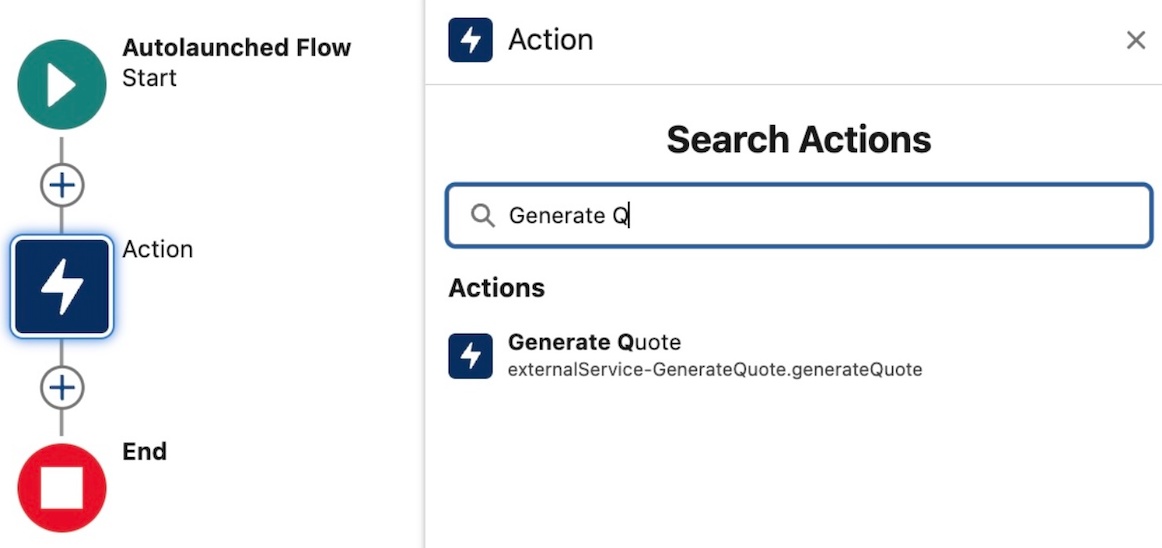
Actions are now a standard means of defining reusable tasks for many platform tools – with Salesforce providing many standard actions to access data, send emails, perform approvals and more. The ability for Admins to create custom actions via Flow is the key means for using no-code to extend other Flows, Lightning UIs and Agentforce. It is also possible to have your Salesforce applications offer Flow extensibility by using the Apex Invocable API. The following Apex code shows how to invoke a Flow action from Apex – once again though hard coded here imagine the Flow name comes from a configuration store, a Custom Metadata Type or property configuration as shown above.

Invocable.Action action = Invocable.Action.createCustomAction('Flow', 'HelloWorld');
action.setInvocationParameter('Name', 'Codey');
List<Invocable.Action.Result> results = action.invoke();
System.debug(results[0].getOutputParameters().get('Message'));

If you have used platform tools like Flow, Lightning App Builder, Buttons, Agent Builder, and more, you will notice that they allow Admins to search for actions – there is no need to remember action names. This can be achieved in your own configuration UIs by using the Standard and Custom Actions list APIs. The snag here is this API is not directly available to Apex; you have to call the Salesforce REST API from Apex.

        String orgDomainUrl = URL.getOrgDomainUrl().toExternalForm(); // Org Domain scoped callouts do not require named credentials
        String sessionId = UserInfo.getSessionId();        
        HttpRequest req = new HttpRequest();
        req.setEndpoint(actionType == 'standard' 
            ? orgDomainUrl + '/services/data/v64.0/actions/standard'
            : orgDomainUrl + '/services/data/v64.0/actions/custom/' + actionType);
        req.setMethod('GET');
        req.setHeader('Authorization', 'Bearer ' + sessionId);
        req.setHeader('Content-Type', 'application/json');        
        Http http = new Http();        
        HttpResponse res = http.send(req);        

This returns the following response

{
  "actions": [
    {
      "label": "Hello World",
      "name": "HelloWorld",
      "type": "FLOW",
      "url": "/services/data/v64.0/actions/custom/flow/HelloWorld"
    }
}

I also integrated this approach in the the Extensions helper I used in the Apex Interface example:

// Find all Flow custom actions
List<Extensions.ActionExtensionsFindResult> flowActions = 
    new Extensions().find(Extensions.ActionTypes.FLOW);
System.debug('Found ' + flowActions.size() + ' Flow custom actions:');
for (Extensions.ActionExtensionsFindResult action : flowActions) {
    System.debug('Action: ' + action.label);
    System.debug('  Name: ' + action.name);
    System.debug('  Qualified Label: ' + action.labelQualified);
    System.debug('  Action Type: ' + action.action.getType());
    System.debug('---');
}

Apex Interfaces vs Actions

Both of these approaches allow you to invoke logic written in either code or no-code from within your Apex code – but which one should you use? Certainly, performance considerations are a key factor, especially if the code you’re adding extensibility to is deep in your core logic and/or tied to processes that operate in bulk or in the background against large volumes of data. Another factor is the information being exchanged: is it simple native values (numbers, strings) or lists, or more complex nested structures? Basically the extensibility context does play a role in your choice – as does use case.

In general, if you’re concerned about performance (trigger context included here) and/or the use case may involve more than moderate calculations/if/then/else logic, I would go with Apex interfaces. Actions (typically implemented in Flow) can offer an easy way for admins to customize your UI logic, search results, add new button handling, or inject additional content on your page/component. Also worth keeping mind, Actions do come in other forms such as those from Salesforce; even Agents are Actions – so simply allowing Admins to reuse Standard Actions within your logic is a potential value to consider – and might be more optimal than them attaching to record changes for example.

Types of Extensibility, Motivations and Value

Carefully consider and validate extensibility use cases before embedding them in your Apex code; in some cases, an admin may find it more natural to use Flow and/or Lightning App Builder to orchestrate a brand-new alternative UI/process to the one you provide rather than extend it from within. By reusing existing objects and/or Apex Invocable actions, you are effectively building around your application logic vs. extending it from within, as per the patterns above. Both patterns are valid, though.

You might also wonder how important providing extensibility is to your users – especially if you have not been asked to include it. I once worked on an API enablement initiative with a Product Manager who had a strong affinity for providing integration facilities as standard. In a prior software purchasing role, they recognized the value as a form of insurance, as they could always build around or extend the application logic if they later found a feature gap.

My experience has also given me an appreciation that strong ecosystems thrive on customization abilities, and strong ecosystems strengthen the value of an offering—allowing influencers, customers, and partners to innovate further. And in case you’re wondering, is this just of interest for ISVs building AppExchange packages, the answer is no; it’s as important when building internal solutions; internal ecosystems and ease of customization are still important here, especially in larger businesses.

Here is a GitHub repository with the sample code and Extensions help class referenced in this blog. Let me know in the comments your thoughts and what ideas this prompted for your solutions?



Leave a comment

Five ways Heroku AppLink Enhances Salesforce Development Capabilities

Over the years through this blog I have enjoyed covering various advancements in Salesforce APIs, Apex, Flow, and more recently, Agentforce. While I have featured Heroku quite a bit – despite it being a Salesforce offering, the reality has been that access to Heroku for a Salesforce developer has felt like plugging in another platform – not just because on the surface its DX is different from SFDX, but because in a more material sense, it has not been integrated with the rest of the platform and its existing tools – in the same way Apex and Flow are. Requiring you to do the integration plumbing before you can access its value.

Now with a new “free” Heroku AppLink add-on, Heroku has now been tangibly integrated by Salesforce into the Salesforce platform – it and code deployed to it even sits under the Setup menu. So now it is finally time to reflect on what Heroku brings to the party!

This blog starts a series on what this new capability means for Salesforce development. Choosing the best tool for the job is crucial for maximizing the holistic development approach the Salesforce platform offers. Apex, Flow, LWC, etc., are still important tools in your toolkit. In my next blog in this series, I’ll share hands-on content, but for now, let’s explore five reasons to be aware of what Heroku and Heroku AppLink can do for Salesforce development:

1. Seamlessly and Securely Attach Unlimited Compute to your Orgs

At times, certain automations or user interactions demand improved response times and/or abiility handle increasing data volumes. While Apex and Flow have a number of options here, they are inherently always constrained by the multi-tenant nature of the core platform that runs their respective logic. The core platform’s first priority is a stable environment for all – thus, largely we see the continued realities of the infamous governor limits. Going beyond some, though not all, of the governor limits that either stop or at least slow things down is now possible – and without leaving the Salesforce family of services.

You can deploy code to Heroku with git push heroku main, which works in much the same way as sf project deploy to upload your code and run it, then you declaratively assign your compute needs, and attach (using the publish command) access to it for use within your Flow, Apex, LWC or Agentforce implementations – across as many orgs as you like using the connect command.

Heroku supports both credit card (pay as you go) and contract billing for compute usage – with the smallest plan at $5 a month already able to run complex and lengthy compute tasks easily – though milage of course varies on usecase.

2. Tap into the worlds most popular languages and frameworks within Salesforce

Salesforce has some history of embracing industry languages such as Node.js for Lightning Web Components and, with that, taps into wider skill set pools, and also commercial and open-source web component libraries. With Heroku AppLink, this is now true for backend logic – and in fact, it extends language support to Python, .NET, Ruby, Java, and many more languages, all with their own rich communities, libraries, and frameworks. Does this mean I am suggesting you port all your Apex code to other languages? No – remember this is a best tool for the job mindset – so if what you need can be better served with existing skills, code, or libraries available in such languages, then with AppLink you can now tap into these while staying within the Salesforce services.
Note: Heroku AppLink provides additional SDK support presently only for Node.js and Python. That said its API is available to any language – and is fully documented. Java samples included with AppLink illustrate how to access the API directly – along with existing Salesforce API libraries.

You may also think that with this flexibility comes more complexity; well, like the rest of Salesforce, Heroku keeps things powerful yet simple. Its buildpacks and simple CLI command git push heroku main remove the heavy lifting of building, deploying, and scaling your code that would otherwise require skills in AWS, GCP, or other platforms – what’s more, Heroku also curates the latest operating system versions, and build tools for you.

3. More power to existing Apex, Flow and Agentforce investments

As we are practicing choosing the best tool for the job – for complex solutions it’s typically not a case of one size fits all – that’s why we have a spectrum of tools to choose from – while one solution, for example, might be mostly delivered through Flow, the most complex parts of it might depend on some code – and thus having interoperability between each approach is important.

Heroku AppLink draws on the use of platform actions – which has over the years become the de facto means to decompose logic/automations – allow reusable logic to be built in code via Apex or declaratively in Flow. Now with Heroku AppLink, you can also effectively write actions in any of the aforementioned languages and also if needed scale that code beyond traditional limits such as CPU timeout and heap – while benefiting from increased execution times.

What is also critical to such code, is user context, so that data access honors the current user, both in terms of their object, field, sharing permissions but also audit information retaining a trail of who did what and when to the data. Thus, Heroku AppLink has the ability to run code in Salesforce “user mode” – much like Apex and Flow – this means the same – your SOQL and DML all operate in this mode – in fact, that’s the default – no need to qualify it as with Apex. This approach follows the industry pattern of the Principle of Least Privilege – there is also a way to selectively elevate permissions as needed using permission sets.

4. Make External Integrations more Secure

Heroku is also known to the wider world as a Paas (Platform-as-a-Service) providing easy to use compute, data and more recently AI services without the infrastructure hassle. This leads to Heroku customers building practically any application or service they desire – again in any language they desire. For example, a web/mobile experience can be hosted along with required data storage – both able to scale to global event needs. Heroku AppLink, joins Heroku Connect to start a family of add-ons that also help such consumer facing or even internal experiences tap into Salesforce org or even Data Cloud data – by effectively managing the connection details securely in one place – elevating the complexity of managing oAuth, JWT, certifications etc.

5. Leverage additional data and AI services

If all your data resides within a Salesforce org or Data Cloud, Heroku AppLink provides an easy to use SDK to make using the most popular APIs easy and even provides a long time favorite of mine, Martin Fowlers, Unit of Work over the relatively complex composite Salesforce APIs to manage multi-object updates within a single transaction.

Beyond this, you can also take advantage of Heroku Postgres to store additional data that does not need to be in the org but needs to be close at hand to your code – likewise attach to data services elsewhere in AWS, DynamoDB for example. Heroku also provides new AI services that provide a set of simple to use AI tooling primitives on top of the latest industry LLM’s. All these Heroku services exist with the same trust and governance as other Salesforce services and thus leveraging them means you don’t have to move data or compute outside of Salesforce if thats something your business is particularly sensitive to.

Summary

Salesforce continues to bring new innovations to its no-code and code tools that are exciting but yet broaden the burden of choice and making the right choice. With Heroku AppLink, this has indeed added to the mix – and expands the classic vs. question – to – when to use Flow vs. Apex vs. Heroku?
I’ve noticed that the Flow vs. Apex debate is still strong at community events this year. When it comes to “code,” whether it’s Apex, Python, Java, or .NET—excluding Triggers, which AppLink doesn’t support—my opinion on no-code versus code remains the same – consider wisely use of one or both accordingly. In respect to coded needs, I still would still generally recommend Apex first, that is unless your project needs align with the points above – then it’s worth further discussion. Ultimately, it’s about finding a suitable mix instead with all three supporting actions, it’s easier to blend and evolve as needed.

As I hinted at the start of this blog, I plan to get into more hands-on blogs on Heroku AppLink and some reflections on ISV usage. Between these, I also have other Apex-related topics I want to explore—such as the new Apex Cursors feature. In the meantime, here below are some useful links about Heroku AppLink available as of the time of this blog.

Thanks for readying, hope it was useful!


Leave a comment

Enhancing Agentforce Output with Rich Text Formatting

I have been working with Agentforce for a while, and as is typically the case, I find myself drawn to platform features that allow extensibility, and then my mind seems to spin as to how to extract the maximum value from them! This blog explores the Rich Text (a subset of HTML) output option to give your agents’ responses a bit more flair, readability, and even some graphical capability.

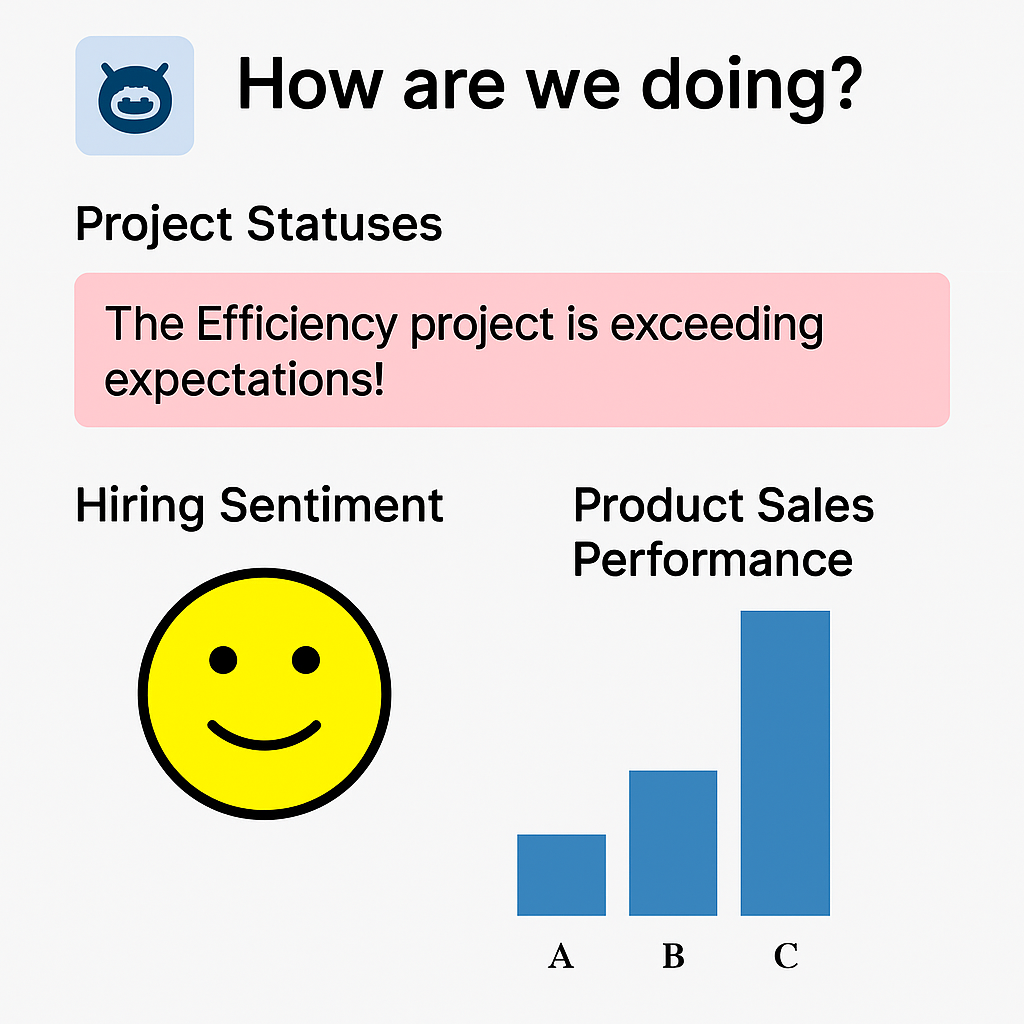
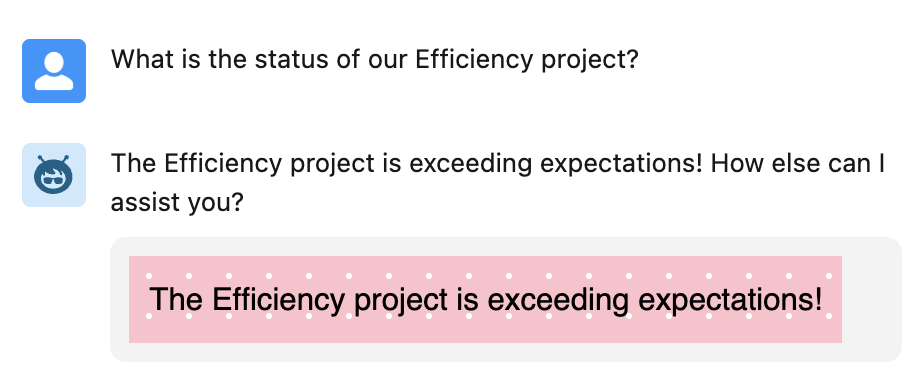
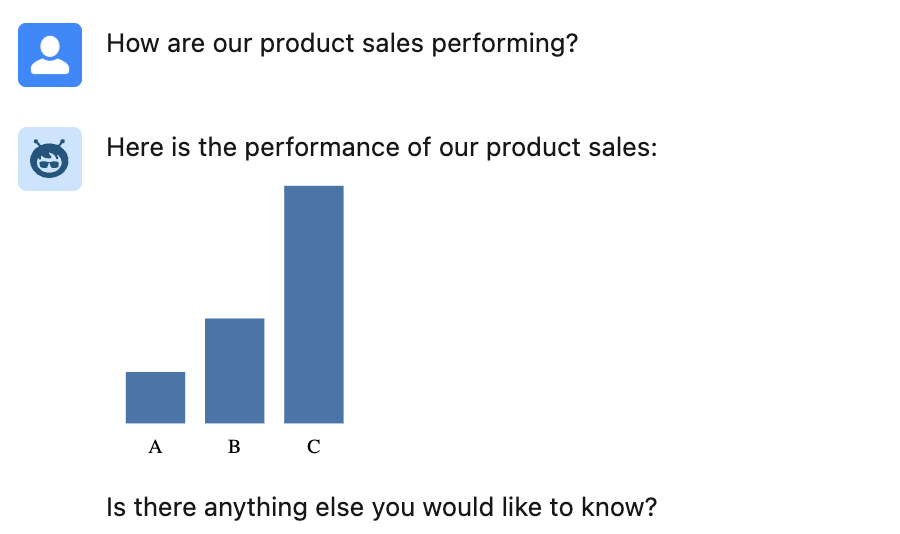
Agentforce Actions typically return data values that the AI massages into human-readable responses such as, “Project sentiment is good”, “Product sales update: 50% for A, 25% for B, and 25% for C”, “Project performance is exceeding expectations; well done!”. While these are informative, they could be more eye-catching and, in some cases, benefit from more visual alternatives. While we are now getting the ability to use LWC’s in Agentforce for the ultimate control over both rendering and input, Rich Text is a middle-ground approach and does not always require code. All be it perhaps a bit of HTML or SVG knowledge and/or AI assistance is needed – you can achieve results like this in Agentforce chat

Lets start with a Flow example, as it also supports Rich Text through its Text Template feature. Here is an example of a Flow action that can be added to a topic with instructions to tell the agent to use it when presenting good news to the user, perhaps in collaboration with a project status query action.

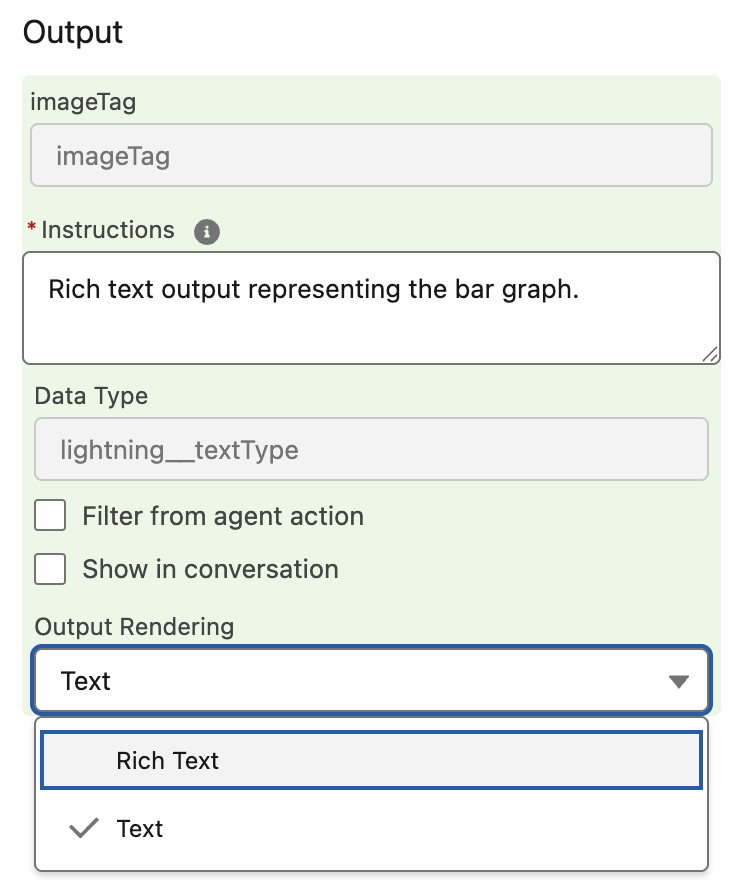
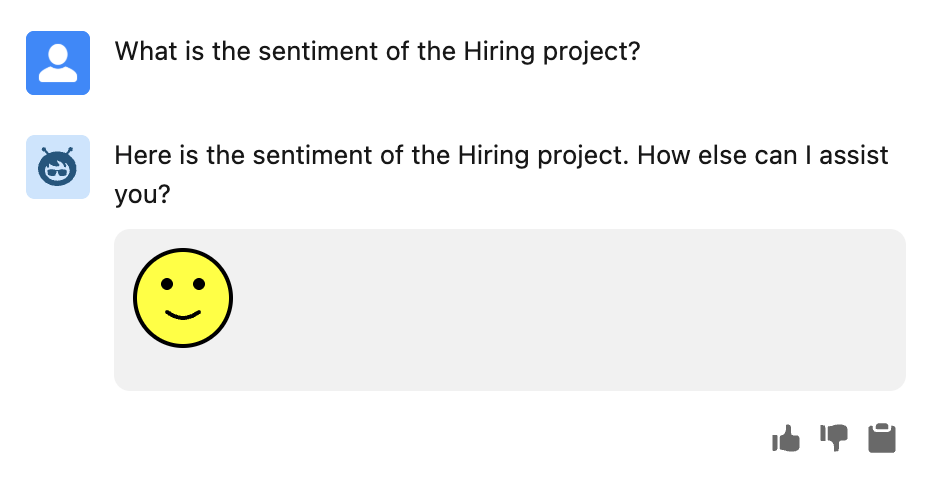
In this next example a Flow conditionally assigns and output from multiple Text Templates based on an input of negative, neutral or positive – perhaps used in conjunction with a project sentiment query action.

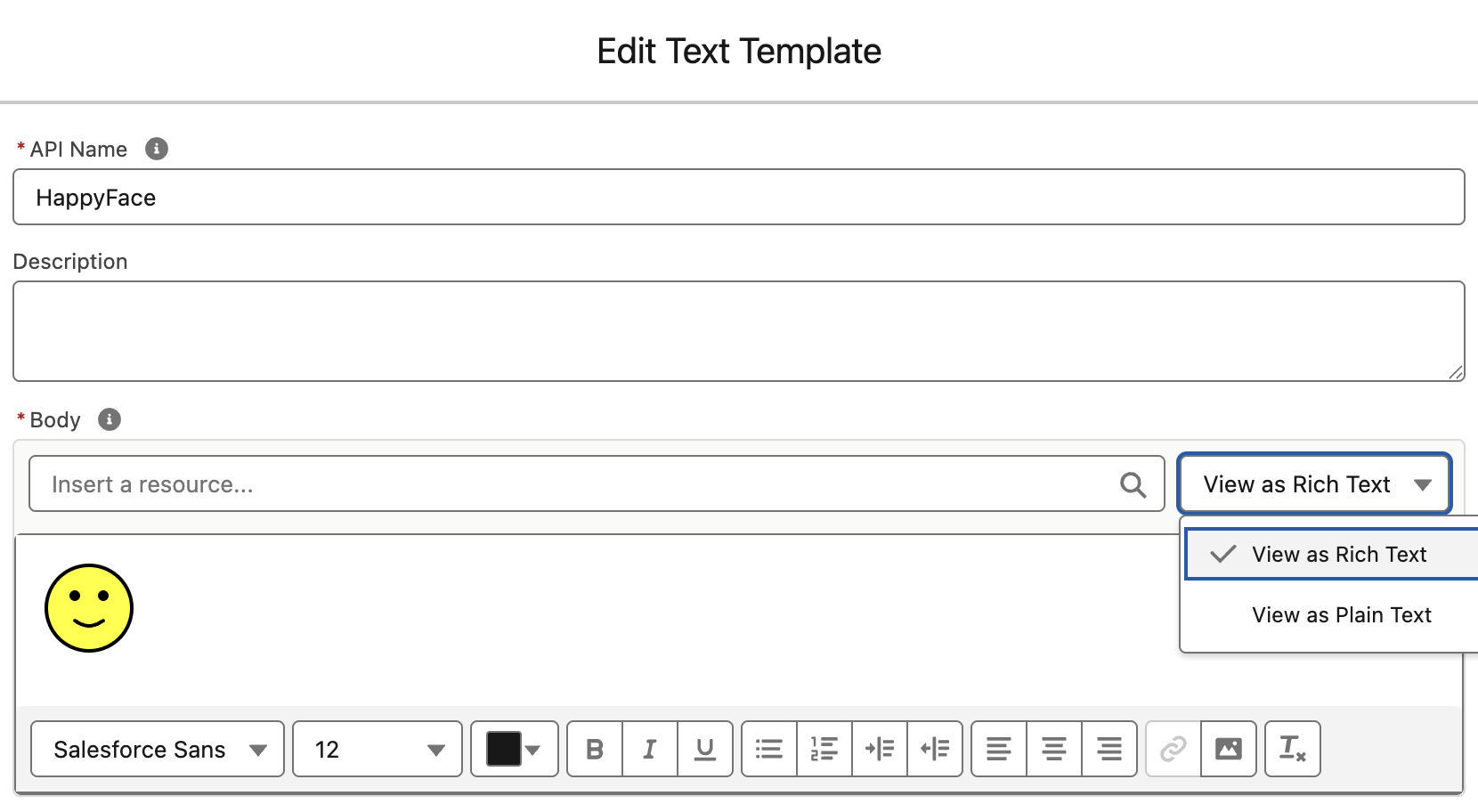
The Edit Text Template dialog allows you to create Rich Text with the toolbar or enter HTML directly. Its using this option we can enter our smile svg shown below:

<svg xmlns='http://www.w3.org/2000/svg' width='50' height='50'><circle cx='25' cy='25' r='24' fill='yellow' stroke='black' stroke-width='2'/><circle cx='17' cy='18' r='3' fill='black'/><circle cx='33' cy='18' r='3' fill='black'/><path d='M17 32 Q25 38 33 32' stroke='black' stroke-width='2' fill='none' stroke-linecap='round'/></svg>

For a more dynamic approach we can break out into Apex and use SVG once again to generate graphs, perhaps in collaboration with an action that retrieves product sales data.

The full Apex is stored in a Gist here but in essence its doing this:

@InvocableMethod(
   label='Generate Bar Chart' 
   description='Creates a bar chart SVG as an embedded <img> tag.')
public static List<ChartOutput> generateBarChart(List<ChartInput> inputList) {
   ...
   String svg = buildSvg(dataMap);
   String imgTag = '<img src="data:image/svg+xml,' + svg + '"/>';
   return new List<ChartOutput>{ new ChartOutput(imgTag) };
}

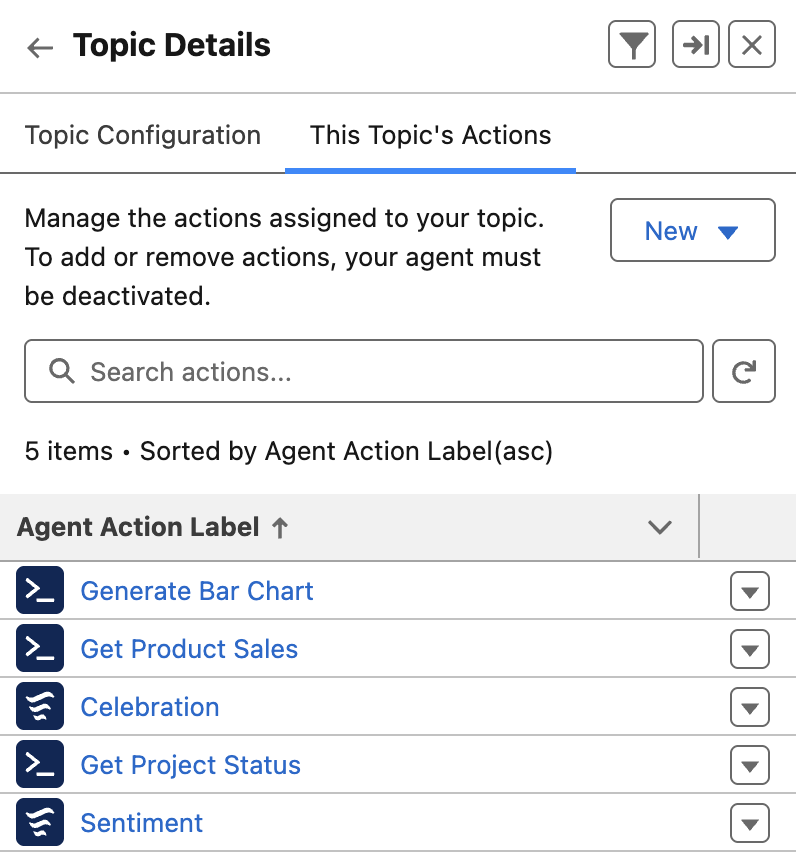
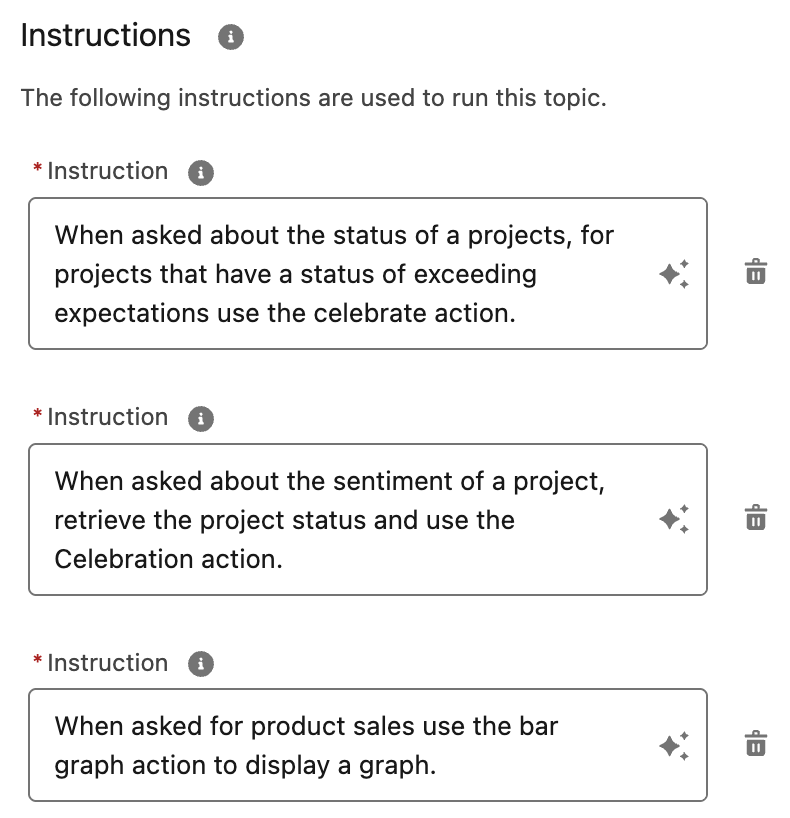
When building the above agent, I was reminded of a best practice shared by Salesforce MVP, Robert Sösemann recently, which is to keep your actions small enough to be reused by the AI. This means that I could have created an action solely for product sales that generated the graph. Instead, I was able to give the topic instructions to use the graph action when it detects data that fits its inputs. In this way, other actions can generate data, and the AI can now use the graph rendering independently. As you can see below, there is a separation of concerns between actions that retrieve data and those that format it (effectively those that render Rich Text). By crafting the correct instructions, you can teach the AI to effectively chain actions together.

You can also use Prompt Builder based actions to generate HTML as well. This is something that the amazing Alba Rivas covered very well in this video already. I also captured the other SVG examples used in this Gist here. A word on security here, SVG can contain code, so please make sure to only use SVG content you create or have from a trusted source – of note is that using SVG embedded in an img tag code is blocked by the browser, <img src="data:image/svg+xml,<svg>....</svg>"/>.

Whats next? Well I am keen to explore the upcoming ability to use LWC’s in Agentforce. This allows for control of how you request input from the user and how the results of actions are rendered. Potentially enabling things like file uploads, live status updates and more! Meanwhile check this out from Avi Rai.

Meanwhile, enjoy!


1 Comment

New Book – Salesforce Platform Enterprise Architecture 4th Edition

It has been nearly 10 years back in 2014 when the first edition of my book Force.com Enterprise Architecture was first published and clearly a lot has moved on since then and not just the platform capabilities. Keeping pace with branding changes resulted in the second edition of the book being called Lightning Platform Enterprise Architecture. This latest 4th edition, Salesforce Platform Enterprise Architecture has probably the most accurate and I hope enduring title! This 4th edition is also nearly twice the size of the first edition, coming in at 681 pages. So much so, its 16 chapters is now split over 4 parts to make digesting the book easier. As is tradition by now, this blog will cover some of latest updates and additions and what to expect in general from the book.

Links: Amazon | Packt Publishing

Motivation and what to expect…

I first came to the platform with a lot of experience and understanding of architecture principles from other platforms, including leveraging platform agnostic patterns such as those of Martin Fowler. Applying patterns to the platform requires some nuance at times, thus this book is about enterprise architecture considerations as applied to the Salesforce Platform and much more in respect to its capabilities that accelerate traditional application development concerns and tasks for you – and can hinder if not considered upfront in your architecture design.

The book dedicates 3 of its 16 chapters to Apex code separation of concerns, how to layout your code, while the rest covers the full spectrum of app concerns such as designing for code and database performance, profiling, testing, data storage design, building apis, extensibility and more and of course how to write much less code by harnessing the declarative aspects. All this is driven throughout the book via a fictitious reference application known as FormulaForce based on Formula1 motor racing – full source is included. Also included are numerous tips and tricks and info blocks pitted among the pages that highlight learnings from my own experiences, and latterly that of the many amazing reviewers.

As good as the platform is at abstracting a huge amount of the complexity of managing and securing modern day applications for you, there is no escaping having to fully understand good architecture principles that would, and do, in most cases apply elsewhere, such as query optimization and indexing.

If you are developing a lot on the Salesforce Platform, have a few years experience and are passionate about creating applications that are enduring and empathetic to the platform itself – this book is for you. Read on for further highlights!

Is it for ISVs or anyone?

This edition is the first to split out the motivations of packaging in respect to internal distribution needs within your own company vs distributing a commercial solution on AppExchange. Regardless of which motivation you fit into, the chapters will callout which bits are relevant vs not. Even if you are not into packaging at all right now, much of the content on Apex, Lightning, Flow, APIs etc is of course agnostic to how you choose to distribute your application. Regardless who you are sharing it with, the book gives you an appreciation of advantages and limits of packaged based distribution and in my view is a key aspect of your overall architecture considerations checklist.

Have the Apex coding patterns evolved given recent features?

The advent of user mode capabilities has had a big impact on the approach taken within the sample application of the book when it comes to using the Apex Enterprise Patterns Library (fflib), specifically in how the Unit of Work and Selector patterns are used when updating and querying for data respectively.

Additionally, the Domain pattern chapter now reflects on how Domain logic, can, if desired allow the developer to split Domain and Trigger logic into separate classes and thus introduces a new pattern (SDCL) to captured this approach. Thats not to say the original model has gone, it is still very much present, but it felt appropriate to include something in the book that reflects how the library usage has also evolved over the years – thanks to my good friend John M. Daniel for pushing for this!

Apply skills in other languages and additional scaling options

A brand new chapter in the book is dedicated to how Heroku and Functions can be used to leverage existing skills or indeed investments in open source or internally for code written in other languages such as Java or Node.js. These technologies also open up further scaling options. The chapter breaks down the approaches using the books sample application as a basis. Thus it continues the Formula1 motor racing theme by introducing Web and API interfaces for race fans and vendors (authentication scenario) to interact with the application backend APIs. Later in the book the integration chapter doubles down further on authoring APIs via OpenAPI standards and how that simplifies integration with the platform.

Lightning Web Components and Lightning Experience expansion

Since the third book, all but one of the Aura components have now been removed as many only existed at the time as workarounds to the lack of LWC enabled integration points. Two large chapters are dedicated to the Lightning framework itself, how it handles separation of concerns, eventing, security and its alignment with the industry Web Component standard. Completing with a section covering the ever expanding possibilities to extend vs build when thinking about your applications user experience, regardless if thats desktop, mobile or driven through the native UIs and tools such as Lightning Pages or Flow. And yes, I still love the Utility Bar integration the most – as you can see from the number of historic posts and tools on the topic here.

APIs, APIs and APIs…

Many years ago a product manager once thanked me for pushing an API strategy internally, since they appreciated first hand as a past buyer that APIs are effectively an insurance policy for buyers when it comes to unexpected feature gaps post or during implementation. Thus several of the chapters highlight the many Salesforce APIs in contextual ways.

Though its not until the integration and extensibility chapter the book really doubles down on building your own application APIs, versioning, naming and design and the value they bring to your fellow developers, customers and/or partner ecosystems. External Services is one of the most impressive aspects of integrating with the Salesforce Platform for me and it was my pleasure to update the book with an updated Heroku based API leveraging OpenAPI to get the full power of the feature – the two are a perfect combo!

And …

This blog is already in danger of becoming chapter size itself, so I will leave it here with the above highlights and before I close share my deepest thanks to this editions reviewers John M. Daniel, Sebastiano Costanzo, Arvind Narasimhan and foreword author Daniel J. Peter.

I will be popping up in the not to distant future in ApexHours (https://www.apexhours.com/) and perhaps other locations to talk in more depth about the book and likely other side topics of interest. I will update this blog as those resources arrive. Thank you all in the meantime, the Salesforce community is the best and remains very close to my heart, enjoy!

AndyInTheCloud

P.S. Suffice to say this 4th edition is an evolution of the prior three books! I would like to also thank the following fine folks for their support as past reviewers and foreword authors!

Past Reviewers and Forewords:
Matt Bingham, Steven Herod, Matt Lacey, Andrew Smith, Rohit Arora, Karanraj Samkaranarayanan, Jitendra Zaa, Joshua Burk, Peter Knolle, John Leen, Aaron Slettenhaugh, Avrom Roy-Faderman, Michael Salem, Mohith Shrivastava and Wade Wegner


3 Comments

The Third Edition

bookI’m proud to announce the third edition of my book has now been released. Back in March this year I took the plunge start updates to many key areas and add two brand new chapters. Between the 2 years and 8 months since the last edition there has been several platform releases and an increasing number of new features and innovations that made this the biggest update ever! This edition also embraces the platforms rebranding to Lightning, hence the book is now entitled Salesforce Lightning Platform Enterprise Architecture.
You can purchase this book direct from Packt or of course from Amazon among other sellers.  As is the case every year Salesforce events such as Dreamforce and TrailheaDX this book and many other awesome publications will be on sale. Here are some of the key update highlights:

  • Automation and Tooling Updates
    Throughout the book SFDX CLI, Visual Studio Code and 2nd Generation Packaging are leverage. While the whole book is certainly larger, certain chapters of the book actually reduced in size as steps previously reflecting clicks where replaced with CLI commands! At one point in time I was quite a master in Ant Scripts and Marcos, they have also given way to built in SFDX commands.
  • User Interface Updates
    Lightning Web Components is a relative new kid on the block, but benefits greatly from its standards compliance, meaning there is plenty of fun to go around exploring industry tools like Jest in the Unit Testing chapter. All of the books components have been re-written to the Web Component standard.
  • Big Data and Async Programming
    Big data was once a future concern for new products, these days it is very much a concern from the very start. The book covers Big Objects and Platform Events more extensibility with worked examples, including ingest and calculations driven by Platform Events and Async Apex Triggers. Event Driven Architecture is something every Lightning developer should be embracing as the platform continues to evolve around more and more standard platforms and features that leverage them.
  • Integration and Extensibility
    A particularly enjoyed exploring the use of Platform Events as another means by which you can expose API’s from your packages to support more scalable invocation of your logic and asynchronous plugins.
  • External Integrations and AI
    External integrations with other cloud services are a key part to application development and also the implementation of your solution, thus one of two brand new chapters focuses on Connected Apps, Named Credentials, External Services and External Objects, with worked examples of existing services or sample Heroku based services. Einstein has an ever growing surface area across Salesforce products and the platform. While this topic alone is worth an entire book, I took the time in the second new chapter, to enumerate Einstein from the perspective of the developer and customer configurations. The Formula1 motor racing theme continued with the ingest of historic race data that you can run AI over.
  • Other Updates
    Among other updates is a fairly extensive update to the CI/CD chapter which still covers Jenkins, but leverages the new Jenkins Pipeline feature to integrate SFDX CLI. The Unit Testing chapter has also been extended with further thoughts on unit vs integration testing and a focus on Lightening Web Component testing.

The above is just highlights for this third edition, you can see a full table of contents here. A massive thanks to everyone involving for providing the inspiration and support for making this third edition happen! Enjoy!


57 Comments

Getting your users attention with Custom Notifications

customnotificationsummaryGetting your users attention is not always easy, choosing how, when and where to notify them is critical. Ever since Lightning Experience and Salesforce Mobile came out the notification bell has been a one stop shop for Chatter and Approval notifications, regardless if you are on your desktop or your mobile device.

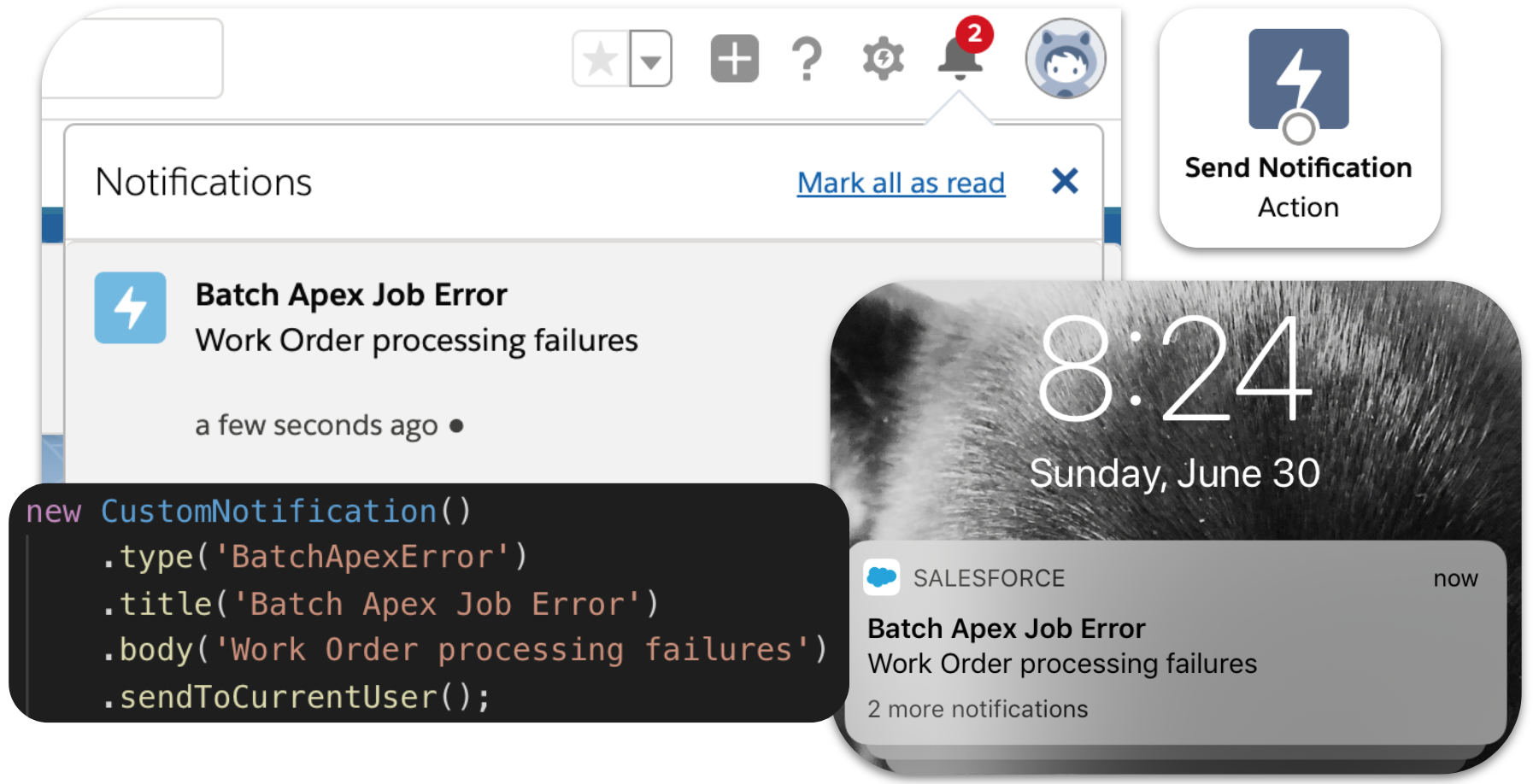
In beta release at time of writing is a new platform feature known as Notification Manager that allows you to send your own custom notifications to your users for anything your heart desires from the very same locations, even on a users mobile device! This blog dives into this feature and how you can integrate it into your creations regardless if you are a admin click coder, Apex developer or REST API junkie.

Getting Started

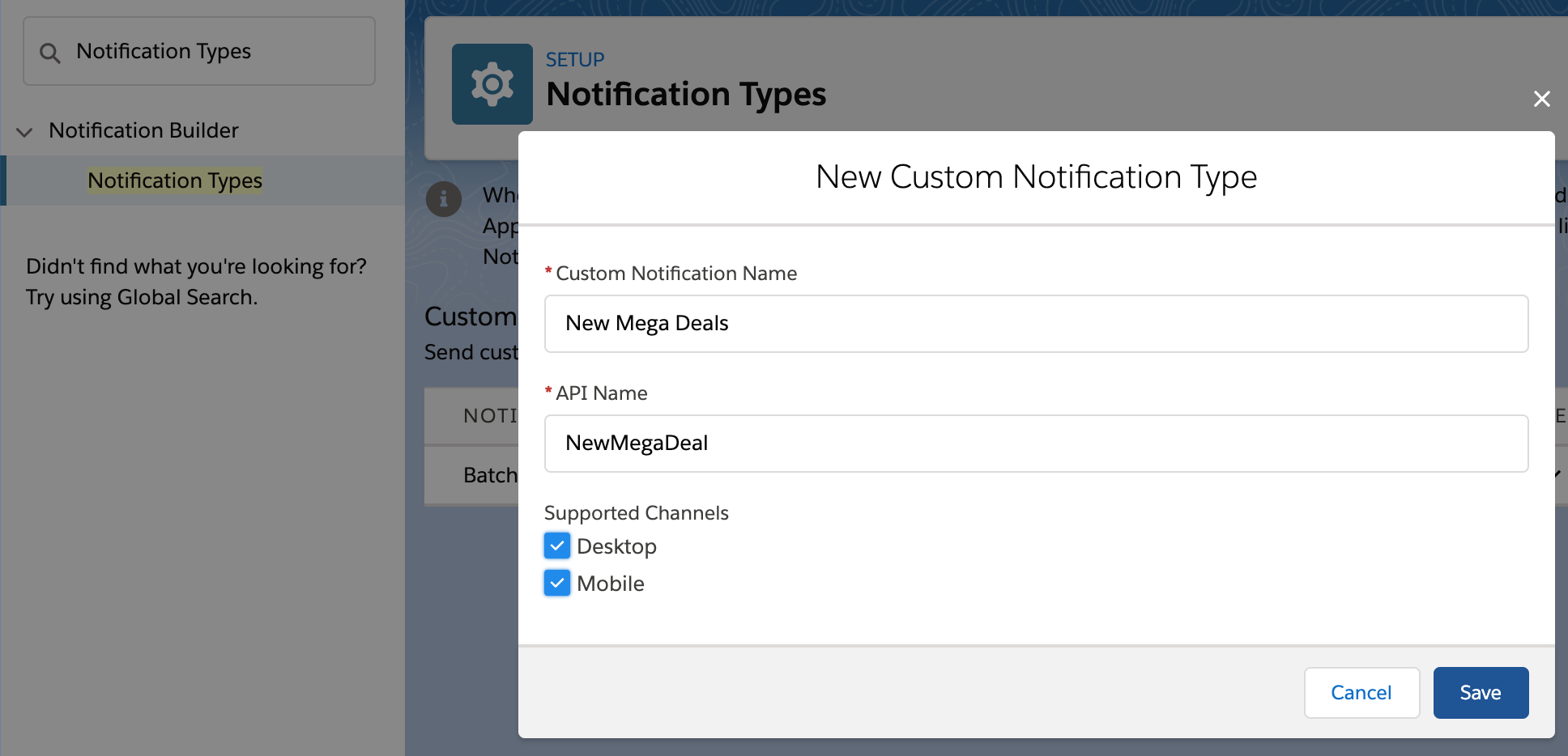
The first thing you need to do is define a new Notification Type under the Setup menu. This is a simple process that involves giving it a name and deciding what channels you want the notification to go out on, currently user desktop and mobile devices.

notificationstypes

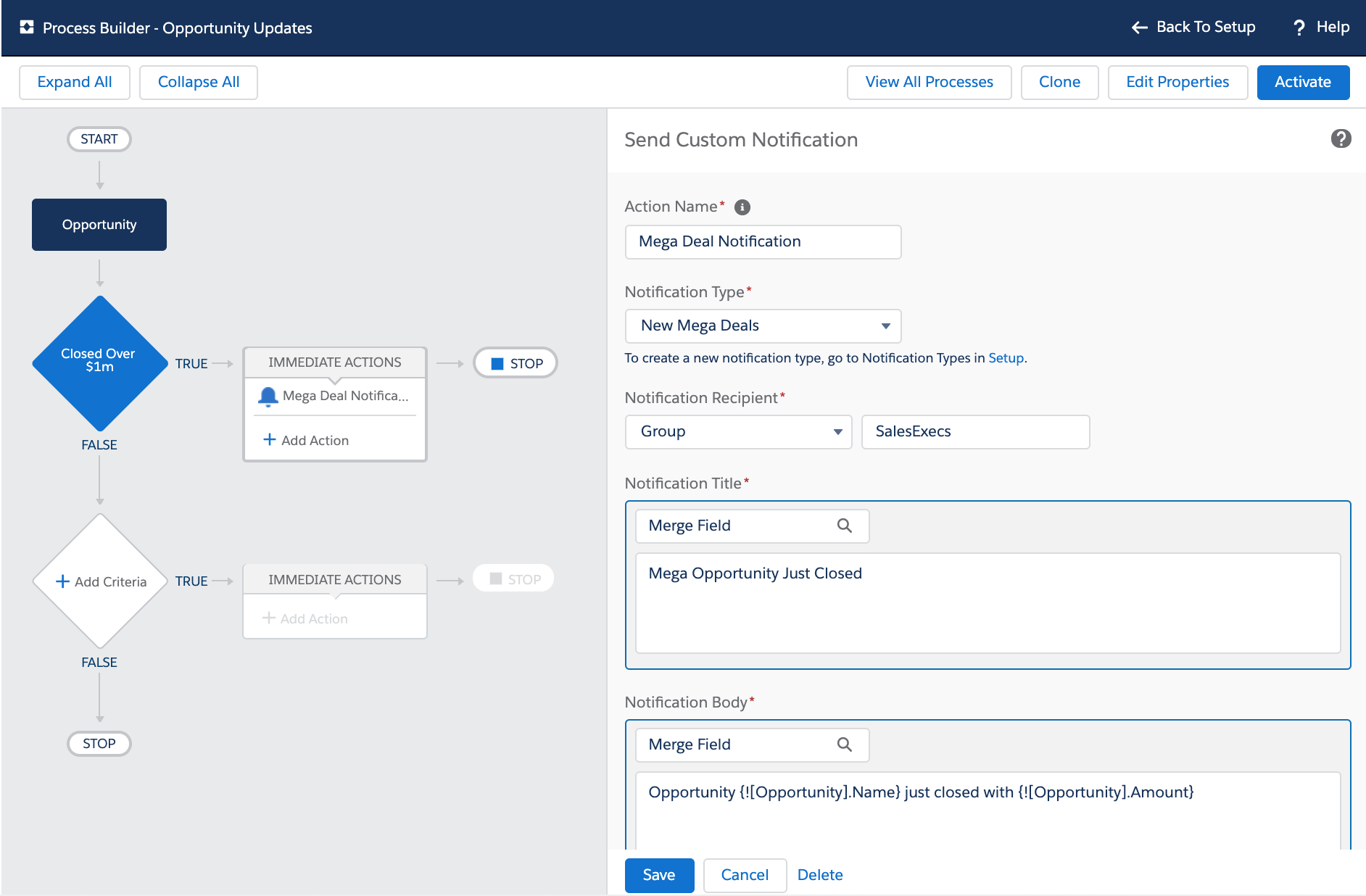
Once this has been done you can use the new Send Custom Notification action in Process Builder or Flow. This allows you to define the title and body of your notification, along with the target recipients (users, groups, queues and more) along the target record that determines the record the user sees when they click/tap the notification. The following screenshot shows an example of such an Action in Process Builder:-

opportunitycustomnotification

notificationoppty.png

Basically that is all there is to it! You will have in a few clicks empowered yourself with the ability to reach out to not only your users desktop but the actual mobile device notification experience on each of the their mobile devices!  You didn’t have to learn how to write a mobile app, figure out how to do mobile notifications, register things with Google or Apple. I am honestly blown away at how easy and powerful this is!

So it is pretty easy to to send notifications this way from Process Builder processes driven by record updates from the user and also reference field values to customize the notification text. However in the ever expanding world of Platform Events, how do we send custom notifications based on Platform Events?

Sending Custom Notifications for Batch Apex Job Failures

One of my oldest and most popular blog posts discussed design best practices around Batch Apex jobs. One of the considerations it calls out is how important it is to route errors that occur in the background back to the user. Fast forward a bit to this blog, where I covered the new BatchApexError Platform Event as a means to capture and route batch errors (even uncatchable exceptions) in near realtime. It also describes strategy to enabled users to retry failed jobs. What it didn’t really solve, is letting them know something had gone wrong without them checking a custom tab. Let’s change that!

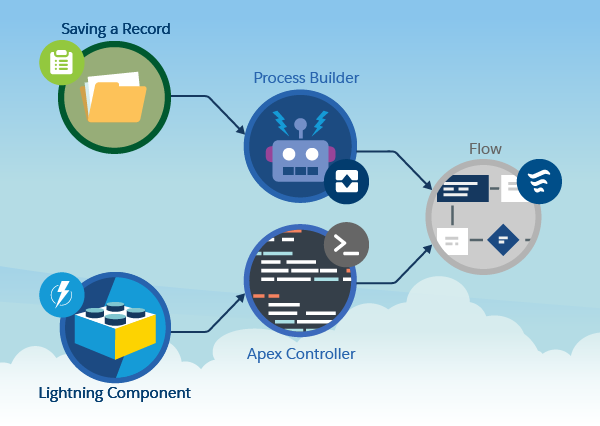
Process Builder is now able to subscribe to the standard BatchApexErrorEvent and thus enables you as an admin to apply filter and routing logic on failed batch jobs. When combined with custom notifications those errors can now be routed to users devices and/or desktops in realtime. While Process Builder can subscribe to events it does have some restrictions on what it can do with the event data itself. Thus we are going to call an autolaunch Flow from Process Builder to actually handle the event and send the custom notification from within Flow. If you are reading this wondering if your Apex code can get in on the action, the answer is yes (ish), more on this later though. The declarative solution utilizes one Process Builder process and two Flows. The separation of concerns between them is shown in the diagram below:-

batchapexeventtonotificationarch

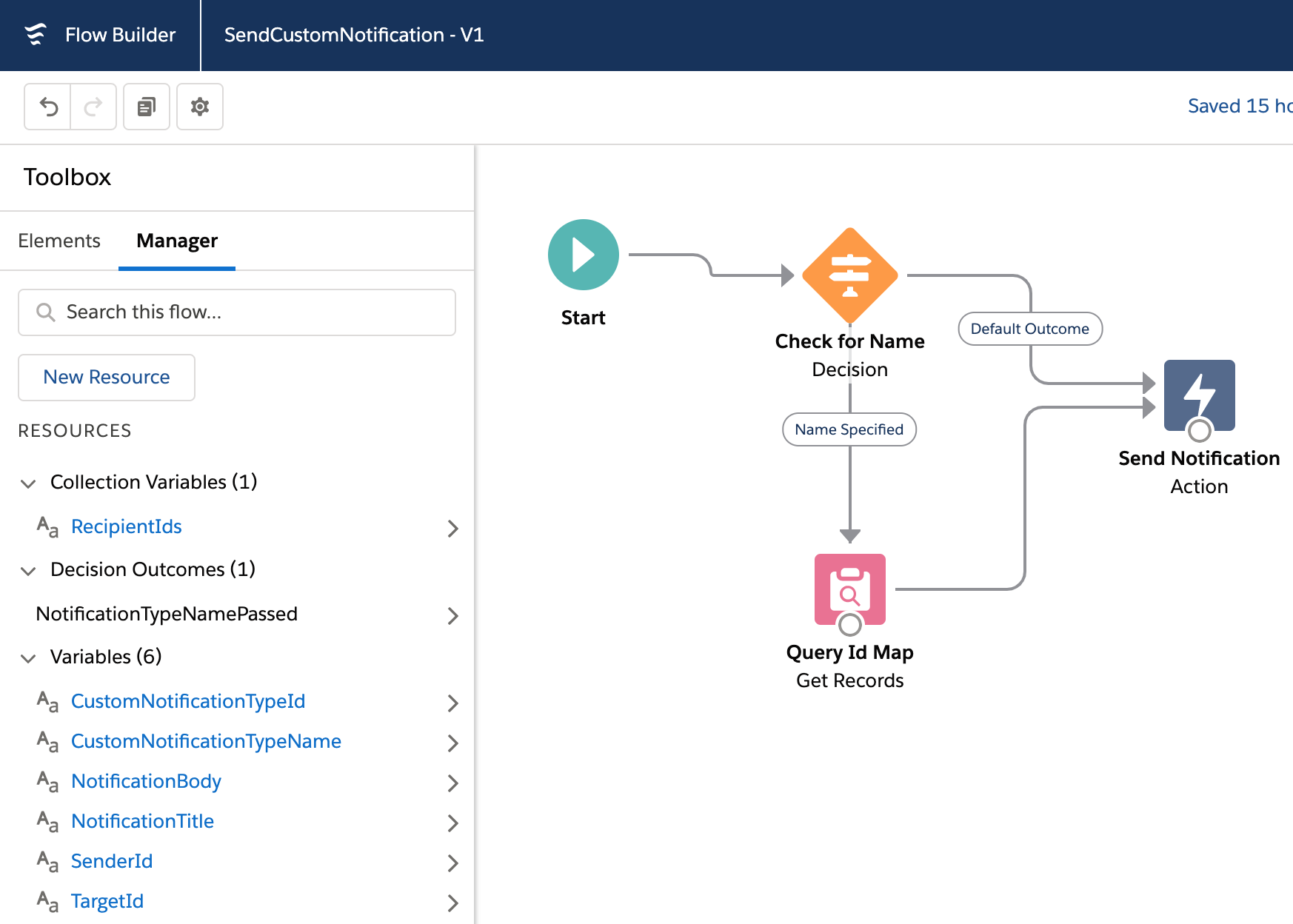
Let’s work from the bottom to the top to understand why I decided to split it up this way. Firstly, SendCustomNotification is a Sub Flow (callable by other Flows) and is a pretty simple wrapper around the new Send Custom Notification action shown above. You can take a closer look at this later through the sample code repository here.

SendCustomNotification

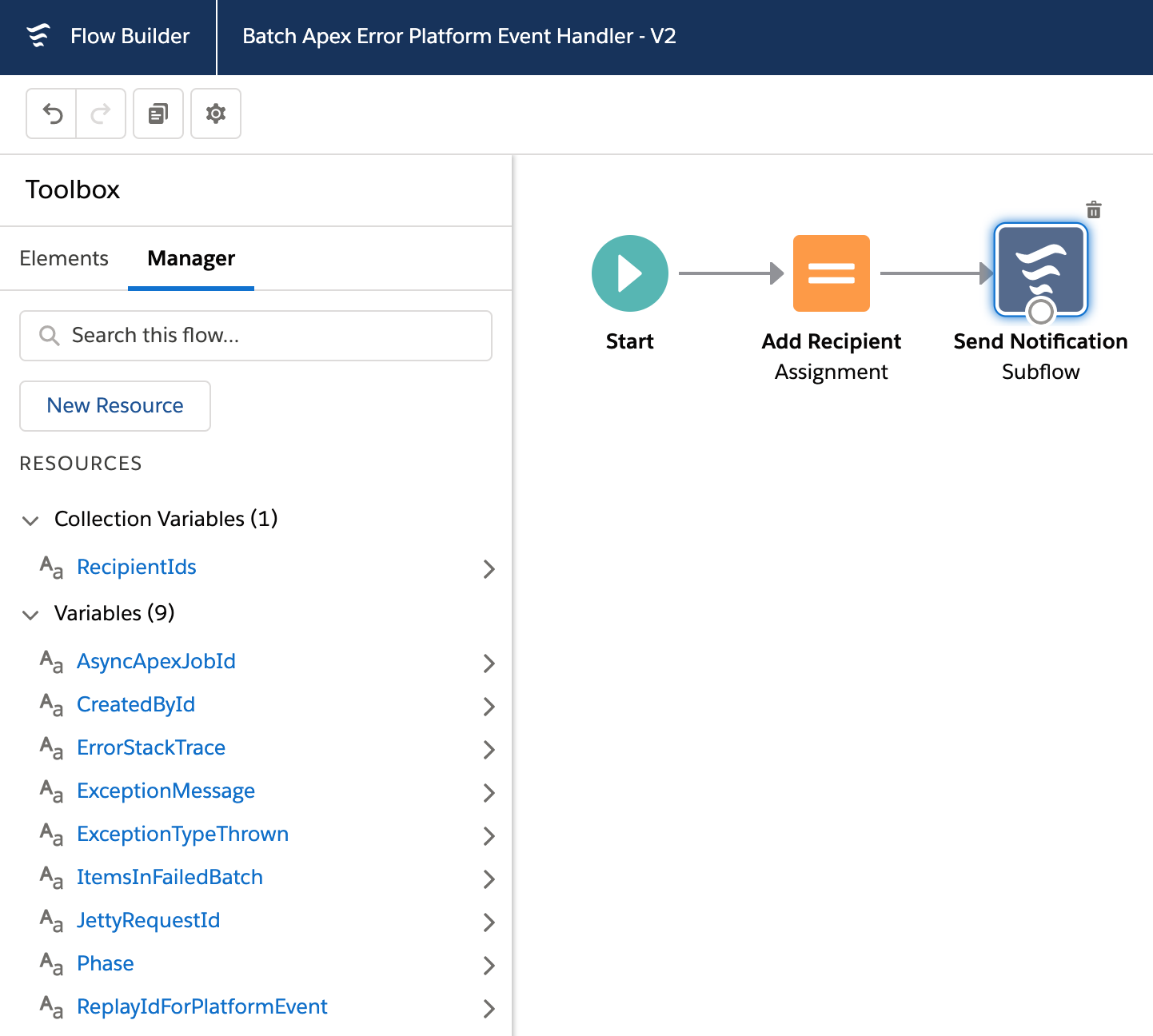
Next the BatchApexErrorPlatformEventHandler Flow defines a set of input variables that are populated from the Process Builder process. These variables match the fields and types per the definition of the Batch Apex Error Event here. The only other thing it does is add the Id of the user that generated the event (aka the user who submitted the failed job) to the list of recipients passed to the SendCustomNotification sub flow above. This could also be a Group Id if you wanted to send the notification further.

batchapexeventhandlerflow.png

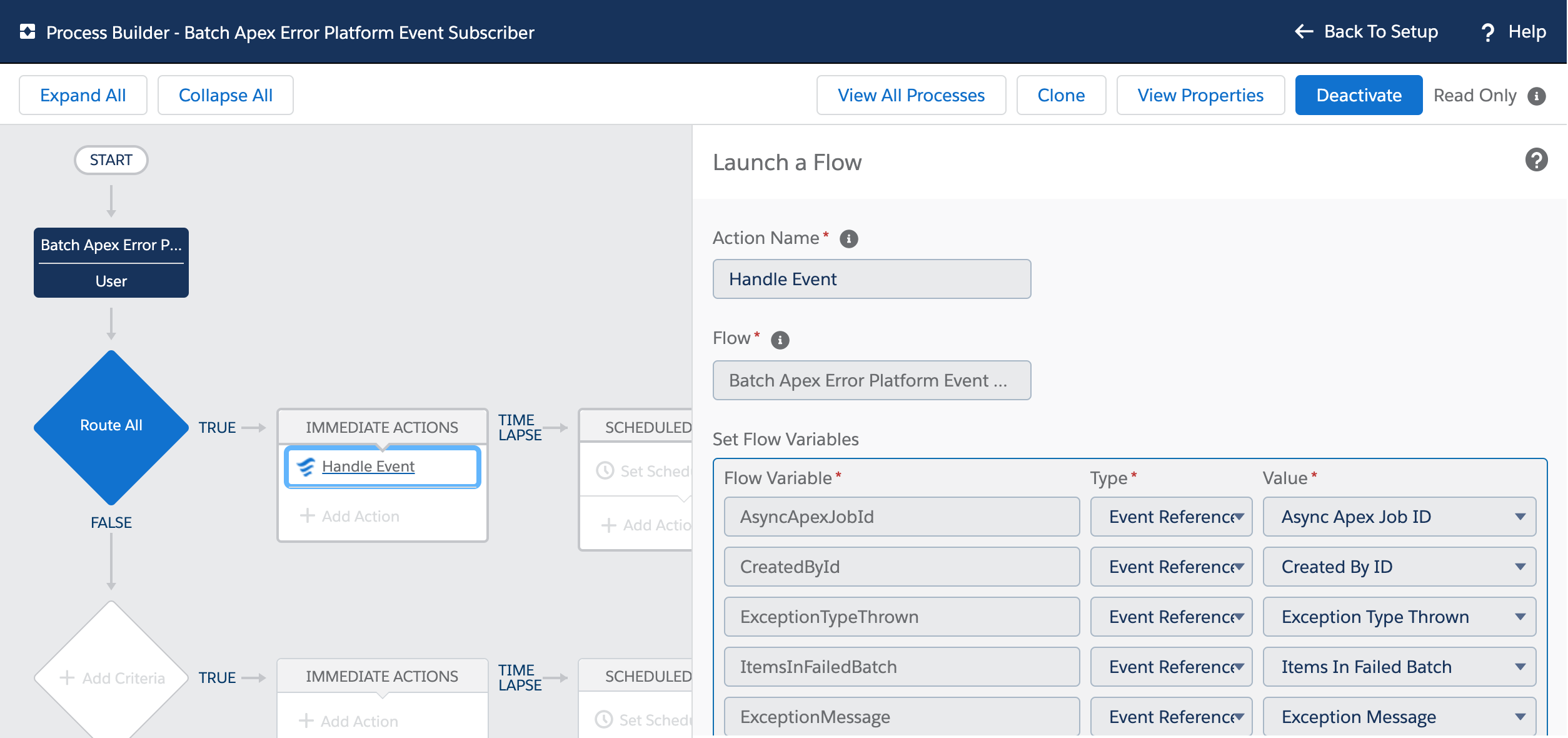
Lastly, in the screenshot below you see the Process Builder that subscribes to the Batch Apex Error Event and maps the event field values to the input variables exposed from BatchApexErrorPlatformEventHandler Flow via the EventReference. The example here is very simple, but you can now imagine how you can add other filter criteria to this process that allows you to inspect which Batch Apex job failed and route and/or adjust messaging in the notifications accordingly, all done declaratively of course!

batchapexerrorfrompb.png

NOTE: It is not immediately apparent in all cases that you can access the event fields from Process Builder, since the documentation states them as not supported within formulas. I want to give a shout out to Alex Edelstein PM for Flow for clarifying that it is possible! Check out his amazing blog around all things Flow here. Finally note that Process Builder requires an Object to map the incoming event to. In this case I mapped to a User record using the CreatedById field on the event.

Sending Custom Notifications from Code

The Send Custom Notification action is also exposed via the Salesforce Action REST API defined here (hint hint for Doug Ayers Mass Action tool to support it). You can of course attempt to call this REST API via Apex as well. While there is currently no native Apex Action API, it turns out calling the above SendCustomNotification Flow from Apex works pretty well meanwhile. I have written a small wrapper around this technique to make it a little more elegant to perform from Apex and it also serves to abstract away this hopefully temporary workaround for Apex developers.

new CustomNotification()
    .type('MyNotificationType')
    .title('Fun Custom Notification')
    .body('Custom Notifications are Awesome!')
    .sendToCurrentUser();

The following Apex code results in this notification appearing on your device!

funfromapexnotification.png

This CustomNotification helper class is included in the sample code for this blog and leverages another class I wrote that wraps the native Apex Flow API. I used this wrapper because it allowed me to mock the actual Flow invocation since there is no way as far as I can see to assert the notification was actually sent.

NOTE: When sending custom notifications via declarative tools and/or via code I did confirm in my testing that they are included in the current transaction. Also I recommend you always avoid calling Flow in loops in your Apex code, instead make your Flows take list variables (aka try to bulkify Flows called from Apex). Though not shown in the Apex above, the wrapped Flow takes a list of recipients.

Summary

You can find all the code for this blog in sample code repository here. So there you have it, custom mobile and desktop notifications sent from Process Builder, Flow, Apex and REST API. Keep in mind of course at time of writing this is a Beta feature and thus read the clause in the documentation carefully. Now go forth and start thinking of all the areas you can enable with this feature!

P.S. Check out another new cool feature called Lightning In-App Guidance.


5 Comments

Adding Clicks not Code Extensibility to your Apex with Lightning Flow

Building solutions on the Lightning Platform is a highly collaborative process, due to its unique ability to allow Trailblazers in a team to operate in no code, low code and/or code environments. Lightning Flow is a Salesforce native tool for no code automation and Apex is the native programming language of the platform — the code!

A flow author is able to create no-code solutions using the Cloud Flow Designer tool that can query and manipulate records, post Chatter posts, manage approvals, and even make external callouts. Conversely using Salesforce DX, the Apex developer can, of course, do all these things and more! This blog post presents a way in which two Trailblazers (Meaning a flow author and an Apex developer) can consider options that allow them to share the work in both building and maintaining a solution.

Often a flow is considered the start of a process — typically and traditionally a UI wizard or more latterly, something that is triggered when a record is updated (via Process Builder). We also know that via invocable methods, flows and processes can call Apex. What you might not know is that the reverse is also true! Just because you have decided to build a process via Apex, you can still leverage flows within that Apex code. Such flows are known as autolaunched flows, as they have no UI.

Blog_Graphic_01_v01-02_abpx5x.png

I am honored to have this blog hosted on the Salesforce Blog site.  To continue reading the rest of this blog head on over to Salesforce.com blog post here.