Andy in the Cloud

From BBC Basic to Force.com and beyond…


34 Comments

Managing Dependency Injection within Salesforce

When developing within Salesforce, dependencies are formed in many ways, not just those made explicitly when writing code, but those formed by using declarative tools. Such as defining Actions and Layouts for example. This blog introduces a new open source library I have been working on called Force DI. The goal is to simplify and more importantly consolidate where and how to configure at runtime certain dependencies between Apex, Visualforce or Lightning component code.

Forming dependencies at runtime instead of explicitly during development can be very advantageous. So whether you are attempting to decompose a large org into multiple DX packages or building a highly configurable solution, hopefully, you will find this library useful!

So what does the DI bit stand for?

The DI bit in Force DI stands for Dependency Injection, which is a form of IoC (Inversion of Control). Both are well-established patterns for providing the runtime glue between two points, basically the bit in the middle. Let’s start with an Apex example. In order to use DI, you need to forgo the use of the “new” operator at the point where you want to do the injection. For example, consider the following code:-

PaymentEngine engine = new PayPal();

In the above example, you are explicitly expressing a dependency.  Which not only means you have to deploy or package all your payment engines together, but you have hardcoded a finite set you support and thus also forgone extensibility. With Force DI you can instead write

PaymentEngine engine = (PaymentEngine) di_Injector.Org.getInstance(PaymentEngine.class);

How does it know which class to instantiate then?

Whats happening here is the Injector class is using binding configuration (also dynamically discovered) to find out which class to actually instantiate. This binding configuration can be admin controlled, packaged (e.g. “PayPal Package”) and/or defined dynamically via code. Setting up binding config via code enables dynamic binding by reading other configuration (e.g. the user’s payment preference) and binding accordingly.

The key goal of DI is that calling code is not concerning itself with how an instance is obtained, only what it does with it. The following shows how a declarative binding is expressed via the libraries Binding Custom Metadata Type:-

If this all seems a bit indirect, that’s the point! Because of this indirection, you can now choose to deploy/package other payment gateway implementations independently from each other as well as be sure that everywhere your other code needs a PaymentEngine the implementation is resolved consistently. For a more advanced OOP walkthrough see the code sample here.

Can this help me with other kinds of dependencies?
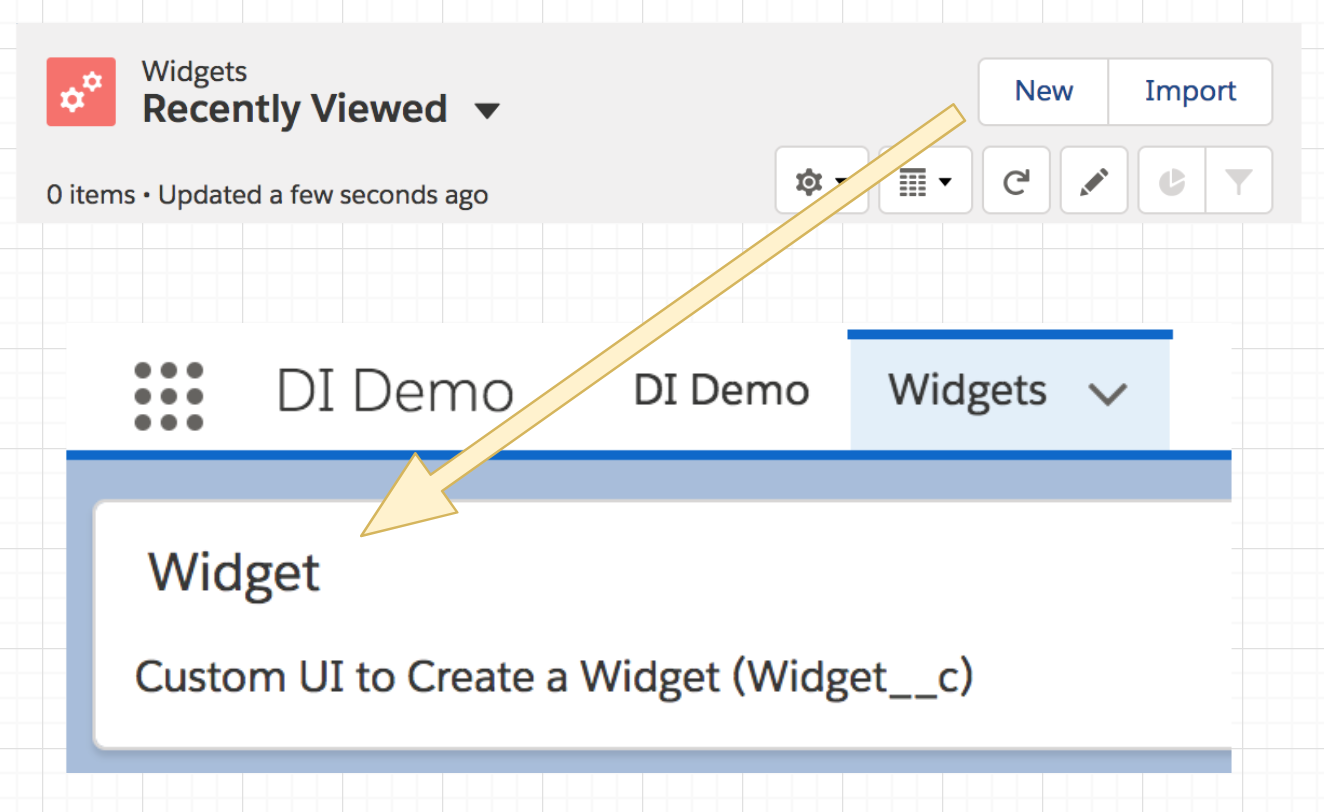
Yes! Let’s take an example of Lightning Component used as an Action Override. Typically you would create a Lightning Component and associate it directly with an action override. However, this means that the object metadata, action override and the Lightning code (as well as whatever is dependent on that) must travel around together. Rather than, for example, in separate DX packages. It also means that if you want to offer different variations of this action you would need to code all of that into the single component as well.

As before let’s review what the Lightning Component Action Override looks like without DI:-

<aura:component implements="lightning:actionOverride,force:hasSObjectName">
   <lightning:cardtitle="Widget">
     <p class="slds-p-horizontal_small">Custom UI to Create a Widget ({!v.sObjectName})</p>
   </lightning:card>
</aura:component>

This component (and all its dependencies) would be directly referenced in the Action Override below:-
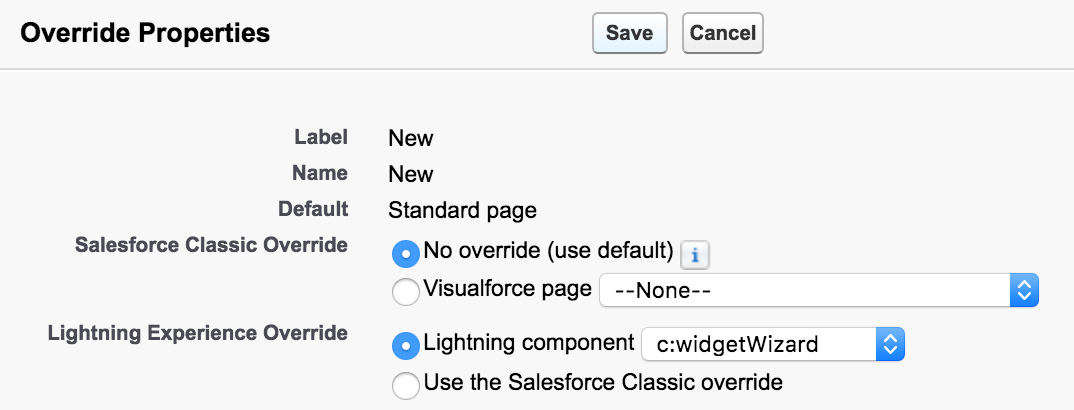
Now let us take a look at this again but using the Lightning c:injector component in its place:-

<aura:component implements="lightning:actionOverride,force:hasSObjectName">
   <c:di_injector bindingName="lc_actionWidgetNew">
      <c:di_injectorAttribute name="sObjectName" value="{!v.sObjectName}"/>
   </c:di_injector>
</aura:component>

To make things clearer when reviewing Lightning Components in the org, the above component follows a generic naming convention, such as actionWidgetNew. This component is instead bound to the Action Override, not the above one and now looks like this:-

The binding configuration looks like this:-

Finally, the injected Lightning Component widgetWizard looks like this:-

<aura:component>
   <aura:attribute name="sObjectName"type="String"/>
   <lightning:card title="Widget">
     <p class="slds-p-horizontal_small">Custom UI to Create a Widget ({!v.sObjectName})</p>
   </lightning:card>
</aura:component>

Note: You have the ability to pass context through to the bound Lightning Component just as the sObjectName attribute value was passed above. The c:injector component can be used in many other places such as Quick Actions, Lightning App Builder Pages, and Utility Bar. Check out this example page in the repo for another example.

What about my Visualforce page content can I inject that?
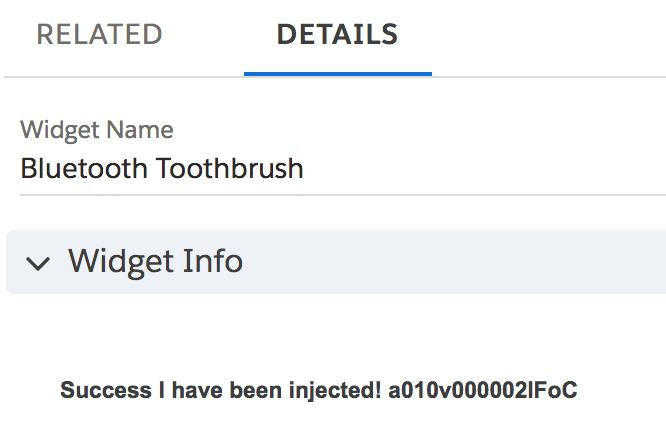
Visualforce used by Actions and in Layouts can be injected in much the same way as above, with a VF page acting as the injector proxy using the Visualforce c:injector component. We will skip showing what things looked like before DI, as things follow much the same general pattern as the Lightning Component approach.

The following example shows the layoutWidgetInfo page, which is again somewhat generically named to indicate its an injector proxy and not a real page. It is this page that is referenced in the Widget objects Layout:-

<apex:page standardController="Widget__c" extensions="di_InjectorController">
   <c:di_injector bindingName="vf_layoutWidgetInfo" parameters="{!standardController}"/>
</apex:page>
The following shows an alternative means to express binding configuration via code. The ForceApp3Module class defines the bindings for a module/package of code where the Visualforce Component that actually implements the UI is stored. Note that the binding for vf_layoutWidgetInfo points to an Apex class in the controller, not the actual VF component to inject. The Provider inner class actually creates the specific component (via Dynamic Visualforce).
public class ForceApp3Module extends di_Module {

    public override void configure() {

        // Example named binding to a Visualforce component (via Provider)
        bind('vf_layoutWidgetInfo').visualforceComponent().to(WidgetInfoController.Provider.class);

        // Example SObject binding (can be used by trigger frameworks, see force-di-demo-trigger)
        bind(Account.getSObjectType()).apex().sequence(20).to(CheckBalanceAccountTrigger.class);

        // Example named binding to a Lightning component
        bind('lc_actionWidgetManage').lightningComponent().to('c:widgetManager');
    }
}

NOTE: The above binding configuration module class is itself injected into the org-wide Injector by a corresponding custom metadata Binding record here. You can also see in the above example other bindings being configured, see below for more on this.

The actual implementation of the injected Visualforce Component widgetInfo looks like this:-

<apex:component controller="WidgetInfoController">
  <apex:attribute name="standardController"
     type="ApexPages.StandardController"
     assignTo="{!StandardControllerValue}" description=""/>
  <h1>Success I have been injected! {!standardController.Id}</h1>
</apex:component>

Decomposition Examples

The examples, shown above and others are contained in the sample repo. Each of the root package directories, force-app-1, force-app-2, and force-app-3 helps illustrate how the point of injection vs the runtime binding can be split across the boundaries of a DX package, thus aiding decomposition. The force-di-trigger-demo (not shown below) also contains a sample trigger handler framework using the libraries ability to resolve multiple bindings (to trigger handlers) in a given sequence, thus supporting the best practice of a single trigger per object.

Further Background and Features

I must confess when I started to research Java Dependency Injection (mainly via Java Guice) I was skeptical as to how much I could get done without custom annotation and reflection support in Apex. However, I am pretty pleased with the result and how it has woven in with features like Custom Metadata Types and how the Visualforce and Lightning Component injectors have turned out. A plan to write future Wiki pages on the associated GitHub repo to share more details on the Force DI API. Meanwhile here is a rundown of some of the more advanced features.

  • Provider Support
    Injectors by default only return one instance of the bound object, hence getInstance. Bindings that point to a class implementing the Provider interface (see inner interface) can override this. Which also allows for the construction of classes that do not have default constructors or types not supported by Type.forName. This feature also works in conjunction with the ability to pass a parameter via the Apex Injector, e.g. Injector.Org.getInstance(PaymentEngine.cls, someData);
  • Parameters
    Each of the three Injectors permits the passing of parameter/context information into the bound class or component. The examples above illustrate this.
  • Modules, Programmatic Binding Configuration and Injector Scopes
    Binding Modules group programmatic bindings and allow you to hook programmatically into the initialization of the Injector. Modules use the Fluent style interface to express bindings very clearly. The force-app-3 package in the repo uses this approach to define the bindings shown in the VF example above. You can also take a look at a worked example here of how local (one-off) Injectors can be used and here for a more complex OO example of conditional bindings works.
  • StandardController Passthrough
    For Visualforce Component injections the frameworks parameter passing capabilities supports passing through the instance of the StandardController from the hosting page into the injected component, as can be seen in the example above.
  • Binding Discovery by SObject vs Name
    The examples above utilize single bindings by a unique name. However, it is becoming quite common to adapt trigger frameworks to support DI and thus allow a single trigger to dynamically reach out to one or more handlers (perhaps installed in separate DX packages). This example shows how Force DI could be used in such a scenario.

Conclusion

This blog has hopefully wet your appetite to learn more! If so, head over to the repo and have a look through the samples in this blog and others. My next step is to wrap this up in a DX package to make it easier to get your hands on it, for now, download the repo and deploy via DX. I am also keen to explore what other aspects of Java Guice might make sense, such as the Linked Bindings feature.

Meanwhile, I would love feedback on the sample code and library thus far. Last but not least I would like to give a shout out to John Daniel and Doug Ayers for their great feedback during the initial development of the library and this blog. Enjoy!


5 Comments

Adding Clicks not Code Extensibility to your Apex with Lightning Flow

Building solutions on the Lightning Platform is a highly collaborative process, due to its unique ability to allow Trailblazers in a team to operate in no code, low code and/or code environments. Lightning Flow is a Salesforce native tool for no code automation and Apex is the native programming language of the platform — the code!

A flow author is able to create no-code solutions using the Cloud Flow Designer tool that can query and manipulate records, post Chatter posts, manage approvals, and even make external callouts. Conversely using Salesforce DX, the Apex developer can, of course, do all these things and more! This blog post presents a way in which two Trailblazers (Meaning a flow author and an Apex developer) can consider options that allow them to share the work in both building and maintaining a solution.

Often a flow is considered the start of a process — typically and traditionally a UI wizard or more latterly, something that is triggered when a record is updated (via Process Builder). We also know that via invocable methods, flows and processes can call Apex. What you might not know is that the reverse is also true! Just because you have decided to build a process via Apex, you can still leverage flows within that Apex code. Such flows are known as autolaunched flows, as they have no UI.

Blog_Graphic_01_v01-02_abpx5x.png

I am honored to have this blog hosted on the Salesforce Blog site.  To continue reading the rest of this blog head on over to Salesforce.com blog post here.


7 Comments

User Notifications with the Utility Bar API

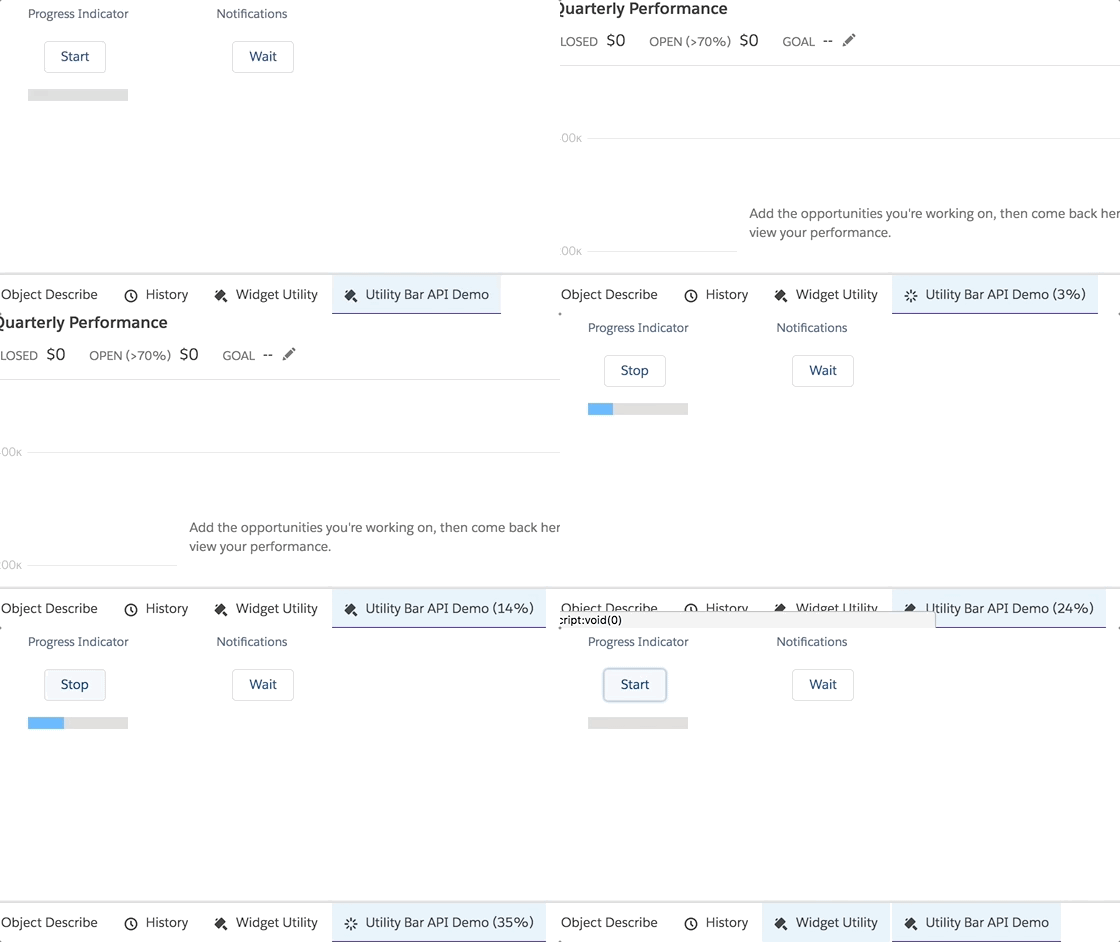
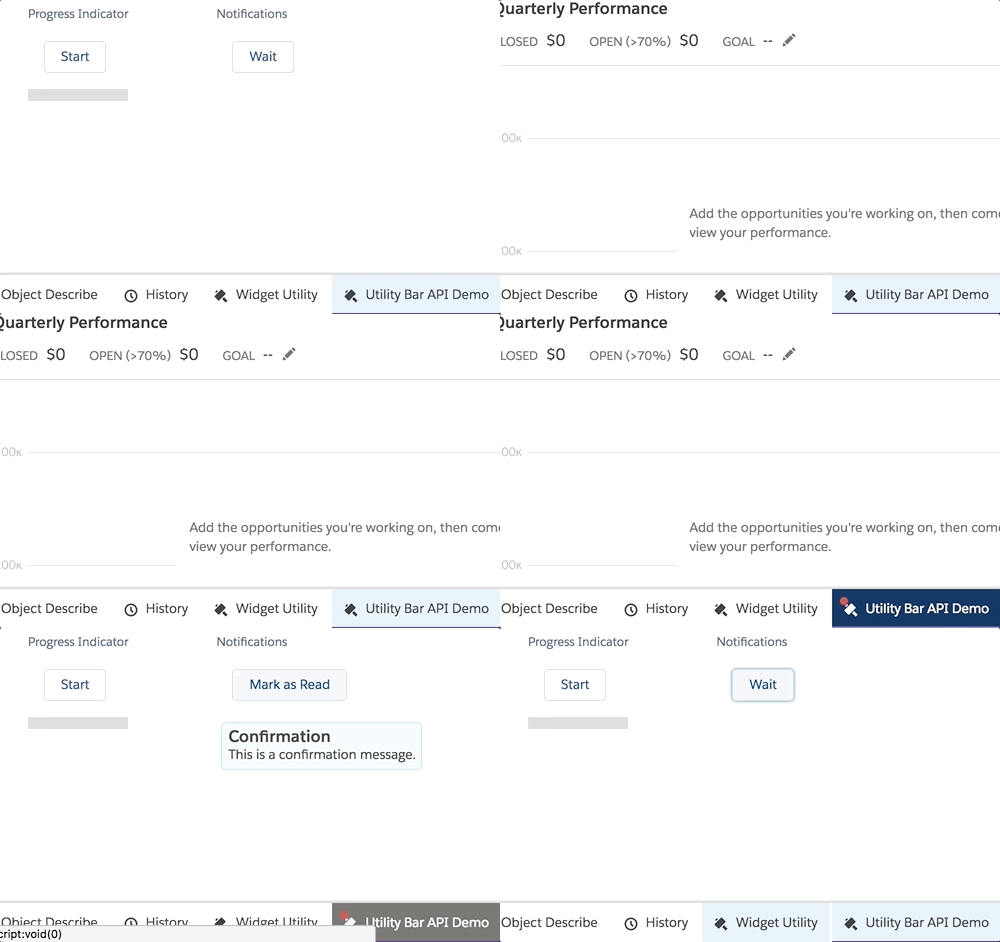
utilityprogressIn this blog, I want to highlight a couple of great UI features provided by the Utility Bar in Lightning Experience. These are relatively new and accessed only via the Utility Bar API, so are not immediately accessible. This blog is based on code and material I prepared for Dreamforce 2017. However, I did not have time to dig into the code during that session so this blog provides that opportunity. My session also covered other cool features in Lightning Experience, such as the amazing App Console mode!
Enabling and Understanding the Utility Bar API
The utility bar API is enabled at a component level though it does have access to the whole utility bar. You can specify the lightning:utilityBarAPI component in any component, regardless if its in the utility bar or not. This component will not display anything but it does have a very useful selection of methods!

<lightning:utilityBarAPI aura:id="utilitybar"/>

In your component code you simple access it like any other component.

var utilityAPI = cmp.find("utilitybar");

Once you have access to an instance of the component you can call any of its methods. All methods take a utilityId parameter. Although if you call it within the context of a component running in the utility bar you can omit this parameter and the API will discover it for you. All the methods take a single JavaScript object with properties representing the parameters to the method.

utilityAPI.setPanelHeaderLabel({ label: "My Label" });

One interesting design aspect of these methods is they do not respond immediately, all responses are returned via a callback. To do this the API uses the JavaScript Promises pattern. Fortunately, its a pretty easy convention to pick up and use. It is worth taking the time to understand, it has fast become defacto callback approach.

Providing Notifications

notificationdemo

There are many occasions that you want to notify the user of something that’s happened since they last logged in or during login as a result of some background process. The setUtilityHighlighted method is a good way to drive such notifications.

You can, of course, evaluate on initialize of your component, but it’s worth considering using Platform Events, it’s really easy to send them from your Apex code or Process Builder and you can easily integrate my Streaming API component to respond to the event. The code below is a very simple isolated example using browser timers, but it helps illustrate the API and give you a basis to build one.

<lightning:button 
   class="slds-m-around_medium" 
   label="{! v.readNotification ? 'Mark as Read' : 'Wait' }" 
   onclick="{!c.demoNotifications}"/>
<aura:if isTrue="{!v.readNotification}">
   <ui:message title="Confirmation"severity="info">
      This is a confirmation message.</ui:message>
</aura:if>
    demoNotifications: function (cmp, event) {
		var utilityAPI = cmp.find("utilitybar"); 
        var readNotification = cmp.get('v.readNotification');
        if(readNotification == true) {
			utilityAPI.setUtilityHighlighted({ highlighted : false });                        
            cmp.set('v.readNotification', false);
        } else {
            utilityAPI.minimizeUtility();                            
            setTimeout($A.getCallback(function () {
                utilityAPI.setUtilityHighlighted({ highlighted : true });            
				cmp.set('v.readNotification', true);
            }), 3000);                    
        }
    }, 

Providing Progress Updates

progressdemo

By using a combination of setUtilityLabel and setUtilityIcon you can create an eye-catching progress updating effect. This sample is a pretty simple browser timer based example. However, you could again use Platform Events to send events as part of a Batch Apex execution to update on progress or just poll the AsyncApexJob object.

 <lightning:button 
    class="slds-m-around_medium" 
    label="{! v.isProgressing ? 'Stop' : 'Start' }" 
    onclick="{!c.demoProgressIndicator}"/>
 <lightning:progressBar 
    value="{! v.progress }" size="large" />
demoProgressIndicator: function (cmp, event) {
    var utilityAPI = cmp.find("utilitybar"); 
    if (cmp.get('v.isProgressing')) {
        // stop
        cmp.set('v.isProgressing', false);
        cmp.set('v.progress', 0);
        cmp.set('v.progressToggleIcon', false);
        clearInterval(cmp._interval);
        utilityAPI.setUtilityLabel({ label : 'Utility Bar API Demo' });                    
        utilityAPI.setUtilityIcon({ icon : 'thunder' } );                                    
    } else {
        // start
        cmp.set('v.isProgressing', true);
        utilityAPI.minimizeUtility();        
        cmp._interval = setInterval($A.getCallback(function () {
            var progresToggleIcon = 
               cmp.get('v.progressToggleIcon') == true ? false : true;
            var progress = cmp.get('v.progress');
            cmp.set('v.progress', progress === 100 ? 0 : progress + 1);
            cmp.set('v.progressToggleIcon', progresToggleIcon);
            utilityAPI.setUtilityLabel(
                { label : 'Utility Bar API Demo (' + progress + '%)' });        
            utilityAPI.setUtilityIcon(
                { icon : progresToggleIcon == true ? 'thunder' : 'spinner' });
        }), 400);
    }
}

Summary

There is still plenty to dig into in the code samples from the session. You can also deploy the sample code into an org and try out some of the other interactive API demos. Enjoy!

utildemo


6 Comments

Adding User Feedback to your Package

featurefeedbackFeature Management has become GA in Winter’18 and with it the ability to have finer control and visibility over how users of your package consume its functionality. It provides an Apex API and corresponding objects in your License Management Org (LMO). With these objects, you can switch features on and off or even extend the capacity or duration of existing ones. For features that you simply want to monitor adoption on you can also track adoption and send metrics back to your LMO as well. This is all done within the platform, no HTTP callouts are required.

This blog focuses on a tracking and metrics use case and presents a Lightning Component to allow users to activate a given feature and after that contribute to an aggregated scoring of that feature sent back to you the package owner!

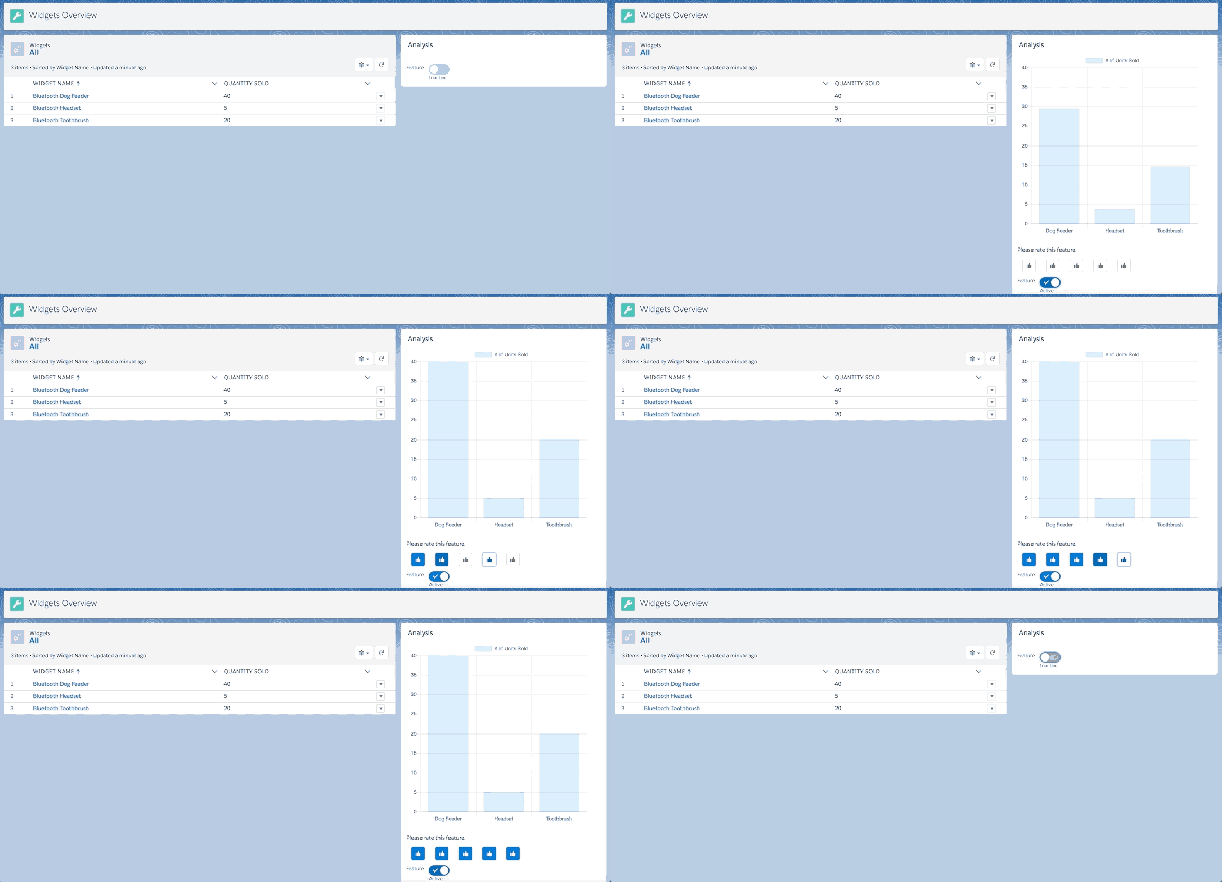
Consider this scenario. The latest Widgets App package has added a new feature to its Widgets Overview tab. The ability to analyze widgets! Using Feature Management they can now track who activates this feature and ratings their customers give it.

featureactivate

Trying it Out: You can find the full source code for this sample app and component here. You can also easily give it a try via the handy Deploy to SFDX button! Do not worry though, it will not write back to your production org, it’s totally isolated in this mode. Unless you choose to package it up and associate your LMA etc.

withoutmanagefeatures.pngYour customers may not want every user to have the ability to activate and deactivate features as shown above. The sample application associated with this blog includes a Manage Featurescustom permission that controls this ability. Users without this custom permission assigned only see the feedback portion of the component. If the feature has not been activated a message is displayed informing the user to consult with their admin.
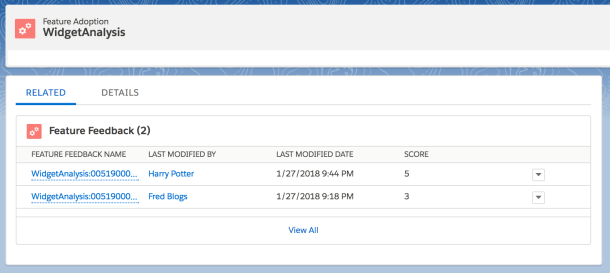
The component only sends the average score per feature per customer back to you. However, a user’s individual score is captured in the subscriber org via custom objects. Enabling you to pick up the phone and dig a bit deeper together with customers showing particularly low or high scores.

featureadoption.png

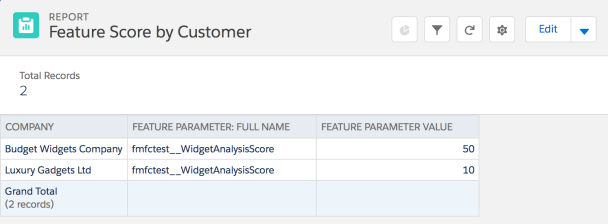
The following shows what you get back in your License Management Org LMO (typically your companies production org). By using standard reporting you can easily see what features have been activated, their average score and how many users contributed to the rating.

featurereport

NOTE: The average score returned to the production org is represented as a value from 1 to 50.

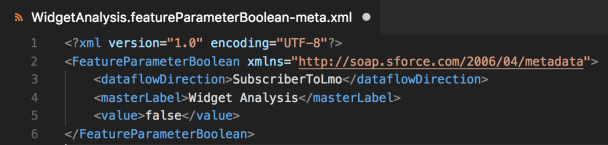
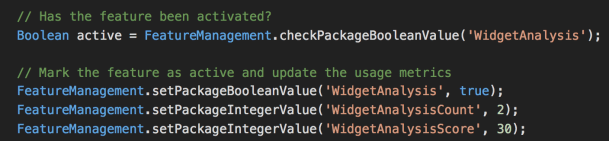
So let’s now dig into the code and the architecture of this solution. Firstly we need some feature parameters, then some corresponding Apex API to read and write to them. You define the parameters via XML under the/featureParameters folder.

FeatureParam

NOTE: In this blog, we are dealing with parameter values that flow from your customers org back into your production org, hence the SubscriberToLmo usage. Also keep in mind that per the docs, updates to your LMO may take up to 24 hrs.

You can also create package feature parameters via a new tab on the Package Details page in your packaging org. However, if you are using Scratch Orgs you define them via metadata directly. The Feedback component needs you to define three parameters per feature. To support our scenario, the following parameters are defined. WidgetAnalysis (Boolean), WidgetAnalysisCount (Integer), and WidgetAnalysisScore (Integer).

featuremanagementapi

NOTE: When your code sets parameter values, mixed DML rules apply. So typically you would set these via an async context such as @future or a queueable.

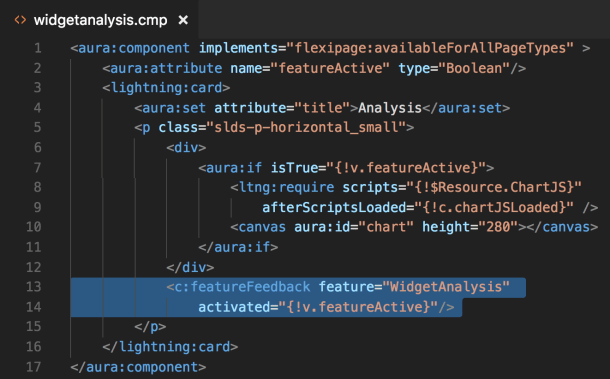
To use the Feedback Component included in the sample code for this blog, you set two attributes, the name of your feature parameter and an attribute that the rest of your component code can use to conditionally display your new feature! The following shows how in the above scenario, the new Widget Analysis component has used c:featureFeedback component to activate the feature, get a user rating and control the display of the new graph to the user.

feedbackcomponent.png

Take a deeper look at the Feature Feedback Component Apex controller to see the above Feature Management API in action, as well as how it aggregates the scores.

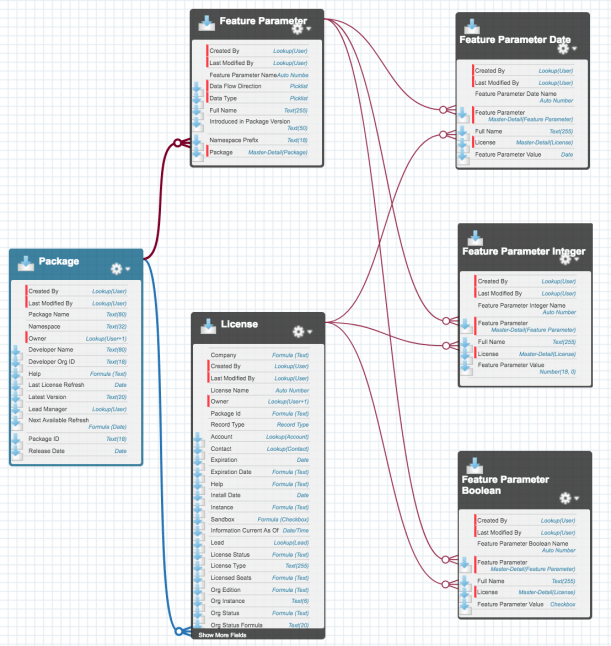
Back over in your License Management Org, the above report was based on one of the four new custom objects provided by a Salesforce package. The Feature Parameter object represents the package parameters defined above. The Feature Parameter Date, Feature Parameter Integer, and Feature Parameter Boolean are the values set via code running in the subscriber org associated with the License record. Per the documentation, it can take up to 24hrs for these to update.

featureparamsschema

Summary

Knowing more about how your customers consume applications you build on the platform is a big part of customer success and your own. You should also check out the Usage Metrics feature if you have not already.

There is a quite a bit more to Feature Management to explore. Such as controlling feature activation exclusively from your side, useful for pilots or enabling paid features. Of special note is the ability tohide related Custom Objects until features are activated. This is certainly a welcome feature to your customer’s admins when working with large packages since they only see in Object Manager objects relating to activated features.

Finally, I recommend you read the excellent documentation in the ISVForce guide very carefully before going ahead and trying this out in your main package. Since this feature integrates with your live production data. The documentation recommends to try this out in a temporary package first and discuss rollout with your legal team.

P.S. You can also use the FeatureManagement.checkPermission method to check if the user has been assigned a given custom permission without SOQL. Very useful!


20 Comments

Platform Events and Lightning Components

UPDATE: There is now native support for this here.

Over the past few weeks i have been working with Platform Events in a number of my Lightning projects, such as the Custom Metadata Services and Event Logging. This component allows you to receive Platform Events in your own components.
streamingcmp
This component can be deployed from this repository here. I have been working on this for a while and I have yet to highlight this component on my blog. I wanted to rectify that now and I also wanted to take some time to explain lessons learned along the way and if anyone else has any thoughts on improving it even further!

Using the Component

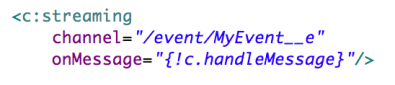
Firstly using the component is very easy, you just need two attributes as you can see above. The channel defines the event and the onMessage attribute the handler for the event. I learnt along the way that if you define a registerEvent in your component it automatically exposes an attribute that takes a callback handler, much nicer for users of your component! The payload event parameter contains the platform event fields.
handleevent

Wrapping CometD in a Component World

The component uses the CometD JavaScript library internally. This library does require a certain amount of configuration and authentication tweaks to initialise (such as disabling WebSockets, since LEX does not currently support it). Also, as i found out eventually, code to unsubscribe from events is also needed.

In the Visualforce page examples this was less of a concern in a page centric world. In the world of components this becomes very important! Without it, i was finding that when i navigated around Lightning Experience and back to components using this component i would accumulate handlers, that would effectively appear to be repeating events, not good.

In order to find the correct moment to unsubscribe and disconnect, the component listens to the aura:valueDestroy event. This does not fire immediately however, so some additional defensive work in the internal handler is needed. I am certainly open to further comments on how to make this component more robust.

This Trialhead module also includes example code on how to use the CometD library in Lightning, though the result is not a generic component like the one in this blog. I am also less sure about its design in terms of unsubscribing only on page unload.

Summary

Access to creating, sending and receiving Platform Events are available in Apex, REST API’s, Process Builder and Flow. Hopefully one day we will see a platform provided Lightning Base Component to replace the one i have created here. Meanwhile have fun!


21 Comments

Simplified API Integrations with External Services

Salesforce are on a mission to make accessing off platform data and web services as easy as possible. This helps keep the user experience optimal and consistent for the user and also allows admins to continue to leverage the platforms tools such as Process Builder and Flow, even if the data or logic is not on the platform.

Starting with External Objects, they added the ability to see and also update data stored in external databases. Once setup, users can manipulate external records without leaving Salesforce, by staying within the familiar UI’s. With External Services, currently in Beta, they have extended this concept to external API services.

UPDATE: The ASCIIArt Service covered in this blog has since been updated to use the Swagger schema standard. However this blog is still a very useful introduction to External Services. Once you have read it, head on over to this blog!

In this blog lets first focus on the clicks-not-code steps you can repeat in your own org, to consume a live ASCII Art web service API i have exposed publicly. The API is simple, it takes a message and returns it in ASCII art format. The following steps result in a working UI to call the API and update a record.

ExternalServicesDemo.png

After the clicks not code bit i will share how the API was built, whats required for compatibility with this feature and how insanely easy it is to develop Web Services in Heroku using Nodejs. So lets dive in to External Services!

Building an ASCII Art Converter in Lightning Experience and Flow

The above solution was built with the following configurations / components. All of which are accessible under the LEX Setup menu (required for External Services) and takes around 5 minutes maximum to get up and running.

  1. Named Credential for the URL of the Web Service
  2. External Service for the URL, referencing the Named Credential
  3. Visual Flow to present a UI, call the External Service and update a record
  4. Lightning Record Page customisation to embed the Flow in the UI

I created myself a Custom Object, called Message, but you can easily adapt the following to any object you want, you just need a Rich Text field to store the result in. The only other thing you need to know of course is the web service URL.

https://createasciiart.herokuapp.com

Can i use External Services with any Web Service then?

In order to build technologies that simplify what are normally things developers have to interpret and code manually. Web Service APIs must be documented in a way that External Services can understand. In this Beta release this is the Interagent schema standard (created by Heroku as it happens).  Support for the more broadly adopted Swagger / OpenId will be added in the Winter release (Safe Harbour).

For my ASCII Art service above, i authored the Interagent schema based on a sample the Salesforce PM for this feature kindly shared, more on this later. When creating the External Service in moment we will provide a schema to this service.

https://createasciiart.herokuapp.com/schema

Creating a Named Credential

From the setup menu search for Named Credential and click New. This is a simple Web Service that requires no authentication. Basically provide only the part of the above URL that points to the Web Service endpoint.

ESNamedCred.png

Creating the External Service

Now for the magic! Under the Setup menu (only in Lightning Experience) search for Integrations and start the wizard. Its a pretty straight forward process, of selecting the above Named Credential, then telling it the URL for the schema. If thats not exposed by the service you want to use, you can paste a Schema in directly (which lets a developer define a schema yourself if one does not already exist).

esstep1.png

esstep2.png

Once you have created the External Service you can review the operations it has discovered. Salesforce uses the documentation embedded in the given schema to display a rather pleasing summary actually.

esstep3.png

So what just happened? Well… internally the wizard wrote some Apex code on your behalf and implemented the Invocable Method annotations to enable that Apex code to appear in tools like Process Builder (not supported in Beta) and Flow. Pretty cool!

Whats more interesting for those wondering, is you cannot actually see this Apex code, its there but some how magically managed by the platform. Though i’ve not confirmed, i would assume it does not require code coverage.

Update: According to the PM, in Winter’18 it will be possible “see” the generated class from other Apex classes and thus reuse the generated code from Apex as well. Kind of like a Api Stub Generator.

Creating a UI to call the External Service via Flow

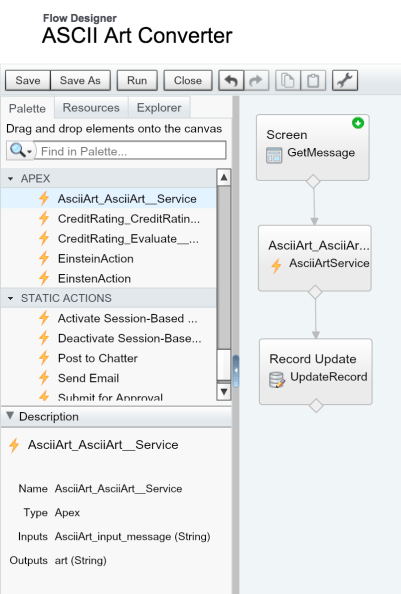
This simple Flow prompts the user for a message to convert, calls the External Service and updates a Rich Text field on the record with the response. You will see in the Flow sidebar the generated Apex class generated by the External Service appears.

esflow

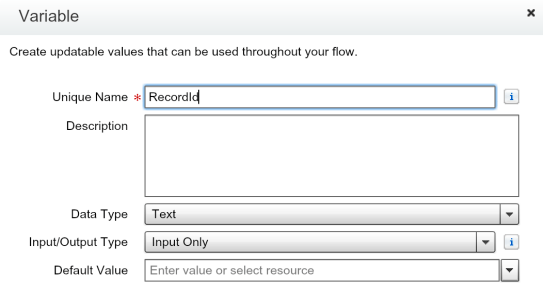
The following screenshots show some of the key steps involved in setting up the Flow and its three steps, including making a Flow variable for the record Id. This is later used when embedding the Flow in Lightning Experience in the next step.

esflow1

RecordId used by Flow Lightning Component

esflow2

Assign the message service parameter

esflow3

Assign the response to variable

esflow4

Update the Rich Text field

TIP: When setting the ASCII Art service response into the field, i wrapped the value in the HTML elements, pre and code to ensure the use of a monospaced font when the Rich Text field displayed the value.

Embedding the Flow UI in Lightning Experience

Navigate to your desired objects record detail page and select Edit Page from the cog in the top right of the page to open the Lightning App Builder. Here you can drag the Flow component onto the page and configure it to call the above flow. Make sure to map the Flow variable for the record Id as shown in the screenshot, to ensure the current record is passed.

esflowlc.png

Thats it, your done! Enjoy your ASCII Art messages!

Creating your own API for use with External Services

Belinda, the PM for this feature was also kind enough to share the sample code for the example shown in TrailheaDX, from which the service in this blog is based. However i did wanted to build my own version to do something different from the credit example. Also extend my personal experience with Heroku and Nodejs more.

The NodeJS code for this solution is only 41 lines long. It runs up a web server (using the very easy to use hapi library), and registers a couple of handlers. One handler returns the statically defined schema.json file, the other implements the service itself. As side note, the joi library is an easy way add validation to the service parameters.

var Hapi = require('hapi');
var joi = require('joi');
var figlet = require('figlet');

// initialize http listener on a default port
var server = new Hapi.Server();
server.connection({ port: process.env.PORT || 3000 });

// establish route for serving up schema.json
server.route({
  method: 'GET',
  path: '/schema',
  handler: function(request, reply) {
    reply(require('./schema'));
  }
});

// establish route for the /asciiart resource, including some light validation
server.route({
  method: 'POST',
  path: '/asciiart',
  config: {
    validate: {
      payload: {
        message: joi.string().required()
      }
    }
  },
  handler: function(request, reply) {
    // Call figlet to generate the ASCII Art and return it!
    const msg = request.payload.message;
    figlet(msg, function(err, data) {
        reply(data);
    });
  }
});

// start the server
server.start(function() {
  console.log('Server started on ' + server.info.uri);
});

I decided i wanted to explore the diversity of whats available in the Nodejs space, through npm. To keep things light i chose to have a bit of fun and quickly found an ASCIIArt library, called figlet. Though i soon discovered that npm had a library for pretty much every other use case i came up with!

Finally the hand written Interagent schema is also shown below and is reasonably short and easy to understand for this example. Its not all that well documented in layman’s terms as far as i can see. See my thoughts on this and upcoming Swagger support below.

{
  "$schema": "http://interagent.github.io/interagent-hyper-schema",
  "title": "ASCII Art Service",
  "description": "External service example from AndyInTheCloud",
  "properties": {
    "asciiart": {
      "$ref": "#/definitions/asciiart"
    }
  },
  "definitions": {
    "asciiart": {
      "title": "ASCII Art Service",
      "description": "Returns the ASCII Art for the given message.",
      "type": [ "object" ],
      "properties": {
        "message": {
          "$ref": "#/definitions/asciiart/definitions/message"
        },
        "art": {
          "$ref": "#/definitions/asciiart/definitions/art"
        }
      },
      "definitions": {
        "message": {
          "description": "The message.",
          "example": "Hello World",
          "type": [ "string" ]
        },
        "art": {
          "description": "The ASCII Art.",
          "example": "",
          "type": [ "string" ]
        }
      },
      "links": [
        {
          "title": "AsciiArt",
          "description": "Converts the given message to ASCII Art.",
          "href": "/asciiart",
          "method": "POST",
          "schema": {
            "type": [ "object" ],
            "description": "Specifies input parameters to calculate payment term",
            "properties": {
              "message": {
                "$ref": "#/definitions/asciiart/definitions/message"
              }
            },
            "required": [ "message" ]
          },
          "targetSchema": {
            "$ref": "#/definitions/asciiart/definitions/art"
          }
        }
      ]
    }
  }
}

Finally here is the package.json file that brings the whole node app together!

{
  "name": "asciiartservice",
  "version": "1.0.0",
  "main": "server.js",
  "dependencies": {
    "figlet": "^1.2.0",
    "hapi": "~8.4.0",
    "joi": "^6.1.1"
  }
}

Other Observations and Thoughts…

  • Error Handling.
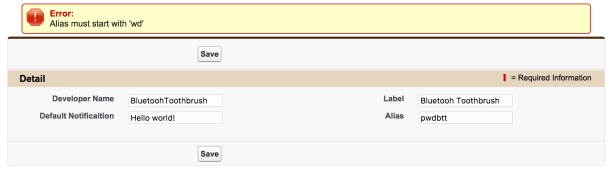
    You can handle errors from the service in the usual way by using the Fault path from the element. The error shown is not all that pretty, but then in fairness there is not really much of a standard to follow here.
    eserrorflow.pngeserror.png
  • Can a Web Service called this way talk back to Salesforce?
    Flow provides various system variables, one of which is the Session Id. Thus you could pass this as an argument to your Web Service. Be careful though as the running user may not have Salesforce API access and this will be a UI session and thus will be short lived. Thus you may want to explore another means to obtain an renewable oAuth token for more advanced uses.
  • Web Service Callbacks.
    Currently in the Beta the Flow is blocked until the Web Service returns, so its good practice to make your service short and sweet. Salesforce are planning async support as part of the roadmap however.
  • Complex Parameters.
    Its unclear at this stage how complex a web service can be supported given Flows limitations around Invocable Methods which this feature depends on.
  • The future is bright with Swagger support!
    I am really glad Salesforce are adding support for Swagger/OpenID, as i really struggled to find good examples and tutorials around Interagent. Really what is needed here is for the schema and code to be tied more closely together, like this!UPDATE: See my other blog entry covering Swagger support

Summary

Both External Objects and External Services reflect the reality of the continued need for integration tools and making this process simpler and thus cheaper. Separate services and data repositories are for now here to stay. I’m really pleased to see Salesforce doing what it does best, making complex things easier for the masses. Or as Einstein would say…Everything should be made as simple as possible, but no simpler.

Finally you can read more about External Objects here and here through Agustina’s and laterally Alba’s excellent blogs.


2 Comments

Highlights from TrailheaDX 2017

IMG_2857.JPGThis was my first TrailheaDX and what an event it was! With my Field Guide in hand i set out into the wilderness! In this blog i’ll share some of my highlights, thoughts and links to the latest resources. Many of the newly announced things you can actually get your hands on now which is amazing!

Overall the event felt well organized, if a little frantic at times. With smaller sessions of 30 minutes each, often 20 mins after intros and questions, each was bite sized, but quite well tuned with demos and code samples being shown.

SalesforceDX, Salesforce announced the public beta of this new technology aimed at improving the developer experience on the platform. SalesforceDX consist of several modules that will be extended further over time. Salesforce has done a great job at providing a wealth of Trailhead resources to get you started.

Einstein, Since its announcement, myself and other developers have been waiting to get access to more custom tools and API’s, well now that wait is well and truly over. As per my previous blogs we’ve had the Einstein Vision API for a little while now. Announced at the event where no less than three other new Einstein related tools and API’s.

  • Einstein Discovery. Salesforce demonstrated a very slick looking tool that allows you to point and click your way through to analyzing various data sets, including those obtained from your custom objects! They have provided a Trailhead module on it here and i plan on digging in! Pricing and further info is here.
  • Einstein Sentiment API. Allows you to interpret text strings for terms that indicate if its a positive, neutral or negative statement / sentiment. This can be used to scan case comments, forum posts, feedback, twitter posts etc in an automated way and respond or be alerted accordingly to what is being said.
  • Einstein Intent API.  Allows you to interpret text strings for meanings, such as instructions or requests. Routing case comments or even implementing bots that can help automate or propose actions to be taken without human interpretation.
  • Einstein Object Detection API. Is an extension of the Einstein Vision API, that allows for individual items in a picture to be identified. For example a pile of items on a coffee table, such as a mug, magazine, laptop or pot plant! Each can then be recognized and classified to build up more intel on whats in the picture for further processing and analysis.
  • PredictionIO on Heroku. Finally, if you want to go below the declarative tools or intentional simplified Einstein API’s, you can build your own machine learning models using Heroku and the PredictionIO build pack!

Platform Events. These allow messages to be published and subscribed to using a new object known as an Event object, suffixed with __e. Once created you can use a new Apex API’s or REST API’s to send messages and use either Apex Triggers or Streaming API to receive them. There is also a new Process Builder action or Flow element to send messages. You can keep your messages within Force.com or use them to integrate between other cloud platforms or the browser. The possibilities are quite endless here, aysnc processing, inter app comms, logging, ui notifications…. i’m sure myself and other bloggers will be exploring them in the coming months!

External Services. If you find a cool API you want to consume in Force.com you currently have to write some code. No longer! If you have a schema that describes that API you use the External Services wizard to generate some Apex code that will call out to the API. Whats special about this, is the Apex code is accessible via Process Builder and Flow. Making clicks not code API integration possible. Its an excellent way to integrate with complementary services you or others might develop on platforms such as Heroku. I have just submitted a session to Dreamforce 2017 to explore this further, fingers crossed it gets selected! You can read more about it here in the meantime.

Sadly i did have to make a key decision to focus on the above topics and not so much on Lightning. I heard from other attendees these sessions where excellent and i did catch a brief sight of dynamic component rendering in Lightning App Builder, very cool!

Thanks Salesforce for filling my blog backlog for the next year or so! 😉